
Close Menu
TechUpdateAlert

    Subscribe to Updates

    Get the latest creative news from FooBar about art, design and business.

    What's Hot

    My Health Anxiety Means I Won’t Use Apple’s or Samsung’s Smartwatches. Here’s Why

    December 22, 2025

    You can now buy the OnePlus 15 in the US and score free earbuds if you hurry

    December 22, 2025

    Today’s NYT Connections: Sports Edition Hints, Answers for Dec. 22 #455

    December 22, 2025
    Facebook X (Twitter) Instagram
    Trending
    • My Health Anxiety Means I Won’t Use Apple’s or Samsung’s Smartwatches. Here’s Why
    • You can now buy the OnePlus 15 in the US and score free earbuds if you hurry
    • Today’s NYT Connections: Sports Edition Hints, Answers for Dec. 22 #455
    • Android might finally stop making you tap twice for Wi-Fi
    • Today’s NYT Mini Crossword Answers for Dec. 22
    • Waymo’s robotaxis didn’t know what to do when a city’s traffic lights failed
    • Today’s NYT Wordle Hints, Answer and Help for Dec. 22 #1647
    • You Asked: OLED Sunlight, VHS on 4K TVs, and HDMI Control Issues
    Facebook X (Twitter) Instagram Pinterest Vimeo
    TechUpdateAlertTechUpdateAlert
    • Home
    • Gaming
    • Laptops
    • Mobile
    • Software
    • Reviews
    • AI & Tech
    • Gadgets
    • How-To
    TechUpdateAlert
    Home»Gaming»Windows PCs have a secret ‘last resort’ emergency restart button
    Gaming

    Windows PCs have a secret ‘last resort’ emergency restart button

    techupdateadminBy techupdateadminNovember 20, 2025No Comments3 Mins Read
    Share Facebook Twitter Pinterest LinkedIn Tumblr Reddit Telegram Email
    Den Power Button mit gedrückt gehaltener Strg-Taste anklicken, um die Notfall-Neustart-Funktion von Windows 10/11 zu aktivieren
    Share
    Facebook Twitter LinkedIn Pinterest Email

    Is nothing working on your Windows 10 or Windows 11 computer? Is an application hanging, or is your PC unresponsive? Many people will reach for the hallowed Ctrl + Alt + Del keyboard shortcut, which has been used since the earliest days of DOS to revive a frozen computer.

    You can also use the shortcut to call up the task manager (although Ctrl + Shift + Esc is faster at that). What many people probably aren’t aware of, however, is the emergency restart function Microsoft hid inside the Ctrl + Alt + Del screen.

    How to activate the hidden Windows emergency restart

    To get to the hidden emergency restart function, first press Ctrl + Alt + Del on your keyboard. The usual “lock,” “switch user,” “sign off,” and “Task manager” options will appear in a full screen.

    To initiate the emergency restart, hold down Crtl and click the power button.

    Foundry

    You don’t want any of those. Instead, at the bottom right, next to buttons for network settings and accessibility functions, there is a power button for switching off or restarting the computer. You can use this button to access the hidden function:

    Hold down the Ctrl key and click on the power button. Now the following note is displayed by Windows in full-screen mode:

    “Click OK to immediately restart. Any unsaved data will be lost.” It then ends with this dramatic-sounding message: “Use this only as a last resort.”
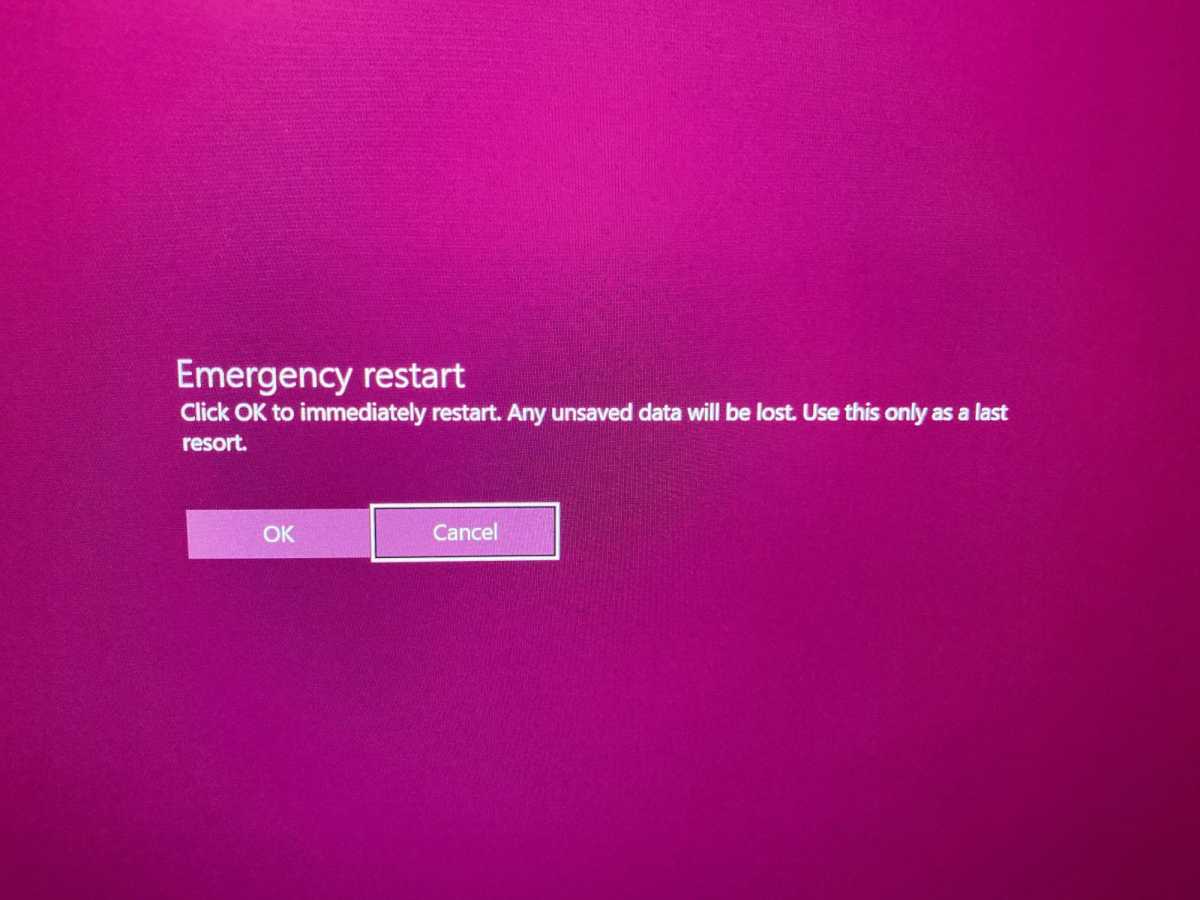
    Emergency restart windows

    Brad Chacos/IDG

    Click on the “OK” button and the expected happens: The computer restarts immediately without any further prompting.

    Why Microsoft added this feature to Windows 10 and 11
    get windows 11 pro for cheap

    Windows 11 Pro

    Windows 11 Pro


    Best Prices Today:


    £59.99 at PCWorld Software Store

    Apparently, Microsoft integrated this method into Windows as an additional way of subjecting the computer to a warm start. Depending on the reason why Windows is having problems at the moment, the other options for a Windows warm start might not work. Before resorting to the last resort of a cold start (i.e. holding down the physical on/off button on your PC or briefly disconnecting the device from the power supply), the hidden emergency restart could offer a way out.

    Many ways to shut down Windows

    I have not yet been able to discover where Microsoft documented this feature, but it’s nice to have another reboot option with the hidden Windows emergency restart. Here are a bunch of other ways you can restart Windows:

    • Method 1: Click Start button and then click Power button
    • Method 2: Press “Ctrl + Alt + Del” and then click on the power button in the bottom right-hand corner
    • Method 3: On the Windows desktop, press the combination Alt + F4 and then select “Reboot” from the drop-down menu
    • Method 4: Open the command prompt with admin rights, type -shutdown -r -t 00 and press Enter.
    • Method 5: Go to the Windows Powershell, type “Restart-Computer” and press Enter.
    • Method 6: The hidden emergency restart option

    For even more secretive goodies, be sure to check out our guide to 10 obscure Windows features that will blow your mind.

    This article was translated from German to English, and originally appeared on pcwelt.de.

    Button Emergency PCs resort restart Secret Windows
    Share. Facebook Twitter Pinterest LinkedIn Tumblr Email
    Previous ArticleGot a Pixel 10? Google’s Android Phone Can Now Share Files With Apple’s AirDrop
    Next Article This Lightweight Laptop Is Almost Half Off
    techupdateadmin
    • Website

    Related Posts

    Gadgets

    Your next Legion Go 2 might run SteamOS instead of Windows 11

    December 21, 2025
    Gadgets

    The RAM shortage is here to stay, raising prices on PCs and phones

    December 19, 2025
    Gadgets

    Microsoft makes theming your Windows 11 PC as easy as phones, but not as much fun

    December 15, 2025
    Add A Comment
    Leave A Reply Cancel Reply

    Top Posts

    NYT Strands hints and answers for Monday, August 11 (game #526)

    August 11, 202549 Views

    These 2 Cities Are Pushing Back on Data Centers. Here’s What They’re Worried About

    September 13, 202542 Views

    Today’s NYT Connections: Sports Edition Hints, Answers for Sept. 4 #346

    September 4, 202540 Views
    Stay In Touch
    • Facebook
    • YouTube
    • TikTok
    • WhatsApp
    • Twitter
    • Instagram
    Latest Reviews

    Subscribe to Updates

    Get the latest tech news from FooBar about tech, design and biz.

    Most Popular

    Best Fitbit fitness trackers and watches in 2025

    July 9, 20250 Views

    There are still 200+ Prime Day 2025 deals you can get

    July 9, 20250 Views

    The best earbuds we’ve tested for 2025

    July 9, 20250 Views
    Our Picks

    My Health Anxiety Means I Won’t Use Apple’s or Samsung’s Smartwatches. Here’s Why

    December 22, 2025

    You can now buy the OnePlus 15 in the US and score free earbuds if you hurry

    December 22, 2025

    Today’s NYT Connections: Sports Edition Hints, Answers for Dec. 22 #455

    December 22, 2025

    Subscribe to Updates

    Get the latest creative news from FooBar about art, design and business.

    Facebook X (Twitter) Instagram Pinterest
    • About Us
    • Contact us
    • Privacy Policy
    • Disclaimer
    • Terms and Conditions
    © 2026 techupdatealert. Designed by Pro.

    Type above and press Enter to search. Press Esc to cancel.