
Close Menu
TechUpdateAlert

    Subscribe to Updates

    Get the latest creative news from FooBar about art, design and business.

    What's Hot

    My Health Anxiety Means I Won’t Use Apple’s or Samsung’s Smartwatches. Here’s Why

    December 22, 2025

    You can now buy the OnePlus 15 in the US and score free earbuds if you hurry

    December 22, 2025

    Today’s NYT Connections: Sports Edition Hints, Answers for Dec. 22 #455

    December 22, 2025
    Facebook X (Twitter) Instagram
    Trending
    • My Health Anxiety Means I Won’t Use Apple’s or Samsung’s Smartwatches. Here’s Why
    • You can now buy the OnePlus 15 in the US and score free earbuds if you hurry
    • Today’s NYT Connections: Sports Edition Hints, Answers for Dec. 22 #455
    • Android might finally stop making you tap twice for Wi-Fi
    • Today’s NYT Mini Crossword Answers for Dec. 22
    • Waymo’s robotaxis didn’t know what to do when a city’s traffic lights failed
    • Today’s NYT Wordle Hints, Answer and Help for Dec. 22 #1647
    • You Asked: OLED Sunlight, VHS on 4K TVs, and HDMI Control Issues
    Facebook X (Twitter) Instagram Pinterest Vimeo
    TechUpdateAlertTechUpdateAlert
    • Home
    • Gaming
    • Laptops
    • Mobile
    • Software
    • Reviews
    • AI & Tech
    • Gadgets
    • How-To
    TechUpdateAlert
    Home»How-To»Windows 11’s new Start menu is now available! Here’s how to get it
    How-To

    Windows 11’s new Start menu is now available! Here’s how to get it

    techupdateadminBy techupdateadminOctober 30, 2025No Comments3 Mins Read
    Share Facebook Twitter Pinterest LinkedIn Tumblr Reddit Telegram Email
    Windows 11 Startmenü finale Optik
    Share
    Facebook Twitter LinkedIn Pinterest Email

    Microsoft has started rolling out the new Start menu for Windows 11, which we previously did a deep dive preview on. Both versions 24H2 and the newer 25H2 of Windows 11 can use the new Start menu. Microsoft is also revising File Explorer to simplify navigation.

    The new features and other improvements are available via optional update KB5067036, which was released on October 28th.

    What the new Start menu looks like

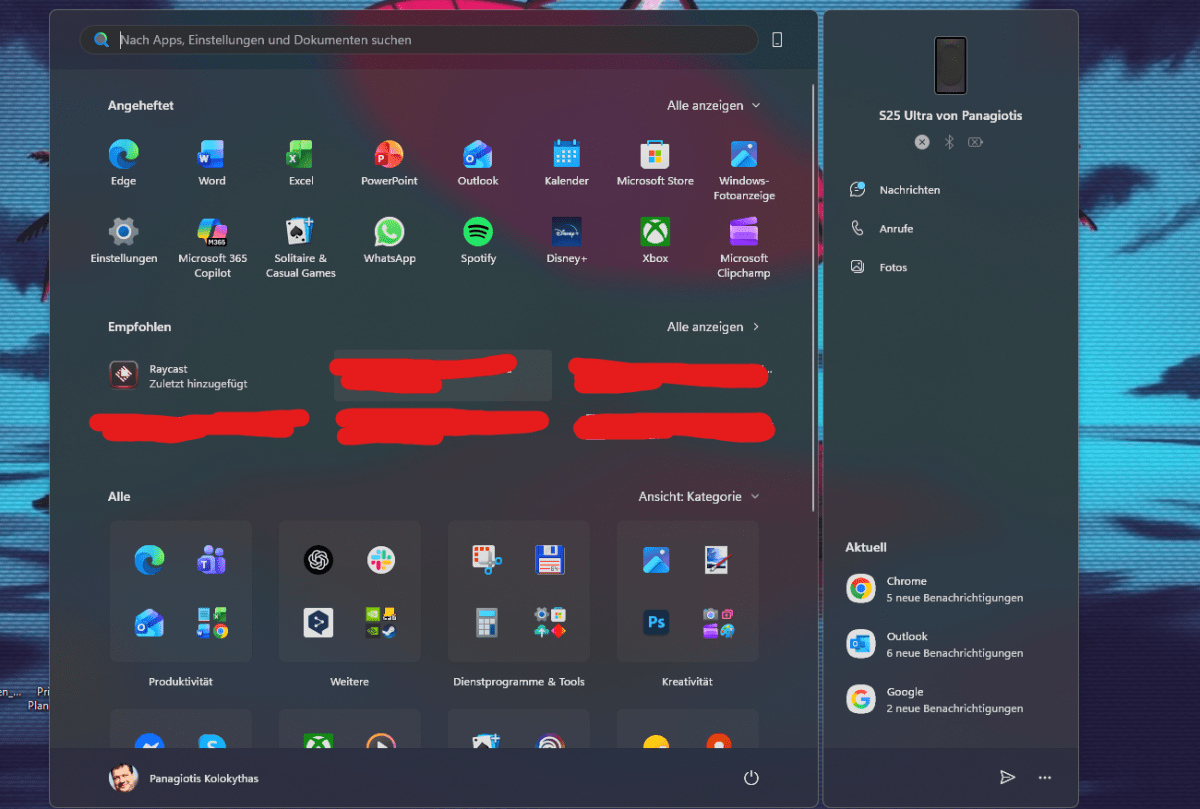
    The new Start menu is the central innovation in this update, designed to enable quick and smooth access to all your apps. It now contains a scrollable section that you can use to access all installed applications.

    Microsoft is also introducing different views: the category view, which sorts apps by category and highlights selected content, and the grid view, in which apps are listed alphabetically. Your last selected view will be applied when you next reopen the Start menu.

    Foundry / PC Welt

    Lists should also provide a better overview. The Start menu also automatically adapts to your screen size, with sections such as Pinned and Recommended expanded or collapsed based on the content. You can also adjust in the settings under Personalization > Start whether you want to see recommendations at all.

    On the right-hand side, there’s also a section for the new Phone Link integration, allowing you to move files between your PC and smartphone or seamlessly resuming Android apps from your Windows PC. The new view also shows important elements such as incoming calls, messages, or photos that you can transfer.

    Other new features in the update

    In addition to the new Start menu, Microsoft has also improved File Explorer, which can now share recommended files in the File Explorer Home section. These are mostly “frequently used” or “recently added” files that you can access more quickly. The new section is optional and can be deactivated in the settings.

    The battery level display (on laptops) is also revamped in this update. Microsoft is introducing improved battery level icons that are color-coded, showing green for sufficient battery or charging in progress, yellow for energy-saving mode or battery below 20 percent, and red for a very low battery that’s on the verge of dying.

    How to get these new features

    You can obtain the optional KB5067036 update via Windows Update, which needs to be installed manually. Alternatively, you can download and install the update via the Microsoft Update Catalog.

    Note that if you’re going to install update KB5067036, you must first install update KB5043080 (the mandatory September update).

    As the new Start menu and other features are on a gradual rollout, you may not have access to all of them immediately after installing the update. If you’re impatient and have some technical know-how, you could try using ViVeTool to force unlock those features.

    To do so, install ViVeTool and then open the Windows Command Prompt with admin rights. Then enter the command cd c:\folder\path\ViveTool-v0.x.x followed by vivetool /enable /id:47205210. Confirm with Enter and restart your PC to apply the changes.

    Further reading: Quick Windows 11 tweaks that speed up your PC

    11s Heres menu start Windows
    Share. Facebook Twitter Pinterest LinkedIn Tumblr Email
    Previous ArticleNew Smart Light Strips Offer Inventive Last-Minute Halloween Glow Art
    Next Article SNAP Benefits Are Expiring. Here Are Some Ways to Help Online
    techupdateadmin
    • Website

    Related Posts

    Gadgets

    My Health Anxiety Means I Won’t Use Apple’s or Samsung’s Smartwatches. Here’s Why

    December 22, 2025
    Gadgets

    Your next Legion Go 2 might run SteamOS instead of Windows 11

    December 21, 2025
    Mobile

    How to Watch James Madison vs. Oregon: Start Time, TV Channel for CFP First Round Game Today

    December 20, 2025
    Add A Comment
    Leave A Reply Cancel Reply

    Top Posts

    NYT Strands hints and answers for Monday, August 11 (game #526)

    August 11, 202549 Views

    These 2 Cities Are Pushing Back on Data Centers. Here’s What They’re Worried About

    September 13, 202543 Views

    Today’s NYT Connections: Sports Edition Hints, Answers for Sept. 4 #346

    September 4, 202540 Views
    Stay In Touch
    • Facebook
    • YouTube
    • TikTok
    • WhatsApp
    • Twitter
    • Instagram
    Latest Reviews

    Subscribe to Updates

    Get the latest tech news from FooBar about tech, design and biz.

    Most Popular

    Best Fitbit fitness trackers and watches in 2025

    July 9, 20250 Views

    There are still 200+ Prime Day 2025 deals you can get

    July 9, 20250 Views

    The best earbuds we’ve tested for 2025

    July 9, 20250 Views
    Our Picks

    My Health Anxiety Means I Won’t Use Apple’s or Samsung’s Smartwatches. Here’s Why

    December 22, 2025

    You can now buy the OnePlus 15 in the US and score free earbuds if you hurry

    December 22, 2025

    Today’s NYT Connections: Sports Edition Hints, Answers for Dec. 22 #455

    December 22, 2025

    Subscribe to Updates

    Get the latest creative news from FooBar about art, design and business.

    Facebook X (Twitter) Instagram Pinterest
    • About Us
    • Contact us
    • Privacy Policy
    • Disclaimer
    • Terms and Conditions
    © 2026 techupdatealert. Designed by Pro.

    Type above and press Enter to search. Press Esc to cancel.