
Close Menu
TechUpdateAlert

    Subscribe to Updates

    Get the latest creative news from FooBar about art, design and business.

    What's Hot

    Corsair Sabre v2 Pro Ultralight review: Excels at the basics

    November 17, 2025

    This Microsoft tool is much needed support for my antivirus software

    November 17, 2025

    This affordable TCL TV is one of the best I’ve tested in 2025, and it’s just dropped to a record-low price for Black Friday

    November 17, 2025
    Facebook X (Twitter) Instagram
    Trending
    • Corsair Sabre v2 Pro Ultralight review: Excels at the basics
    • This Microsoft tool is much needed support for my antivirus software
    • This affordable TCL TV is one of the best I’ve tested in 2025, and it’s just dropped to a record-low price for Black Friday
    • AT&T Subscribers Just Got a Significant 5G Speed Boost Due to New Spectrum
    • Is 2025 the year that used hardware goes mainstream?
    • Detailed Samsung Galaxy Buds 4 leak shows off refined design, head gestures
    • 11 Best Dry Shampoos for All Types of Hair (2025)
    • You Bought Eggs for Thanksgiving Weeks Ago. Are They Still Safe? We Asked an Expert.
    Facebook X (Twitter) Instagram Pinterest Vimeo
    TechUpdateAlertTechUpdateAlert
    • Home
    • Gaming
    • Laptops
    • Mobile
    • Software
    • Reviews
    • AI & Tech
    • Gadgets
    • How-To
    TechUpdateAlert
    Home»Gaming»Why two SSDs are better than one in your Windows PC
    Gaming

    Why two SSDs are better than one in your Windows PC

    techupdateadminBy techupdateadminJuly 23, 2025No Comments3 Mins Read
    Share Facebook Twitter Pinterest LinkedIn Tumblr Reddit Telegram Email
    Samsung SSD
    Share
    Facebook Twitter LinkedIn Pinterest Email

    If you’re looking to speed up your PC, you should consider using two SSDs instead of one. One way to do this is to configure the two drives in a RAID 0 array. This allows the read and write speeds of both SSDs to be combined, resulting in impressive benchmark results. Another way is using one SSD for the operating system and the other for applications and games. In this guide, we’ll explain how to effectively use two SSDs to free up bandwidth.

    Separate the operating system and applications

    A RAID 0 isn’t necessarily recommended for improving the speed of your PC. This is because flash drives are already fast, so you’ll only see speed increases in benchmark results and not in day-to-day use. A much more effective method of improving performance with two SSDs is to separate the operating system and applications or data.

    If you use one SSD for your operating system and a second for applications and games, these processes will not compete for bandwidth on the same drive. This is especially true for professionals involved in video editing or 3D modeling.

    A hardware upgrade with many advantages: Because thanks to a second SSD in the computer, you can store the operating system and data on separate drives or swap out programs, but also encrypt each drive individually.

    Kingston

    You can store the operating system and programs on one drive and the scratch discs and project files on a second SSD, avoiding competition for bandwidth.

    Durability of SSDs

    Two SSDs offer better reliability than one. There’s a lot of debate about the durability of SSDs. First, there’s the concern of wear and tear. Second, SSDs are considered to be more durable than conventional hard drives due to the lack of mechanical parts.

    The truth lies somewhere in between. Using two SSDs in a RAID 1 array is a great way to ensure you don’t lose critical data or suffer downtime while doing important work.
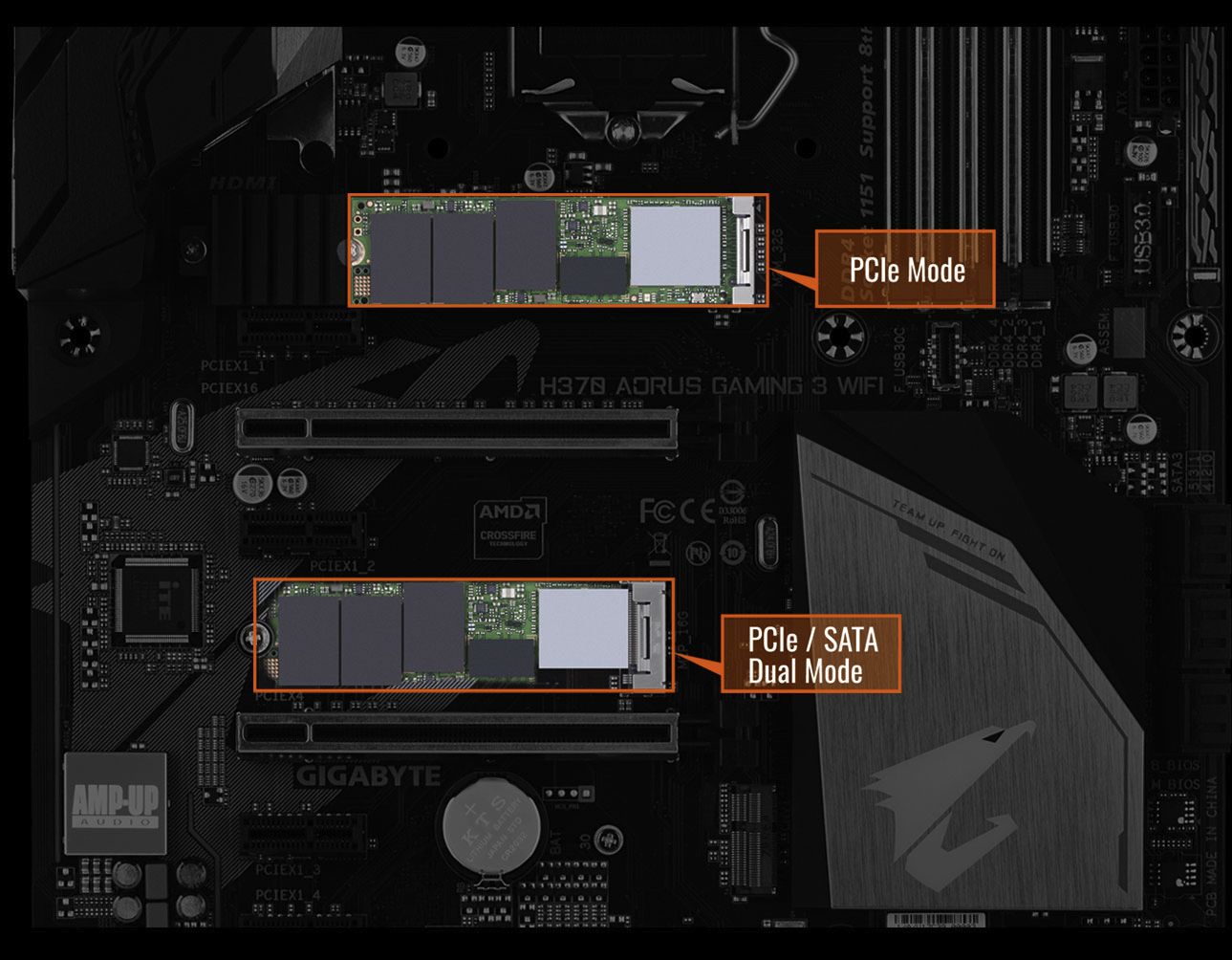
    PCI Dual Mode

    Two SSDs in the M.2 plug-in card format can now be accommodated on almost all current mainboards. With the price of NVMe SSDs falling, the upgrade is now affordable and offers more than just increased storage capacity.

    IDG

    Separate write-intensive applications and encrypting your drivves

    Another way to improve reliability with two SSDs is to separate applications and data so that write-intensive applications run on the primary SSD. Media, video games, documents, and project files are stored on the secondary hard drive.

    Finally, two SSDs provide better protection for your data. By physically separating the data, you can encrypt each drive separately.

    If there’s a problem with the primary drive due to a faulty update or another operating system problem, you can strip the data from the main drive with peace of mind, so long as you have the key for the second drive.

    Further reading: Best SSDs of 2025: Reviews and buying advice

    This article originally appeared on our sister publication PC-WELT and was translated and localized from German.

    SSDs Windows
    Share. Facebook Twitter Pinterest LinkedIn Tumblr Email
    Previous ArticleUbisoft Confirms Assassin’s Creed Shadows Is Coming to ‘Other Machines’, Suggesting a Switch 2 Port
    Next Article Meta Announces New Safety Features for Instagram Teen Accounts, Adult-Managed Profiles for Children
    techupdateadmin
    • Website

    Related Posts

    Gaming

    AT&T Subscribers Just Got a Significant 5G Speed Boost Due to New Spectrum

    November 17, 2025
    Gaming

    The sequel to one of my favorite 3D platformers always had a janky PC port, but a huge fanmade patch just dropped in hopes to fix it

    November 17, 2025
    Gaming

    Five new Steam games you probably missed (November 17, 2025)

    November 17, 2025
    Add A Comment
    Leave A Reply Cancel Reply

    Top Posts

    NYT Strands hints and answers for Monday, August 11 (game #526)

    August 11, 202531 Views

    These 2 Cities Are Pushing Back on Data Centers. Here’s What They’re Worried About

    September 13, 202529 Views

    I’m obsessed with Windows 11’s secret God mode

    September 11, 202528 Views
    Stay In Touch
    • Facebook
    • YouTube
    • TikTok
    • WhatsApp
    • Twitter
    • Instagram
    Latest Reviews

    Subscribe to Updates

    Get the latest tech news from FooBar about tech, design and biz.

    Most Popular

    Best Fitbit fitness trackers and watches in 2025

    July 9, 20250 Views

    There are still 200+ Prime Day 2025 deals you can get

    July 9, 20250 Views

    The best earbuds we’ve tested for 2025

    July 9, 20250 Views
    Our Picks

    Corsair Sabre v2 Pro Ultralight review: Excels at the basics

    November 17, 2025

    This Microsoft tool is much needed support for my antivirus software

    November 17, 2025

    This affordable TCL TV is one of the best I’ve tested in 2025, and it’s just dropped to a record-low price for Black Friday

    November 17, 2025

    Subscribe to Updates

    Get the latest creative news from FooBar about art, design and business.

    Facebook X (Twitter) Instagram Pinterest
    • About Us
    • Contact us
    • Privacy Policy
    • Disclaimer
    • Terms and Conditions
    © 2025 techupdatealert. Designed by Pro.

    Type above and press Enter to search. Press Esc to cancel.