



Expert’s Rating
Pros
- Sharp image with reasonably accurate gamma and color temperature
- USB-C with 60 watts power delivery and power pass-through
- Good menu system with joystick control
Cons
- Thicker and heavier than some alternatives
- Modest contrast and color performance
- Weak speakers
Our Verdict
The Viewsonic VA1655 has USB-C power with 60 watts of power delivery and supports power pass-through for charging a connected laptop, but it’s thicker than the alternatives, and its image quality doesn’t beat more affordable peers.
Price When Reviewed
This value will show the geolocated pricing text for product undefined
Best Pricing Today
Best Prices Today: Viewsonic VA1655
£126.02
Searching for a portable monitor on Amazon can overwhelm you with a torrent of choices from brands you’ve never heard of. That might lead you towards a brand that’s a bit more familiar—like Viewsonic, a brand that’s been in the business for decades. There are advantages to playing it safe with a better-known brand, like superior USB-C connectivity and an easy-to-use menu system, but the VA1655’s image quality doesn’t stand out from the crowd.
Viewsonic VA1655 (15.6-inch) specs and features
The Viewsonic VA1655’s specifications are identical to dozens of other inexpensive portable monitors. It has a 15.6-inch 1080p IPS-LCD display with a refresh rate of 60Hz.
- Display size: 15.6-inch 16:9 aspect ratio
- Native resolution: 1920×1080
- Panel type: IPS LCD
- Refresh rate: 60Hz
- Adaptive Sync: None
- HDR: No
- Ports: 1x Mini-HDMI 1.4, 2x USB-C, 3.5mm audio-out
- Audio: 2x speakers
- Additional features: Carrying case, built-in stand
- Price: $109.99 MSRP
The portable monitor’s connectivity is provided by one mini-HDMI port, as well as two USB-C ports. Notably, the USB-C ports both support 60 watts of power delivery, so they can charge and provide video input to the monitor. The monitor also ships with a carrying case.
Read on to learn more, then see our roundup of the best portable monitors for comparison.
Viewsonic VA1655 design
The Viewsonic VA1655’s design is unusual for a budget portable monitor. It doesn’t use a detachable kickstand carrying case but instead integrates the kickstand into the monitor itself.
On the plus side, this means the stand will always be with you. The stand also provides a good range of tilt adjustment with up to roughly 45 degrees of tilt; far better than competitors like the Innoview Portable Monitor, which relies on a kickstand case.
On the downside, the built-in kickstand increases the monitor’s thickness to 0.7 inches and its weight to 1.5 pounds. It’s noticeably thicker and heavier than most competitors that use a kickstand case.
Portability aside, the Viewsonic VA1655’s design reveals its budget price. The exterior is constructed from black plastics that look cheap and feel a bit hollow, and the monitor allows some flex when it’s handled. This is par for the course with budget portable monitors, though, and the VA1655’s thickness means it feels more durable than most.
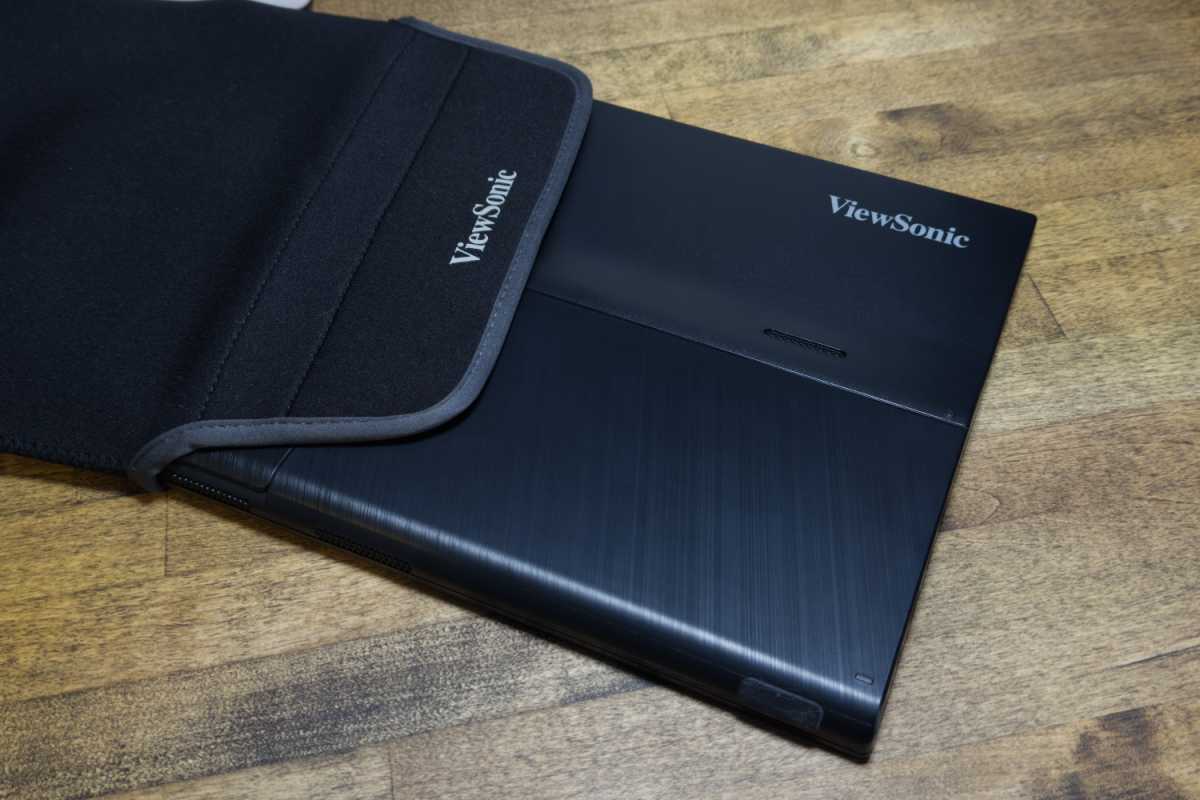
Because the portable monitor doesn’t have a carrying case with kickstand, it instead ships with a padded sleeve to provide some protection when the monitor is stored. The sleeve works well enough but, like the monitor itself, feels rather cheap.
Matthew Smith / Foundry
Viewsonic VA1655 connectivity
The USB-C ports both support up to 60 watts of power delivery. That’s more than enough to power the monitor, so you don’t need any additional external power source for it. ViewSonic doesn’t ship the monitor with a USB power brick, though, so you’ll need to buy one separately or use one that you have on hand.
The USB-C ports support power pass-through, which means you can connect a USB-C power brick to the portable monitor and then connect the portable monitor to a laptop via USB-C. This will charge the laptop. Power pass-through is a handy feature that budget portable monitors don’t often include.
Unfortunately, the monitor has a mini-HDMI instead of full-sized HDMI. That’s a small disappointment because mini-HDMI is much less common, so adapters and cables that support it are more difficult to find. However, a suitable cable is included in the box.
The USB-C ports support power pass-through — a handy feature that budget portable monitors don’t often include.
Viewsonic VA1655 menus, features, and audio
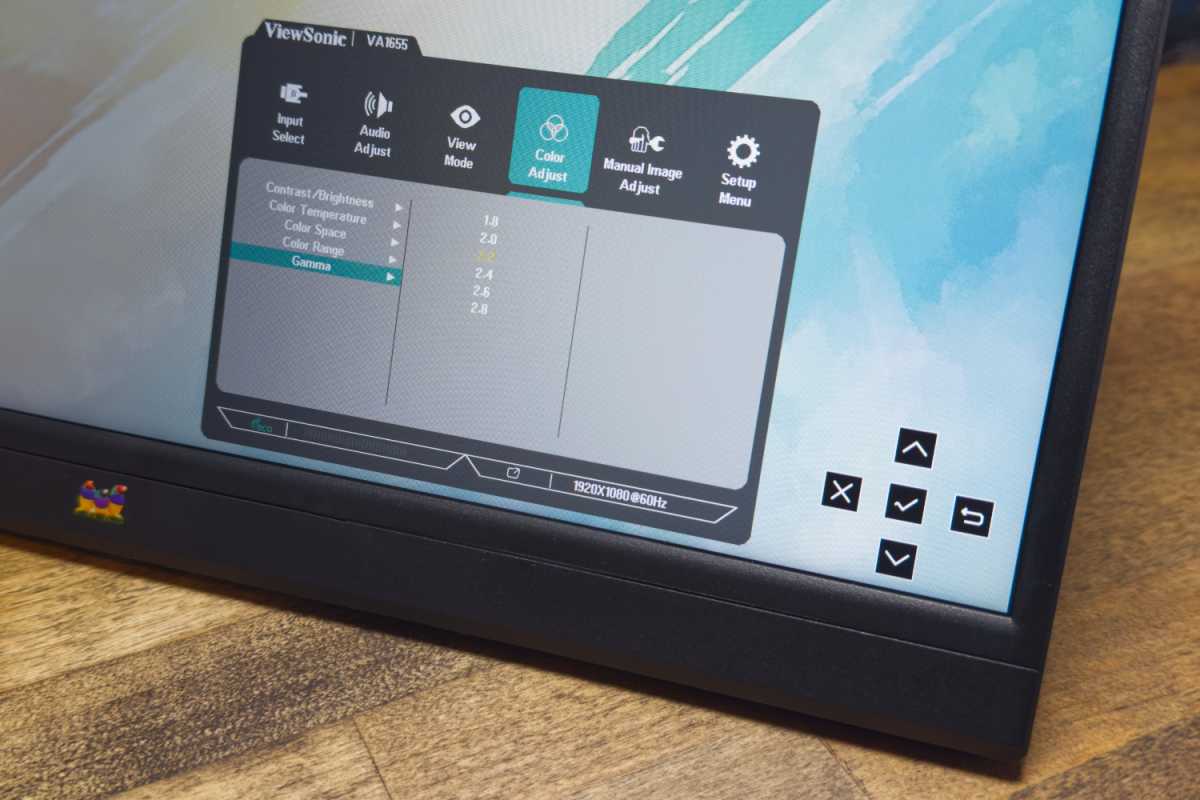
The VA1655’s menu system is much easier to navigate than most portable monitors thanks to a joystick control tucked around the right-hand side of the display. Most budget portable monitors bundle menu controls into the volume buttons, which is awkward.
The monitor also provides a decent range of image quality settings, including precise gamma presets and custom color modes for RGB calibration. The monitor’s modest image quality sets a limit on how useful these features can be, but it’s another area where the VA1655 beats most competitors.
Matthew Smith / Foundry
Speakers are included, but they’re rated at less than a watt of power each. Their maximum volume is low and bass-heavy tracks will immediately cause distortion. They’re fine for listening to system notification sounds, but not much else.
Viewsonic VA1655 SDR image quality
Priced at roughly $110, the Viewsonic VA1655 is firmly in the budget portable monitor category. With that said, it’s also a long way from the least expensive portable monitor available, as 15.6-inch 1080p alternatives can be found for as little as $60. The VA1655’s higher price unfortunately doesn’t buy you a significant improvement in image quality.
Matthew Smith / Foundry
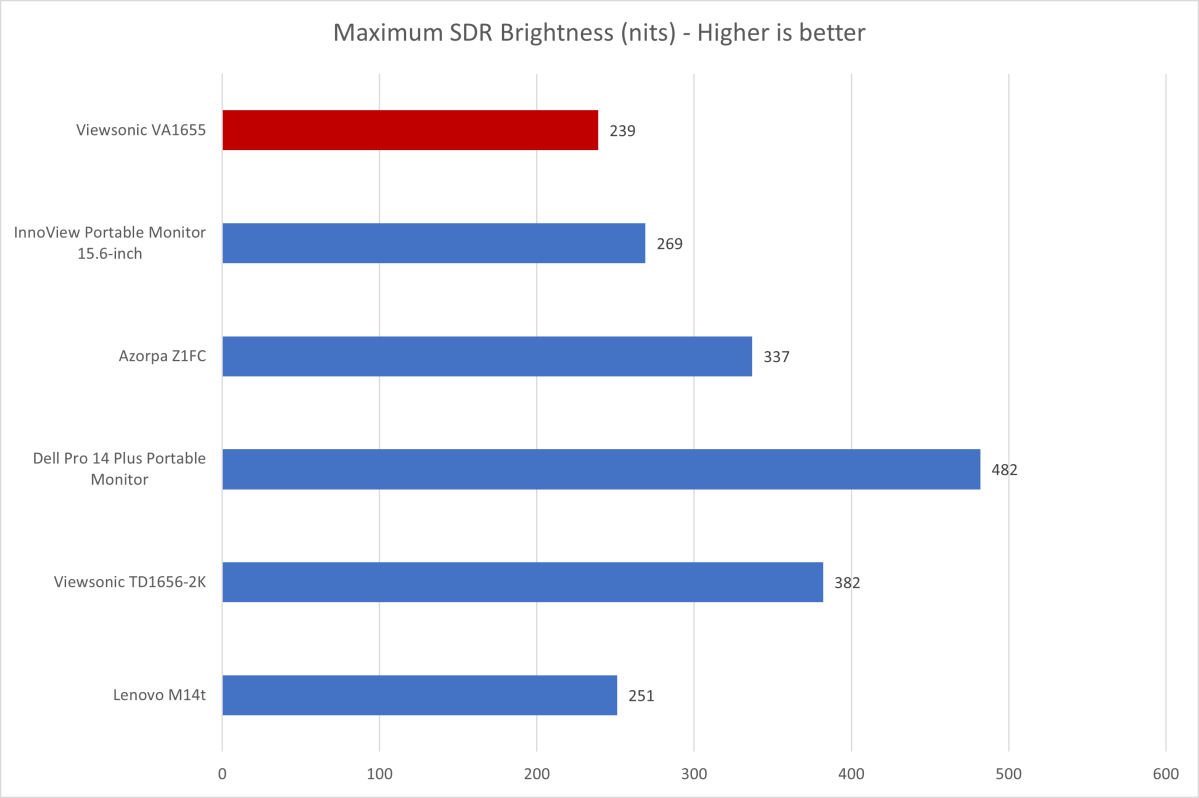
The Viewsonic VA1655 reached a maximum SDR brightness of 239 nits. That’s fine for most home use, but it’s a long way from the brightest in this category, and it won’t always be enough to keep the display usable while traveling.
The VA1655 also has a semi-gloss display finish. While it partially dampens reflections, a bright light source opposite the display will easily overwhelm the panel.
Matthew Smith / Foundry
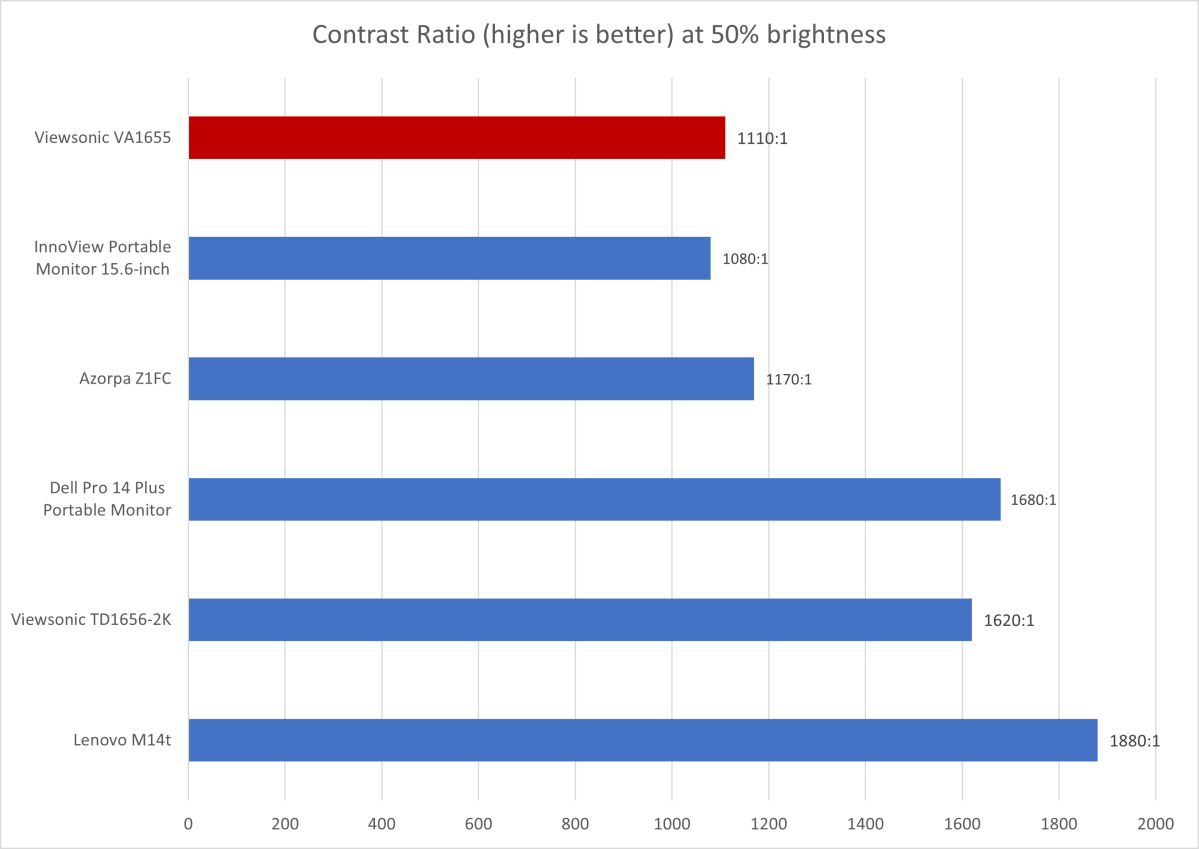
Contrast isn’t a perk of the VA1655, though it’s typical for a budget portable monitor. Its maximum contrast ratio of 1110:1 is mid-pack when the VA1655 is placed against similar rivals, like the Arzopa Z1FC and Innoview Portable Monitor.
When compared to OLED alternatives, however, the VA1655 is in far worse shape. OLED portable monitors are more expensive, to be fair, with budget options starting around $200. Still, it’s worth knowing what an extra $100 will get you.
Matthew Smith / Foundry
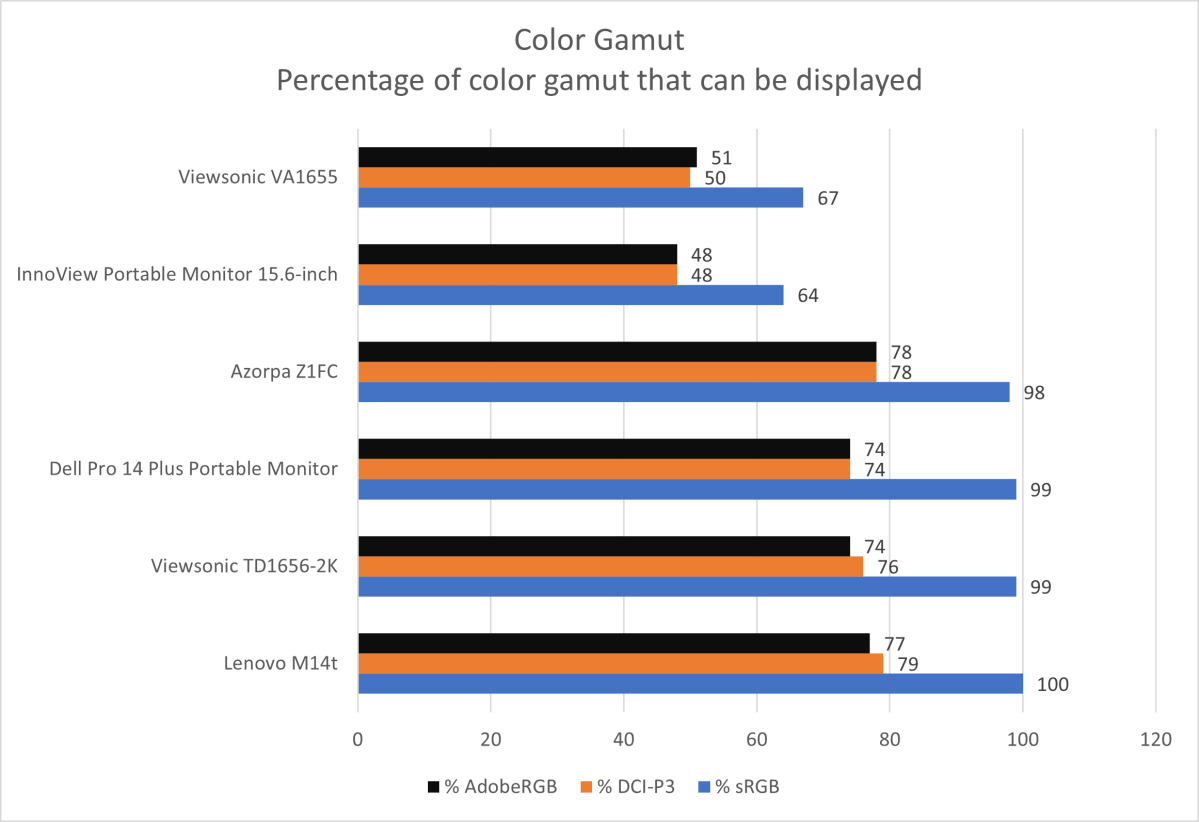
The VA1655 struggles with color performance. It handles just 67 percent of the sRGB gamut, as well as 50 percent of DCI-P3 and 51 percent of AdobeRGB. That’s similar to other budget portable monitors, but it’s much less than more expensive monitors. The VA1655’s limited color gamut won’t be an issue for most web browsing or working in Microsoft Office, but it will prove a problem if you want to edit photos or videos.
Matthew Smith / Foundry
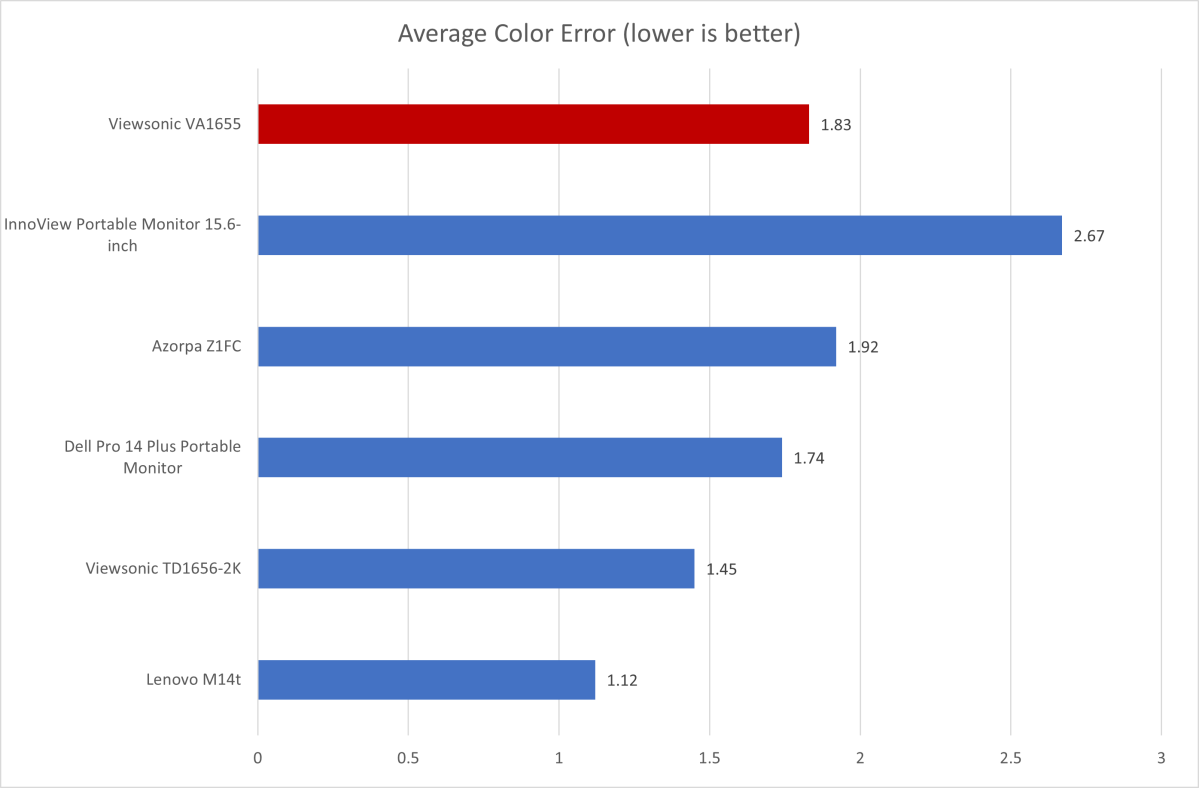
Viewsonic’s budget monitor is better in color accuracy, but still mid-pack. The monitor’s color accuracy is solid on average and better than the Innoview Portable Monitor. However, it still suffers significant variations in some hues, including cyan and red. These appear muted, with vibrant reds sliding to orange and blues looking faded or pastel.
The VA1655 is better in color temperature and gamma tests. It has a default gamma curve that roughly tracks the target value of 2.2 and a default color temperature of 6700K, which is just a tad cooler than the target of 6500K. The color temperature variance will be noticeable to critical viewers, but it doesn’t immediately stand out.
Sharpness is a perk for the VA1655. 1920×1080 resolution across a 15.6-inch panel works out to about 140 pixels per inch. That’s much sharper than a 27-inch 1440p monitor, though not quite as sharp as a 27-inch 4K display. In any case, the image is clear and crisp.
Viewing angles are decent, too. The VA1655 is easy to view in both the horizontal and vertical planes, though brightness is reduced and color fades if, for example, you stand up and view the monitor from above. However, the VA1655 helps to address even that, as its wide range of adjustment makes it possible to view the display from many angles.
The Viewsonic VA1655’s overall SDR image quality is passable for basic day-to-day productivity. It’s sharp and provides reasonable, though not precise, color accuracy. However, the VA1655’s brightness is towards the low end even for a budget monitor, which might be a problem if you plan to travel with the display.
Viewsonic VA1655 HDR image quality and motion performance
The Viewsonic VA1655 doesn’t support HDR. That might seem disappointing, but budget portable monitors that claim HDR support are, without exception, full of baloney. In this sense, the lack of HDR is a perk. Viewsonic isn’t trying to pull one over on customers.
Motion performance is modest. The monitor has a 60Hz refresh rate, quotes a gray-to-gray pixel response time of 7 milliseconds, and doesn’t support Adaptive Sync. That means 3D games will look blurry in motion, at least when compared to a gaming monitor with a 144Hz refresh rate (or better).
A 60Hz refresh rate is typical at this price, though. Gamers will need to stretch their budget for a portable monitor like the Arzopa Z1FC, which has a 144Hz refresh rate (though even it still lacks Adaptive Sync).
Should you buy the Viewsonic VA1655?
The Viewsonic VA1655 is a passable entry in the highly competitive portable monitor area. It has a few advantages over most budget alternatives like a built-in kickstand, USB-C charging with power pass-through, and a superior menu system. However, those advantages are countered by the VA1655’s bulky design. The monitor’s image quality is modest, too, and matched by less expensive peers.
