
Close Menu
TechUpdateAlert

    Subscribe to Updates

    Get the latest creative news from FooBar about art, design and business.

    What's Hot

    My Health Anxiety Means I Won’t Use Apple’s or Samsung’s Smartwatches. Here’s Why

    December 22, 2025

    You can now buy the OnePlus 15 in the US and score free earbuds if you hurry

    December 22, 2025

    Today’s NYT Connections: Sports Edition Hints, Answers for Dec. 22 #455

    December 22, 2025
    Facebook X (Twitter) Instagram
    Trending
    • My Health Anxiety Means I Won’t Use Apple’s or Samsung’s Smartwatches. Here’s Why
    • You can now buy the OnePlus 15 in the US and score free earbuds if you hurry
    • Today’s NYT Connections: Sports Edition Hints, Answers for Dec. 22 #455
    • Android might finally stop making you tap twice for Wi-Fi
    • Today’s NYT Mini Crossword Answers for Dec. 22
    • Waymo’s robotaxis didn’t know what to do when a city’s traffic lights failed
    • Today’s NYT Wordle Hints, Answer and Help for Dec. 22 #1647
    • You Asked: OLED Sunlight, VHS on 4K TVs, and HDMI Control Issues
    Facebook X (Twitter) Instagram Pinterest Vimeo
    TechUpdateAlertTechUpdateAlert
    • Home
    • Gaming
    • Laptops
    • Mobile
    • Software
    • Reviews
    • AI & Tech
    • Gadgets
    • How-To
    TechUpdateAlert
    Home»Reviews»The hidden power of your keyboard’s media keys
    Reviews

    The hidden power of your keyboard’s media keys

    techupdateadminBy techupdateadminJuly 30, 2025No Comments3 Mins Read
    Share Facebook Twitter Pinterest LinkedIn Tumblr Reddit Telegram Email
    Elgato Stream Deck
    Share
    Facebook Twitter LinkedIn Pinterest Email

    Anyone who has ever used a keyboard with these practical controls will be reluctant to do without them. They not only make media control easier, but also enhance workflow and add everyday convenience.

    Media keys provide intuitive control over playback, volume, and track changes—without requiring complex key combinations. Many keyboards rely on an Fn key combination–for example, Fn and F7 are used to pause playback. But this solution requires memorizing the combination. Pressing two keys at the same time interrupts your workflow.

    Media keys are a real convenience, especially when working or gaming. They can be executed quickly without having to switch windows or search for icons.

    A macro pad like the Elgato Stream Deck offers programmable buttons, but it comes at a high price.

    Elgato

    Another advantage is the ergonomic layout. On many keyboard models, media keys are located in the top right-hand section of the keyboard. Here they are easy to reach and do not interfere with the regular key block. Some keyboards also offer an additional rotary wheel or a slider for the volume — a real plus for even more intuitive operation. This is especially practical in meetings or video calls: a quick press of a button is enough to pause the music or lower the volume without interrupting the conversation.

    If you work with a keyboard without media keys, you can make do with software solutions or double-mapped keys. Many keyboards allow you to customize the assignment using special software so that less-used keys such as “Page Up” or “Page Down” can be used for media control. However, this workaround has drawbacks: the original key functions are lost, and there’s often a lack of visual feedback.
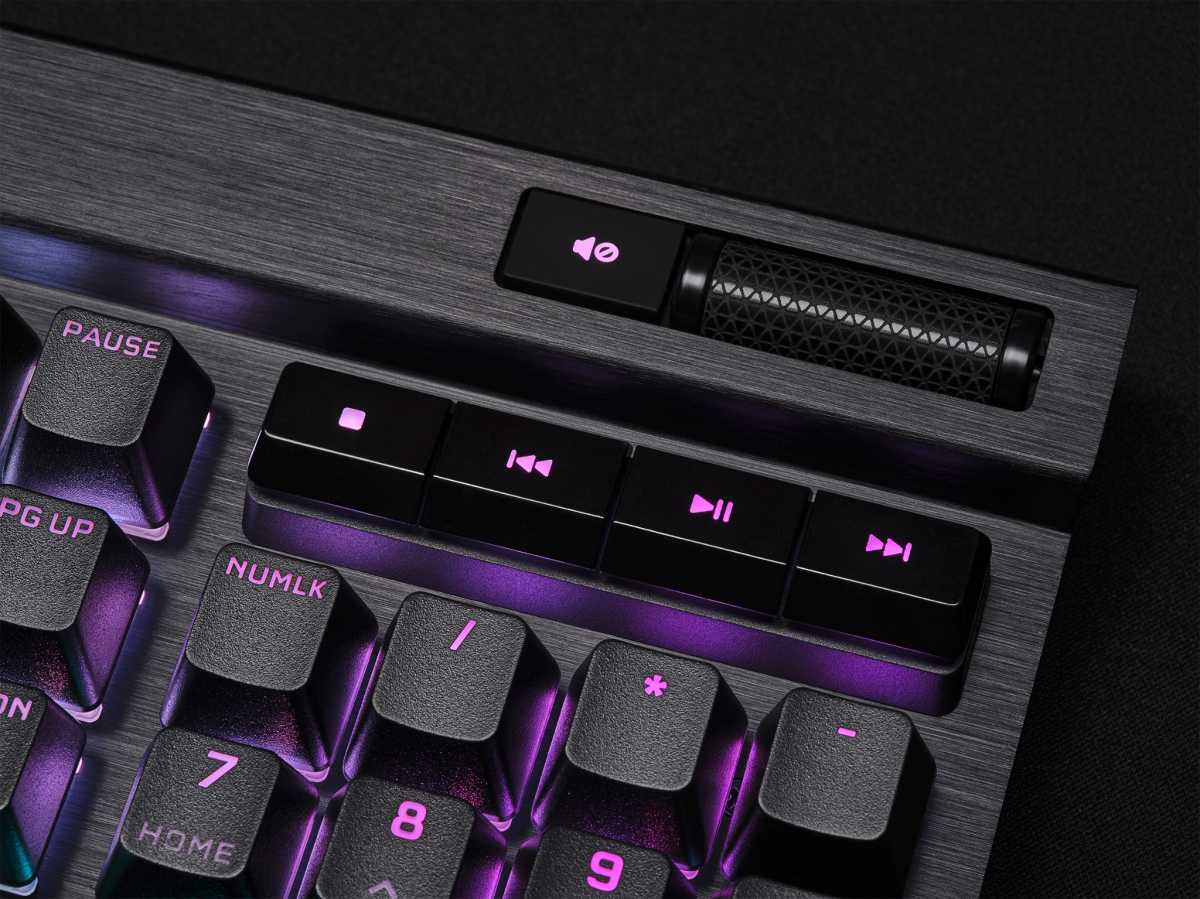
    Keyboard mit dedizierten Medientasten
    Dedicated media keys simplify everyday PC use by making volume and track control easy. Once accustomed, you won’t want to do without them.

    IDG

    In Windows 11, for example, media key notifications have been removed, which can make it unclear whether a command was successfully registered. One hardware alternative is a macro pad with freely assignable keys. However, these can be expensive — often costing more than keyboards with integrated media keys.

    For budget-conscious users, heaper alternatives include smaller macro pads or software apps for smartphones and tablets. But these can cause noticeable latency or stability issues and don’t always offer the desired response time.

    The best solution is to choose a keyboard with dedicated media keys. This provides the easiest use and ensures smooth control of music, videos, and other media. Whether you prefer mechanical keyboards with extra volume controls or compact models with well-arranged media keys, there are many options to meet your personal preferences and requirements.

    This article originally appeared on our sister publication PC-WELT and was translated and localized from German.

    Hidden Keyboards keys Media Power
    Share. Facebook Twitter Pinterest LinkedIn Tumblr Email
    Previous ArticleDropbox Passwords will soon be no more – here’s how to save your passwords, and our pick of alternatives
    Next Article Opera issues government complaint against Microsoft for Edge-y antics
    techupdateadmin
    • Website

    Related Posts

    Gadgets

    Semi-solid state MagSafe power banks arrive from the founder of Hyper

    December 19, 2025
    Gadgets

    Newborn Not Sleeping? Try This Hidden iPhone Feature

    December 15, 2025
    Mobile

    Watch this humanoid robot power through an hour of sorting packages

    December 15, 2025
    Add A Comment
    Leave A Reply Cancel Reply

    Top Posts

    NYT Strands hints and answers for Monday, August 11 (game #526)

    August 11, 202545 Views

    These 2 Cities Are Pushing Back on Data Centers. Here’s What They’re Worried About

    September 13, 202542 Views

    Today’s NYT Connections: Sports Edition Hints, Answers for Sept. 4 #346

    September 4, 202540 Views
    Stay In Touch
    • Facebook
    • YouTube
    • TikTok
    • WhatsApp
    • Twitter
    • Instagram
    Latest Reviews

    Subscribe to Updates

    Get the latest tech news from FooBar about tech, design and biz.

    Most Popular

    Best Fitbit fitness trackers and watches in 2025

    July 9, 20250 Views

    There are still 200+ Prime Day 2025 deals you can get

    July 9, 20250 Views

    The best earbuds we’ve tested for 2025

    July 9, 20250 Views
    Our Picks

    My Health Anxiety Means I Won’t Use Apple’s or Samsung’s Smartwatches. Here’s Why

    December 22, 2025

    You can now buy the OnePlus 15 in the US and score free earbuds if you hurry

    December 22, 2025

    Today’s NYT Connections: Sports Edition Hints, Answers for Dec. 22 #455

    December 22, 2025

    Subscribe to Updates

    Get the latest creative news from FooBar about art, design and business.

    Facebook X (Twitter) Instagram Pinterest
    • About Us
    • Contact us
    • Privacy Policy
    • Disclaimer
    • Terms and Conditions
    © 2026 techupdatealert. Designed by Pro.

    Type above and press Enter to search. Press Esc to cancel.