


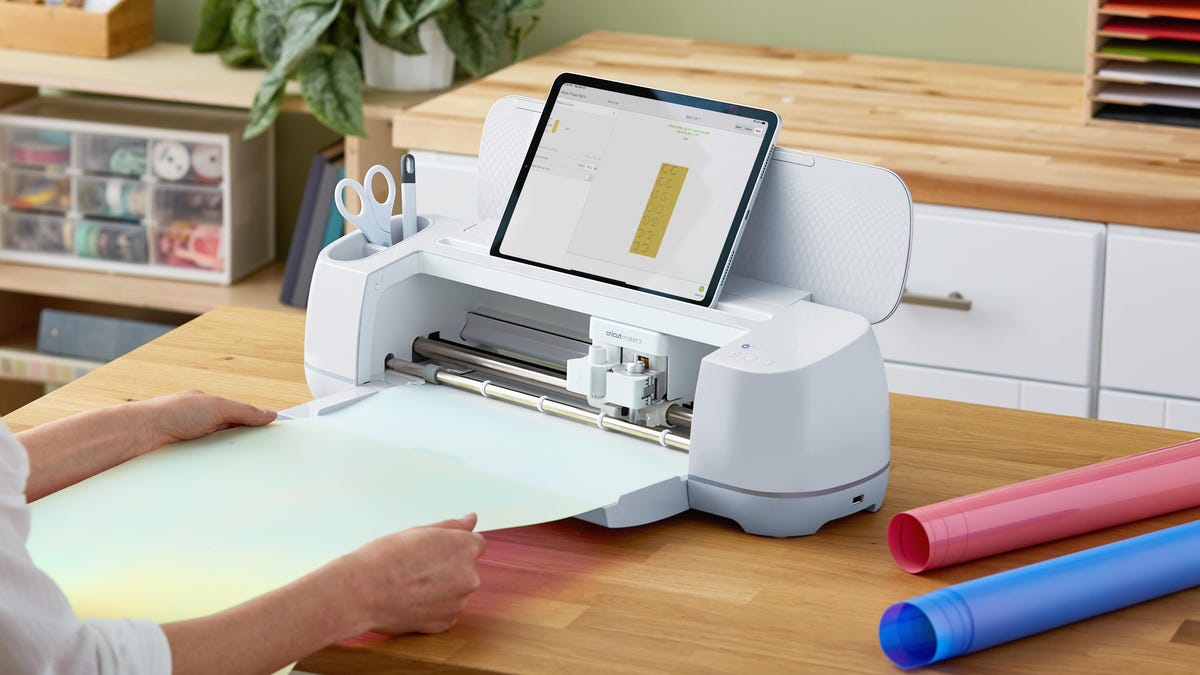
Prime Big Deal Days alert: Normally priced at $399, the Cricut Maker 3 is now available at a 30% discount, bringing the price down to $280. That’s an excellent bargain on the model I recommend to anyone who wants to start creating with one of these fun, adaptable crafting machines.
One of the things I enjoy most about my Cricut is the many ways I can use it. While the clever car decals and cutesy T-shirts are fun, it’s not always obvious how much this machine can do until you have one in your home.
I’ve made a puzzle with a photo of my sister’s favorite family, custom place cards for family dinners and unique vinyl runners for my kitchen cabinets — all from this same machine. I’ve even made acid-etched glassware as gifts for a bridal party, which was its own adventure.
My friends and family frequently ask me which Cricut is the right one to buy, and for the last four years, my answer has always been the same. Even though Cricut just released its new Explore 4 and Maker 4 machines, I think the best Cricut for the money right now remains the Maker 3. And since it’s not the latest model, you can get it for much less than the newest machine.
Right now, the basic Cricut Maker 3 is available for $119 offduring Amazon’s Prime Day sale. That drops the price down to $280 from its usual list price of $399. But keep in mind that the sale ends tomorrow.
When the Cricut Maker 3 was released, it represented a massive shift in the crafting world. Cricut as a company had already become something of a household name in maker circles, but the Maker 3 is effectively everything you need to start a small craft business wrapped up in a single machine. It supports over 300 different materials and allows you to easily swap out the primary cutting tool for a ton of other options.
Whether you’re printing out a sticker for a custom candle or faux suede for decorative roses to add to a flower crown, the Maker 3 gets the job done quickly and consistently. A lot of this ease of use comes down to the excellent Design Space app, which runs on just about every type of device and makes creating new projects wildly simple.
Today, it’s nearly impossible to scroll through Etsy or walk through a local farmers’ market without seeing something that was at least partially made on a Cricut. If you’ve been to a theme park in the last couple of years, you have absolutely seen families with matching shirts that were all clearly made using a Cricut.
It’s common to say that the limitations of these machines are your imagination, but a big part of that is also how many supportive accessories are made by Cricut. Things like iron-on material designed to stretch so it can be applied to athleisure wear and sports jerseys or wood veneers, so you can add a touch of class to an existing project without needing to worry about adhesives or the quality of the wood.
It’s a whole ecosystem, and Cricut’s Maker platform is the best, so there are very few limits on what you can make.
3D PRINTER DEALS OF THE WEEK
Deals are selected by the CNET Group commerce team, and may be unrelated to this article.
Why I recommend the Cricut Maker 3
No big laptop required. I almost exclusively use my phone or my tablet to design things for my Cricut.
I have recently been able to thoroughly test and review the Cricut Maker 4, released this year as the new top of the Cricut lineup. The Maker 4 does not add to the list of things it is capable of.
In fact, when it comes to how many materials are supported and what tools can be used with it, this new machine is essentially identical to the Maker 3. The big feature that has been added with the new model is speed — the Maker 4 is noticeably faster than the Maker 3 when cutting anything that isn’t labeled Smart Materials.
Cricut’s Smart Materials are specially made so there are as few tolerance differences as possible. For example, Cricut’s Smart Iron-On materials can be put directly into the machine without the use of a supportive cutting mat, and you’ll get either the same quality or higher quality cut than if you use an off-brand material. This is because Cricut knows the precise depth to cut its Smart Materials without any risk of damage to the machine or loss in quality.
On the Cricut Explore 3 and Maker 3, these Smart Materials cut the fastest and are widely considered to be a more reliable product despite the added cost associated with the brand name.
This decal for my bar cart is one of the first things I made with my Cricut.
With the Cricut Explore 4 and Maker 4, a lot of third-party vinyl and iron-on material will cut faster than the previous models because these new machines are able to apply more precise pressure to the cutting mats. These speed improvements do not quite reach the performance level of Smart Materials, but it does make it possible for someone running a small business to consider using alternative materials without slowing down the production line by much. And if that’s something you’re concerned about, the Maker 4 may be worth a closer look for you.
If you’re planning on owning a Cricut so you can make fun things for your family, iterative improvements in speed aren’t likely to be all that important. Cricut’s Maker 3 is still a fantastic machine, and because something new exists, you can get the Maker 3 at a substantial discount compared to the $400 price tag of the new model. If all you are really losing is speed, the cost savings is more than worth it.
It’s possible to get in on this new Cricut world for even less, if you’re willing to sacrifice functionality. The Cricut Explore 4 is just as fast as the Maker 4, but it doesn’t support as many materials as the Maker 3 and 4. You would lose the ability to cut puzzles out of chipboard or wood veneers, among other things, but if you’re only interested in cutting vinyl, iron-ons and stickers, you can get an Explore 4 for $250, which is a fantastic price.
Cricut Maker 3 specs
- Dimensions: 21.1×6.9×5.9 inches
- Max cut width: 11.5 inches on a cutting mat, 12 inches with Smart Materials
- Max cut length: 11.5 inches on a cutting mat, 12 feet with Smart Materials
- Control: Cricut Design Space on Windows, Mac, iOS and Android
- Tool compatibility: 13 tools
- Wireless connectivity: Bluetooth only
Nothing you own will ever be boring again
I make my own cards for friends now, and they love how personal each one is.
There’s an addictive quality to using a Cricut. That feeling of accomplishment, where you push the Go button on the machine and the thing you made comes out the other side, does not go away.
Cricut’s Design Space app is a never-ending fountain of ideas for things to make if you’re not sure where to get started, and if you pay for the monthly subscription to the app you even get step-by-step instructions on how to make a ton of things that have been designed by other users. It’s a whole community of clever makers who enjoy sharing what they have made so you can make it yours, and as long as you carefully follow those instructions, you will have a great time.
If you’ve been curious about how to get started, do yourself a favor and get the Maker 3. You will be so happy you did.
You can find even more great bargains in our roundup of the best deals from Amazon’s October Prime Day sale.
Join Our Daily Deals Text Group!
Get hand-picked deals from CNET shopping experts straight to your phone.
Impulse Buys Under $25 on Amazon That Make Unexpectedly Great Gifts
See all photos
