
Close Menu
TechUpdateAlert

    Subscribe to Updates

    Get the latest creative news from FooBar about art, design and business.

    What's Hot

    AI image generators are getting better by getting worse

    December 15, 2025

    Watch this humanoid robot power through an hour of sorting packages

    December 15, 2025

    Microsoft makes theming your Windows 11 PC as easy as phones, but not as much fun

    December 15, 2025
    Facebook X (Twitter) Instagram
    Trending
    • AI image generators are getting better by getting worse
    • Watch this humanoid robot power through an hour of sorting packages
    • Microsoft makes theming your Windows 11 PC as easy as phones, but not as much fun
    • The Best Bike Gear for Your Brisk, Wintry Commute (2025)
    • Today’s NYT Connections Hints, Answers for Dec. 15 #918
    • Today’s NYT Strands Hints, Answer and Help for Dec. 15 #652
    • Deals: OnePlus 15 goes on pre-order, Galaxy S25 series gets discounted
    • Inside the high drama of the iPhone 4
    Facebook X (Twitter) Instagram Pinterest Vimeo
    TechUpdateAlertTechUpdateAlert
    • Home
    • Gaming
    • Laptops
    • Mobile
    • Software
    • Reviews
    • AI & Tech
    • Gadgets
    • How-To
    TechUpdateAlert
    Home»Reviews»Microsoft’s Copilot Vision can now see your entire Windows desktop
    Reviews

    Microsoft’s Copilot Vision can now see your entire Windows desktop

    techupdateadminBy techupdateadminJuly 16, 2025No Comments2 Mins Read
    Share Facebook Twitter Pinterest LinkedIn Tumblr Reddit Telegram Email
    Microsoft Windows Copilot Vision plus desktop share
    Share
    Facebook Twitter LinkedIn Pinterest Email

    Copilot Vision’s vision is improving.

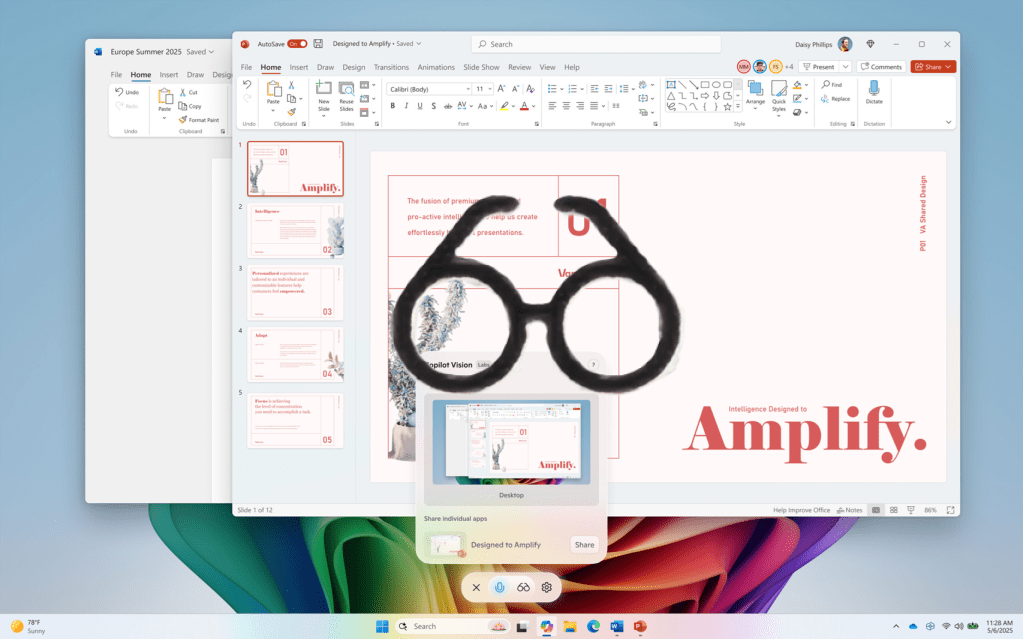
    Microsoft said Monday that it’s beginning to allow Copilot Vision to “see” your desktop, as well as specific applications. Microsoft calls this “Desktop Share,” and it’s a part of a new Copilot app update, version 1.25071.125.

    Microsoft introduced Copilot Vision in April with the ability to see a single app; when Copilot Vision formally debuted, it could see two. Now, it can see your entire desktop in one fell swoop.

    I’m not sure what the difference is, to be honest. Presumably, Copilot Vision was limited to one or two apps before. Now, I suppose, you can have several applications open on your desktop, and Copilot Vision can now see and understand all of them at once. Or maybe it can give advice toward tidying up a Windows desktop with a couple dozen app icons scattered about?

    In any event, Desktop Share for Copilot Vision is now complemented by a Microsoft test of turning on Vision from an existing Voice conversation. If you’re already orally chatting with Copilot, you can now flip on Copilot Vision by clicking the “glasses” icon in the conversation.

    I wasn’t too impressed when I tried Copilot Vision earlier this year. when I tried out Copilot Vision earlier this year, but I’d expect the technology to improve. It needs to better understand what it sees, not just see more.

    Copilot desktop entire Microsofts Vision Windows
    Share. Facebook Twitter Pinterest LinkedIn Tumblr Email
    Previous ArticleFaulty Shopify plugin puts hundreds of websites at risk of invasive attacks – find out how to stay safe
    Next Article Meta AI Vulnerability That Could Leak Users’ Private Conversations Fixed: Report
    techupdateadmin
    • Website

    Related Posts

    Gadgets

    Microsoft makes theming your Windows 11 PC as easy as phones, but not as much fun

    December 15, 2025
    Mobile

    Running Android apps on your Windows 11 PC is about to feel slightly better

    December 12, 2025
    Mobile

    Donald Trump reminds the entire world he has no idea what 6G means

    December 11, 2025
    Add A Comment
    Leave A Reply Cancel Reply

    Top Posts

    These 2 Cities Are Pushing Back on Data Centers. Here’s What They’re Worried About

    September 13, 202542 Views

    NYT Strands hints and answers for Monday, August 11 (game #526)

    August 11, 202542 Views

    Today’s NYT Connections: Sports Edition Hints, Answers for Sept. 4 #346

    September 4, 202539 Views
    Stay In Touch
    • Facebook
    • YouTube
    • TikTok
    • WhatsApp
    • Twitter
    • Instagram
    Latest Reviews

    Subscribe to Updates

    Get the latest tech news from FooBar about tech, design and biz.

    Most Popular

    Best Fitbit fitness trackers and watches in 2025

    July 9, 20250 Views

    There are still 200+ Prime Day 2025 deals you can get

    July 9, 20250 Views

    The best earbuds we’ve tested for 2025

    July 9, 20250 Views
    Our Picks

    AI image generators are getting better by getting worse

    December 15, 2025

    Watch this humanoid robot power through an hour of sorting packages

    December 15, 2025

    Microsoft makes theming your Windows 11 PC as easy as phones, but not as much fun

    December 15, 2025

    Subscribe to Updates

    Get the latest creative news from FooBar about art, design and business.

    Facebook X (Twitter) Instagram Pinterest
    • About Us
    • Contact us
    • Privacy Policy
    • Disclaimer
    • Terms and Conditions
    © 2025 techupdatealert. Designed by Pro.

    Type above and press Enter to search. Press Esc to cancel.