



Expert’s Rating
Pros
- Reliable
- Basic 1080p, 30Hz functionality
- No issues with Windows Hello
- Attractive price
Cons
- Just the basics — no added features
Our Verdict
The Lenovo Performance FHD Webcam is just a basic, functional, reliable 1080p Windows Hello webcam. If that’s what you want, go buy it.
Price When Reviewed
This value will show the geolocated pricing text for product undefined
Best Pricing Today
Best Prices Today: Lenovo Performance FHD Webcam
Sometimes you just want to buy a Honda Civic: cheap, reliable, dependable, without any of the bells and whistles. If you want a 1080p Windows Hello webcam that fits the bill, check out the Lenovo Performance FHD Webcam.
Lenovo sells a pair of Windows Hello webcams: the Lenovo Performance FHD Webcam, reviewed here, and the slightly more expensive Lenovo 510 FHD webcam. Both are basically identical 1080p Windows Hello webcams, though the Performance FHD webcam appears to have a chassis that’s somewhat better designed. Listings on shopping sites seem to play a little fast and loose with the descriptions, however, so it’s simpler to click through the links above.
As those links indicate, this is a very moderately priced Windows Hello webcam, with 1080p resolution and fixed focus. A broad swathe of modern laptops now offer 1080p resolution at 30Hz, so the appeal here is the upgrade to Windows Hello. Windows Hello allows your PC to “recognize” you, offering both convenience and security, especially as passkeys have become more prevalent.
Read on to learn more, then see our roundup of the best Windows Hello webcams for comparison.
Lenovo Performance FHD Webcam: Design and features
Lenovo’s Performance FHD Webcam arrived in a small, non-descript brown box, with just the barest of instruction manuals inside. There’s a black-on-black logo on the webcam itself, very nondescript.
Mark Hachman / Foundry
Some webcams ask you to download an additional piece of utility software to manage more sophisticated functions like backlight adjustments. Lenovo’s webcam does not: The illustrations guide provides basic guidance on how to connect the webcam to your display and then attach the cable, and that’s it.
If you want budget Windows Hello capabilities that work reliably and without spending more than you need to, this is the webcam for you.
The webcam measures 2.22 x 4.72 x 2.48 inches, with a cable length of about 5.6 feet. The included USB-C to USB-A cable plugs into a USB-C port on the webcam, leaving you to find an available USB-A port on your PC.
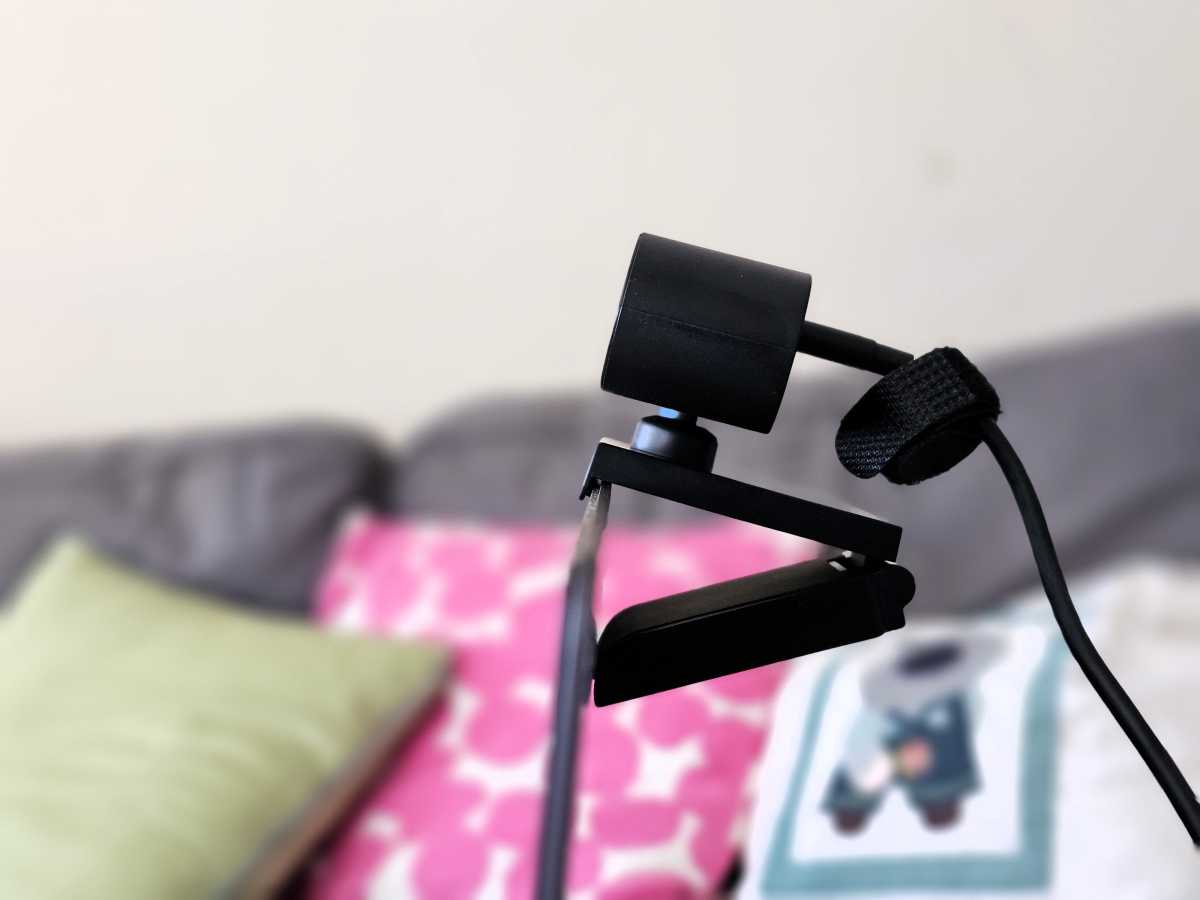
Like most webcams, Lenovo’s camera uses what I call a “jaws” mount. An upper jaw with an overhanging “lip” hangs on to the front of your monitor or screen. The weight of the camera pulls it back, but it’s supported by the bottom “jaw” which rests against the back of the monitor or screen. Some webcams have an additional, pivoting surface on the bottom jaw to lay flat against the back surface, but this one does not. However, the rubberized surface prevented it from moving accidentally. It’s totally stable on the top of a display, but less so on top of a laptop’s screen — no different than most webcams, unfortunately.
Mark Hachman / Foundry
Lenovo’s webcam perches on top of a swivel ball, which is handy for tilting it forward and back. I always felt like it constantly was tilted a few degrees off-kilter, however.
Lenovo uses a sliding manual shutter on the top of the camera itself for privacy. When closed, there’s a small red dot where the lens is to indicate that the camera is off. There’s no indication that the shutter turns off the microphone, however.
Lenovo Performance FHD Webcam: Performance
Again, Lenovo doesn’t provide its own utility software. Instead, Lenovo allows Windows to manage its settings, found within the Windows 11 Settings (Bluetooth & devices > Cameras > [name of camera]). There, you’ll find contrast, brightness, and saturation controls. Lenovo’s Performance FHD Webcam also has 4x digital zoom, and you can adjust that too within the Windows controls. Most video calling apps seem to crop down to your face automatically, but it’s an option I like to use if available.

Mark Hachman / Foundry
As a webcam, Lenovo’s device seems pretty decent. My downstairs office is pretty gloomy, but with windows behind me and to one side. Lenovo’s camera (1/2.9-inch RGB sensor, with a 95-inch field of view, and 4x digital zoom) picked up on my face, rather than the window behind me, which was blown out. (I block it with a privacy screen for my test shot, above.) The color makes me slightly ruddier than normal, but otherwise I think everything looks pretty good.
Upstairs, the webcam painted a somewhat dim image of my family room, with afternoon light coming through the shaded window to my right. Here, though, Lenovo’s webcam does a decent job with the color and the scene, otherwise.
I test any noise filtering by recording my voice on the Windows Sound Recorder app, while playing back some rock music and then some white noise on a phone speaker at a loud volume. Lenovo’s webcam does a fine job filtering out background noises like rain and thunder. However, the mic clearly picked up the rock music. It was faint, but audible.
The webcam did a good job of capturing my voice, clearly and at a good volume.

Mark Hachman / Foundry
Lenovo Performance FHD Webcam: Windows Hello performance
I had no issues with setting up Windows Hello with this webcam, which I used on a machine without a Windows Hello webcam already installed. I didn’t record how long it actually takes to look and store my image, but it was on the order of a few seconds, which is normal.
Lenovo’s Windows Hello recognition also survived a haircut, which was pretty badly needed.
Lenovo’s webcam woke up when the laptop did, and logged me in quickly and consistently, even when I had it attached to a laptop docking station. When the webcam is optically recording you, a small white LED lights up to the left of the camera glass. When you’re being recognized by the webcam via Windows Hello, a bright red light flashes on the left-hand side as well. It’s a little disconcerting, but it’s only on for a second or two.
Supposedly Windows Hello webcams have stopped working as effectively as they should in the dark, so I clipped the webcam to the laptop and tried repeatedly logging on and off while standing in a darkened hallway, with just the laptop screen as illumination. I didn’t have any issues.
Should you buy the Lenovo Performance FHD Webcam?
Our recommendations for the best webcams, specifically the budget models, offer some tremendous value for the money — there are 4K and 2K cameras priced at what you might expect the price of an ordinary 1080p webcam to be. Lenovo’s Performance FHD Webcam doesn’t offer the higher resolutions some webcams do, but it adds Windows Hello capabilities. There’s value there.
Typically, the products we recommend as part of our best Windows Hello webcams command some sort of price premium. Lenovo’s webcam doesn’t, or at least not really.
Lenovo’s Performance FHD Webcam is a basic, functional budget 1080p Windows Hello webcam without any added features. And that’s fine. If you want budget Windows Hello capabilities that work reliably and without spending more than you need to, this is the webcam for you.
