
Close Menu
TechUpdateAlert

    Subscribe to Updates

    Get the latest creative news from FooBar about art, design and business.

    What's Hot

    JBL Grip Review: A Bluetooth Speaker With Lava Lamp Vibes

    December 8, 2025

    Samsung announces One UI 8.5 beta program

    December 8, 2025

    EV, Hybrid, or Gas? We Know Which One Is Losing You Money Every Month

    December 8, 2025
    Facebook X (Twitter) Instagram
    Trending
    • JBL Grip Review: A Bluetooth Speaker With Lava Lamp Vibes
    • Samsung announces One UI 8.5 beta program
    • EV, Hybrid, or Gas? We Know Which One Is Losing You Money Every Month
    • Samsung’s One UI 8.5 might just save your vacation photos
    • Today’s NYT Mini Crossword Answers for Dec. 8
    • Today’s NYT Connections: Sports Edition Hints, Answers for Dec. 8 #441
    • vivo S50 and S50 Pro mini launch date revealed
    • I used the Galaxy Watch 8 for a long vacation, and it’s better than the Apple Watch
    Facebook X (Twitter) Instagram Pinterest Vimeo
    TechUpdateAlertTechUpdateAlert
    • Home
    • Gaming
    • Laptops
    • Mobile
    • Software
    • Reviews
    • AI & Tech
    • Gadgets
    • How-To
    TechUpdateAlert
    Home»Reviews»I hate passwords. This cheap webcam helps me get rid of them
    Reviews

    I hate passwords. This cheap webcam helps me get rid of them

    techupdateadminBy techupdateadminJuly 9, 2025No Comments3 Mins Read
    Share Facebook Twitter Pinterest LinkedIn Tumblr Reddit Telegram Email
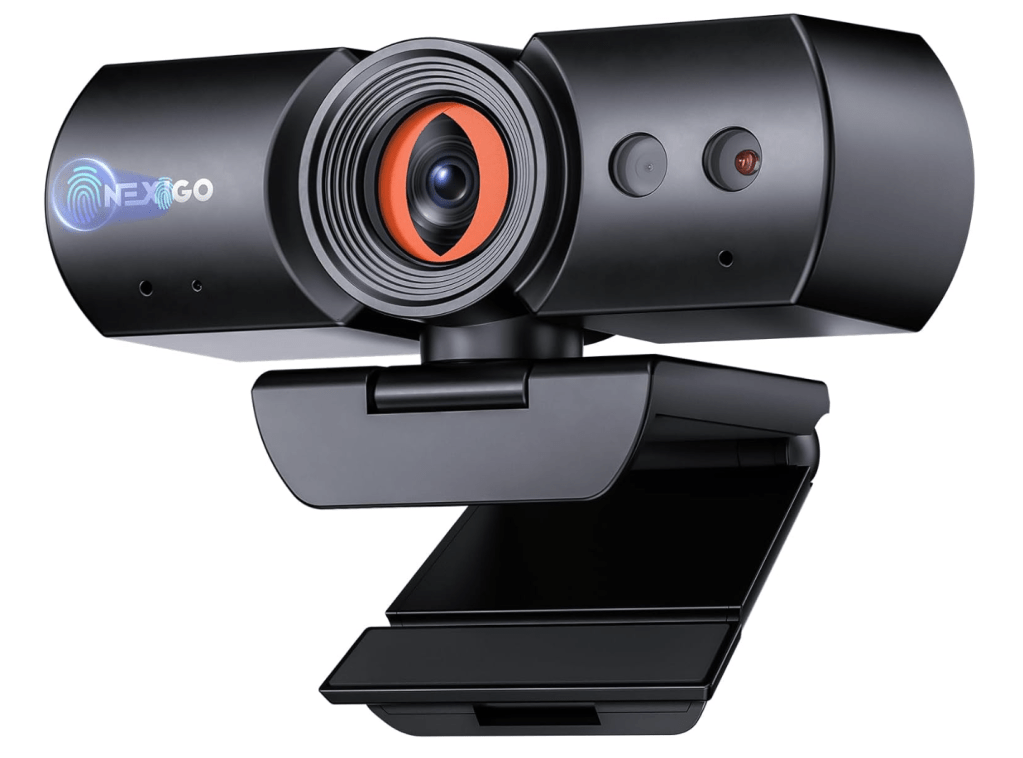
    NexiGo HelloCam Pro
    Share
    Facebook Twitter LinkedIn Pinterest Email

    By now, you’re probably used to logging on to your bank or email via your phone, letting it recognize your face or finger. What you probably don’t know is that feature is marching into your PC — and if you own just a plain-Jane webcam, you’re out of the loop.

    The NexiGo HelloCam ($56 at Amazon) solves that problem. Let me explain why.

    Laptops often come with decent webcams, and most of those include Windows Hello capabilities that can recognize your face. Desktops come with no webcam at all, and if you bought a top webcam to improve your appearance on a video call, you may still be missing out.

    Windows Hello has been a basic part of Windows since Windows 10. It simply recognizes your face and unlocks your PC, even if a recent change adjusts how that happens. That enables you to log yourself into your PC quickly and securely, without needing to type in a password.

    But there’s a new trend that’s taking hold, too: passkeys. You can read our deep dive on passkeys if you want, but the message is quite simple: Windows Hello used to unlock your PC. Now it can unlock websites that used to make you remember a complex password, too. It’s simple and secure.

    Setting up a passkey is as easy as logging on to a site with your traditional password, then basically telling the site to use your face as an authentication device, via Windows Hello. (You can still use your password if something glitches.) What’s nice about a passkey is that you can use a complex password to access Amazon, your email, or another site on the web, then use your face to log you in in a split second.

    What you need: A Windows Hello webcam

    For this, however, you’ll need a webcam with Windows Hello capabilities. A couple of years ago, you’d pay over $100 for the privilege. Now, there are numerous, cheap webcam options that include Windows Hello capabilities.

    For Prime Day, I’d recommend you buy the NexiGo HelloCam, which is 20 percent off at Amazon for $56. It’s a standard 1080p webcam, but with a privacy shutter, facial and audio enhancement, and a couple of other small features like autofocus and a ring light. I don’t consider it to be the best Windows Hello webcam, but it’s one of my budget picks. Not that it matters, but it’s also the most popular Windows Hello webcam by far on Amazon, too.

    Toallin’s Windows Hello webcam is cheaper at about $30, but even at a higher resolution the picture quality seems to be a step down.

    (Don’t buy anything you don’t need. If you own a laptop, go to the Windows Settings menu and type in “set up face sign-in” in the box. Your laptop’s webcam may already have Windows Hello capabilities, and if it does Windows will tell you.)

    A lot of Amazon reviewers will tell you that the NexiGo offers excellent picture quality. I’m telling you to use Prime Day to pick up an extremely convenient security feature on the cheap.

    Unlock Windows Hello and passkeys on your PC for Prime Day

    cheap hate helps passwords rid webcam
    Share. Facebook Twitter Pinterest LinkedIn Tumblr Email
    Previous ArticleLinda Yaccarino Tried to Tame X. Now She’s Out as CEO
    Next Article iPhone 17 Air colorways leak
    techupdateadmin
    • Website

    Related Posts

    Gadgets

    You can now use Pixel phones as a Switch 2 webcam

    December 6, 2025
    Gaming

    Black Friday 2025 could be your last chance for cheap PC deals, experts warn

    November 27, 2025
    Gaming

    Can Tech Get Rid of Bad Trips?

    November 25, 2025
    Add A Comment
    Leave A Reply Cancel Reply

    Top Posts

    NYT Strands hints and answers for Monday, August 11 (game #526)

    August 11, 202542 Views

    These 2 Cities Are Pushing Back on Data Centers. Here’s What They’re Worried About

    September 13, 202541 Views

    Today’s NYT Connections: Sports Edition Hints, Answers for Sept. 4 #346

    September 4, 202539 Views
    Stay In Touch
    • Facebook
    • YouTube
    • TikTok
    • WhatsApp
    • Twitter
    • Instagram
    Latest Reviews

    Subscribe to Updates

    Get the latest tech news from FooBar about tech, design and biz.

    Most Popular

    Best Fitbit fitness trackers and watches in 2025

    July 9, 20250 Views

    There are still 200+ Prime Day 2025 deals you can get

    July 9, 20250 Views

    The best earbuds we’ve tested for 2025

    July 9, 20250 Views
    Our Picks

    JBL Grip Review: A Bluetooth Speaker With Lava Lamp Vibes

    December 8, 2025

    Samsung announces One UI 8.5 beta program

    December 8, 2025

    EV, Hybrid, or Gas? We Know Which One Is Losing You Money Every Month

    December 8, 2025

    Subscribe to Updates

    Get the latest creative news from FooBar about art, design and business.

    Facebook X (Twitter) Instagram Pinterest
    • About Us
    • Contact us
    • Privacy Policy
    • Disclaimer
    • Terms and Conditions
    © 2025 techupdatealert. Designed by Pro.

    Type above and press Enter to search. Press Esc to cancel.