
Close Menu
TechUpdateAlert

    Subscribe to Updates

    Get the latest creative news from FooBar about art, design and business.

    What's Hot

    My Health Anxiety Means I Won’t Use Apple’s or Samsung’s Smartwatches. Here’s Why

    December 22, 2025

    You can now buy the OnePlus 15 in the US and score free earbuds if you hurry

    December 22, 2025

    Today’s NYT Connections: Sports Edition Hints, Answers for Dec. 22 #455

    December 22, 2025
    Facebook X (Twitter) Instagram
    Trending
    • My Health Anxiety Means I Won’t Use Apple’s or Samsung’s Smartwatches. Here’s Why
    • You can now buy the OnePlus 15 in the US and score free earbuds if you hurry
    • Today’s NYT Connections: Sports Edition Hints, Answers for Dec. 22 #455
    • Android might finally stop making you tap twice for Wi-Fi
    • Today’s NYT Mini Crossword Answers for Dec. 22
    • Waymo’s robotaxis didn’t know what to do when a city’s traffic lights failed
    • Today’s NYT Wordle Hints, Answer and Help for Dec. 22 #1647
    • You Asked: OLED Sunlight, VHS on 4K TVs, and HDMI Control Issues
    Facebook X (Twitter) Instagram Pinterest Vimeo
    TechUpdateAlertTechUpdateAlert
    • Home
    • Gaming
    • Laptops
    • Mobile
    • Software
    • Reviews
    • AI & Tech
    • Gadgets
    • How-To
    TechUpdateAlert
    Home»Reviews»I hate Outlook’s reading pane change. Here’s how I fixed it
    Reviews

    I hate Outlook’s reading pane change. Here’s how I fixed it

    techupdateadminBy techupdateadminSeptember 25, 2025No Comments2 Mins Read
    Share Facebook Twitter Pinterest LinkedIn Tumblr Reddit Telegram Email
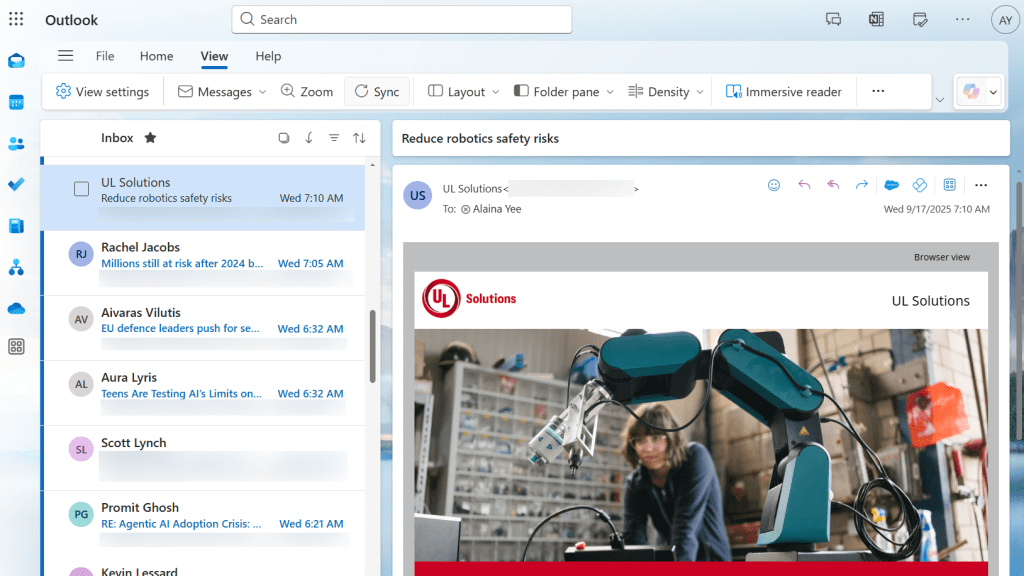
    Outlook for web, post summer 2025 update
    Share
    Facebook Twitter LinkedIn Pinterest Email

    Microsoft pushes often for accessibility and inclusiveness, which I love. But recently, it bungled a change in the web-based version of Outlook while pursuing this goal. 

    In August, Outlook on the web abruptly killed the Off option for the reading pane (along with other refreshes to settings and aesthetics). Instead, the choices became Right, Bottom, and Fill Screen.

    I got switched automatically to a right-aligned reading pane. Looking over that list, you might assume, as I did, that your options are sharing part of the screen with the reading pane (Right or Bottom) or most of the screen (Fill Screen).

    Nope.

    The fix is both the easiest and the dumbest thing. You have to switch to Fill Screen.

    Fill Screen is functionally the same as hiding or turning off the reading pane. Clicking on an email switches the view to it, while closing it shows your full inbox or folder’s message list.

    PCWorld

    To switch, you can go about it in one of two ways;

    • In the main screen for Outlook for web, click on View > Layout > Reading Pane > Fill Screen.
    • Alternatively, click on the gear icon at the upper right of the main screen. Then choose Layout (if not already autoselected). Scroll down to Reading Pane, then select Fill Screen.

    The first method is fastest, but the second method also lets you easily adjust other message list and reading settings, like conversation threads, behavior after you delete or mark an item as read, and message list layout.

    I feel exasperated after spending a month limping along with the reading pane. (I can’t see as much info on the screen, which causes me to miss messages in the list and be slower at identifying which are priorities.) Yeah, I could have tried all the options out earlier on to figure this out. But I trusted my command of the English language to my own detriment.

    I take comfort that while Microsoft believes people will automatically equate a full reading pane and a message list showing no reading pane as the same, I’m not the only one who failed to make that association. Even their own support helpers missed the mark when offering advice.

    But hey, now we all know.

    Change Fixed hate Heres Outlooks pane Reading
    Share. Facebook Twitter Pinterest LinkedIn Tumblr Email
    Previous ArticleA Former Apple Luminary Sets Out to Create the Ultimate GPU Software
    Next Article Honor X9d announced with 8,300mAh battery and IP69K rating
    techupdateadmin
    • Website

    Related Posts

    Gadgets

    My Health Anxiety Means I Won’t Use Apple’s or Samsung’s Smartwatches. Here’s Why

    December 22, 2025
    Mobile

    Oppo Pad Air5’s launch date is official, here’s what it looks like

    December 20, 2025
    Mobile

    Video Game Hardware Sales Are the Worst in Decades: Here’s Why You Should Buy Now

    December 18, 2025
    Add A Comment
    Leave A Reply Cancel Reply

    Top Posts

    NYT Strands hints and answers for Monday, August 11 (game #526)

    August 11, 202549 Views

    These 2 Cities Are Pushing Back on Data Centers. Here’s What They’re Worried About

    September 13, 202543 Views

    Today’s NYT Connections: Sports Edition Hints, Answers for Sept. 4 #346

    September 4, 202540 Views
    Stay In Touch
    • Facebook
    • YouTube
    • TikTok
    • WhatsApp
    • Twitter
    • Instagram
    Latest Reviews

    Subscribe to Updates

    Get the latest tech news from FooBar about tech, design and biz.

    Most Popular

    Best Fitbit fitness trackers and watches in 2025

    July 9, 20250 Views

    There are still 200+ Prime Day 2025 deals you can get

    July 9, 20250 Views

    The best earbuds we’ve tested for 2025

    July 9, 20250 Views
    Our Picks

    My Health Anxiety Means I Won’t Use Apple’s or Samsung’s Smartwatches. Here’s Why

    December 22, 2025

    You can now buy the OnePlus 15 in the US and score free earbuds if you hurry

    December 22, 2025

    Today’s NYT Connections: Sports Edition Hints, Answers for Dec. 22 #455

    December 22, 2025

    Subscribe to Updates

    Get the latest creative news from FooBar about art, design and business.

    Facebook X (Twitter) Instagram Pinterest
    • About Us
    • Contact us
    • Privacy Policy
    • Disclaimer
    • Terms and Conditions
    © 2026 techupdatealert. Designed by Pro.

    Type above and press Enter to search. Press Esc to cancel.