


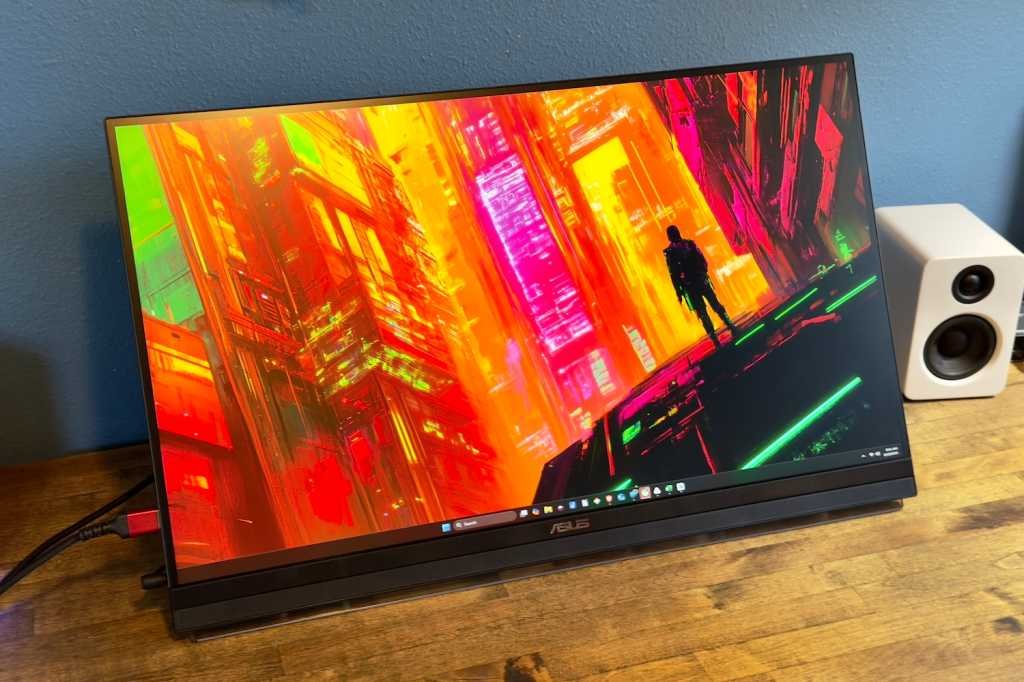
At a glance
Expert’s Rating
Pros
- Portable design with 27-inch display
- USB-C with 70 watts of Power Delivery
- Includes C-clamp desk stand and cubicle mount
- Decent audio quality from 2.1-channel sound system
Cons
- Limited connectivity
- Low contrast ratio
- Modest color performance
- Expensive for a 27-inch 1440p display panel
Our Verdict
The Asus ZenScreen MB27ACF combines a 27-inch 1440p display with the versatility of a portable monitor.
Price When Reviewed
This value will show the geolocated pricing text for product undefined
Best Pricing Today
Best Prices Today: Asus ZenScreen MB27ACF
£857.25
Have you ever wanted to buy a portable monitor that’s big? Really big? Like, 27 inches big?
I’d guess that, for most people, the answer is “nah.” But I also know from experience that demand exists for a big portable display that can be used in meetings or moved easily between workspaces in an office. If that’s you, the Asus ZenScreen MB27ACF might be the monitor you’ve always wanted.
Read on to learn more, then see our roundup of the best portable monitors for comparison.
Asus ZenScreen MB27ACF specs and features
The Asus ZenScreen MB27ACF might look like a typical 27-inch monitor at a glance. It has an IPS display panel and a resolution of 2560×1440, which is typical for a mid-tier LCD monitor.
- Display size: 27-inch 16:9 aspect ratio
- Native resolution: 2560×1440
- Panel type: IPS-LED
- Refresh rate: 100Hz
- Adaptive sync: Yes
- HDR: Yes, HDR10, VESA DisplayHDR 400 True Black
- Ports: 1x USB-C with DisplayPort and 70 watts of USB Power Delivery, 1x HDMI 2.0, 1x 3.5mm combo audio jack
- Audio: 2x speakers, 1.5 watt woofer
- Additional features: C-clamp style ergonomic stand, built-in kickstand
- Price: $449 MSRP
However, the MB27ACF is anything but normal. It’s actually a 27-inch portable monitor with a built-in kickstand. That means it can be used anywhere there’s room to sit it (and an AC outlet, because while the monitor is portable, it still requires power).
That’s not to say you can’t use it like a normal monitor. On the contrary, the versatility to treat it like both a portable monitor and a desktop monitor is the entire point. It even ships with an ergonomic stand that uses a C-clamp to attach to a desk.
Pricing starts at $449, and it appears to retail at (or slightly above) that price right now. That’s a lot for a 27-inch 1440p monitor, though the lack of competitors with identical features helps the MB27ACF carve its own niche.
Asus ZenScreen MB27ACF design
Unboxing the Asus ZenScreen MB27ACF immediately shows it’s not like most monitors. It has an extremely slim profile, made slightly thicker only by the built-in kickstand on the back. The kickstand can fold flat when using the monitor with the included ergonomic stand, or fold out to let the monitor stand on its own. In this way, it functions much like smaller portable monitors, with one key exception: The MB27ACF requires an external AC power brick, so you’ll need a nearby wall outlet.
The monitor also comes with an ergonomic desktop stand designed for quick attachment and removal. Unlike most stands that sit on top of your desk, this one connects via an included C-clamp, which saves desk space. The stand’s wedge-shaped mount makes it simple to slip the MB27ACF on or off in just a second, and at only 6.5 pounds, the monitor is light and easy to handle.
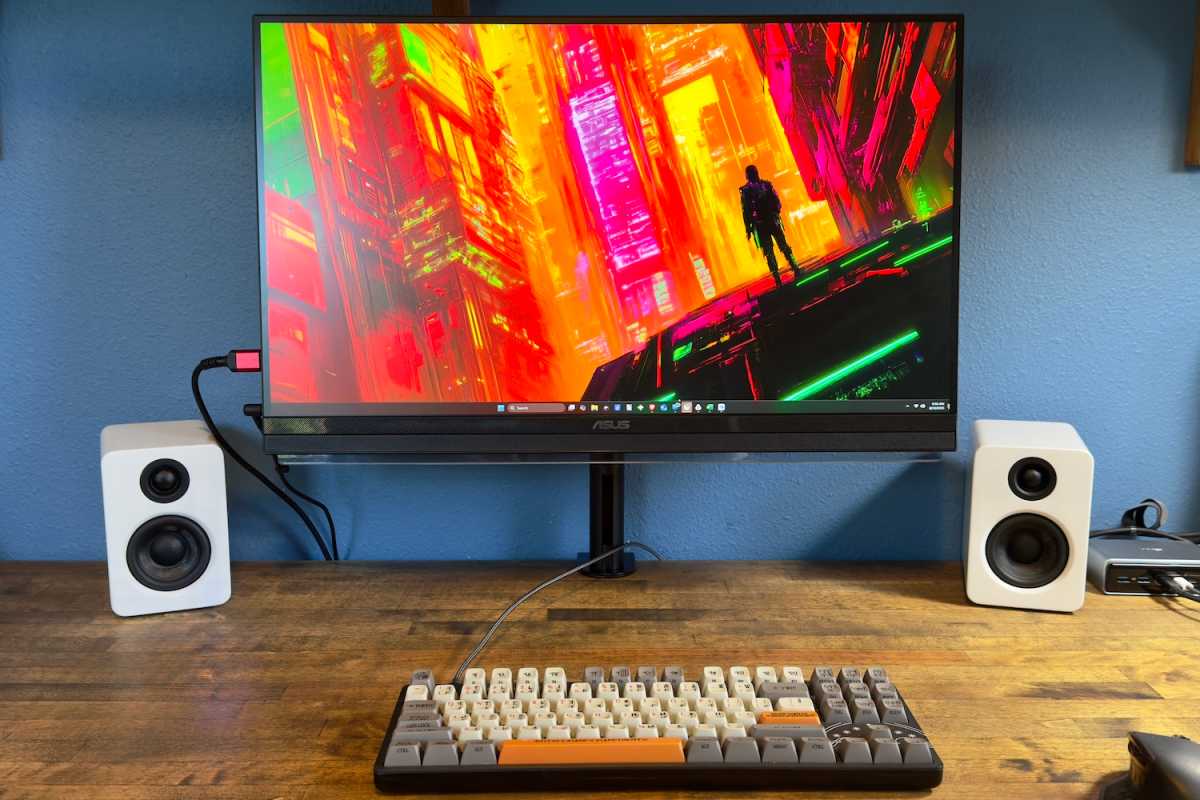
Matthew Smith / Foundry
That’s not to say the stand is perfect. Adjusting the height requires pressing a lever, which isn’t a major inconvenience but feels slightly less refined than what you’d expect from a premium ergonomic stand. The stand also has a loose feel compared to the sturdier mounts found on other office monitors in this price range. It wasn’t an issue on my desk, but on a less stable surface it could allow the monitor to wobble more than you’d like.
And the options don’t end there. The monitor also includes two metal brackets designed to screw into the back of the display and hang over the top of a cubicle wall. It’s a very specific mounting option, but one that could be useful in certain office setups. These brackets attach to a 75x75mm VESA mount, so you can also use the MB27ACF with any compatible stand or monitor arm of your choice.
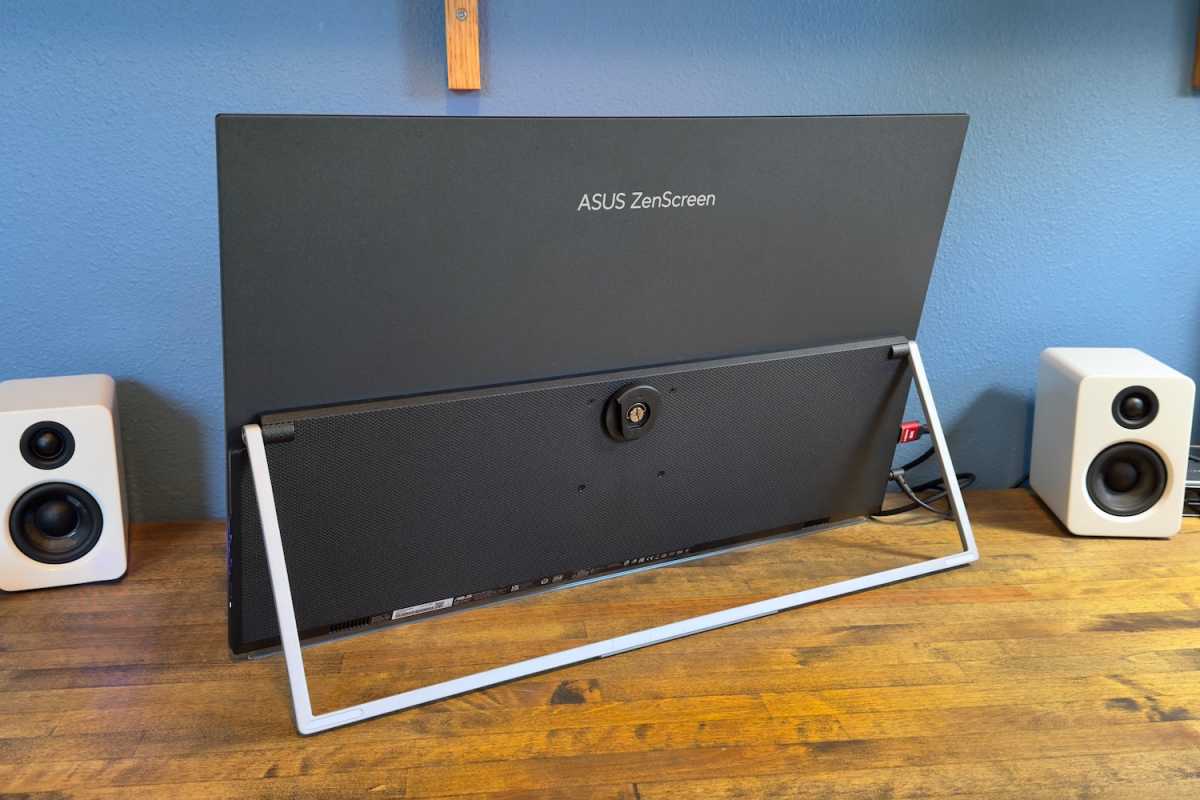
Matthew Smith / Foundry
Taken together, these mounting options make the MB27ACF a versatile monitor. They also help justify its high MSRP for a 1440p IPS display. The monitor is ready to handle multiple use cases without buying additional accessories.
The lack of competitors with identical features helps the MB27ACF carve its own niche.
Asus ZenScreen MB27ACF connectivity
While design is a strength of the Asus ZenScreen MB27ACF, connectivity is a clear weakness. The monitor offers just two video input options: a USB-C port with DisplayPort Alternate Mode and an HDMI 2.0 port. That’s not much for a desktop monitor, though it’s about average for a portable display.
The USB-C port does provide up to 70 watts of power delivery, enough to charge most midrange Windows laptops and nearly all MacBooks. I had no trouble running a single-cable connection with both an HP Omnibook 5 and a MacBook Air 15, with plenty of power to keep them charged.
Interestingly, it’s possible to power the MB27ACF with only a USB-C connection, but Asus states that doing so limits that maximum brightness to 85 nits. That’s dim, so I doubt it will be useful in most situations.
Port placement may also be an issue. All the connections are on the left side of the monitor, rather than the rear, which means the cables will always be visible. This design is convenient for portable use, where you’re frequently plugging and unplugging, but less ideal if you plan to keep the monitor on a desk full time.
A 3.5mm audio-out jack and the barrel-style power input are also located on the left, meaning you could end up with as many as four cables dangling off that side of the display.
Asus ZenScreen MB27ACF menus, features, and audio
The Asus ZenScreen MB27ACF’s on-screen menus are controlled by buttons on the right side of the monitor, including a menu button and two navigation buttons. I found them a bit finicky and I often hit the wrong button. Fortunately, the monitor supports Asus’ DisplayWidget software utility, which allows many settings to be adjusted directly in Windows or macOS.
The menus offer a good range of image quality options. In addition to multiple preset image modes it includes five gamma settings that target specific values, along with color temperature adjustments. However, the temperature settings are labeled only as “warm” or “cool” rather than precise Kelvin values. The monitor also has color calibration options, though in practice the MB27ACF’s image quality doesn’t justify use in demanding professional workflows.
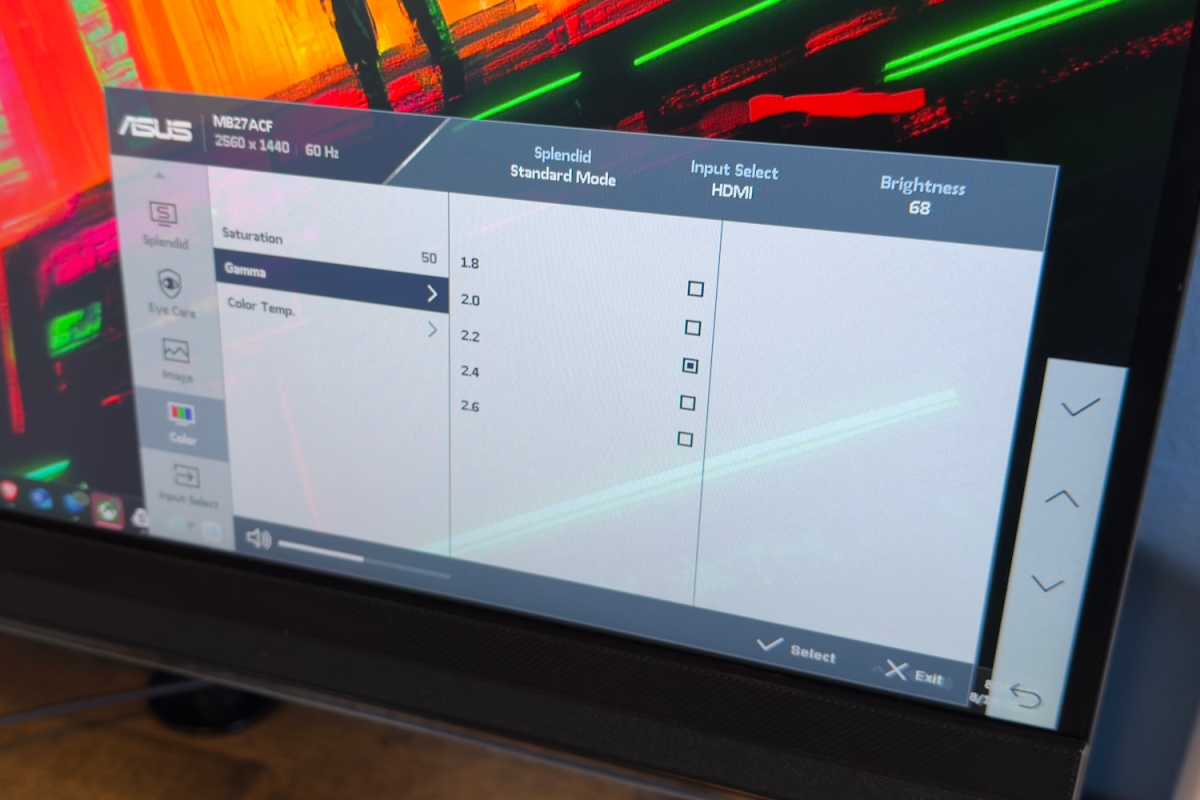
Matthew Smith / Foundry
The monitor also has a pair of speakers and a tiny 1.5-watt woofer. Together, they provide decent audio with a good range and minimal distortion at higher volumes. The sound won’t impress, but it’s better than typical for an office or productivity monitor, and fine for video calls or showing a video clip in a meeting.
Asus ZenScreen MB27ACF SDR image quality
The Asus ZenScreen MB27ACF is meant primarily for office productivity. As a result, it provides a fairly basic 27-inch 1440p IPS panel. That puts a ceiling on how good the monitor’s image quality can be, and it arguably doesn’t even reach those limited heights.
Matthew Smith / Foundry
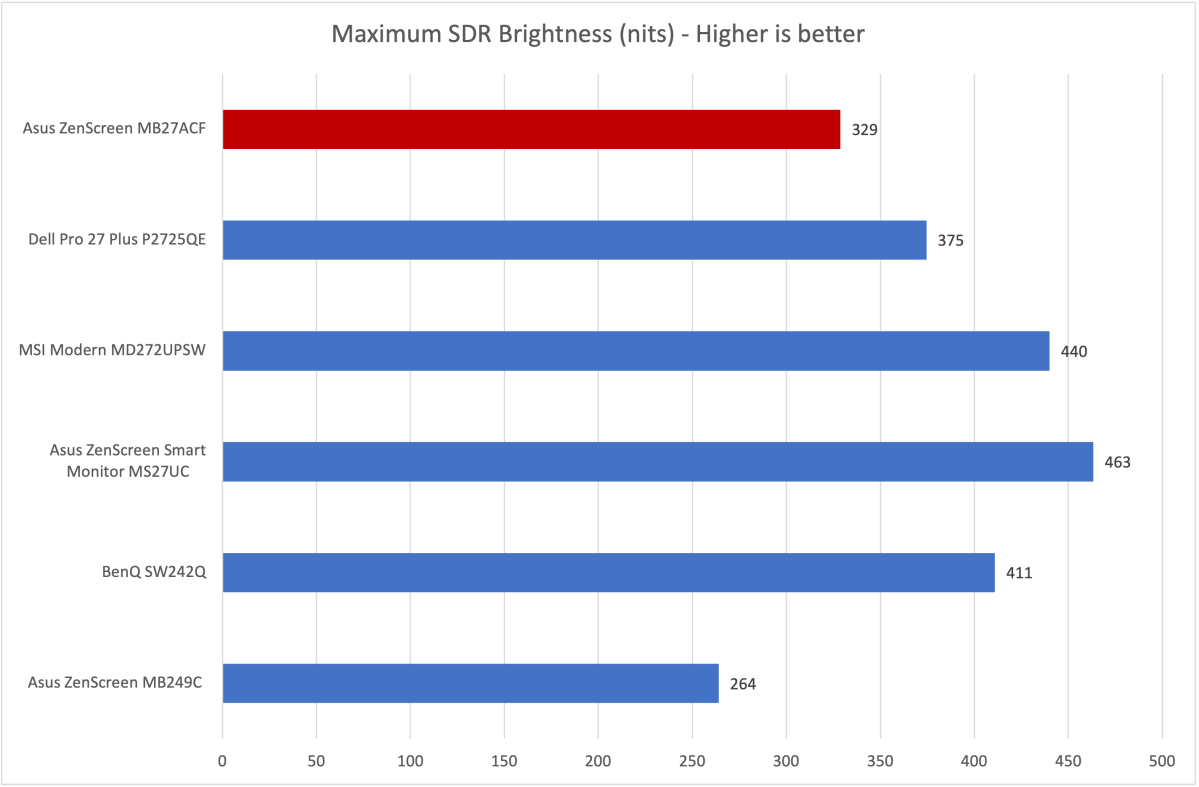
First up is brightness, where the MB27ACF provides a maximum SDR brightness of about 328 nits. As the graph shows, that’s not bad, but also not great. This level of brightness is fine for most situations and is aided by the monitor’s anti-glare finish, which keeps reflections to a minimum.
Still, portable monitors like the MB27ACF are likely to be used in rooms with little or no light control, like a corporate conference room. In these situations the monitor will likely be used near its maximum brightness and in some cases may appear a tad dim.
Matthew Smith / Foundry
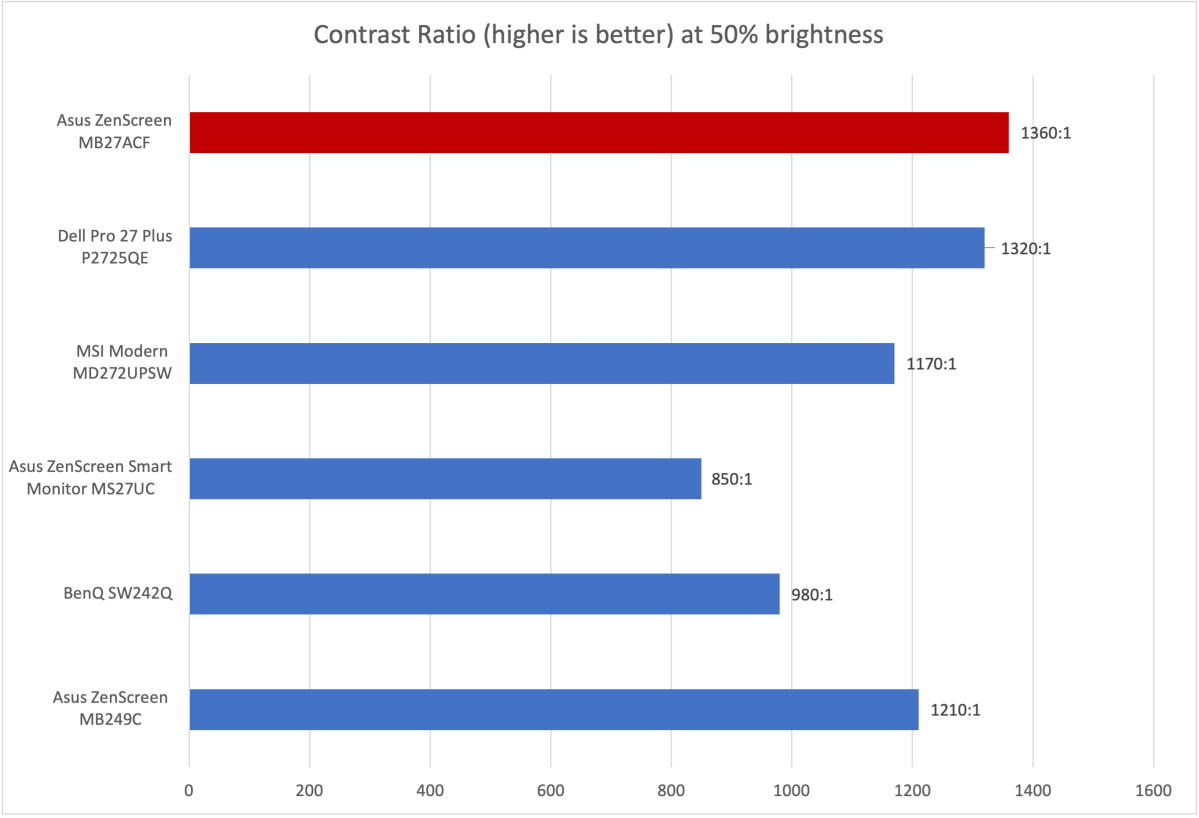
Monitors with an IPS panel tend to have a limited contrast ratio, and the MB27ACF is no exception, though it actually performs a tad better than I expected. Many IPS monitors meant for office productivity hover closer to a 1000:1 contrast ratio.
Still, the MB27ACF’s limited contrast comes with consequences. The monitor lacks depth, particularly in dark scenes, where it can appear hazy and gray. Most direct competitors suffer the same problem, however.
Matthew Smith / Foundry
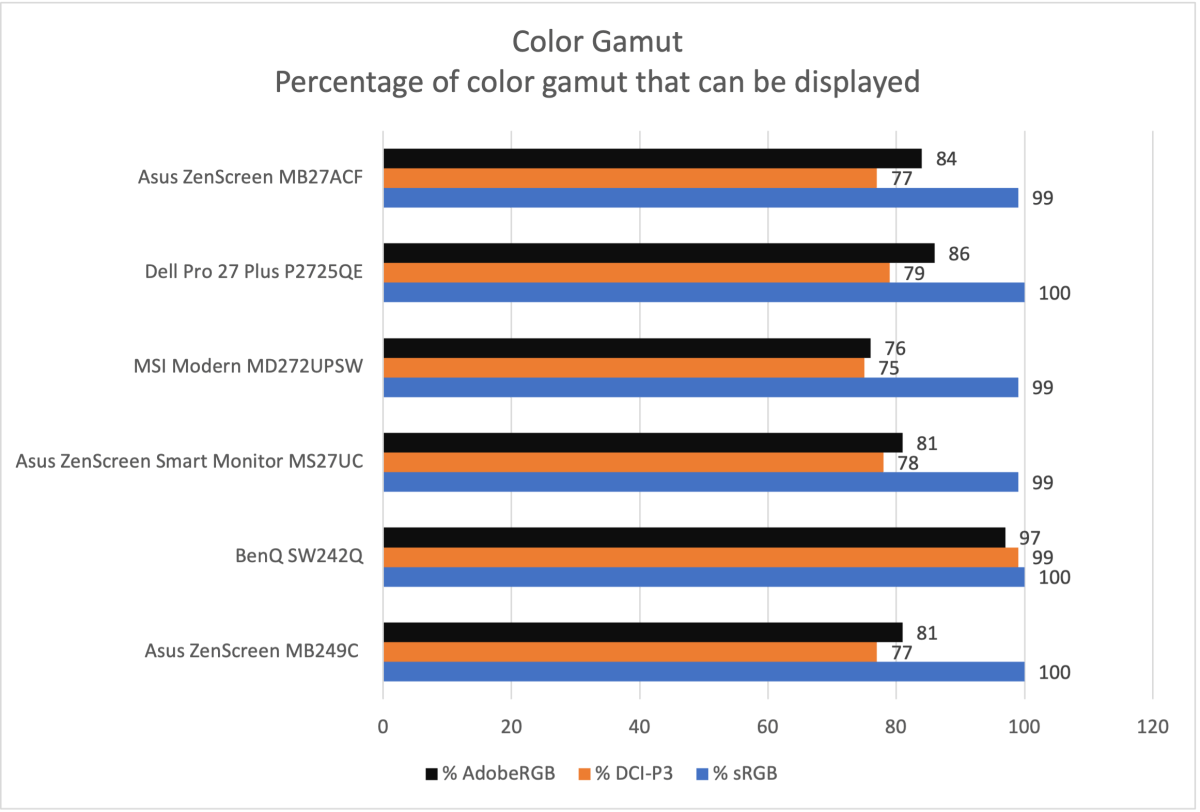
The MB27ACF’s color performance is modest. It has a wide enough color gamut to look vivid in bright and colorful content, but it otherwise can appear under-saturated and dull.
The color performance on tap is certainly adequate for office productivity and similar to many other mid-range IPS-LCD monitors. However, it will rule out content creation for anyone who wants to work in a wider color gamut like DCI-P3 or AdobeRGB. Which, in 2025, covers many creative professionals.
Matthew Smith / Foundry
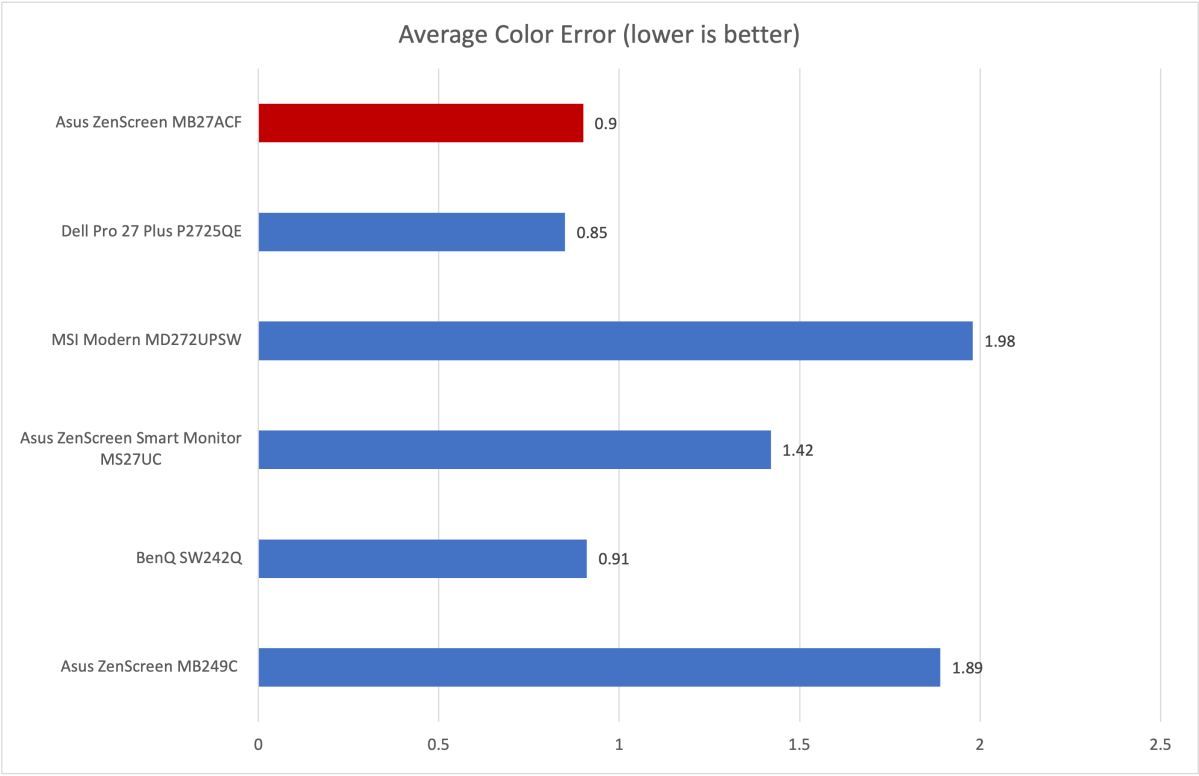
Color accuracy is quite good, however, which means the colors that are displayed appear as they should. Most modern displays score well here, but the MB27ACF is above average. It provides a realistic image and I think it could be used for photos, art, or video if you can stick to the humble sRGB color gamut.
The MB27ACF delivered moderate results in gamma and color temperature. I measured a default gamma curve of 2.1, which is slightly off the target of 2.2 and means the image appears a bit brighter than it should. The default color temperature was 6700K, which is a tad cooler and more sterile than the target of 6500K. Neither variance is major, but picky viewers are likely to notice it.
Sharpness is respectable, but not a perk. The MB27ACF’s 27-inch 1440 panel packs about 110 pixels per inch. That would’ve been great five years ago but today, with 27-inch 4K monitors widely available at lower prices, the MB27ACF’s resolution is adequate at best.
On the whole, it’s clear the MB27ACF’s unusual portability requires a compromise in image quality. That’s not to say the monitor looks bad. It’s more than adequate for typical office productivity, and I suspect most shoppers looking at the monitor won’t be too bothered by the fact its image quality is unremarkable for the price. Still, it’s important to understand that you can buy a monitor with much better image quality if you don’t need the M27ACF’s versatility.
Asus ZenScreen MB27ACF HDR image quality and motion
The Asus ZenScreen MB27ACF does not support HDR. While that might seem like a negative, it’s actually positive. Why? No monitor in this category can provide a good HDR experience, and many that have supposed HDR support are selling a feature that doesn’t work as it should. Keeping HDR off the spec sheet means Asus isn’t trying to fool anyone.
While the MB27ACF lacks HDR, it does provide a 100Hz refresh rate and Adaptive Sync for improved motion clarity. Though certainly not a gaming monitor, the MB27ACF does provide noticeable motion clarity and responsiveness gains over a 60Hz display. It’s probably not a major advantage for the monitor’s intended use. Still, I always prefer to see a refresh rate beyond 60Hz.
Should you buy the Asus ZenScreen MB27ACF?
The Asus ZenScreen MB27ACF is a versatile 27-inch portable monitor with built-in kickstand that also ships with a desk stand. This versatility is unusual and makes the monitor useful if you often want to share your screen with colleagues or give presentations at work. I can also see the monitor used as a kiosk or a dedicated conference room display. Unfortunately, the monitor’s versatility requires compromise in connectivity and image quality. Its MSRP of $449 is also high for a 27-inch 1440p display. However, the MB27ACF has very few competitors, and those that do exist (like the LG StandbyMe) are even more expensive. That makes the MB27ACF the king of its niche.
