



One of the most frustrating things about owning a Windows PC is when it crashes, refuses to boot, or simply doesn’t work. Microsoft is preparing to roll out a technology called “quick machine recovery” for consumers to help solve this, after testing it in an enterprise environment.
Microsoft tests various features across different Windows Insider testing channels, before eventually pushing them to your PC. Quick machine recovery comes courtesy of Windows 11 Build 26100.4762, part of the Release Preview Channel. It’s the “closest” channel to the traditional Windows updates, so it’s likely to debut on your PC soon.
In fact, this preview gathers several features, many of which you might find useful, including “semantic search” in Settings: the ability to describe a problem and let Settings understand what you’re talking about in terms of natural language.
Quick machine recovery, however, sounds like a lifesaver in certain situations. It’s been around since March, but only in this recent build has it been specifically turned on for consumer PCs. If your PC glitches and throws a BSOD, it might boot up in what’s known as the Windows Recovery Environment (Windows RE), which gathers up several Windows 8-looking options to get things running, from uninstalling updates to playing with the Windows startup settings.
Microsoft
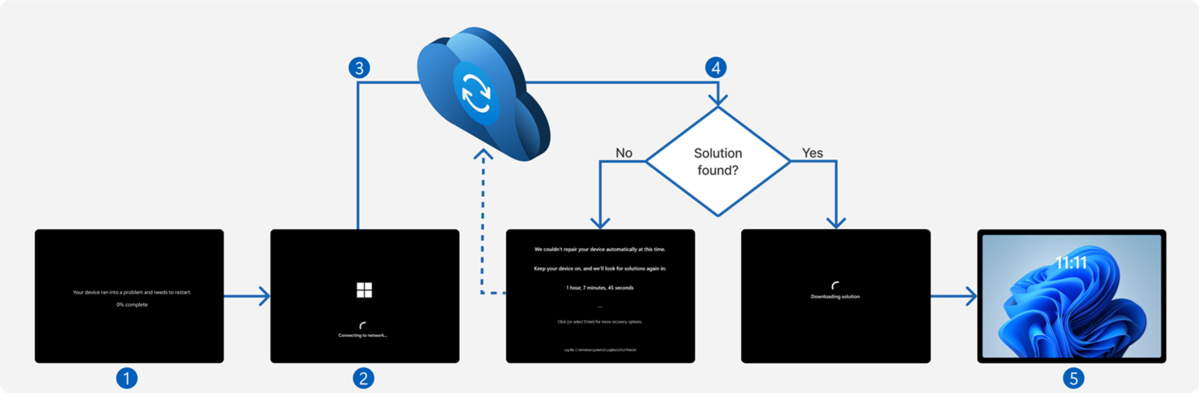
What quick machine recovery does is essentially troubleshoot what’s wrong, without you needing to intervene. If a device enters the Windows RE recovery mode, it tries to ping Microsoft via a network connection. If it can, it then sends recovery information directly to Microsoft itself. (Remember the obscure codes that would accompany a Blue Screen of Death? This removes the need for you to take action, and puts the heavy lifting on Microsoft itself.)
Microsoft then analyzes the crash data, identifies any patterns of behavior, and then sends down a patch or fix via Windows Update, according to Microsoft’s support documentation. Microsoft does this in two ways: cloud remediation, where the device connects to Microsoft’s servers, and looks for an update; and auto remediation, where your PC will keep periodically checking for a solution.
Auto remediation is off by default on home PCs, which makes sense: An example screenshot of auto remediation below shows that it could be an hour or more before your PC checks again. Until then, you’re essentially sitting on your hands.
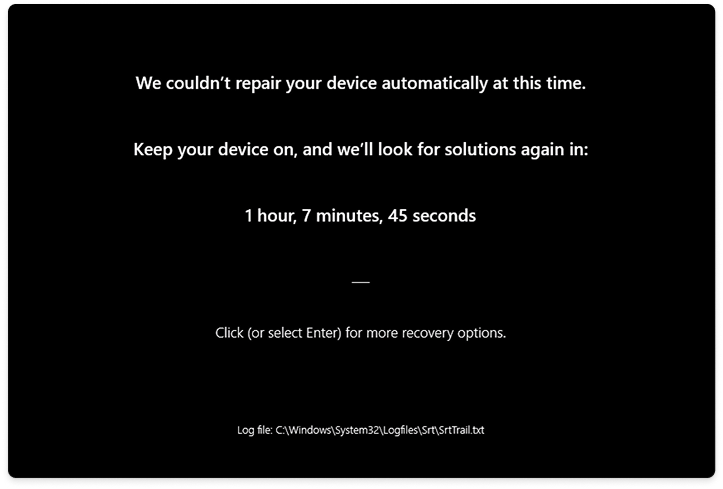
Microsoft already has a tool called Startup Repair that quick machine recovery essentially replaces. Startup Repair will remain on your PC, in case your PC can’t connect to the internet. Quick machine recovery can also be turned off, and in that case Startup Repair will be the default option if something goes wrong.
(This image may be difficult to read because of its formatting, but here’s how Microsoft describes the recovery process.)
Microsoft
Microsoft describes this feature as part of a “gradual rollout” of features attached to this build, so even if you have this build on your PC, you might not see it right away.
Semantic search in Settings draws closer
Other features in this new build are more familiar. In January, Microsoft made “semantic search” part of its Dev Channel builds, and locked them to PCs with Qualcomm Snapdragon chips inside. Now, this feature appears to be coming to all Copilot+ PCs, though it’s still restricted to Windows on Snapdragon for now. The new “Mu” language model that this feature is built upon is specifically offloaded to the NPU on a PC, Microsoft said in June.
Click to Do is also taking advantage of a Microsoft app that you might not be aware of: Reading Coach, which appears in the Microsoft Store. Right-click a word or phrase, and you can then read the text aloud to Reading Coach and it will offer feedback. A similar Immersive Reader option will actually read the text to you, aloud. You can also “Draft with Copilot,” turning that phrase into a “full draft.” Finally, email addresses can be highlighted and turned into Teams meetings, again via right-click.
For some reason, Recall snapshots can now be exported to trusted third-party apps, too, but only in Europe.
“When saving snapshots is turned on for the first time, a unique Recall export code appears,” Microsoft says. “This code is required to decrypt exported snapshots and is shown only once during initial setup. Microsoft doesn’t store or recover this code. To export, go to Settings > Privacy & Security > Recall & Snapshots > Advanced Settings and authenticate with Windows Hello. Choose to export past snapshots (from the last 7 days, 30 days, or all) or start a continuous export. Third-party apps can access exported snapshots only when both the export code and folder path are provided.”
To me, Windows Recall seems increasingly risky with the aggressive policing actions now taking place, and I’ve advised (American) readers to turn off Recall.
Quick machine recovery, however, sounds like one of those useful features that hide within Windows, such as Windows Sandbox. The difference here is that you don’t need to know about it, and it will simply offer to help when needed most.
