



I’m a big fan of mini PCs and frequently recommend my most trusted mini PC brands to family and friends. These devices tend to cost much less than a desktop or laptop and don’t take up a ton of room while still being able to tackle a range of tasks.
The thing is, there are several mistakes people tend to make when purchasing a mini PC. Some of these oversights are harmless, while others can put you at risk.
1. Buying the cheapest option without researching first
I’m going to hammer this home several times during this page; there are some underhanded people out there trying to sell mini PCs with malicious software on them, specifically malware that can send your sensitive data, like banking and other personal info, to someone else.
RELATED: I discovered malicious software on a couple AceMagic mini PCs a few years ago
One of the most common ways these shifty sellers convince people to buy one of these dangerous devices is by selling it for a song.
Outside of safety concerns, the cheapest mini PC might not fit the use case you have in mind for it. As such, you shouldn’t just buy the cheapest mini PC you can find.
If you do want an inexpensive mini PC with modest performance, I recommend looking at the Beelink EQR6, which has a starting price of $389.00 at Amazon.
2. Falling for deals that are too good to be true

This goes hand in hand with the previous tip, but it’s different enough that it warrants addressing separately.
If you discover that a mini PC is being offered at a ridiculously low price, then it’s likely a scam. And if it isn’t a scam, then there might be something wrong with the device, or it might not work well.
Now, there are certainly times when a mini PC can go on sale, like during a Black Friday deals event or Amazon Prime Day. However, you’ll want to check prices against other similar devices to ensure it isn’t too far down from where it ought to be.
Really, to save yourself any kind of hassle, avoid buying a mini PC that’s selling at a much lower price than is typical.
3. Purchasing a mini PC based on customer reviews

There are two reasons why buying a mini PC based on customer reviews is a bad idea: Safety and usability.
On top of that, what one person uses their mini PC for might not fit the same use case you’re intending to use it for. What you want to do is understand what you want the computer to do and then buy a mini PC whose specs, ports, and size are conducive to that vision.
4. Forgetting that you need additional accessories

Mini PCs are just like desktops in that you need to connect them to a keyboard, a mouse, and a monitor in order to interact with them.
I recommend checking out our lists of the best computer mice, best keyboards, and best monitors to help you out with this.
Note that some mini PCs come with HDMI cables or USB-C display cables. However, others do not. So you will want to double-check this and buy a compatible cable, if necessary.
5. Failing to consider upgradeability, thermal design, and cooling

Despite their small size, there are several mini PCs on the market that allow for limited upgradeability — Typically, only the RAM and SSD are intended to be swapped out. Make sure you know what kind of options are available to you and what their max capacities are.
Now, since mini PCs have such small form factors, many of them are fanless. If they aren’t optimized and designed well, they can throttle, overheat, and get damaged. Some can even emit a loud noise as air rushes out of the vents.
It’s hard to know if this is the case unless you have one in your presence. To check these things before buying, it’s best to check a review from a trusted site and see what the reviewer has to say.
6. Assuming all mini PC offer similar performance

Although small, mini PCs can offer vastly different performance from each other. This is due to a variety of factors, including what kinds of processors and other components are used in the devices. While most mini PCs offer modest performance, there are some, like the HP Z2 Mini (G1a) ($1.999.00 at HP) and the ASUS ROG NUC (2025) ($1,899.00 at ASUS), that are specifically designed for gaming and have relatively powerful GPUs.
Additionally, how well a mini PC keeps cool also determines how well it works.
Before buying a mini PC, determine what kind of tasks you want it to perform, and then make sure to buy a device that offers the following:
- A processor and graphics card that are powerful enough to keep up with the tasks you want to do on the mini PC. There are countless offerings from Intel, AMD, and NVIDIA, so make sure you understand what kinds of things they can handle.
- Large enough memory (RAM) capacity to facilitate smooth multitasking, background processing, and efficiency. 16GB to 32GB is usually plenty.
- Enough storage (SSD) to hold all of the data and files you want the computer to have. I recommend 512GB to 1TB, depending on how many files you tend to create.
7. Neglecting to make sure it has the OS you want

This might seem like an obvious one to many people, but it’s still a problem for some.
While most mini PCs on the market run Windows, there are also mini PCs that run macOS or Linux. Never assume that the mini PC you’re looking at is the operating system you’re looking for; this will only lead to frustration.
BONUS: Assuming a clean install of Windows gets rid of all malware and problems
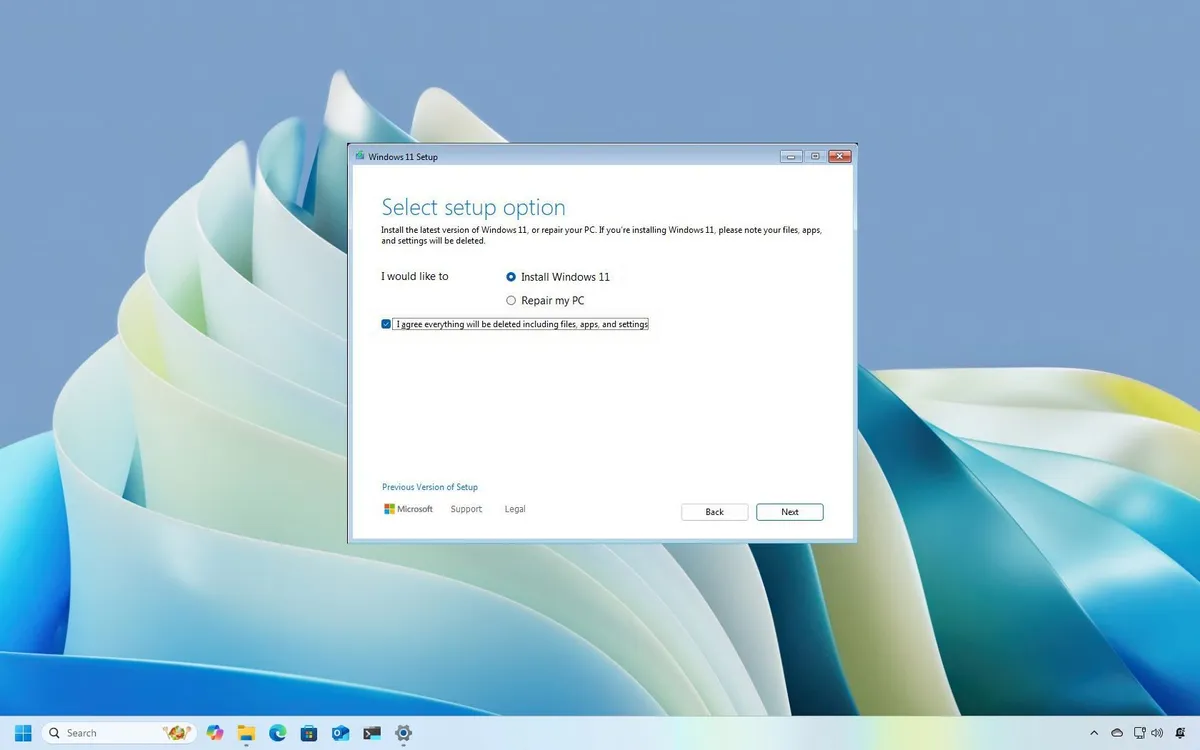
After all, if a company cut corners or allowed shady software on a device, they might have made other alterations to the mini PC, such as putting firmware malware on secondary drives.
It’s also possible that an untrustworthy seller or manufacturer fudged some things to make the mini PC work, and doing a clean install could break these adjustments.
As an example, when I did a clean install of Windows on a mini PC that had malware on it, the Wi-Fi card stopped working, possibly because the manufacturer used a generic Wi-Fi card and tricked the system into thinking it was a more common one.
My advice is to avoid shady devices to begin with, rather than putting yourself at risk.
Be safe and get a mini PC that fits your needs
If you plan out what you want from a device and then thoughtfully purchase a mini PC with the right specs, you can end up with a reliable little device.
Just remember that there are scammers out there who would love to get you to interact with malicious software. Only purchase trusted mini PCs and only from trusted sellers to keep yourself safe. Additionally, never fall for a deal that seems too good to be true.
Avoiding common purchasing mistakes can help you get a safe mini PC that perfectly suits your needs.
FAQ
Why buy a mini PC instead of a desktop or laptop?
Mini PCs are compact, affordable, and versatile — great for office work, media centers, or light gaming.
What’s the biggest risk when buying a mini PC?
Untrustworthy sellers. Some devices ship with malware or poor components. Always buy from reputable brands.
Can mini PCs be upgraded?
Most allow limited upgrades (RAM and SSD). Check specs before buying to ensure future flexibility
Do mini PCs overheat easily?
Some models have poor cooling due to their small size. Look for reviews that mention thermal design and noise levels.
How do I avoid scams?
Don’t fall for deals that seem too good to be true. Compare prices and stick to trusted retailers.
Do all mini PCs run Windows?
No. Some run Linux or macOS. Always confirm the operating system before purchasing.

Follow Windows Central on Google News to keep our latest news, insights, and features at the top of your feeds!
