

Close Menu
TechUpdateAlert

    Subscribe to Updates

    Get the latest creative news from FooBar about art, design and business.

    What's Hot

    My Health Anxiety Means I Won’t Use Apple’s or Samsung’s Smartwatches. Here’s Why

    December 22, 2025

    You can now buy the OnePlus 15 in the US and score free earbuds if you hurry

    December 22, 2025

    Today’s NYT Connections: Sports Edition Hints, Answers for Dec. 22 #455

    December 22, 2025
    Facebook X (Twitter) Instagram
    Trending
    • My Health Anxiety Means I Won’t Use Apple’s or Samsung’s Smartwatches. Here’s Why
    • You can now buy the OnePlus 15 in the US and score free earbuds if you hurry
    • Today’s NYT Connections: Sports Edition Hints, Answers for Dec. 22 #455
    • Android might finally stop making you tap twice for Wi-Fi
    • Today’s NYT Mini Crossword Answers for Dec. 22
    • Waymo’s robotaxis didn’t know what to do when a city’s traffic lights failed
    • Today’s NYT Wordle Hints, Answer and Help for Dec. 22 #1647
    • You Asked: OLED Sunlight, VHS on 4K TVs, and HDMI Control Issues
    Facebook X (Twitter) Instagram Pinterest Vimeo
    TechUpdateAlertTechUpdateAlert
    • Home
    • Gaming
    • Laptops
    • Mobile
    • Software
    • Reviews
    • AI & Tech
    • Gadgets
    • How-To
    TechUpdateAlert
    Home»Laptops»Your Windows 11 PC hangs at shutdown? Adobe may be at fault
    Laptops

    Your Windows 11 PC hangs at shutdown? Adobe may be at fault

    techupdateadminBy techupdateadminAugust 30, 2025No Comments3 Mins Read
    Share Facebook Twitter Pinterest LinkedIn Tumblr Reddit Telegram Email
    Woman in white top looking at a laptop screen, upset
    Share
    Facebook Twitter LinkedIn Pinterest Email

    Recently, my Windows 11 PC began to choke when shutting down. A small error window would appear, holding up the process. The cause? A program called LogTransport2.exe. If you have the same problem and are also wondering what’s going on—it’s Adobe’s fault.

    Adobe bundles this file with its Creative Cloud applications for the purpose of transmitting data about you back to the company. If the executable is still communicating with Adobe servers when you shut down your PC, it’ll stall the process to finish its task. So, to nip this issue in the bud, you have to tell Adobe to stop spying on you.

    The fix

    1. Open a web browser. Head to adobe.com, then log into your account.
    2. Click on your avatar icon at the upper right.
    3. Choose Manage account.
    4. At the top of the screen, choose Account and Security, then Data and privacy settings.
    5. Uncheck the boxes for sharing.

    PCWorld

    If you don’t see any boxes for sharing at first, you may need to switch your profile. Click your avatar icon in the upper right. In the menu that appears, look under the Account section for a Switch profile option.

    When I first logged in, I was signed into the profile associated with the organization I have my subscription through—and so only saw a message that said, “You have been automatically opted out from content analysis for product improvement when using Creative Cloud and Document Cloud apps. This setting does not apply when you separately choose to participate in product improvement programs.” Switching to my personal profile revealed the settings I needed.
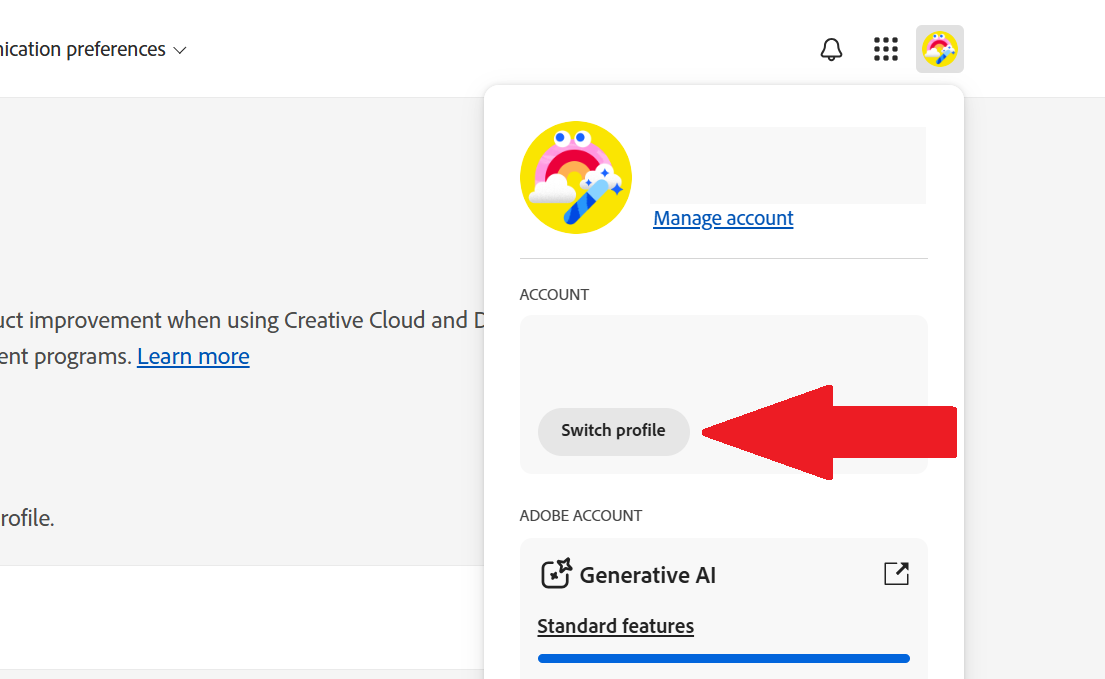
    Switch profile option within the Adobe website

    PCWorld

    Why this change solves the issue

    Stopping the telemetry data quiets LogTransport2.exe’s activity. When it stays idle, your PC can shut down without interruption.

    Adobe could do much, much more to help with the problem, though. Data sharing should be opt in, rather than opt out. Given the cost of a Creative Cloud subscription, I think few people expect their desktop app usage to be spied on. When paying for a service, I don’t expect to still be the product. Nor my content stored on their servers either.

    At the very least, the Creative Cloud app should give periodic reminders that the setting is turned on. And allowing changes to data sharing within the Creative Cloud app, rather than only through the Adobe website.

    My colleague Mike Crider switched off Photoshop (after years of loyalty) to a far more affordable and less invasive web app (Photopea). He seems to have the right of it. These days, privacy is security. Anyone monitoring us without our knowledge is a risk.

    Adobe fault hangs shutdown Windows
    Share. Facebook Twitter Pinterest LinkedIn Tumblr Email
    Previous ArticleTCL NxtPaper 60 Ultra 5G listed ahead of official IFA debut
    Next Article AT&T Prepares to Pay $177 Million to Settle Privacy Lawsuit. Here’s How to File a Claim
    techupdateadmin
    • Website

    Related Posts

    Gadgets

    Your next Legion Go 2 might run SteamOS instead of Windows 11

    December 21, 2025
    Gadgets

    Microsoft makes theming your Windows 11 PC as easy as phones, but not as much fun

    December 15, 2025
    Mobile

    Running Android apps on your Windows 11 PC is about to feel slightly better

    December 12, 2025
    Add A Comment
    Leave A Reply Cancel Reply

    Top Posts

    NYT Strands hints and answers for Monday, August 11 (game #526)

    August 11, 202545 Views

    These 2 Cities Are Pushing Back on Data Centers. Here’s What They’re Worried About

    September 13, 202542 Views

    Today’s NYT Connections: Sports Edition Hints, Answers for Sept. 4 #346

    September 4, 202540 Views
    Stay In Touch
    • Facebook
    • YouTube
    • TikTok
    • WhatsApp
    • Twitter
    • Instagram
    Latest Reviews

    Subscribe to Updates

    Get the latest tech news from FooBar about tech, design and biz.

    Most Popular

    Best Fitbit fitness trackers and watches in 2025

    July 9, 20250 Views

    There are still 200+ Prime Day 2025 deals you can get

    July 9, 20250 Views

    The best earbuds we’ve tested for 2025

    July 9, 20250 Views
    Our Picks

    My Health Anxiety Means I Won’t Use Apple’s or Samsung’s Smartwatches. Here’s Why

    December 22, 2025

    You can now buy the OnePlus 15 in the US and score free earbuds if you hurry

    December 22, 2025

    Today’s NYT Connections: Sports Edition Hints, Answers for Dec. 22 #455

    December 22, 2025

    Subscribe to Updates

    Get the latest creative news from FooBar about art, design and business.

    Facebook X (Twitter) Instagram Pinterest
    • About Us
    • Contact us
    • Privacy Policy
    • Disclaimer
    • Terms and Conditions
    © 2026 techupdatealert. Designed by Pro.

    Type above and press Enter to search. Press Esc to cancel.