
Close Menu
TechUpdateAlert

    Subscribe to Updates

    Get the latest creative news from FooBar about art, design and business.

    What's Hot

    My Health Anxiety Means I Won’t Use Apple’s or Samsung’s Smartwatches. Here’s Why

    December 22, 2025

    You can now buy the OnePlus 15 in the US and score free earbuds if you hurry

    December 22, 2025

    Today’s NYT Connections: Sports Edition Hints, Answers for Dec. 22 #455

    December 22, 2025
    Facebook X (Twitter) Instagram
    Trending
    • My Health Anxiety Means I Won’t Use Apple’s or Samsung’s Smartwatches. Here’s Why
    • You can now buy the OnePlus 15 in the US and score free earbuds if you hurry
    • Today’s NYT Connections: Sports Edition Hints, Answers for Dec. 22 #455
    • Android might finally stop making you tap twice for Wi-Fi
    • Today’s NYT Mini Crossword Answers for Dec. 22
    • Waymo’s robotaxis didn’t know what to do when a city’s traffic lights failed
    • Today’s NYT Wordle Hints, Answer and Help for Dec. 22 #1647
    • You Asked: OLED Sunlight, VHS on 4K TVs, and HDMI Control Issues
    Facebook X (Twitter) Instagram Pinterest Vimeo
    TechUpdateAlertTechUpdateAlert
    • Home
    • Gaming
    • Laptops
    • Mobile
    • Software
    • Reviews
    • AI & Tech
    • Gadgets
    • How-To
    TechUpdateAlert
    Home»AI & Tech»You should set up your Google recovery info, before it’s too late
    AI & Tech

    You should set up your Google recovery info, before it’s too late

    techupdateadminBy techupdateadminSeptember 17, 2025No Comments2 Mins Read
    Share Facebook Twitter Pinterest LinkedIn Tumblr Reddit Telegram Email
    Google Logo und Handy
    Share
    Facebook Twitter LinkedIn Pinterest Email

    People often overlook a crucial step while setting up a Google account—ways to get back into the account, should they ever forget their password, lose their method of two-factor authentication, or have their phone stolen. Or if their account gets hacked.

    Setting up recovery info is especially important if you use your Google account as a central spot for coordinating your life—not just digital accounts, but fundamental daily services like utilities and banking.

    Fortunately, taking this step (or at least, checking that it’s already done) only takes minutes. Here’s how to do it.

    Set a recovery email address (and/or phone number)

    PCWorld

    1. Go to myaccount.google.com/security, then scroll down to How you sign into Google.
    2. Near the bottom, find Recovery phone and Recovery email. Click the arrow for either (or both) to set the information.

    My recommendation for most people is to set up both a recovery phone and a recovery email, in case one or the other becomes unavailable to you.

    For the recovery email address, it will need to be a separate account. Be sure that it’s guarded with a strong, unique password, too. You can use another Gmail account or one at another service (Apple, Microsoft, Proton, etc.)

    Download your 2FA backup codes
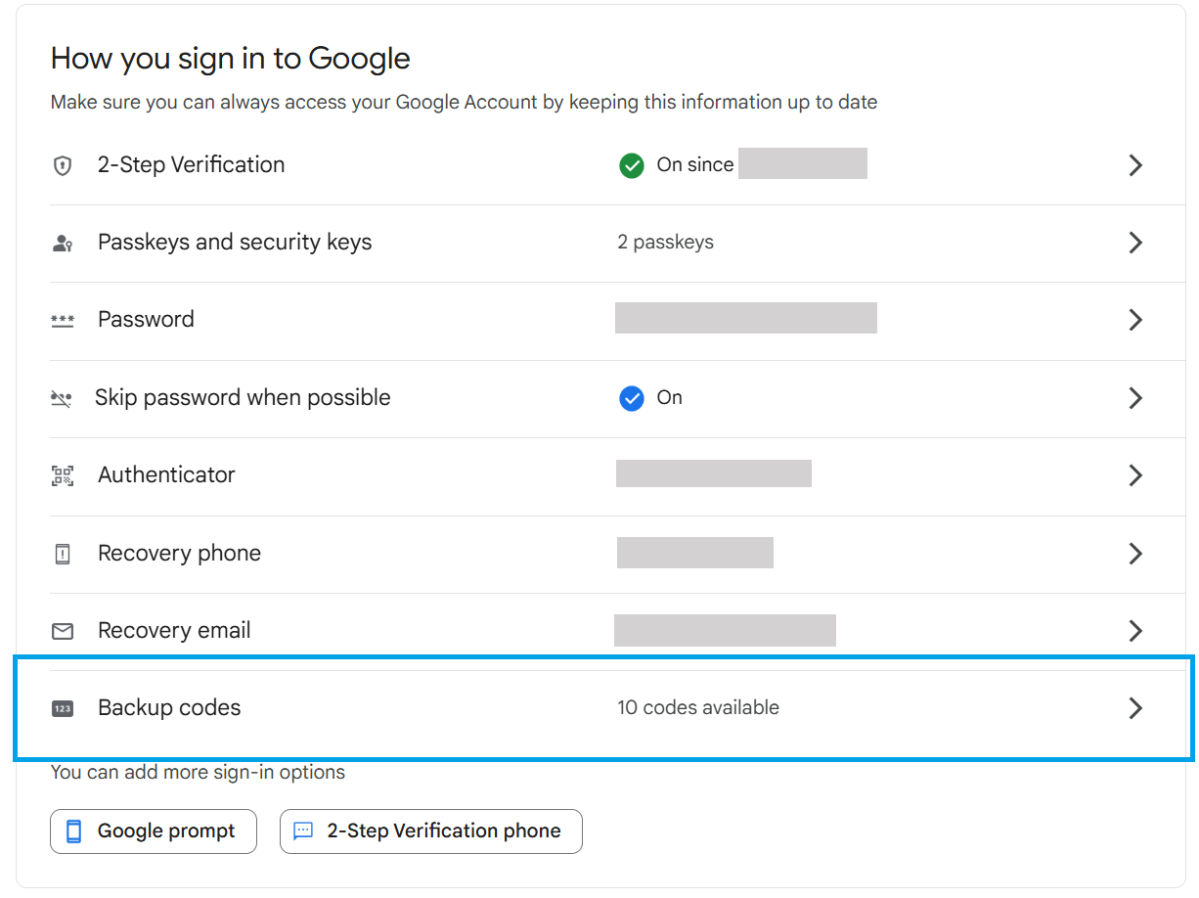
    Google backup code option in Security settings

    PCWorld

    If you’ve set up two-factor authentication on your account, a set of backup codes ensures you can get into your account when your main 2FA methods are unavailable (phone, hardware key, etc.) These can be stored offline in a secure spot as a printed set of codes. You can also save them in a secure, encrypted file.

    I prefer not to save these in a password manager if the vault also contains your Google password. That puts all the info needed to get into your account into the wrong hands, if your vault ever becomes compromised.

    1. Go to myaccount.google.com/security, then scroll down to How you sign into Google.
    2. Toward the bottom of the list, find Backup codes. Click on the arrow to view your codes.

    If you use all of your backup codes (or worry they’re no longer secret), you can cycle them and generate a fresh set of 10 codes.

    Google Info late Recovery Set
    Share. Facebook Twitter Pinterest LinkedIn Tumblr Email
    Previous ArticleApple’s Super-Slim iPhone Air Had Me on Edge — Until I Tested It
    Next Article Windows 11 widgets feel like abandonware next to macOS
    techupdateadmin
    • Website

    Related Posts

    Gadgets

    Gear News of the Week: LG Debuts an RGB LED TV, and Google Brings Find Hub to Wear OS

    December 21, 2025
    Mobile

    Deals: Freebies with Google Pixels, discounts on Xiaomi 15, Poco F7 Ultra, and more

    December 20, 2025
    Gadgets

    Google confirms Gemini will fully replace Assistant on phones in 2026

    December 20, 2025
    Add A Comment
    Leave A Reply Cancel Reply

    Top Posts

    NYT Strands hints and answers for Monday, August 11 (game #526)

    August 11, 202545 Views

    These 2 Cities Are Pushing Back on Data Centers. Here’s What They’re Worried About

    September 13, 202542 Views

    Today’s NYT Connections: Sports Edition Hints, Answers for Sept. 4 #346

    September 4, 202540 Views
    Stay In Touch
    • Facebook
    • YouTube
    • TikTok
    • WhatsApp
    • Twitter
    • Instagram
    Latest Reviews

    Subscribe to Updates

    Get the latest tech news from FooBar about tech, design and biz.

    Most Popular

    Best Fitbit fitness trackers and watches in 2025

    July 9, 20250 Views

    There are still 200+ Prime Day 2025 deals you can get

    July 9, 20250 Views

    The best earbuds we’ve tested for 2025

    July 9, 20250 Views
    Our Picks

    My Health Anxiety Means I Won’t Use Apple’s or Samsung’s Smartwatches. Here’s Why

    December 22, 2025

    You can now buy the OnePlus 15 in the US and score free earbuds if you hurry

    December 22, 2025

    Today’s NYT Connections: Sports Edition Hints, Answers for Dec. 22 #455

    December 22, 2025

    Subscribe to Updates

    Get the latest creative news from FooBar about art, design and business.

    Facebook X (Twitter) Instagram Pinterest
    • About Us
    • Contact us
    • Privacy Policy
    • Disclaimer
    • Terms and Conditions
    © 2026 techupdatealert. Designed by Pro.

    Type above and press Enter to search. Press Esc to cancel.