



Windows 11 version 25H2 will be officially available in Fall 2025 and marks the next major feature update for Microsoft’s current operating system. The new features are already available for Insiders and can be tested in the current Windows 11 25H2 Insider Preview. Despite being categorized as an “enablement update”, the scope of the changes is considerable. The basic architecture remains identical to version 24H2, which means there are no new hardware requirements.
If you don’t already have Windows 11, or just need a new license, you can grab it for 50 percent off on the PCWorld Software store right now.
For all systems that are already running on 24H2, the upgrade requires minimal effort. A small enablement package activates the new functions without the need for a complete reinstallation or in-place upgrade.
This procedure not only saves time, but also significantly reduces downtime, both in private households and in corporate environments. For Home and Pro editions, support is extended with the release by a further 24 months until 2027, for Enterprise and Education versions it’s even extended by 36 months until 2028. Devices with older versions such as 23H2 or Windows 10, on the other hand, must go through the classic, more extensive upgrade process.
Windows Latest
Thanks to the “Shared Servicing Branch”, many new features are already distributed in 24H2, but are deactivated until the Enablement Package activates them. Users benefit from around 40 percent smaller update packages thanks to the combination of servicing stack updates and other cumulative updates, which further shortens the installation time.
The revised start menu is one of the most visible changes in 25H2. It shows the pinned apps at the top, a section with recommended content such as recently used documents or programs in the middle and the complete app list below. The latter can be displayed in three modes, as a category view, as a compact grid, or as a classic list. Users can control the scope dynamically using buttons such as “Show all” or “Show less”.
New personalization settings allow more pinned apps to be displayed by default or recommendations to be hidden completely. Frequently used and recently installed apps can also be displayed or hidden as desired. Companies benefit from the largely retained basic structure, as adjustments to documentation and training material are minimal.
Restrictions still exist. Categories cannot yet be renamed or created, drag & drop currently only works from “All” to “Pinned”, and touch navigation currently lacks support for swipe up gestures. The start menu is supplemented by the option to display system folders such as “Settings” or “Explorer” as fixed icons in the bottom bar, which enables quick access to frequently used functions.
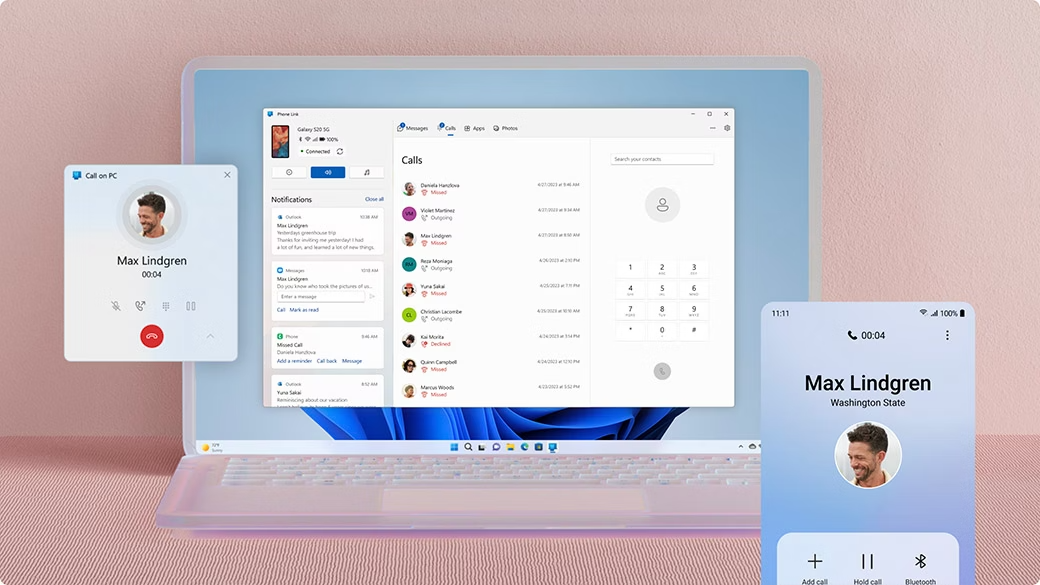
Direct integration of smartphones via Phone Link
With the new start menu integration of “Phone Link”, the connection between PC and smartphone takes center stage even more. Users can exchange files between PC and mobile devices via drag & drop, send images from Explorer directly “to my phone” or retrieve messages and content from the Start menu. The setup requires a Microsoft account for the app, but not for the Windows login.
In private households, this simplifies the management of media and documents; in companies, it enables uncomplicated connection of service devices. Content can be synchronized via local networks or even mobile data connections. The implementation is considered to be more stable than in previous pre-release versions, in which Phone Link was often prone to errors.
Windows
The lock screen display can be expanded with widgets, including weather, stock market prices, countdown counters or customized information sources. These elements can be customized to keep important data directly in view without unlocking the desktop. A new feature is the “Discover widgets” function, which displays suggestions for other available widgets and simplifies the selection process.
For companies, this can be a way of providing employees with status information or appointments, while private users can keep an eye on birthdays or deadlines, for example. Currently, changes only take effect after a restart, which is likely to be optimized in the final version.
Optimized energy management and performance diagnostics
A new mechanism for throttling the CPU during idle phases reduces power consumption and extends battery life, which particularly affects mobile work devices and notebooks. In addition, Windows automatically records diagnostic data when the system reacts slowly. These logs can be sent to Microsoft via the feedback hub in order to identify the causes of performance problems more quickly. For the user, these are stored locally in the system under “%systemRoot%\Temp\DiagOutputDir\Whesvc” and are only transmitted when feedback is active.
Extensions in the file explorer and in the search
The File Explorer displays person icons in the “Recommended” area under the “Activity” column to make it easier to recognise who has recently worked on a file, but only when using a business or school account. In the search options, the direct link to the Bing search history has been removed; instead, access is centralised via the data protection dashboard. This change reduces redundant menu items and bundles data protection controls in one place.
Higher quality system drivers through CodeQL analysis
Higher quality standards will apply to driver signing in the future. Every kernel-mode driver (except graphics drivers) must pass a CodeQL scan before WHCP certification. This analysis uncovers potential errors or security gaps at an early stage and forces manufacturers to rectify them before the driver is released for Windows. This means more stable systems for OEM manufacturers and companies and a lower crash and incompatibility rate for private users.
AI-supported functions and Copilot optimizations
New functions are activated on devices with NPU, the so-called Copilot PCs. These include image descriptions for screen readers, live subtitles with translation options (currently still with crash problems), and intelligent text actions in “Click to Do”. The latter enables context-dependent processing of text content, such as recognizing and automatically processing certain entries. In addition, the search field in the top bar of “Click to Do” has been removed to simplify the interface.
Users report long waiting times when using the app for the first time after model or build updates, which must be taken into account in corporate environments during rollouts. A new addition is the option to enter your own words in the Windows dictionary, which offers clear benefits for both private writers and companies with industry-specific vocabulary.
Quick Machine Recovery and gamepad control of the on-screen keyboard
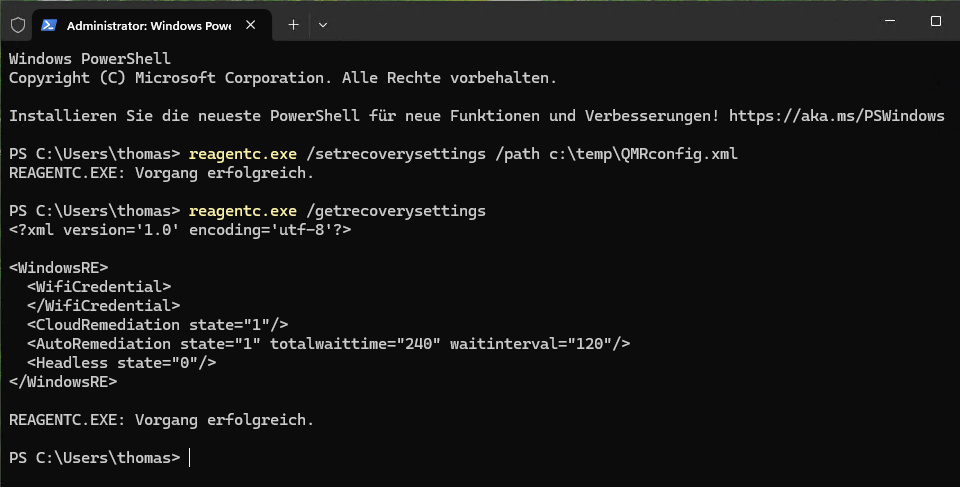
With version 25H2, Windows 11 will receive an extended self-repair function, which will be introduced under the name “Quick Machine Recovery”. It builds on the Windows Recovery Environment, but extends it with the ability to automatically obtain updates or repair scripts from the Internet to resolve boot problems. If the system recognizes repeated boot errors, it automatically switches to the recovery environment, establishes a network connection and searches for suitable corrections via Windows Update.
Administrators can specify whether this process should take place completely without user intervention. Activation is possible both locally, for example via configuration using Reagentc and XML files, and centrally via Intune policies. Parameters for waiting time, restart intervals and even WLAN login data can be predefined so that devices without a LAN connection can also be integrated.
In Home editions, cloud-supported repair will be active by default in the future; in Pro and Enterprise environments, it must be specifically enabled. After a successful repair, Windows restarts automatically; if the repair is unsuccessful, the cycle is repeated according to the defined specifications. Thanks to this automation, Quick Machine Recovery reduces the administration effort and significantly shortens downtimes in both company networks and private installations.
Thomas Joos
New data protection dialogues and administrator protection
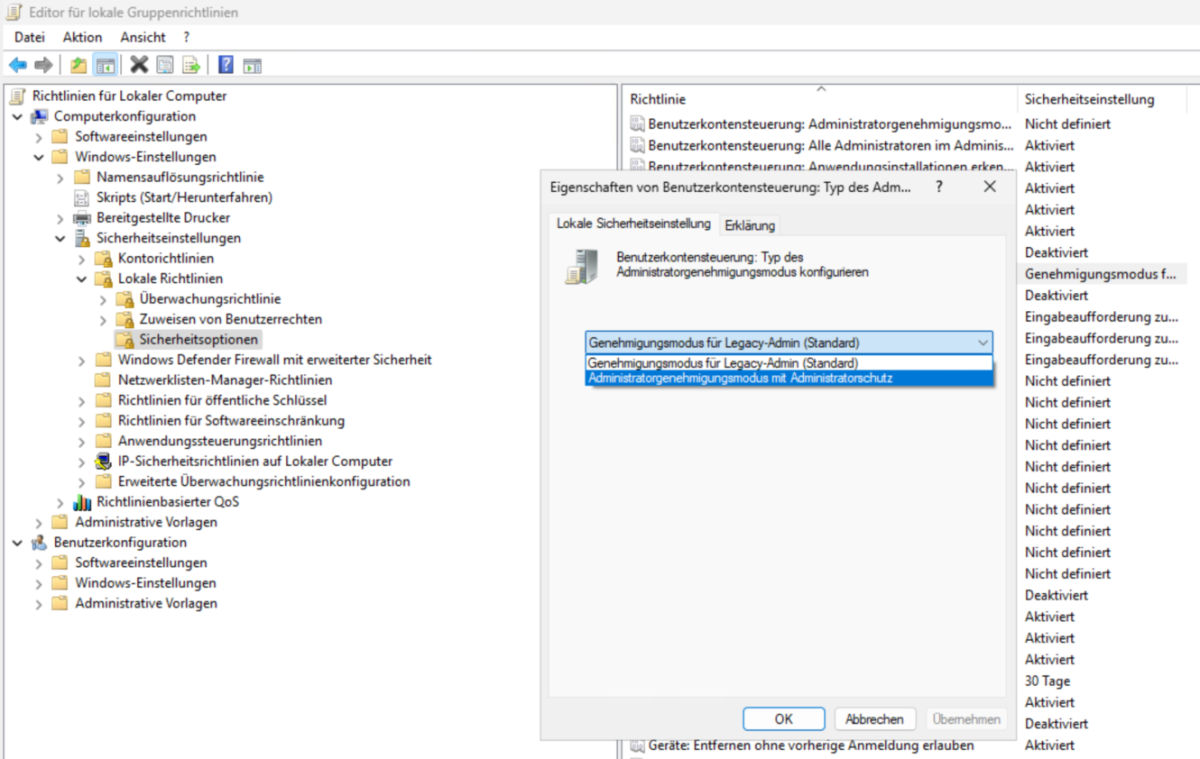
25H2 comes with revised data protection dialogues that offer more transparency when applications access data and system functions. An additional protection mechanism has been introduced for administrators, which makes unauthorized changes to the system more difficult and provides greater protection for security-critical actions. This gives companies an additional layer of security without having to resort to third-party solutions.
Thomas Joos
Further functional improvements and known problems
Taskbar scaling adapts better to different display sizes and DPI settings. Context menus in Explorer have been optimized, new sharing options have been added, and Voice Access has been further developed. Support for Chinese and Japanese has been expanded, and in the settings under “Privacy and security” you can now see which applications are accessing Windows generative AI models. In current builds, this display is already visible in the user interface, but the full functionality will only be activated in a later update. Further adjustments relate to the toolbox, which has been improved in terms of its operation and integration.
Microsoft has also fixed several bugs, such as truncated content in the notification center when the clock display is activated or a problem with dbgcore.dll, which could cause explorer.exe and other applications to crash. Known problems still exist, however: the Xbox controller can trigger a bug check on some systems when connected via Bluetooth.
The Microsoft Changjie input method currently works incorrectly, which can be avoided by resetting to the previous IME version. In addition, Windows 11 25H2 supports touch keyboard control with a gamepad for the first time. This function, originally planned for 24H2, allows the on-screen keyboard to be operated without a mouse or touchscreen, which can be relevant in special application scenarios, such as on console-based workstations or for accessibility adaptations.
Update strategy, insider options and rollback
Microsoft emphasizes stability in 25H2. Many functions are already included in 24H2 and are only activated with the Enablement Package. For private users, this means a smooth upgrade without long installation times; for companies, it means the option to test only the new functions instead of recertifying the entire system environment. The update follows the shared servicing branch approach, which has also been used for previous upgrades, for example from 22H2 to 23H2.

Mark Hachman
After the official release, Microsoft offers a time window to leave the Windows Insider program and receive regular updates again. It’s also possible to completely reset 25H2 to 24H2 by uninstalling the Enablement Package without reinstalling the operating system; all 25H2 functions will then be deactivated immediately.
This article originally appeared on our sister publication PC-WELT and was translated and localized from German.
