
Close Menu
TechUpdateAlert

    Subscribe to Updates

    Get the latest creative news from FooBar about art, design and business.

    What's Hot

    My Health Anxiety Means I Won’t Use Apple’s or Samsung’s Smartwatches. Here’s Why

    December 22, 2025

    You can now buy the OnePlus 15 in the US and score free earbuds if you hurry

    December 22, 2025

    Today’s NYT Connections: Sports Edition Hints, Answers for Dec. 22 #455

    December 22, 2025
    Facebook X (Twitter) Instagram
    Trending
    • My Health Anxiety Means I Won’t Use Apple’s or Samsung’s Smartwatches. Here’s Why
    • You can now buy the OnePlus 15 in the US and score free earbuds if you hurry
    • Today’s NYT Connections: Sports Edition Hints, Answers for Dec. 22 #455
    • Android might finally stop making you tap twice for Wi-Fi
    • Today’s NYT Mini Crossword Answers for Dec. 22
    • Waymo’s robotaxis didn’t know what to do when a city’s traffic lights failed
    • Today’s NYT Wordle Hints, Answer and Help for Dec. 22 #1647
    • You Asked: OLED Sunlight, VHS on 4K TVs, and HDMI Control Issues
    Facebook X (Twitter) Instagram Pinterest Vimeo
    TechUpdateAlertTechUpdateAlert
    • Home
    • Gaming
    • Laptops
    • Mobile
    • Software
    • Reviews
    • AI & Tech
    • Gadgets
    • How-To
    TechUpdateAlert
    Home»How-To»Video wallpapers are returning to Windows 11, according to preview builds
    How-To

    Video wallpapers are returning to Windows 11, according to preview builds

    techupdateadminBy techupdateadminSeptember 22, 2025No Comments2 Mins Read
    Share Facebook Twitter Pinterest LinkedIn Tumblr Reddit Telegram Email
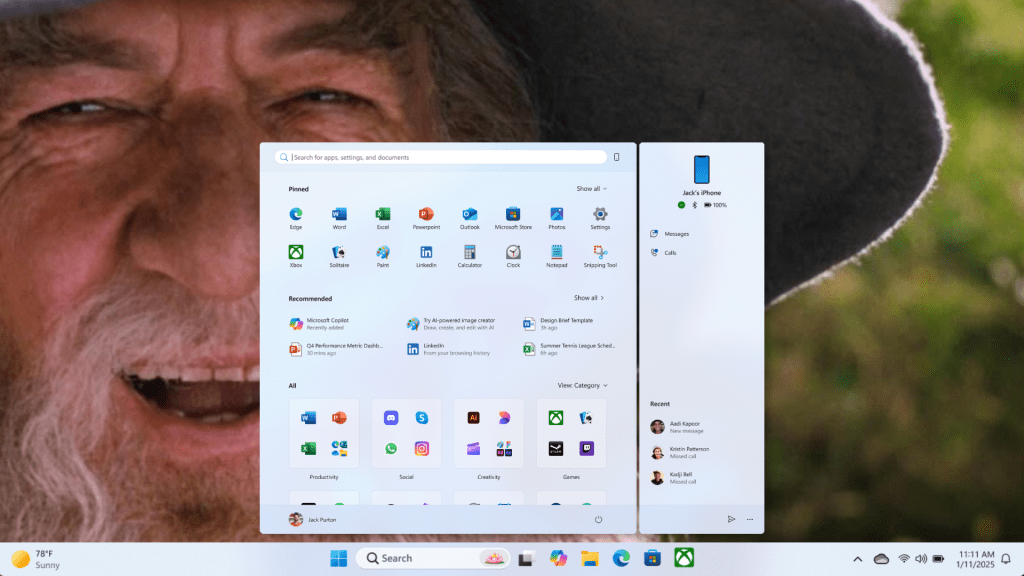
    Windows 11 desktop with "Gandalf Sax" wallpaper
    Share
    Facebook Twitter LinkedIn Pinterest Email

    Setting your desktop background to an animated video is one of those things that seems really cool at first thought, but the practical implementations—including an official version from Microsoft back in the Vista days—always leave me cold. Still, PCs are a lot more powerful than they used to be, and it looks like Windows 11 is giving it another go with the latest Insider builds.

    Social media user PhantomOfEarth is a frequent digger-upper of new Windows features, and they spotted this in the latest developer and beta builds for Windows 11. You can apparently now set MP4 video files and other frequently-used formats as your desktop background and they’ll animate with surprising smoothness.

    It won’t just show up on the Insider build, though. You need to enable feature ID 57645315 and restart explorer.exe. But once that’s done, it appears to be ready to rock in the Personalization menu.

    As PhantomOfEarth notes, this is essentially reviving the “DreamScene” feature from Windows Vista, one of the many visual enhancements that Microsoft was quick to highlight way back in 2007. (Stay to the end of the commercial below to see it—and to feel really old about remembering when “burn disc” was a cool new feature for an OS.)

    Of course, DreamScene didn’t really work out that well back then. Video performance was choppy at best, and it had a high system overhead for a purely aesthetic enhancement. The slowdown of the user interface to add visual flair was one of the many reasons Vista isn’t remembered as fondly as XP before it and Windows 8 after.

    There have been plenty of third-party options for video wallpapers going back even further, and you can still implement the feature right now if you want to using tools like Wallpaper Engine. Meanwhile, macOS offers animated wallpapers, ditto for mobile platforms, so it’s more than possible without debilitating slowdown on modern hardware.

    That said, I don’t know how much I’d bet on this feature making its way to the release version of Windows 11 in the near future. Since it still needs to be manually enabled even in Insider, Microsoft isn’t making a splash about it yet, and these sorts of low-impact additions that are prone to bugs or usability compromises tend to get the chop on a regular basis.

    Still, if it arrives on my desktop, I know the first video I’ll use.

    builds Preview Returning video Wallpapers Windows
    Share. Facebook Twitter Pinterest LinkedIn Tumblr Email
    Previous ArticleSamsung is next to hike prices on memory and storage devices
    Next Article Microsoft Paint is finally getting project files with saved layers
    techupdateadmin
    • Website

    Related Posts

    Gadgets

    Your next Legion Go 2 might run SteamOS instead of Windows 11

    December 21, 2025
    Mobile

    Video Game Hardware Sales Are the Worst in Decades: Here’s Why You Should Buy Now

    December 18, 2025
    Gadgets

    Netflix to Stream iHeart Video Podcasts: The Breakfast Club, My Favorite Murder and More

    December 16, 2025
    Add A Comment
    Leave A Reply Cancel Reply

    Top Posts

    NYT Strands hints and answers for Monday, August 11 (game #526)

    August 11, 202545 Views

    These 2 Cities Are Pushing Back on Data Centers. Here’s What They’re Worried About

    September 13, 202542 Views

    Today’s NYT Connections: Sports Edition Hints, Answers for Sept. 4 #346

    September 4, 202540 Views
    Stay In Touch
    • Facebook
    • YouTube
    • TikTok
    • WhatsApp
    • Twitter
    • Instagram
    Latest Reviews

    Subscribe to Updates

    Get the latest tech news from FooBar about tech, design and biz.

    Most Popular

    Best Fitbit fitness trackers and watches in 2025

    July 9, 20250 Views

    There are still 200+ Prime Day 2025 deals you can get

    July 9, 20250 Views

    The best earbuds we’ve tested for 2025

    July 9, 20250 Views
    Our Picks

    My Health Anxiety Means I Won’t Use Apple’s or Samsung’s Smartwatches. Here’s Why

    December 22, 2025

    You can now buy the OnePlus 15 in the US and score free earbuds if you hurry

    December 22, 2025

    Today’s NYT Connections: Sports Edition Hints, Answers for Dec. 22 #455

    December 22, 2025

    Subscribe to Updates

    Get the latest creative news from FooBar about art, design and business.

    Facebook X (Twitter) Instagram Pinterest
    • About Us
    • Contact us
    • Privacy Policy
    • Disclaimer
    • Terms and Conditions
    © 2026 techupdatealert. Designed by Pro.

    Type above and press Enter to search. Press Esc to cancel.