


Why you can trust TechRadar
We spend hours testing every product or service we review, so you can be sure you’re buying the best. Find out more about how we test.
I’ve worked with Uplift in the past, so when I heard they released a new desk, I, of course, had to try it out for myself.
I’ve tried out their V2 Standing Desk with commercial legs, and the team has reviewed the V2 standing desk with standard legs. Both desks scored 4.5 and are widely recognized by the TechRadar Pro team as fantastic standing desk options. Sometimes when companies knock it out of the park, they swing too far in a different direction and lose touch with what made their original product so successful. Uplift, on the other hand, did the right move – they listened to their customers.
The Uplift V3 is everything that made the V2 great, everything that the V2 Commercial refined, and made it just a little bit better. Assembly is improved, stability is enhanced, and we still have the same great desktop and accessory options. We also have a sturdier frame and the same high-quality materials. For me, this might be the best standing desk around right now.
Uplift V3 Standing Desk: Price and availability
The Uplift Standing Desk V3 offers some of the most customizable options I have seen, including material choices and built-in features. Depending on what you choose, you’ll adjust the price and time it takes to get to you drastically.
With the base-level desk in the smallest size, without any modifications, you’ll come in around $700 and will get it shipped that day, free of charge. However, if you want to, and your budget allows of course, you could go all out and get a desk, and come out to over $2000 without accessories.
There are so many combination options that we could all make unique desks if we wanted to, and that is one of the things that sets Uplift apart.

Uplift V3 Standing Desk: Unboxing and First Impressions
I’ve customized and ordered numerous standing desks. Uplift still has the most robust number of options for me to choose from when I build, making it feel like I have a truly customized and almost one-of-a-kind desk.
I get to design it to be precisely what I want. Granted, there are other companies, such as Oakywood, that allow you to customize down to the exact inch, but when it comes to options for materials, Uplift may have just about everyone else beat. Even with this incredible selection of desktops and accessories, delivery time is still within a week, which is insane, sometimes as quickly as three days.
Everything comes well-packaged, with all the accessories you chose, and easy-to-follow directions to help with setup. Right off the bat, the desk feels sturdier than the V2, providing the rigidity I wanted with the V2 and even the V2 Commercial, while still maintaining a sleek and minimal appearance. The biggest game changer for me is the inclusion of the FlexMount Cable Manager.
I am the kind of person who loves a clean desk, even if it’s cluttered; I still like it to be tidy and have the cables organized. The FlexMount cable Manager is the cable management solution that FlexiSpot added to their E7 Pro, except on the back of the desk, which works out well, as that’s where most of the cable mess is.
Uplift V3 Standing Desk: Design & Build Quality
Specs
Height range: 22.6” – 48.2” (BIFMA-certified)
Lift capacity: ~355 lbs
Frame: dual-motor, steel, crossbar stability design
Noise: <50dB
Keypad: programmable memory, hush or RGB options
Warranty: 15 years
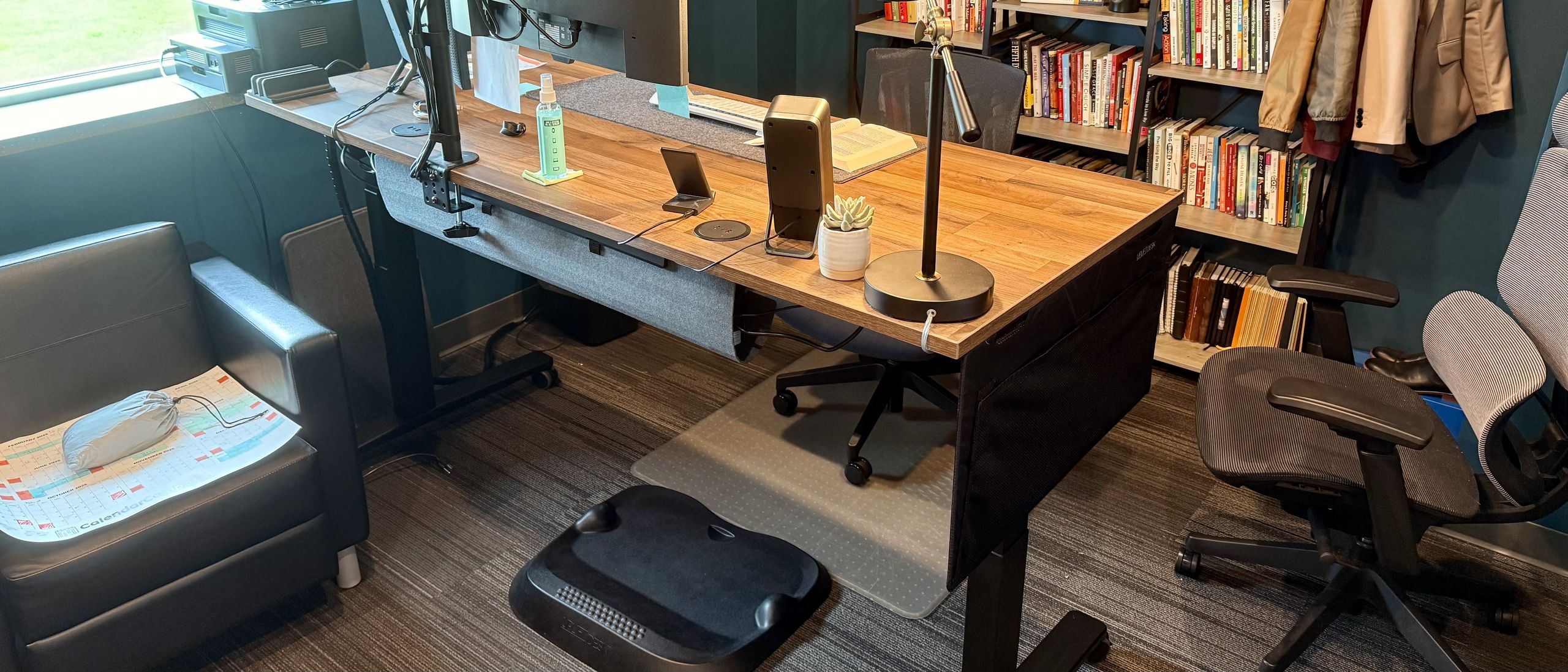
For my V3 desk, I built out a beautiful Heritage Oak desktop paired with the V3 C-Shaped legs, a handful of accessories, and powered grommets. The Heritage Oak is lovely. It looks excellent from a distance, and even up close, it still looks great for a laminate. It is worth noting that it is laminate, so it’s not solid wood, but for what it is, it feels very nice.
I wanted to see how good their laminate could be, and I’m glad I did. If a more accessible desk can be this good, and I’ve also tested a solid wood option from Uplift, I know that their desks, overall, are solid and worth suggesting and promoting now.
Another element I really like about the design is the ability to add features like powered grommets at the point of purchase. These wouldn’t be as beloved as they are, but the powered grommets are frequently the most notable feature of this desk, according to my team. We use them all the time to plug in whatever we are working with, all without having to run an extension cord, leave out a cable mess, or look for an outlet. We can pop up the grommet, plug in, and get to work.
The upgraded V3 legs still feature the same four programmable presets, and we also have a selection to choose from when it comes to the controller, which is quite impressive. We can choose the variant that best suits our working style and aesthetic, and it will work seamlessly with the desk out of the box.

Uplift V3 Standing Desk: In use

I’ve had this desk set up and in use for my team and I for the past 39 days at the time of writing this review. In that time, we have had numerous people rotate using it.
We have had multiple meetings, working sessions, and full days of work at this desk. We have it set up with dual monitors, an external Logitech MX Keys Keyboard, and the Logitech MX Master 3. We added a desk pad to protect the desk and enhance its aesthetic appeal. We also built out dual docking stations, one to run dual monitors for a Mac (that shouldn’t be able to run dual monitors) through DisplayLink Manager, and another Thunderbolt Dock pulled forward for easy port access.
On top of this, we added a lamp, speakers, and multiple power options with under-mounted power strips and both grommet power solutions all running to where the desk itself can be powered with a single cable, and one ethernet port for wired internet (though it could be wireless if required).

This is how I like to build my desks, over-built but ready for modifications in the future if desired. Creating this way also highlights the limitations of a desk, if any exist. So far, this desk has withstood the hefty build beautifully, and it is working precisely as intended. The privacy screen blocks exactly where we’d want it to, and provides some lovely pouches for quick access to books or documents.
The grommets are easy to use and highly convenient. The desk has not bowed or sagged at all. The cable management solution keeps everything in place without allowing any cables to come into contact with the ground. Additionally, the wheels provide super-easy maneuverability.
After using this for a month and walking into the office every day, looking at the desk as I do in the photos, I wish that the cable management solution were either black to blend in or a more rigid and refined metal to match the desk frame. Everything looks so high quality, and then that stands out as an outlier. But not in a terrible way – just a little room for growth for V4.
Uplift V3 Standing Desk: Final verdict
The Uplift V3 is a significant and highly welcomed update from the Uplift V2 and V2 Commercial lines. Not to say that those are bad by any means, but the V3 is a definite step above. This desk has been excellent for all kinds of office work and would work beautifully in a dedicated office or a home office space. If you’re investing in a standing desk, consider one that offers not only a fun, customizable option but also a quality, well-tested desk.
Should you buy an Uplift V3 Standing Desk?
Image 1 of 9


|
Value |
Can be built out to be very affordable, or very bougie depending on your budget |
4 / 5 |
|
Design |
Beautiful and sturdy design, with room to grow |
4.5 / 5 |
|
Hardware |
Dual motors, great range, sturdy, and high lift capacity |
5 / 5 |
|
Performance |
Quiet, responsive, stable, great to build a setup with |
5 / 5 |
|
Overall |
The V3 continues the line of greatness with Uplift’s standing desk, giving us a fantastic desk all around |
5 / 5 |
Buy it if…
Don’t buy it if…
For more office furniture essentials, we’ve tested and reviewed the best office chairs.
