
Close Menu
TechUpdateAlert

    Subscribe to Updates

    Get the latest creative news from FooBar about art, design and business.

    What's Hot

    My Health Anxiety Means I Won’t Use Apple’s or Samsung’s Smartwatches. Here’s Why

    December 22, 2025

    You can now buy the OnePlus 15 in the US and score free earbuds if you hurry

    December 22, 2025

    Today’s NYT Connections: Sports Edition Hints, Answers for Dec. 22 #455

    December 22, 2025
    Facebook X (Twitter) Instagram
    Trending
    • My Health Anxiety Means I Won’t Use Apple’s or Samsung’s Smartwatches. Here’s Why
    • You can now buy the OnePlus 15 in the US and score free earbuds if you hurry
    • Today’s NYT Connections: Sports Edition Hints, Answers for Dec. 22 #455
    • Android might finally stop making you tap twice for Wi-Fi
    • Today’s NYT Mini Crossword Answers for Dec. 22
    • Waymo’s robotaxis didn’t know what to do when a city’s traffic lights failed
    • Today’s NYT Wordle Hints, Answer and Help for Dec. 22 #1647
    • You Asked: OLED Sunlight, VHS on 4K TVs, and HDMI Control Issues
    Facebook X (Twitter) Instagram Pinterest Vimeo
    TechUpdateAlertTechUpdateAlert
    • Home
    • Gaming
    • Laptops
    • Mobile
    • Software
    • Reviews
    • AI & Tech
    • Gadgets
    • How-To
    TechUpdateAlert
    Home»Mobile»Truecaller to Discontinue Call Recording Feature on iPhones from September 30
    Mobile

    Truecaller to Discontinue Call Recording Feature on iPhones from September 30

    techupdateadminBy techupdateadminAugust 5, 2025No Comments3 Mins Read
    Share Facebook Twitter Pinterest LinkedIn Tumblr Reddit Telegram Email
    Truecaller to Discontinue Call Recording Feature on iPhones from September 30
    Share
    Facebook Twitter LinkedIn Pinterest Email

    Truecaller will soon stop offering call recording functionality on iPhone. The caller identification app re-introduced this ability on both Android and iOS platforms almost two years ago, following the prior discontinuation after Google cracked down on APIs designed for accessibility features related to voice calls. Instead, the Swedish platform will shift focus to improving its core spam-fighting functionality, with features such as real-time caller identification via Live Caller ID and automatic blocking of spam telephone calls.

    No More Call Recording on iPhone With Truecaller

    First reported by TechCrunch, Truecaller’s call recording feature will no longer work on iPhone beginning September 30. It also means that call recordings, which are already saved within the app, will not be accessible.

    Citing Nakul Kabra, Product Director iOS at Truecaller, told the publication that this decision has been taken due to the platform shifting its focus to improving the core functionality, which is fighting spam calls.

    On its support page, the caller identification platform has provided users with three choices — download saved recordings and store them locally on their devices, share them via email and other messaging apps, or change their storage preference from Truecaller to iCloud.

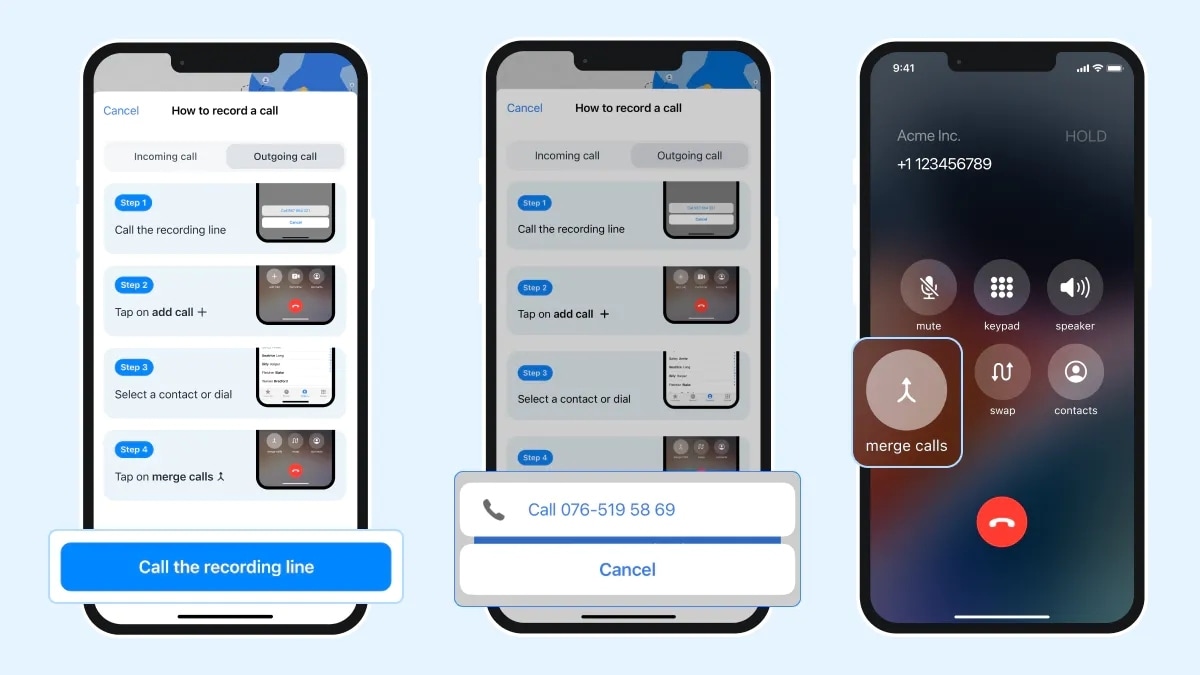
    Currently, Truecaller offers call recording via a dedicated button on its dialler on Android. iOS users need to take a slightly longer route by opening a recording line through the app and then merge the calls. There is an alternative way as well. The caller ID app also provides a floating action button (FAB) if you make calls with the native dealer instead.

    However, this functionality will go away on iOS after the September 30 deadline. There is no word whether the same change would also be made to Truecaller’s call recording feature on Android.

    How to Save Call Recording on iPhone

    If you are planning to save your call recording, you can follow these steps:

    1. Open Truecaller and navigate to the Record tab
    2. Next, tap on the Settings icon
    3. Tap on Storage preference and change your preference to iCloud storage

    If the iCloud storage option is greyed out, you can enable it manually by going to the iPhone Settings and selecting your profile. Next, select iCloud > Saved to iCloud, and then turn on the Truecaller toggle.

    You can also save specific saved recordings on your iPhone. Here’s how to do it:

    1. Open Truecaller and navigate to the Record tab
    2. Now, swipe left on the specific recording which you wish to locally save or share
    3. Tap the Share option. You can now either save the call recording locally in the Files app or share them via email or messaging apps
    Call Discontinue Feature iPhones Recording September Truecaller
    Share. Facebook Twitter Pinterest LinkedIn Tumblr Email
    Previous ArticleVuze torrent client review | TechRadar
    Next Article Amazon Great Freedom Festival Sale 2025: Best Deals on Semi-Automatic Washing Machines From LG, Samsung, Voltas, and More
    techupdateadmin
    • Website

    Related Posts

    Mobile

    Today’s NYT Wordle Hints, Answer and Help for Dec. 21 #1646

    December 21, 2025
    Mobile

    OnePlus 15T’s specs tipped – GSMArena.com news

    December 21, 2025
    Mobile

    TikTok is not getting banned in the US, after all

    December 21, 2025
    Add A Comment
    Leave A Reply Cancel Reply

    Top Posts

    NYT Strands hints and answers for Monday, August 11 (game #526)

    August 11, 202545 Views

    These 2 Cities Are Pushing Back on Data Centers. Here’s What They’re Worried About

    September 13, 202542 Views

    Today’s NYT Connections: Sports Edition Hints, Answers for Sept. 4 #346

    September 4, 202540 Views
    Stay In Touch
    • Facebook
    • YouTube
    • TikTok
    • WhatsApp
    • Twitter
    • Instagram
    Latest Reviews

    Subscribe to Updates

    Get the latest tech news from FooBar about tech, design and biz.

    Most Popular

    Best Fitbit fitness trackers and watches in 2025

    July 9, 20250 Views

    There are still 200+ Prime Day 2025 deals you can get

    July 9, 20250 Views

    The best earbuds we’ve tested for 2025

    July 9, 20250 Views
    Our Picks

    My Health Anxiety Means I Won’t Use Apple’s or Samsung’s Smartwatches. Here’s Why

    December 22, 2025

    You can now buy the OnePlus 15 in the US and score free earbuds if you hurry

    December 22, 2025

    Today’s NYT Connections: Sports Edition Hints, Answers for Dec. 22 #455

    December 22, 2025

    Subscribe to Updates

    Get the latest creative news from FooBar about art, design and business.

    Facebook X (Twitter) Instagram Pinterest
    • About Us
    • Contact us
    • Privacy Policy
    • Disclaimer
    • Terms and Conditions
    © 2026 techupdatealert. Designed by Pro.

    Type above and press Enter to search. Press Esc to cancel.