
Close Menu
TechUpdateAlert

    Subscribe to Updates

    Get the latest creative news from FooBar about art, design and business.

    What's Hot

    My Health Anxiety Means I Won’t Use Apple’s or Samsung’s Smartwatches. Here’s Why

    December 22, 2025

    You can now buy the OnePlus 15 in the US and score free earbuds if you hurry

    December 22, 2025

    Today’s NYT Connections: Sports Edition Hints, Answers for Dec. 22 #455

    December 22, 2025
    Facebook X (Twitter) Instagram
    Trending
    • My Health Anxiety Means I Won’t Use Apple’s or Samsung’s Smartwatches. Here’s Why
    • You can now buy the OnePlus 15 in the US and score free earbuds if you hurry
    • Today’s NYT Connections: Sports Edition Hints, Answers for Dec. 22 #455
    • Android might finally stop making you tap twice for Wi-Fi
    • Today’s NYT Mini Crossword Answers for Dec. 22
    • Waymo’s robotaxis didn’t know what to do when a city’s traffic lights failed
    • Today’s NYT Wordle Hints, Answer and Help for Dec. 22 #1647
    • You Asked: OLED Sunlight, VHS on 4K TVs, and HDMI Control Issues
    Facebook X (Twitter) Instagram Pinterest Vimeo
    TechUpdateAlertTechUpdateAlert
    • Home
    • Gaming
    • Laptops
    • Mobile
    • Software
    • Reviews
    • AI & Tech
    • Gadgets
    • How-To
    TechUpdateAlert
    Home»Gaming»The Roku home screen is getting worse. A fix is hiding in plain sight
    Gaming

    The Roku home screen is getting worse. A fix is hiding in plain sight

    techupdateadminBy techupdateadminOctober 17, 2025No Comments5 Mins Read
    Share Facebook Twitter Pinterest LinkedIn Tumblr Reddit Telegram Email
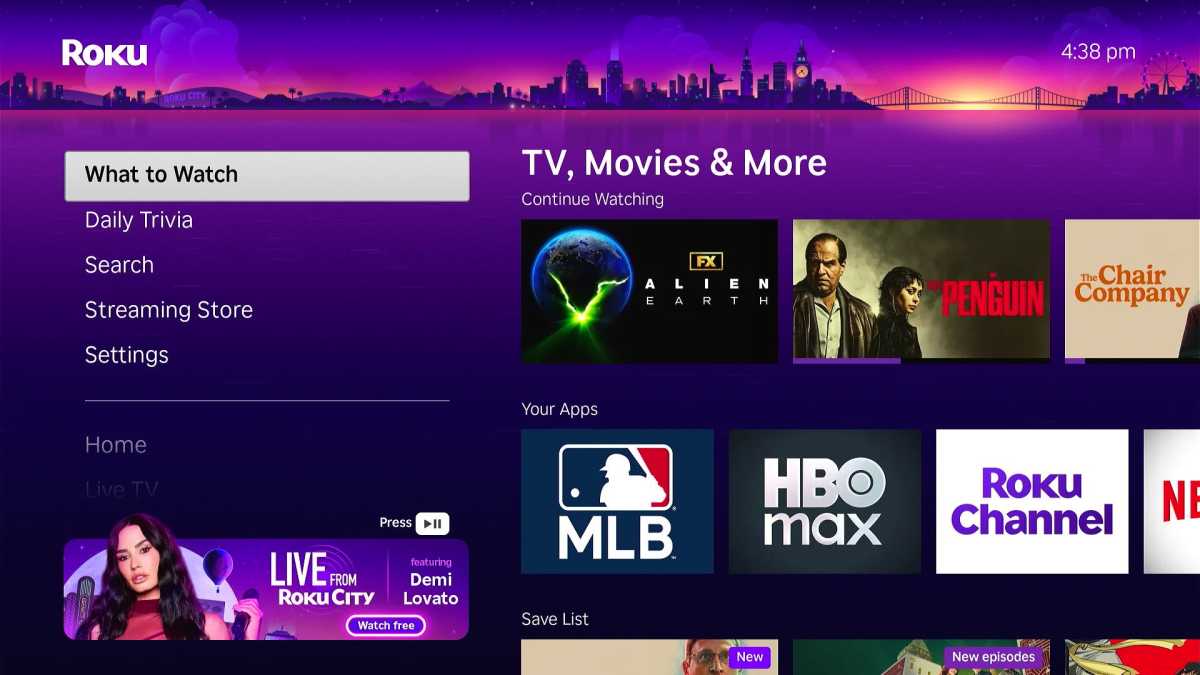
    Roku What to Watch menu and sidebar navigation
    Share
    Facebook Twitter LinkedIn Pinterest Email

    If you’ve been using a Roku player or smart TV over the past year or so, you’ve probably noticed some big changes on the home screen.

    What used to be a straightforward grid for all your installed apps has now become a mishmash of menu options, shortcuts, and content recommendations. While you can still simplify the Roku home screen with some settings tweaks, the trend is clearly toward stuffing it with content that makes Roku money.

    So here’s my counterproposal: Instead of keeping up the pretense of a simple home screen, Roku should just toss it in favor of something more useful. In fact, Roku already has a perfectly good starting point lurking in a different part of its menu system.

    Roku’s What to Watch menu is a better home screen

    you access Roku’s What to Watch menu from the left-hand sidebar.

    Jared Newman / Foundry

    Click over to Roku’s left-hand sidebar menu and you’ll see a “What to Watch” section among the increasingly numerous options (which themselves are partially obscured nowadays by a banner ad).

    When Roku added the Watch to Watch section in 2022, it wasn’t all that useful. Mostly, it was just a way for Roku to recommend more ad-supported content, both from its own Roku Channel and other free, ad-supported streaming sources.

    Over time, though, What to Watch has improved in a few notable ways:

    • The Continue Watching row lets you quickly resume what you’ve been watching from across different streaming services, including Netflix, HBO Max, Hulu, Disney+, and Peacock.
    • You can bookmark movies and shows for later—either from search or other parts of Roku’s menu system—by adding them to a Save List that appears in the What to Watch menu as well.
    • The Your Apps row at the top of the screen lets you jump directly into apps you’ve already installed on your Roku device.

    What we have, in other words, is a nearly complete menu system. From a single screen, you can launch apps, pick up where you left off, and discover new things to watch. It’s also arranged in a way that actually benefits users, with content they’re watching and saving prioritized over anything promotional.
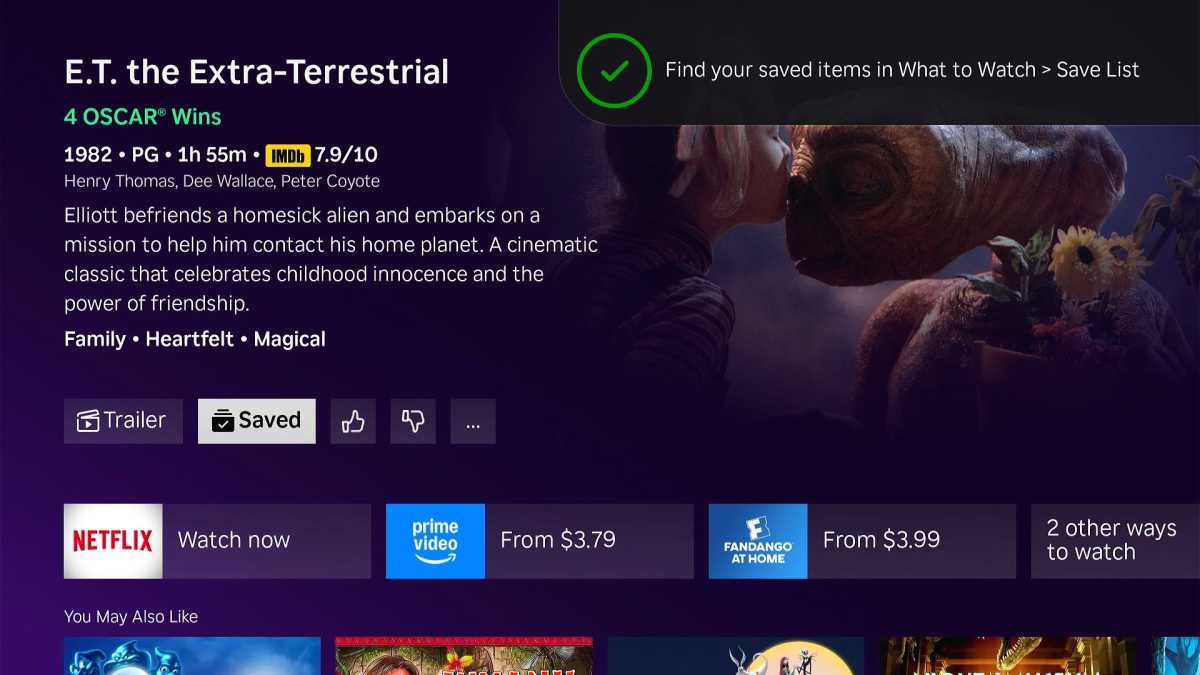
    Roku page for E.T., being added to the Save List

    Roku’s Save List is a great feature, but saved items only appear in the What to Watch menu, not on your home screen.

    Jared Newman / Foundry

    If it were up to me, I would simply make this What to Watch menu the default Roku screen, perhaps fleshing it out with quick links to Roku’s live TV and Sports menus. The layout is very much in line with what most other streaming platforms offer today, although Roku’s version is simpler and cleaner than the likes of Google TV and Amazon Fire TV.

    Roku needn’t ditch the app grid entirely. Instead, it should give the What to Watch section an All Apps button at very front of the Your Apps row, and have it link to a straightforward list of apps, without all the cruft that Roku has been adding lately. By defaulting to a richer and more useful content hub, Roku can free up the app grid to serve its original purpose.

    Why won’t Roku do this?
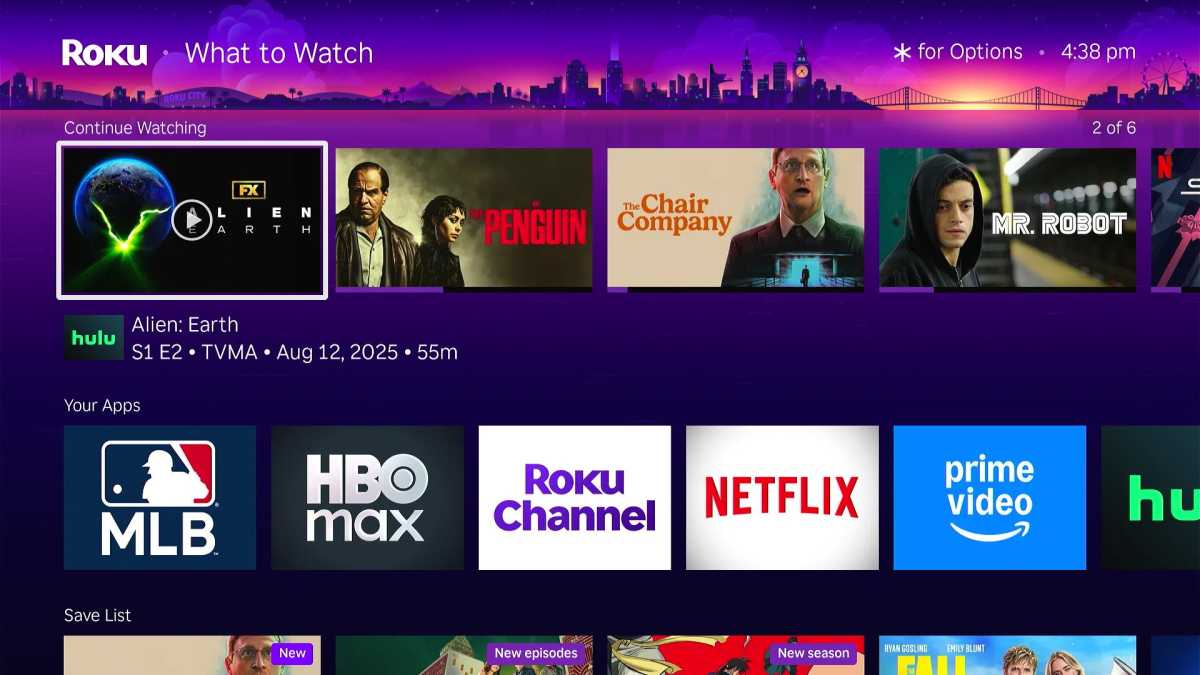
    Roku What to Watch menu
    Everything you need in one place, including shows-in-progress, recent apps, and saved items.

    Jared Newman / Foundry

    Part of me was hoping Roku would announce this kind of home screen shake-up as part of its fall software announcements earlier this week. Instead, the company announced some more modest updates, including a new AI-powered voice assistant and a way to tune your home-screen recommendations.

    I’m not too surprised. The company tends to be conservative with software changes, and the app grid has always been a defining Roku feature. Throwing it out or making it less prominent might confuse some users and invite a backlash.

    Still, Roku could easily mitigate this by letting users choose their default home screen. Keep the app grid by default for existing users, but let those of us in the know switch to the What to Watch menu instead. Over time Roku could move new users over to the Watch to Watch menu and present a choice to existing users as they set up additional smart TVs or streaming players.
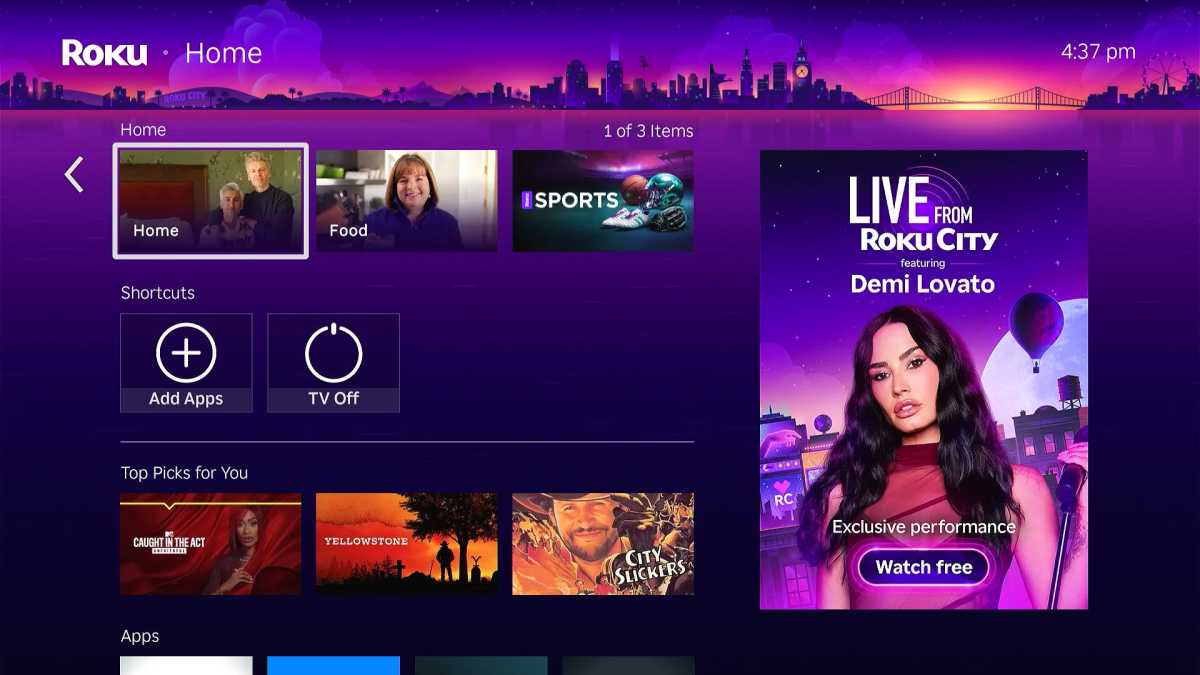
    Roku home screen filled with non-app tiles.
    Roku’s Home screen, now filled with junk.

    Jared Newman / Foundry

    It’s not as if the app grid is sacrosanct for Roku. The addition of recommendation tiles, genre-based menu options, and shortcuts show that Roku itself wants to get away from the app paradigm and make its home screen more content-forward. Doing so helps serve Roku’s business goals of upselling subscriptions through its billing system and promoting ad-supported content.

    But Roku already has a better version of that idea elsewhere in its menu system, one that’s also more useful for its users. With the What to Watch menu providing a better launch experience, Roku should stop patching up the home screen with Band-Aid measures and finally perform the necessary surgery.
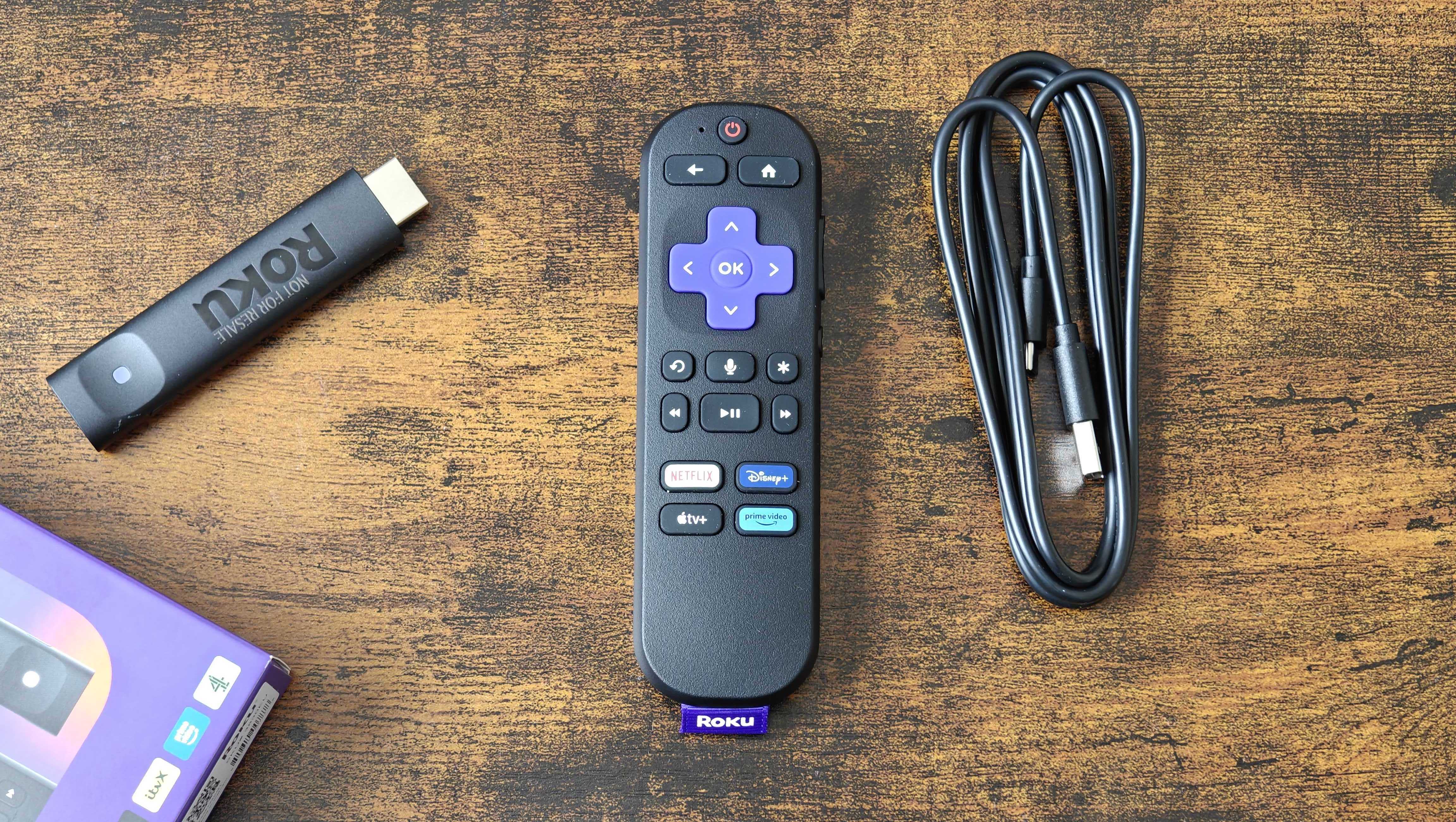
    the best value in roku media streamers

    Roku Streaming Stick Plus

    Roku Streaming Stick Plus

    Editors' Choice

    Read our review


    Price When Reviewed:


    £39.99

    Best Prices Today:


    £39.99 at Amazon |
    £39.99 at Argos |
    £39.99 at Currys

    And sign up for Jared’s Cord Cutter Weekly newsletter for more streaming TV insights.

    Fix hiding Home plain Roku Screen sight worse
    Share. Facebook Twitter Pinterest LinkedIn Tumblr Email
    Previous ArticleEvery Active Pokemon Legends: Z-A Mystery Gift Code and Reward
    Next Article This sleek aluminum workstation folds into your backpack, yet your $10,000 MacBook Pro may not feel safe there
    techupdateadmin
    • Website

    Related Posts

    Gadgets

    Marshall’s Acton III home speaker is 40% off and looks good in any room

    December 18, 2025
    Gadgets

    Snap rear camera selfies using this iPhone’s case’s second screen.

    December 17, 2025
    Mobile

    iPhone 17e might fix key limitations of the iPhone 16e with MagSafe charging and C1X modem

    December 16, 2025
    Add A Comment
    Leave A Reply Cancel Reply

    Top Posts

    NYT Strands hints and answers for Monday, August 11 (game #526)

    August 11, 202545 Views

    These 2 Cities Are Pushing Back on Data Centers. Here’s What They’re Worried About

    September 13, 202542 Views

    Today’s NYT Connections: Sports Edition Hints, Answers for Sept. 4 #346

    September 4, 202540 Views
    Stay In Touch
    • Facebook
    • YouTube
    • TikTok
    • WhatsApp
    • Twitter
    • Instagram
    Latest Reviews

    Subscribe to Updates

    Get the latest tech news from FooBar about tech, design and biz.

    Most Popular

    Best Fitbit fitness trackers and watches in 2025

    July 9, 20250 Views

    There are still 200+ Prime Day 2025 deals you can get

    July 9, 20250 Views

    The best earbuds we’ve tested for 2025

    July 9, 20250 Views
    Our Picks

    My Health Anxiety Means I Won’t Use Apple’s or Samsung’s Smartwatches. Here’s Why

    December 22, 2025

    You can now buy the OnePlus 15 in the US and score free earbuds if you hurry

    December 22, 2025

    Today’s NYT Connections: Sports Edition Hints, Answers for Dec. 22 #455

    December 22, 2025

    Subscribe to Updates

    Get the latest creative news from FooBar about art, design and business.

    Facebook X (Twitter) Instagram Pinterest
    • About Us
    • Contact us
    • Privacy Policy
    • Disclaimer
    • Terms and Conditions
    © 2026 techupdatealert. Designed by Pro.

    Type above and press Enter to search. Press Esc to cancel.