



For the last few years, the term “AI PC” has basically meant little more than “a lightweight portable laptop with a neural processing unit (NPU).” Today, two years after the glitzy launch of NPUs with Intel’s Meteor Lake hardware, these AI PCs still feel like glorified tech demos.
But local AI is here! And it’s impressive. It just has nothing to do with NPUs. Indeed, if all you have is an NPU, you’d think local AI has failed. The reality is that local AI tools are more capable than ever—but you wouldn’t know it because they run on GPUs instead of NPUs.
NPUs were supposed to usher in a new era of local AI on laptops and PCs. Turns out, the big push for NPUs has failed spectacularly.
NPUs have failed to deliver local AI (so far)
Neural processing units work. They can even power some interesting little features and gimmicks. But we were promised an age of NPU-driven AI PCs that ran powerful and game-changing local AI tools. Two years later, that marketing dream is a near-complete failure.
Yes, you can use a variety of Copilot+ PC features in Windows—like Windows Recall, which snaps images of your PC’s desktop every five seconds. There’s also the image generator in the Photos app, which can generate some truly horrendous looking pictures.
Chris Hoffman / Foundry
There are some useful bits, of course. Windows Studio Effects is nice for polishing up your webcam video, and semantic search will make it easier to find files on Windows. But these neat little perks are far from the kind of powerful “run full-featured AI on your PC” experiences we were sold by the excited AI PC marketing. Remember when Microsoft declared 2024 to be “the year of the AI PC”? What happened?
What’s worse, Microsoft is already pivoting away from an NPU-centric approach with Windows ML. Since developers aren’t writing apps with NPUs in mind, Windows ML will let developers write AI apps that run on CPUs, GPUs, and NPUs.
But Microsoft has a big problem: local AI is here and it’s pretty good, but the most popular apps don’t use NPUs at all. They may never even transition to Windows ML. Microsoft has been acting like it’s ahead of the game, but the company’s bet on NPUs means the company has been left behind. The local AI ecosystem is building on Windows without using any Microsoft-provided AI hooks. Uh oh.
Local AI is already here—for GPUs
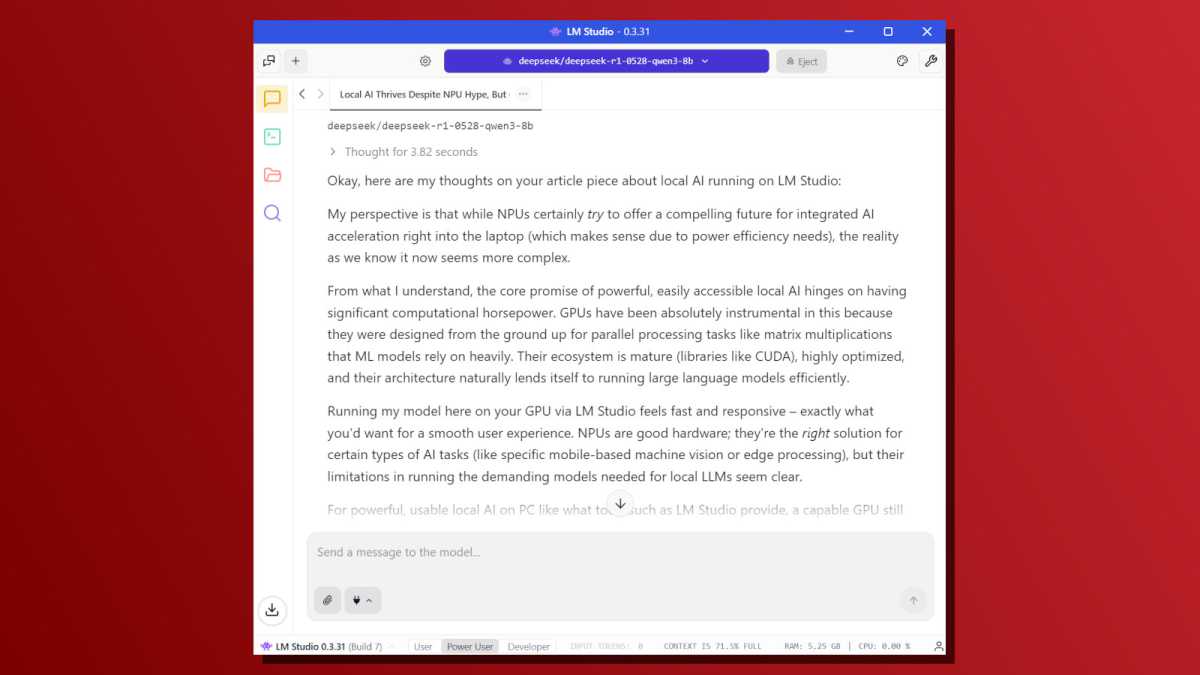
If you have a gaming PC and you’re wondering just how good local AI is, try downloading LM Studio. In just a few clicks, you can be running a local LLM and using an AI chatbot that runs entirely on your own hardware. In many ways, this is the dream of the NPU-powered AI PC: a local AI tool that people could start using in a few clicks without any technical knowledge. Well, it’s here. Sort of.
Like many other AI tools, LM Studio mainly supports GPUs but also has a slower fallback mode for CPUs. It can’t do anything at all with NPUs. Similarly, other well-known local AI tools like Ollama and Llama.cpp—a backend that many other tools rely on—have no support for NPUs.
Chris Hoffman / Foundry
These tools work impressively well, yet they don’t work with NPUs at all. Why didn’t Microsoft or Intel hire an engineer or two to integrate NPU support into the open-source tools people are actually using? If a fraction of the money spent on marketing NPU-powered “AI PCs” went to actually making NPUs useful, I’d be singing a different tune.
Long story short: if you want to run local AI on your own hardware, steer clear of so-called “AI PCs” with NPUs. What you really want is a gaming PC with a powerful GPU—ideally one by Nvidia, since local AI tools are still written with Nvidia hardware in mind (thanks to Nvidia’s CUDA).
AnythingLLM is an exception
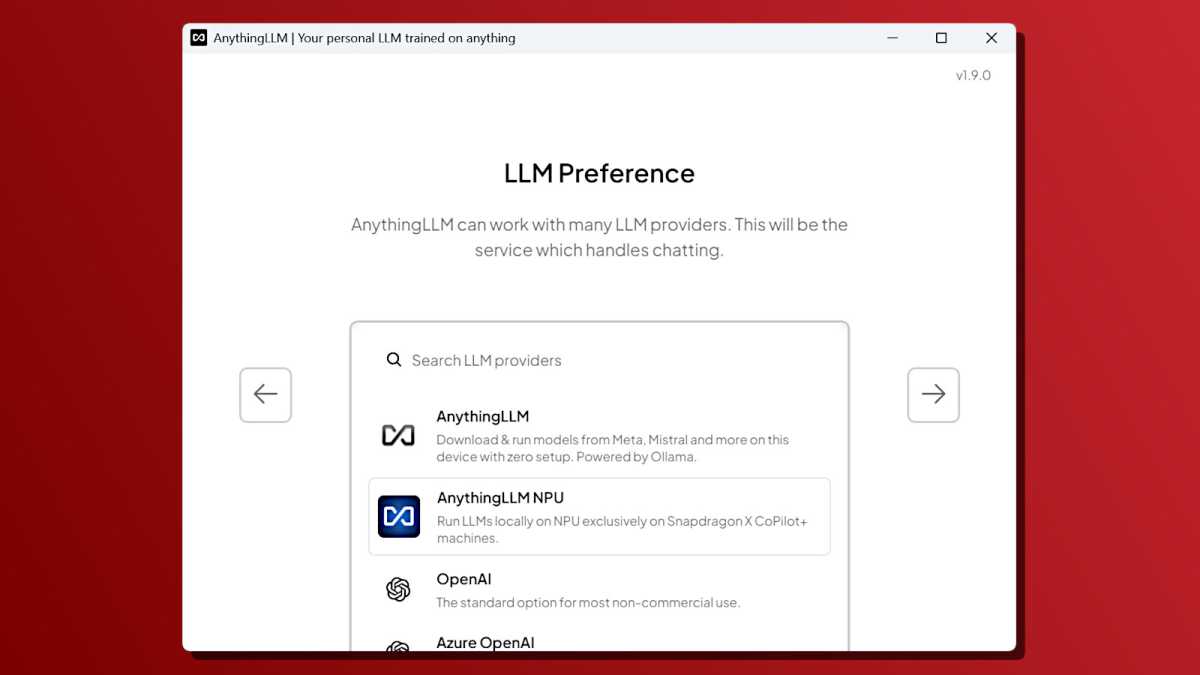
While trawling the web to find out if there were any popular local LLM tools that supported NPUs, I discovered this one: AnythingLLM. This tool has an NPU backend that supports the Qualcomm Hexagon NPU on Qualcomm Snapdragon X systems. But that’s it. No support for NPUs on Intel or AMD systems.
Qualcomm has an excited blog post talking about this software. When I downloaded it to try it out on my Qualcomm Snapdragon X-powered Surface Laptop, I ran into a Windows SmartScreen warning—that’s the kind of error you see when you download a rarely used program that Microsoft’s security defenses aren’t familiar with.
Chris Hoffman / Foundry
What does that mean? Here’s the single most polished solution for running local LLMs on an NPU… and no one is using it. It’s so off the beaten path that it trips Windows’ security warnings.
AnythingLLM is only one example of the problem. There are other apps that supports LLMs, but they’re mostly confined to developer tech demos. For example, Intel has OpenVINO GenAI software intended for developers, but it’s nowhere close to the “just a few clicks” experience of LM Studio and other popular GPU-based local AI tools.
NPUs were supposed to be mainstream, but GPUs are winning
What’s funny is that NPUs were supposed to democratize local AI. The idea was that GPUs were too expensive and power-hungry for local AI features. So, instead of a PC with a discrete GPU, people could run local AI features on a power-efficient NPU. GPUs were the “enthusiast” option while NPUs would be the easy-to-use “mainstream” option.
That dream hasn’t just failed to materialize—it has totally collapsed. If you want easy-to-use local AI tools, you want a PC with a powerful GPU so you can use the “just a few clicks” tools mentioned above. If you really want to use local AI on a lightweight laptop with an NPU, you’ll either have to dig through obscure tech demos designed for developers or be limited to the handful of Copilot+ PC AI features built into Windows.
But those features are toys compared to the kinds of local LLMs that anyone with a GPU can run in LM Studio—in just a few clicks. Even if we’re just talking about AI-powered webcam and microphone effects, the free and easy-to-use Nvidia Broadcast app delivers much more powerful effects than Microsoft’s Windows Studio Effects solution… and all you need is a PC with a modern Nvidia GPU.
Microsoft shot itself in the foot
Since the launch of Copilot+ PCs, Microsoft has repeatedly told the people who are actually using local AI tools (like LM Studio, Ollama, Llama.cpp, and others) that AI PCs aren’t for them.
Microsoft was very clear that built-in Windows AI features should only run on NPUs and aren’t suitable for use on GPUs. Even if you care about local AI, Microsoft says you can’t have built-in Windows AI features on your NPU-lacking PC. I found that out the hard way with my $3,000 gaming PC that can’t run Copilot+ features.
As a result, local AI users have responded by ignoring the AI features built into Windows. Or in other words, Microsoft has created two different local AI experiences:
- The NPU-powered Copilot+ PC playground full of little tech demos that don’t do much. People with these “AI PCs” are largely unimpressed and think local AI can’t do much.
- The GPU-powered PC experience full of open-source tools that Microsoft ignores. People using these “AI PCs” realize that local AI is interesting, but they don’t engage with any Microsoft AI tools.
What a complete mess.
If Microsoft, Intel, or another big company had paid software engineers to focus on integrating NPU support into existing local AI tools with real-world adoption, perhaps we’d be in a different spot. Instead, I’m left looking at the great NPU push and concluding that it was just marketing that failed to deliver on what it promised.
It’s no wonder that Microsoft is now talking about how “every Windows 11 PC is becoming an AI PC.” But what does that even mean? You still need a powerful GPU for real local AI. If Microsoft wants to make every Windows PC an “AI PC” by talking up the cloud-powered Copilot chatbot, they could have done that years ago—but that wouldn’t have helped the PC industry sell so many “AI laptops.”
It’s the great NPU failure—the big push for NPUs has amounted to diddly-squat. If you want local AI, just get a PC with a powerful GPU. You’ll be disappointed if you try taking the NPU path.
