


At a glance
Expert’s Rating
Pros
- Includes tripod, VESA mounts
- Includes a monitor sleeve with velcro
- Has two USB-C ports, both with Power Delivery
- High brightness for the price
Cons
- Contrast performance doesn’t stand out
- Modest color performance and accuracy
- Limited menu and image quality options
Our Verdict
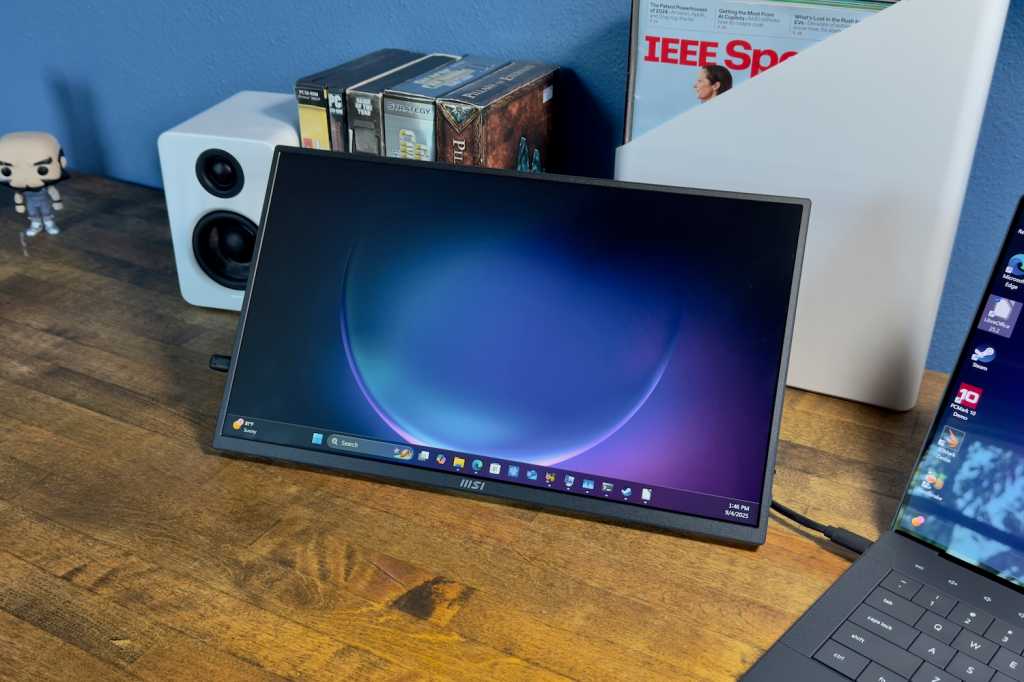
The MSI Pro MP165 E6 is a versatile option for shoppers who need a budget portable monitor that can be used with a VESA wall mount, a conventional monitor arm, or even a tripod.
Price When Reviewed
This value will show the geolocated pricing text for product undefined
Best Pricing Today
Best Prices Today: MSI Pro MP165 E6
£141.26
Budget portable monitors are a dime a dozen, and to be frank, many are interchangeable. That’s because most use the same IPS-LCD display panel technology, offer the same or similar ports, and are similar in size. The MSI Pro MP165 E6 also follows these trends but stands out with tripod and VESA mount options.
Read on to learn more, then see our roundup of the best portable monitors for comparison.
MSI Pro MP165 E6 specs and features
The MSI Pro MP165 E6’s basic specifications are similar to most budget portable monitors. It has a 15.6-inch IPS-LCD display (despite the giant “16” badge on the box) with 1920×1080 resolution. This is standard for any sub-$100 portable monitor.
- Display size: 15.6-inch 16:9 aspect ratio
- Native resolution: 1920×1080
- Panel type: IPS-LED
- Refresh rate: 60Hz
- Adaptive Sync: Yes
- HDR: None
- Ports: 1x HDMI 2.0b, 2x USB Type-C with 15 watts of Power Delivery
- Audio: 2x 1-watt speakers
- Additional features: Built-in kickstand, 1/4 in. standard tripod mount, 75x75mm VESA mount
- Dimensions: 14.04 x 8.28 x 0.55 inches
- Weight: 1.72 pounds
- Price: $89.99 MSRP
However, the MSI offers a few extra features that are less common. It has a built-in kickstand, a 1/4-inch tripod mount, and a 75x75mm VESA mount. These extras are subtle but make the monitor more versatile.
MSI Pro MP165 E6 design
The MSI Pro MP165 E6’s design lives up to its “Pro” badging.
At a glance, the portable monitor appears to be a slim plastic slab that’s similar to dozens of competitive portable monitors. It measures just 0.55 inches thick and weighs 1.72 pounds. Both figures are low but typical for a portable monitor.
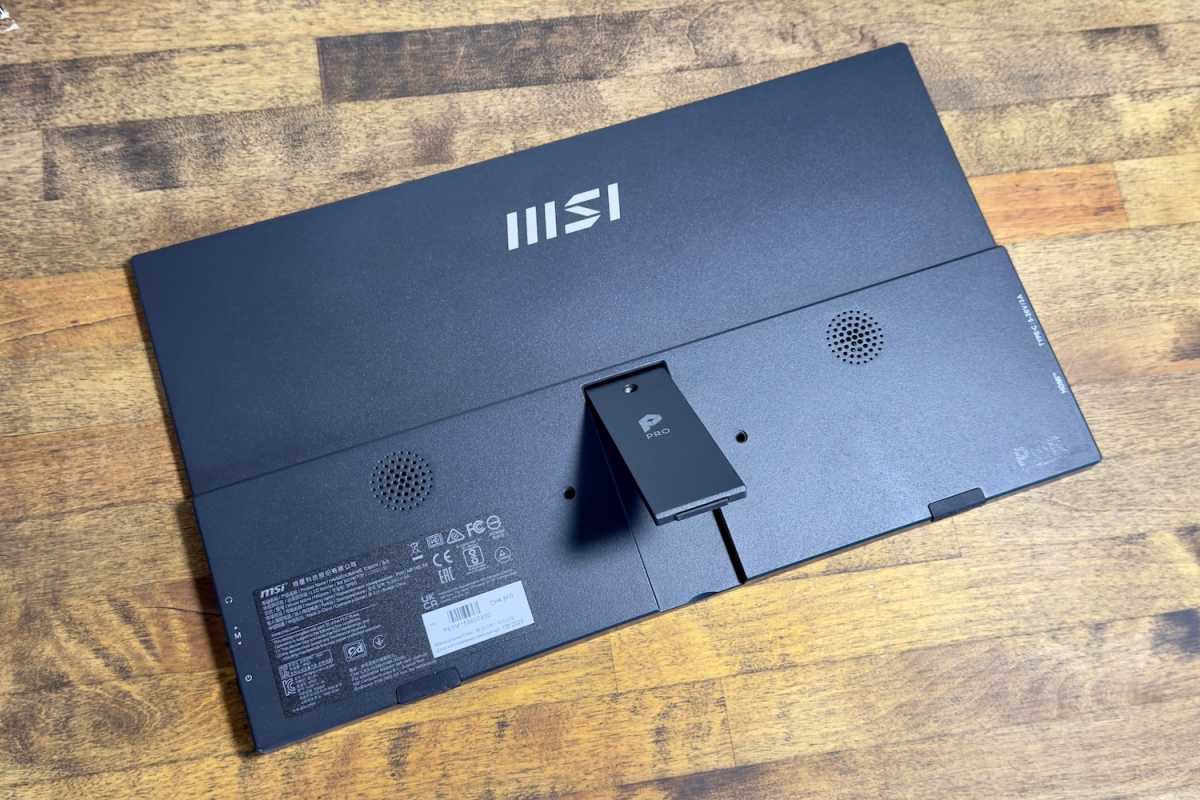
Flip it around, though, and you’ll find three important features. The monitor has a kickstand, a 1/4-inch tripod mount, and a 75mm VESA mount.
Matthew Smith / Foundry
First up, the kickstand, which is the most common of the MSI’s three extra features. Kickstands are often used by portable monitors, though most budget monitors instead have a fabric stand or cover. The kickstand is small but keeps the monitor firmly angled at the desired position and is aided by two small rubber feet, one on each side of the monitor, which keeps the monitor from moving when bumped. Its range of tilt is a bit limited, however, and portrait orientation is not possible.
The monitor also has two mounting options: a 1/4-inch tripod mount and a 75mm VESA mount. Both are uncommon for a portable monitor and nice to see at this price. These mounts are useful for photographers, videographers, YouTubers, TikTokers, and anyone else who needs a low-cost display for monitoring their content. They also make it possible to use the display as digital signage, on a wall in your home, and in other less common situations.
MSI ships the monitor with a cloth sleeve that closes with velcro. It’s not fancy but adds some protection against bumps and scratches. The inclusion of a velcro flap to secure the monitor is also appreciated. Budget monitors sometimes have a sleeve that does not include a flap, strap, or other physical way to keep the display secure when stowed.
MSI Pro MP165 E6 connectivity
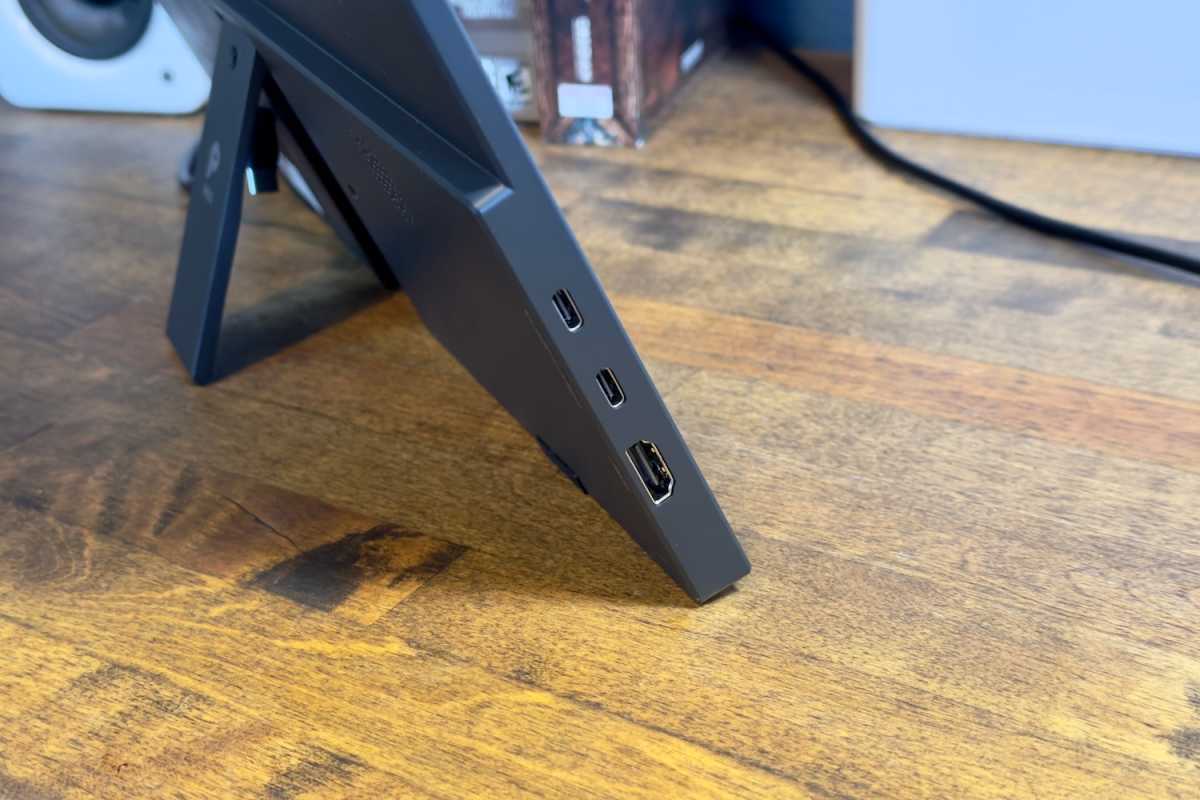
Three ports line the MSI Pro MP165 E6’s left flank; one full-sized HDMI 2.0 and two USB-C. The USB-C ports both support DisplayPort and 15 watts of Power Delivery, so both can drive a single-cable connection to the monitor if you have a laptop, or other device, that can output both video and 15 watts of power over USB-C. The monitor also has a 3.5mm audio jack for audio pass-through.
The location of the ports could be better. All three are on the left, which can be annoying if you intend to place the monitor to the right of your primary display.
Matthew Smith / Foundry
The portable monitor also lacks a power brick, which you’ll need if you send a video signal to the monitor over HDMI, or over USB-C from a device that can’t deliver power. This is common in the sub-$100 monitor arena, though.
On the plus side, the monitor ships with both USB-C and HDMI cables, and the cables have a 90-degree connection on one side. That’s handy, as it reduces desk clutter and makes the cables easier to route if mounting the monitor to a wall mount or tripod mount. Cables with 90-degree connections are inexpensive, but they’re not free (typically $8 to $10 a cable, and a few bucks more than cables with a standard connector). Their inclusion is a nice bonus for a monitor that retails at an MSRP of just $89.99.
The MSI Pro MP165 E6 is a budget portable monitor that stands out from most competitors with several features that are uncommon in the sub-$100 price bracket.
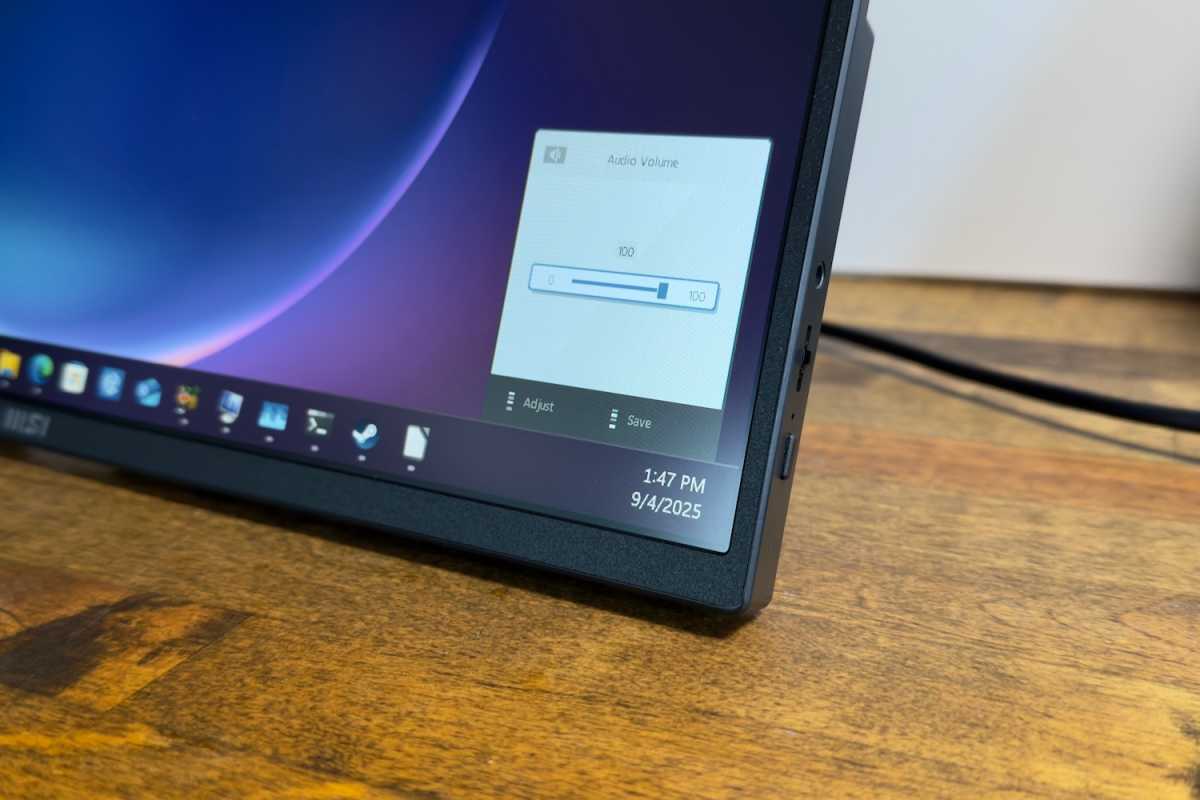
While the MSI Pro MP165 E6 delivers on connectivity, the menu system is disappointing. The monitor provides a power button and toggle on the right flank. The power button works as expected. The toggle, meanwhile, is used for audio and brightness adjustment. And that’s it.
Budget portable monitors are often slim on menu and image quality features, but the MSI is lacking even by the category’s low standards. Competitors like the InnoView Portable Monitor offer a wider range of features and image quality adjustments.
Matthew Smith / Foundry
The monitor is compatible with MSI’s Display Kit utility, which is available for Windows 11 and Windows 10. Display Kit offers a handful of additional features including preset color modes and RGB color adjustment. These features are not specific to the MSI Pro MP165 E6, however. They work with any monitor including those from other companies.
Audio is provided by a pair of 1-watt speakers on the rear of the monitor. They deliver decent volume, which makes them usable for listening to podcasts or a video call, but they’re quickly overwhelmed by more complicated content like music, movies, or games. Many budget portable monitors have the same problem, though I found the speakers on the InnoView Portable Monitor more listenable.
MSI Pro MP165 E6 SDR image quality
The MSI Pro MP165 E6 has an MSRP below $100. Monitors in this price bracket universally compromise image quality to achieve attractive pricing, but some sacrifice more than others. MSI’s approach is practical, focusing on usability over image quality.
Matthew Smith / Foundry
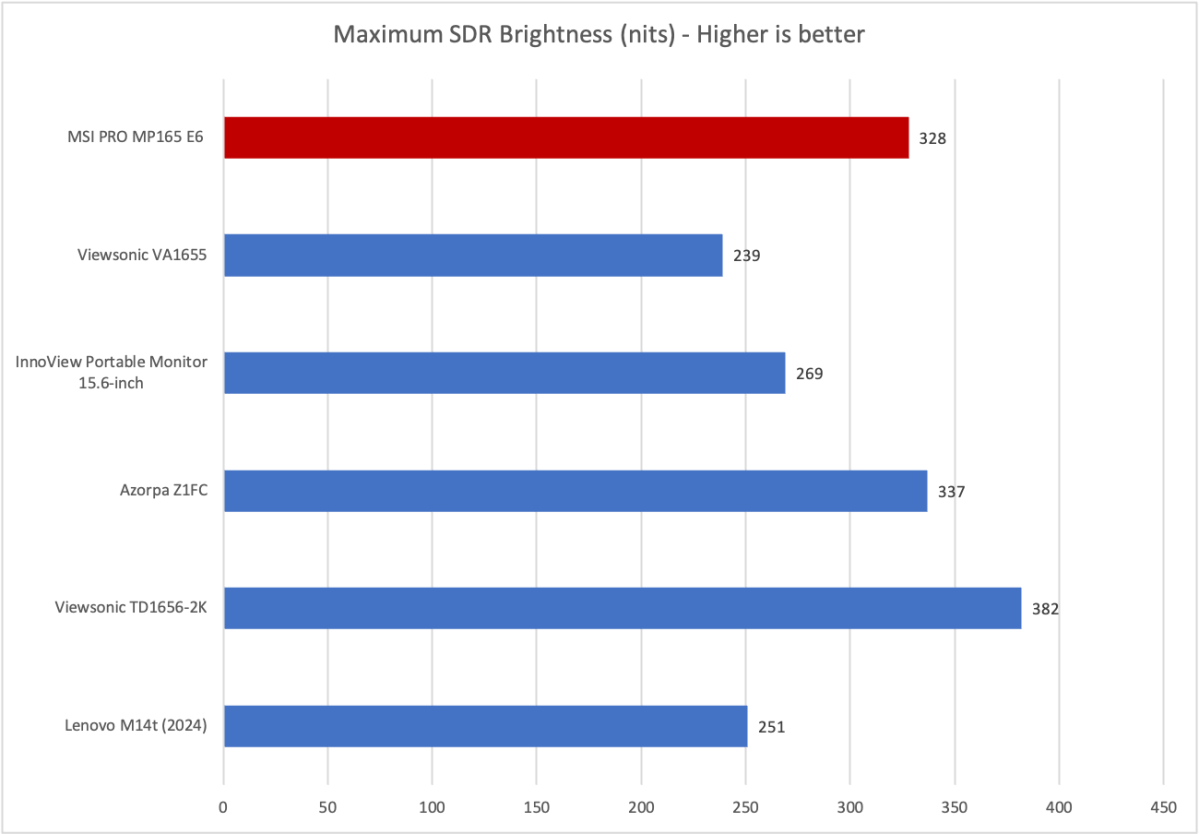
First up is brightness, where the MSI Pro MP165 E6 achieves a solid 328 nits at its peak. That’s a good result for a portable monitor, and while not the best available, it’s superior to competitively priced alternatives like the Viewsonic VA1655 and InnoView Portable monitor.
Brightness isn’t exciting, but it’s important. Many budget portable monitors are so dim that they can prove a bit frustrating to use in a brightly lit office or near sunlit windows. The MSI is still overwhelmed in very bright conditions, but handles harsh lighting better than most alternatives in this price bracket.
Matthew Smith / Foundry
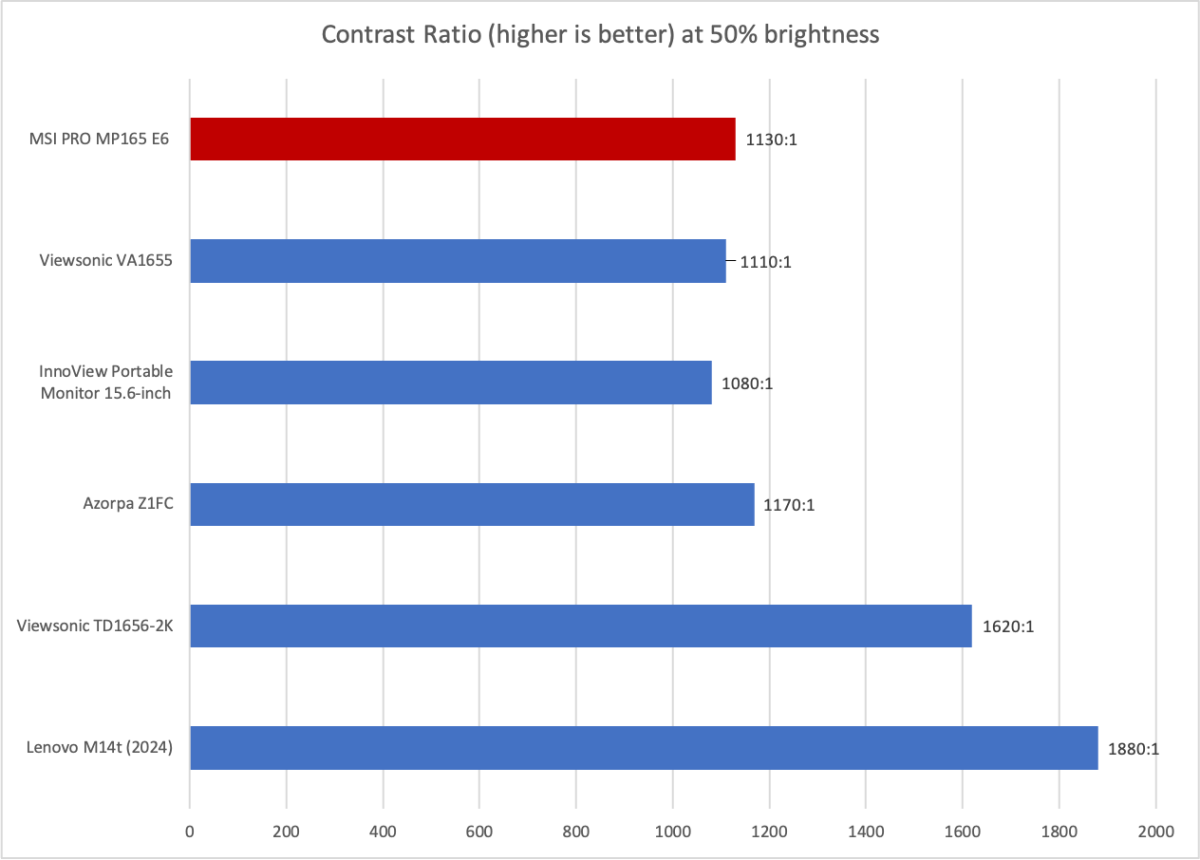
Contrast is typical for the category. MSI delivers a solid mid-pack result that slightly exceeds the price-comparable alternatives. Some IPS-LCD portable monitors, like the Lenovo M14t and Viewsonic TD1656-2K, can deliver much better contrast, but they’re also more expensive.
It’s worth mention that all of these IPS-LCD portable monitors offer limited contrast if compared to OLED alternatives. IPS-LCD is noticeably dull and washed-out compared to OLED. However, OLED portable monitors are quite a bit more expensive, with the most affordable options starting around $200.
Matthew Smith / Foundry
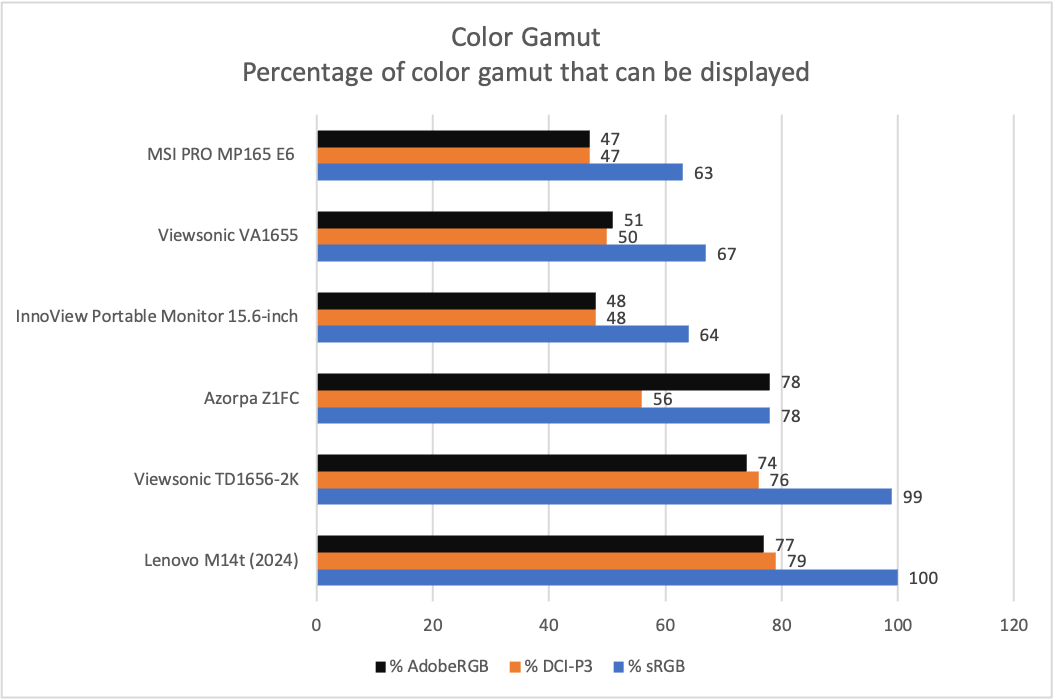
Color gamut is where the MSI Pro MP165 E6 falls towards the bottom of the budget competition. It has a very limited color gamut that covers just 63 percent of sRGB and 47 percent of both DCI-P3 and AdobeRGB.
This is average for a budget portable monitor, and far behind most expensive alternatives. The MSI’s poor color performance is less of an issue if you plan to view documents, browse the web, or use it in content creation roles where color is not as important (such as using the monitor as a teleprompter). Image and video editing, however, is a no-go, as the monitor lacks the range of color needed to display an image with accuracy.

Matthew Smith / Foundry
Perhaps it’s no surprise, then, that color accuracy also falls short. The monitor’s average color error of 2.5 is towards the high end for a portable monitor. And the real-world result is worse than the average might suggest, as color accuracy spiked in both the blue and red hues. I found that red hues looked too brown or orange and that blue hues tended towards cyan.
Sharpness, on the other hand, is a perk. A resolution of 1920×1080 isn’t news in 2025 but, spread across a 15.6-inch display, it results in a pixel density of about 141 pixels per inch. That’s better than a 27-inch 1440p display (about 109 pixels per inch). The image generally looks sharp and small text is rendered well.
The MSI Pro MP165 E6’s overall image quality is tilted towards its professional marketing, though with some caveats. This is not a monitor for professional photo or video editing but, rather, a budget portable monitor for office productivity, digital signage, collaboration, and other tasks where color performance is less of a concern.
MSI Pro MP165 E6 HDR image quality and motion
The MSI Pro MP165 E6 doesn’t support HDR. That might seem like a negative, as many budget portable monitors claim HDR support. However, the truth is that while some competitors list HDR support, the quality of the HDR is extremely low. MSI’s decision not to support HDR is more honest, in my opinion.
Motion clarity, meanwhile, is average for a modern IPS LCD display. The monitor has a refresh rate of 60Hz and doesn’t support Adaptive Sync, so while motion blur is tolerable overall, it’s nowhere near what monitors with a higher refresh rate or OLED panel can provide. Still, this is a budget monitor, so modest motion clarity is to be expected.
Should you buy the MSI Pro MP165 E6?
The MSI Pro MP165 E6 is a budget portable monitor that stands out from most competitors with several features that are uncommon in the sub-$100 price bracket. The monitor’s image quality is rather limited, but it has a tripod mount, a VESA mount, and a useful built-in kickstand, plus 90-degree cables for better cable management and a decent carrying case. While none of these extras will set your hair on fire, they’re handy and make MSI’s portable monitor more versatile than its competitors.
