


Pros
- Potent CPU in a compact box
- Expandable memory and (especially) storage
- Many high-bandwidth ports
- Integrated power supply with USB-C power delivery
Cons
- Integrated graphics can’t compete with discrete chips
- Tricky value consideration compared to laptops
The Minisforum AI X1 Pro is a commendable little desktop with a thoughtful design, high utility and a minimal footprint if you want a Windows alternative to the Mac Mini. It looks like a pre-2024 Mac Mini (before Apple shrunk it with the recent M4 models), and it’s built around a relatively powerful mobile processor, the AMD Ryzen AI 9 HX 370. What sets it apart is the considerable number of connections and commendable upgradability. And there aren’t a lot of name brand mini PCs catering to consumers — a lot are intended for cube farmers, rack mounts or workstations (like HP’s Z series).
The X1 Pro isn’t for everyone, though. If you need high-power graphics, the integrated Radeon 890M graphics can’t hold a torch to the integrated 140V graphics in Intel’s 200V series mobile chips much less discrete chips, like the mobile Nvidia GeForce RTX 4070 in Minisforum’s own AtomMan G7 Ti.
Don’t miss any of our unbiased tech content and lab-based reviews. Add CNET as a preferred Google source on Chrome.
The starting manufacturer price of the AI X1 Pro may also seem a little hard to swallow at $1,229, but it was discounted to $899 the entire time I tested it and tends to be about $1,000. For reference, the base M4 Mac Mini is only $599. But unlike the Mac, the value of the AI X1 Pro becomes clear when you want to upgrade: it has three M.2 slots for SSD and swappable memory, allowing for up to 96GB of memory and 12TB of storage that you could add for less than an M4 Mac Mini with 32GB of memory and just 2TB of storage. If you’re not sure you’ll need the extra ports or expandable memory and storage, a laptop based on the same chip may be a better value.
Minisforum AI X1 Pro
| Price as reviewed | $1,229 |
|---|---|
| CPU | 2.0GHz AMD Ryzen AI 9 HX 370 |
| Memory | 64GB DDR5-5600 |
| Graphics | AMD Radeon 890M (Integrated) |
| Storage | 1TB NVMe M.2 PCIe Gen 4 SSD (Kingston OM8PGP41024Q-A0), SD card slot |
| Ports | 2 x USB 3.2 Gen 2 Type-A, 2 x USB 4, 1 x USB 2.0 Type-A, 1x Oculink, 3.5mm audio, 1 x HDMI 2.1, 1 x DisplayPort 2.0 |
| Networking | 2 x Ethernet (2.5Gb), MediaTek MT7925 Wi-Fi 7 802.11ax, Bluetooth 5.4 |
| Operating system | Windows 11 Pro 24H2 |
| Dimensions | 7.6 x 7.6 x 1.8 in/195 x 195 x 47.5 mm |
| Weight | 3.8 lbs/1.7kg |
The Minisforum’s AI X1 Pro’s Ryzen AI 9 HX 370 chip incorporates AMD Radeon 890M integrated graphics and doesn’t offer a lot of configuration options. Its configurations start with 32GB of memory and 1TB of storage at a base price of $1,129. Doubling the memory to 64GB, as tested here, raises the price to $1,229 (discounted to $979). Finally, Minisforum offers a configuration with 96GB of memory and 2TB of storage for $1,369 (on sale for $1,119).
Minisforum also offers the AI X1 mini PC, but despite the similar naming, it’s an entirely different machine, with a much smaller case and lower-end CPU.
Fast, but not super fast
It’s potent for a mini PC. It may not be as small as some other options, but you’d be hard-pressed to go much smaller without making some more significant compromises. The Ryzen AI HX 370 is quite fast here and not likely to face the kind of performance constraints it might have in a tight laptop chassis. It offers excellent single-core performance that can rival the Intel Core i9-14900HX, and its multicore performance is exceptional thanks to its 12-core/24-thread design. In Cinebench R24 and Geekbench 6, it still stacks up well against the Intel Core i9-14900HX for multicore performance and outpaces the M4 Mac Mini, though can’t quite hold a torch to the performance of the M4 Pro or Intel Core i9-14900KF chips.
The graphics performance isn’t a significant leap forward for integrated GPUs, however. Next to the Intel Core Ultra 7 258V’s Arc graphics, as found in the HP OmniBook Ultra Flip 14, the Minisforum AI X1 Pro’s AMD Radeon 890M offers comparable performance. The system could run Shadow of the Tomb Raider at its highest graphics preset at 1080p but only averaged 37fps. If you’re thinking of gaming on this tiny PC you’ll likely need to dial down settings unless you play undemanding mobile games. You also have the option to attach an eGPU dock; Minisforum’s is $99, but you’ll also need a graphics card and power supply.
The AI X1 Pro is effectively designed for the performance it musters. Even while running under load, the system remains mostly quiet. Its fans kick in but run at a very low level while still managing their job. Running 3DMark’s Steel Nomad Lite stress test, the AI X1 Pro managed to settle in at a CPU temp below 70°C, keeping the fans quiet and sustaining performance with minimal variability across the 20 runs that comprise the test.
Designed with upgrades in mind
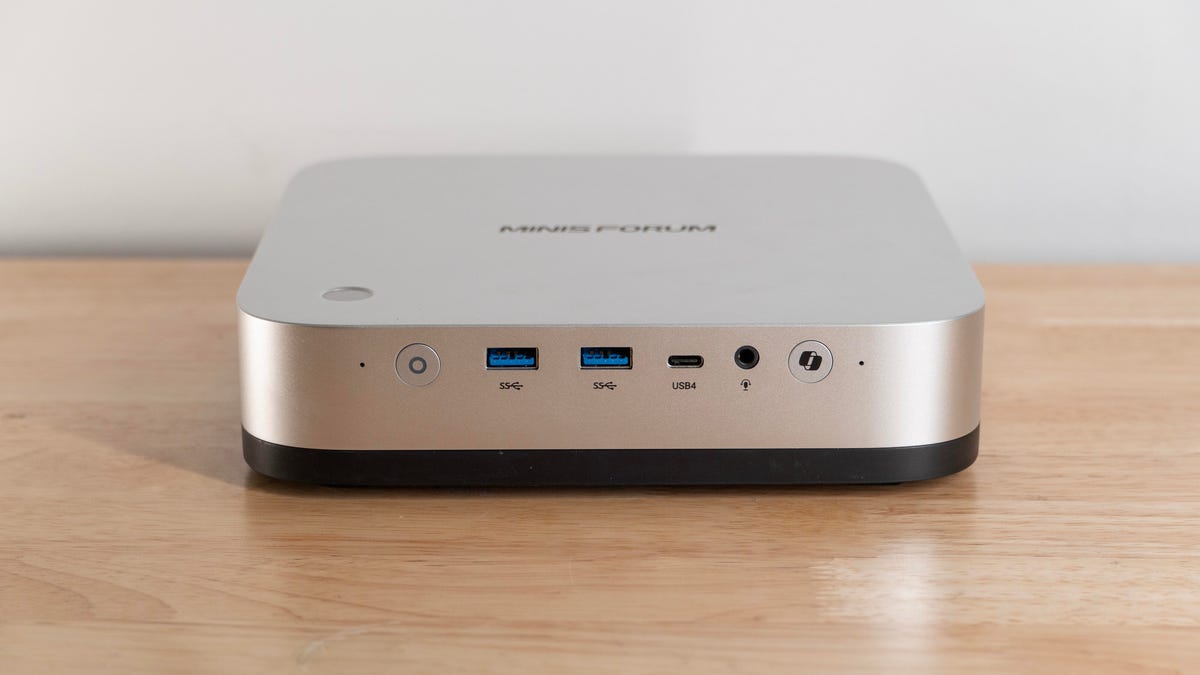
The AI X1 Pro’s design is in line with Apple’s littlest desktop circa 2023 and earlier, before the jump to the M4 chip, but the resemblance of its silver-and-black frame is striking. The most obvious differentiation: The AI X1 Pro is covered in ports and buttons. You’ll find multiple USB-A and USB-C ports on the front and back, the latter with USB4 support. The rear one even supports 100W power delivery in case you don’t want to use an AC cable (I was able to run the system off a 65-watt USB-C laptop charger I had handy, although this came with massive performance penalties, more than halving the system’s Geekbench scores). The rear includes HDMI 2.1 and DisplayPort 2.0 ports, and an Oculink connector for the company’s eGPU dock.
That’s a lot of connectors for a PC its size.
Minisforum puts an emphasis on networking with the AI X1 Pro, too. It features Wi-Fi 7 for wireless but the rear also has two 2.5Gbps Ethernet ports. And a nod to the creatives: one side of the AI X1 Pro includes a full-size SD card slot. The system even comes kitted with power and Windows Copilot buttons on the front and a fingerprint scanner on the top.
The AI X1 Pro’s compact design can help create a clean, minimalist workspace, much like Apple’s Mac Mini. The PC can sit flat on a desk but Minisforum includes a small stand for vertical mounting as well. Because the system has an integrated power supply, it doesn’t need an external power brick cluttering up your desk (something even the larger Minisforum AtomMan G7 Ti neglected).
While Minisforum may have taken inspiration from Apple in its design, it clearly didn’t take it too far. The inside of the AI X1 Pro is user accessible for aftermarket upgrades. The case has four large screws and one small screw (hidden under a rubber cover) to open it. From there, you remove eight small screws to (carefully) lift an assembly holding the speakers, power supply and one fan with corresponding cables still attached to access the memory and storage.
You can swap memory and SSDs.
The system supports up to 96GB of DDR5-5600 memory via two SO-DIMM slots and there’s room for three M.2 2280 NVMe solid-state drives, allowing a total of 12TB of storage. For reference, Apple’s M4 Pro Mac Mini starts with 512GB of storage and upgrading to just 8TB adds $2,400 to the price. Meanwhile, 12TB worth of quality NVMe storage would only cost between $600 and $800.
In a bit of a surprise for a desktop PC, the AI X1 Pro includes not just speakers but mics. The speakers are a bit grating at even medium volume, but sound clear and clean at lower levels. The mics aren’t impressive, but they do the job and can cancel out some room noise.
The system pulls air in through the bottom, where two fans push it through the system and vent out the rear. This provides airflow over the CPU cooling fin stack and the power supply. The SSDs sit in line with the power supply exhaust but the airflow doesn’t appear to pass over them directly.
Is the Minisforum AI X1 Pro for you?
The Minisforum AI X1 Pro offers a lot in terms of expandability and networking, plus it has a substantial CPU and plenty of ports. If you’re tight on space and want a capable little Windows machine, it’s a good option with more flexibility than the Apple alternative. But if you have enough space, a proper desktop can deliver more performance and flexibility for the money. And if you don’t plan on expanding, you may be better off with a laptop built around the same CPU; it may be more expensive, but a laptop comes with a display.
Geekbench 6 (multicore)
Mac Mini M2 (2023) 10,152Apple Mac Mini M4 (2025) 14,908Minisforum AI X1 Pro 15,358Minisforum AtomMan G7 Ti 16,959
Cinebench 2024 CPU (multicore)
Mac Mini M2 (2023) 601Apple Mac Mini M4 (2025) 958Minisforum AI X1 Pro 1,225Minisforum AtomMan G7 Ti 1,413
Cinebench 2024 CPU (single core)
Minisforum AI X1 Pro 120Minisforum AtomMan G7 Ti 121Mac Mini M2 (2023) 125Apple Mac Mini M4 (2025) 175
3DMark Steel Nomad
Minisforum AI X1 Pro 529Asus Zenbook S 14 882
Procyon Stable Diffusion 1.5
Asus ZenBook S 16 150Minisforum AI X1 Pro 222
Configurations
| Apple Mac Mini M4 (2024) | Apple macOS Sequoia 15.1; Apple M4 (10-core CPU, 10-core GPU); 16GB LPDDR5; 512GB SSD |
|---|---|
| Asus Zenbook S 14 | Microsoft Windows 11 Home; Intel Core Ultra 7 258V; 32GB DDR5 RAM; Intel Arc 140V Graphics; 512GB SSD |
| Asus ZenBook S 16 | Microsoft Windows 11 Home; 2.0GHz AMD Ryzen AI HX 370; 32GB LPDDR5x-7500; integrated Radeon 890M; 1TB SSD |
| Mac Mini M2 (2023) | MacOS Ventura 13.2; Apple M2 (8 CPU cores, 10 GPU cores); 8GB LPDDR5 RAM; 256GB SSD |
| Minisforum AI X1 Pro | Microsoft Windows 11 Pro 24H2; 2.0GHz AMD Ryzen AI 9 HX 370; 64GB DDR5 RAM; AMD Radeon 890M integrated graphics; 1TB SSD |
| Minisforum AtomMan G7 Ti | Microsoft Windows 11 Home; 2.2GHz Intel Core i9-14900HX; 32GB DDR5 5,600MHz RAM; 8GB Nvidia RTX 4070 graphics; 1TB SSD |
