
Close Menu
TechUpdateAlert

    Subscribe to Updates

    Get the latest creative news from FooBar about art, design and business.

    What's Hot

    My Health Anxiety Means I Won’t Use Apple’s or Samsung’s Smartwatches. Here’s Why

    December 22, 2025

    You can now buy the OnePlus 15 in the US and score free earbuds if you hurry

    December 22, 2025

    Today’s NYT Connections: Sports Edition Hints, Answers for Dec. 22 #455

    December 22, 2025
    Facebook X (Twitter) Instagram
    Trending
    • My Health Anxiety Means I Won’t Use Apple’s or Samsung’s Smartwatches. Here’s Why
    • You can now buy the OnePlus 15 in the US and score free earbuds if you hurry
    • Today’s NYT Connections: Sports Edition Hints, Answers for Dec. 22 #455
    • Android might finally stop making you tap twice for Wi-Fi
    • Today’s NYT Mini Crossword Answers for Dec. 22
    • Waymo’s robotaxis didn’t know what to do when a city’s traffic lights failed
    • Today’s NYT Wordle Hints, Answer and Help for Dec. 22 #1647
    • You Asked: OLED Sunlight, VHS on 4K TVs, and HDMI Control Issues
    Facebook X (Twitter) Instagram Pinterest Vimeo
    TechUpdateAlertTechUpdateAlert
    • Home
    • Gaming
    • Laptops
    • Mobile
    • Software
    • Reviews
    • AI & Tech
    • Gadgets
    • How-To
    TechUpdateAlert
    Home»How-To»Microsoft is testing its own AI browser via Copilot Mode for Edge
    How-To

    Microsoft is testing its own AI browser via Copilot Mode for Edge

    techupdateadminBy techupdateadminJuly 28, 2025No Comments4 Mins Read
    Share Facebook Twitter Pinterest LinkedIn Tumblr Reddit Telegram Email
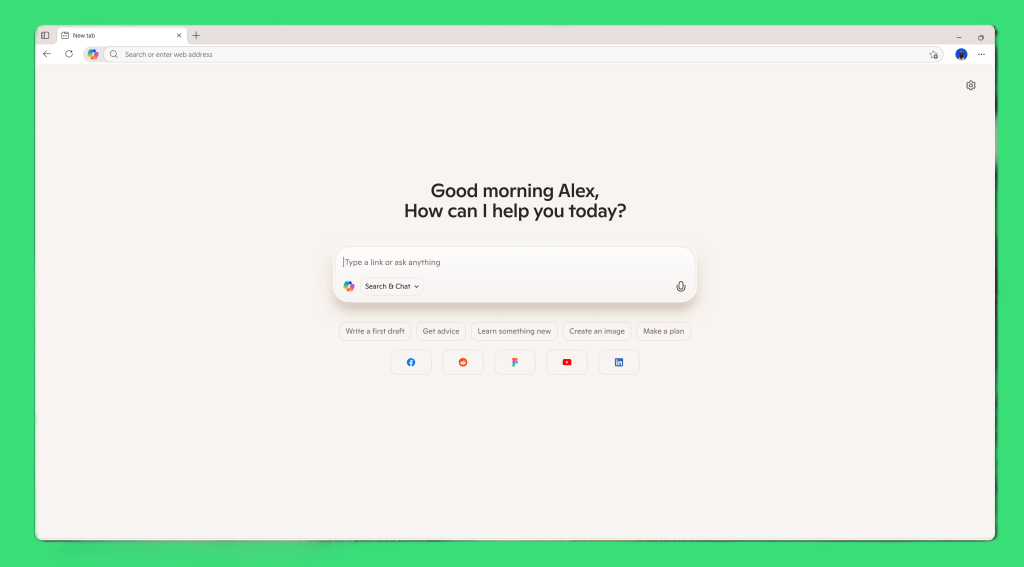
    Microsoft Copilot Mode for Edge new tab
    Share
    Facebook Twitter LinkedIn Pinterest Email

    Beginning today, Microsoft is debuting Copilot Mode for Edge, an experimental version of Edge that places Copilot front and center on new tabs and allows it to see the content on all of your open tabs.

    Tip-toeing into this space, Microsoft is describing Copilot Mode for Edge as “experimental” and “free for a limited time,” suggesting that it will eventually become part of a paid subscription. Usage limits will apply, though Microsoft isn’t saying what they are yet.

    Microsoft is also saying that Copilot Mode is optional, opt-in, and can be flipped on or off via the Settings panel at any time.

    Turn it on, however, and the “new tab” page — which typically mimics the Windows widgets panel with news and other content supplied by MSN and other publications — will be replaced with a simple Copilot box like the one above, similar to the box on the Copilot app itself.

    A closeup of Copilot Mode for Edge’s agentic sidebar.

    Microsoft

    What Copilot Mode appears to offer is Microsoft’s official response to AI browsing efforts from Opera, OpenAI, PerplexityAI, and others, where an AI chatbot fields a user’s search query, rather than presenting a traditional list of links. Microsoft is also showing Copilot Mode for Edge as a showcase for its first foray into agentic AI, where “independent” AI agents go out and perform tasks for you, independently. Finally, a Microsoft demonstration video indicated that it will be able to search through and scrub selected information within a video, rather than forcing you to watch the entire content.

    All of this might be user-friendly, but Microsoft is also demonstrating a callousness to creators that it hasn’t shown before. In a video demonstrating Copilot Mode for Edge and how it could parse a web page for a cookie recipe, the prompt read, “Can you skip the life story and get to the recipe?”
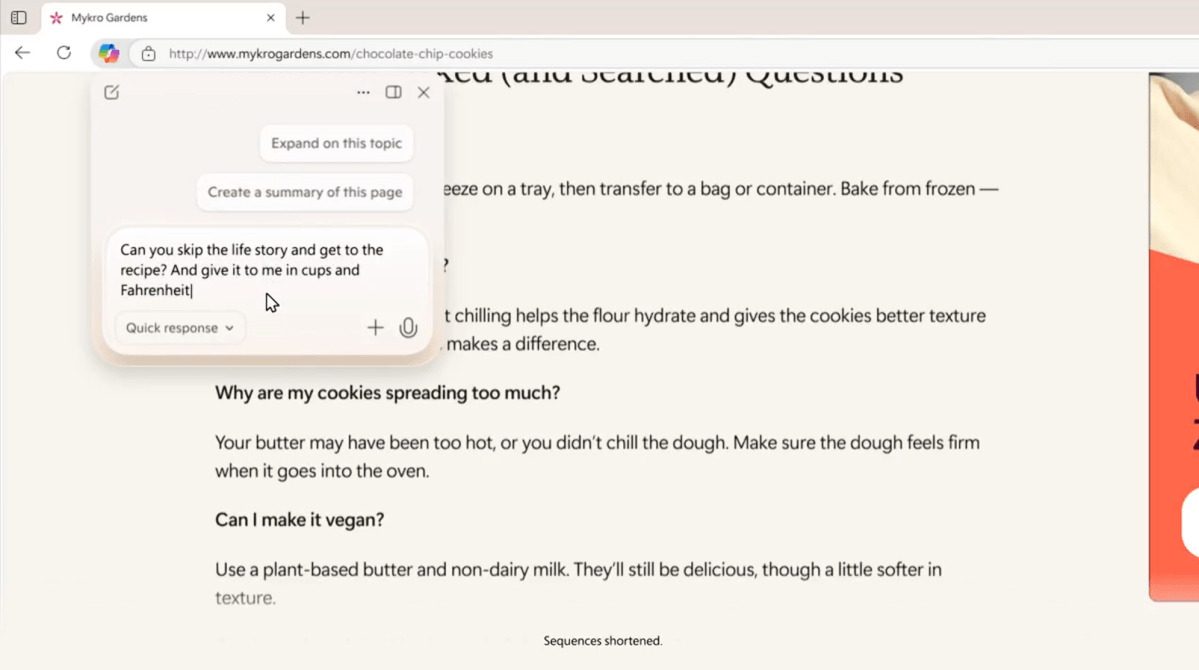
    You can interact with a web page with Copilot, similar to what you can do now.

    The prompt clearly referred to the trend of recipe creators adding additional details to provide context and improve their search rankings, but the Copilot prompt relegated it to the cold efficiency of an order at a fast-food drive-through. It’s similar to how Google’s AI Mode now sees content: something to be mined, not showcased.

    Copilot’s ability to “see” all of your available content pushes further down the path that Windows’ Copilot Vision has already taken. Copilot Vision can already “see” the contents of two applications that you can choose to share with it, and Microsoft is testing the ability to “see” your entire desktop, as well. Copilot Mode will extend this to multiple tab pages — Microsoft’s not specifying a limit, nor how many windows it will apply to. Microsoft also didn’t say anything about excluding tabs opened in private or incognito mode.

    It’s also unclear how quickly Microsoft will move into agentic browsing. An example demonstration asked Edge to compare several tabs, research the weather at a given time of day, and then book a paddleboarding reservation, similar to what was seen in Microsoft’s shopping demonstration at its anniversary celebration. Typically, such transactions require the user to sign off on the final agreement.
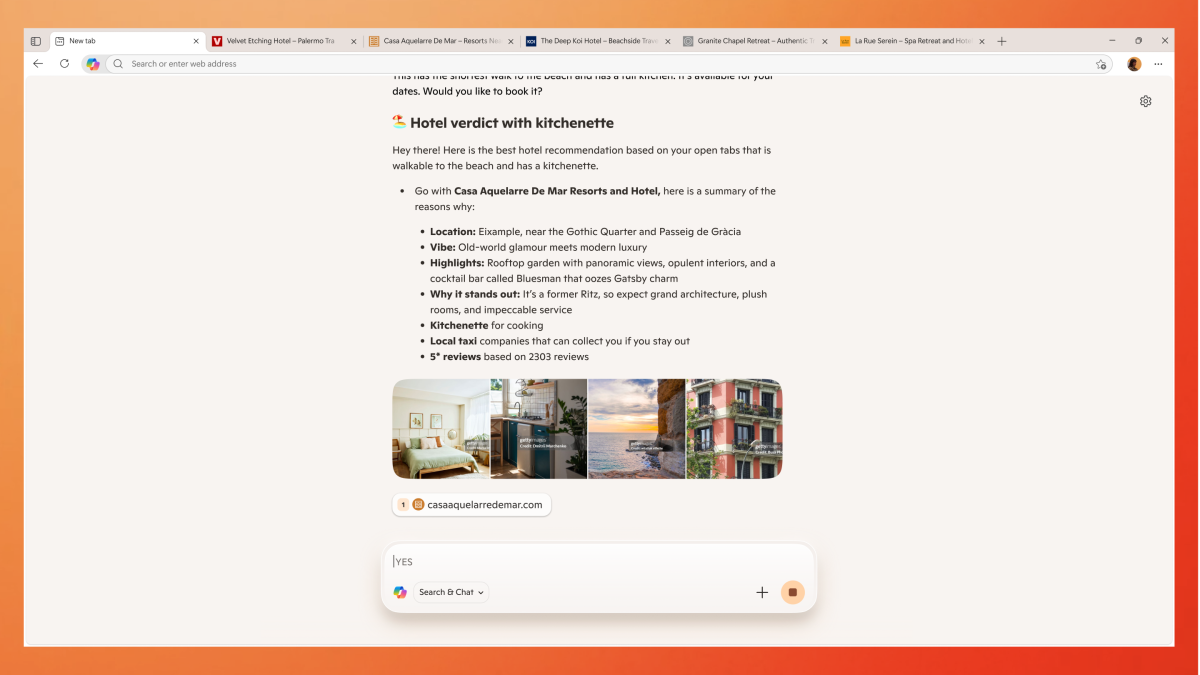
    Microsoft Copilot Mode for Edge multi tabs
    Copilot Mode for Edge will be able to view multiple tabs.

    Microsoft

    A Microsoft representative said that Copilot Mode will “scan” the transcript of a video, so that it can scrub to a particular segment that interests you. Microsoft is also touting Copilot Mode’s ability to suggest the next steps to carry out a particular task, but it sort of does that already.

    Eventually, Microsoft is saying that it will want Copilot Mode to access your browser history and related data to better answer your queries and select new directions and tasks. Whether users will be amenable to that, however, remains to be seen.

    browser Copilot Edge Microsoft Mode Testing
    Share. Facebook Twitter Pinterest LinkedIn Tumblr Email
    Previous ArticleWhat Is MicroSD Express? Everything You Need to Know
    Next Article Roku Streaming Stick (2025) review: The return of an HD classic
    techupdateadmin
    • Website

    Related Posts

    Gadgets

    LG forced a Copilot web app onto its TVs but will let you delete it

    December 19, 2025
    Mobile

    Headphone Conversation Awareness Mode: How It Works and Why You Need It

    December 18, 2025
    Gadgets

    ChatGPT’s adult mode is coming, but you’ll have to wait until next year to try it

    December 15, 2025
    Add A Comment
    Leave A Reply Cancel Reply

    Top Posts

    NYT Strands hints and answers for Monday, August 11 (game #526)

    August 11, 202545 Views

    These 2 Cities Are Pushing Back on Data Centers. Here’s What They’re Worried About

    September 13, 202542 Views

    Today’s NYT Connections: Sports Edition Hints, Answers for Sept. 4 #346

    September 4, 202540 Views
    Stay In Touch
    • Facebook
    • YouTube
    • TikTok
    • WhatsApp
    • Twitter
    • Instagram
    Latest Reviews

    Subscribe to Updates

    Get the latest tech news from FooBar about tech, design and biz.

    Most Popular

    Best Fitbit fitness trackers and watches in 2025

    July 9, 20250 Views

    There are still 200+ Prime Day 2025 deals you can get

    July 9, 20250 Views

    The best earbuds we’ve tested for 2025

    July 9, 20250 Views
    Our Picks

    My Health Anxiety Means I Won’t Use Apple’s or Samsung’s Smartwatches. Here’s Why

    December 22, 2025

    You can now buy the OnePlus 15 in the US and score free earbuds if you hurry

    December 22, 2025

    Today’s NYT Connections: Sports Edition Hints, Answers for Dec. 22 #455

    December 22, 2025

    Subscribe to Updates

    Get the latest creative news from FooBar about art, design and business.

    Facebook X (Twitter) Instagram Pinterest
    • About Us
    • Contact us
    • Privacy Policy
    • Disclaimer
    • Terms and Conditions
    © 2026 techupdatealert. Designed by Pro.

    Type above and press Enter to search. Press Esc to cancel.