



Your PC’s operating system and running applications store countless temporary files on its mass storage device. One of the best-known examples of this is web browsers.
In addition to the temporary data from the cache, there are download logs, cookies, saved passwords, updates downloaded in the background, or log files.
System and application programs don’t always take care of removing such files themselves.
As a result, more and more junk data accumulates on the hard drive, which then wastes unnecessary time and space during backups. This is exactly where the BleachBit program comes in. And the latest version 5.0 is the first major update in around two years.
Bleachbit removes superfluous data such as temporary files or remnants from updates and thus frees up space on the hard drive.
IDG
The new features of version 5.0
Are you already familiar with Bleachbit? Then you’re probably primarily interested in the new features of the fifth version.
First and foremost, this includes the expansion of supported programs. With this version, the tool can remove defective “.desktop” files (i.e. the shortcuts to applications).
In addition, the program now also removes temporary files from Discord, Geary, Librewolf and Microsoft’s Edge browser. The temporary data created by Bash can also be deleted.
As the developers reveal in the release notes, the cleaning up of log files has also been further optimized. The small icon for the desktop panel is more of a minor optimization. This allows you to recognize more quickly whether the software is running and currently active.
How the program works
Essentially, BleachBit can be used for two main tasks.
Firstly, the program completely removes files and directories from the system. And it does so in such a way that they can no longer be restored.
In other words: If you want to securely delete confidential information via a GUI, Bleachbit is the right app for the job. To delete one or more files or a folder as a whole, start the program and then call up the menu in the top right-hand corner of the program window.
Decide on one of the two options and then select the objects to be deleted via the system’s file dialogue.
The second, probably more popular function area deals with cleaning up data rubbish left behind by programs or the system itself. It works like this: Under “Places” on the left-hand side of the program window, you select the applications whose data you want to check and delete.
Depending on the application, further sub-items appear. For Firefox, for example, you will find ten detailed options to get rid of clutter. In order not to reduce performance, you could, for example, leave the cache and cookies as they are, but selectively remove form histories or crash reports.

After starting the program for the first time, switch to the basic settings to set updates or automatically hide unnecessary cleaners.
Sam Singleton
The “System” section is also interesting. It provides access to entries such as the list of programs used, the content of the clipboard or rotating log files. You make your selection here step by step.
If you’re satisfied, it’s best to click on “Preview” first. The test run shows how much memory would be freed up by the action. BleachBit provides a list of all the objects that would be removed if you actually deleted them.
This gives you the option of deciding in advance whether you’ve selected too little or too much. Only when you click on “Clean” does the program actually remove these items.
Once you make your selections, these settings are retained for the future. This means you don’t have to select the deleted objects again each time. BleachBit therefore proves to be a useful helper in everyday life.
Anyone who regularly exchanges data on a system with users from the Apple world will be familiar with the “DS_Store” files. This is where the Mac’s file manager stores meta information about the files. These are completely useless under Linux and Windows, but require storage space. With the corresponding function in BleachBit, you can elegantly get rid of these troublemakers.
Finally, there are two functions that contribute to greater data security.
You can access “Clean up free storage space” via the menu. As the name suggests, this will overwrite free space so that deleted files cannot be restored. You can specify which areas these are under “Drives“.
The entry “Create chaff” requires explanation: BleachBit uses this to insert a number of files in the selected folder according to your specifications in order to fill it. You can then “hide” documents in between that should not be immediately recognizable. Compared to secure encryption, however, this is a rather obscure method.
Command line mode
BleachBit can be controlled entirely via the command line. Without the addition of a parameter, entering “bleachbit” in a terminal starts the GUI. However, if you add “–list” to the call, the program displays all available modules.
bleachbit --list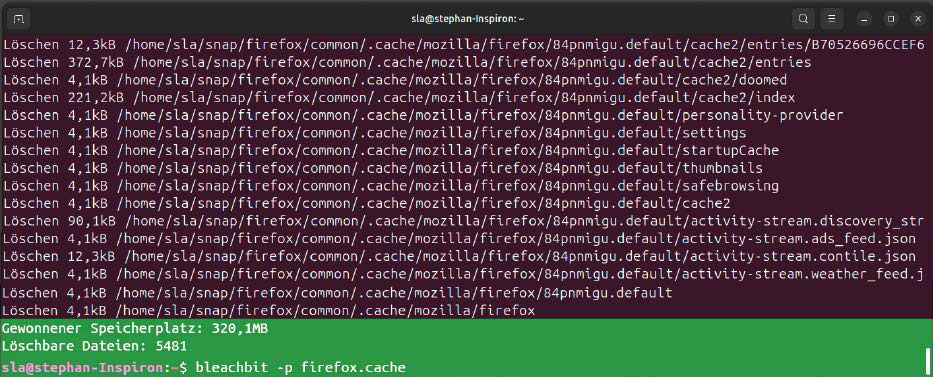
Bleachbit has a complete mode for the command line, which enables complete automation or quick deletion aliases in the terminal.
IDG
The CLI mode is interesting for all those who regularly delete the same data and want to automate this process. Commands such as
bleachbit --clean system.cachecan be used in scripts or even automated as a cron job.
It’s always advisable to check the effects of a “cleaner” in advance. This is done with the switch “–preview” (or “-p”). For example, when
bleachbit --preview firefox.cacheis executed, the program shows which files would be affected, just like on the graphical user interface. If you’re then sure that this is what you want, use the “–clean” (or “-c”) switch.
If you’ve familiarized yourself with programming, you can even write your own cleaners. These are XML files; you can find an example on the project’s Github page.
This article originally appeared on our sister publication PC-WELT and was translated and localized from German.
