


Whether you’re buying a high-end gaming desktop, a compact mini PC, or simply docking your laptop, those accessories you bought 5+ years ago might be showing their age—and even dragging you down.
Believe me when I say that you’ll have a much better PC experience if you upgrade with a handful of accessories that most people overlook or underestimate. After I recently set up my own high-end gaming PC, I realized the blazing-fast GPU and CPU weren’t enough. For a truly elevated experience, I needed to ditch my outdated tech.
Here are some next-level accessories and peripherals you should actually consider upgrading to, and why they’re worth every penny.
A sharp IR webcam with facial recognition
The best modern webcams have built-in infrared capabilities, allowing you to sign into your desktop PC using your face (instead of a password), just as you can on a modern laptop.
When I sit down at my desktop, I hit the spacebar on my keyboard to wake up my PC, then the webcam instantly signs me in using my face thanks to Windows Hello. No typing of a PIN or password. It may sound small, but it still feels magically easy whenever I wake my PC from sleep.
But the IR camera is just one part of a webcam package. I use a Dell UltraSharp webcam, which combines facial recognition with a 4K sensor. It’s one of our favorite Windows Hello webcams. Now I don’t look blurry and unprofessional in my meetings and recorded videos.
A high-quality mechanical keyboard
Mechanical keyboards are one of the best things about using a desktop PC. Even the rare gaming laptop with a built-in mechanical keyboard can’t reproduce the tactile joy of typing on crisp keys with satisfying switches. Plus, mechanical keyboards are customizable—the keycaps, the switches, the RGB, and almost anything else about them.
Take a look at PCWorld’s list of the best mechanical keyboards for shopping advice. You owe it to yourself to try one. If you’d like to save some desk space and don’t find yourself using the number pad on full-sized keyboards, no worries! Consider a TKL (“tenkeyless”) keyboard, which is more compact and omits the number pad.
A separate keypad for macros
Back in 2005, PC geeks loved the idea of the “Optimus keyboard” that sadly turned out to be vaporware. The idea was flashy: a keyboard where every key was actually a little mini display, and the images on each key could change based on context.
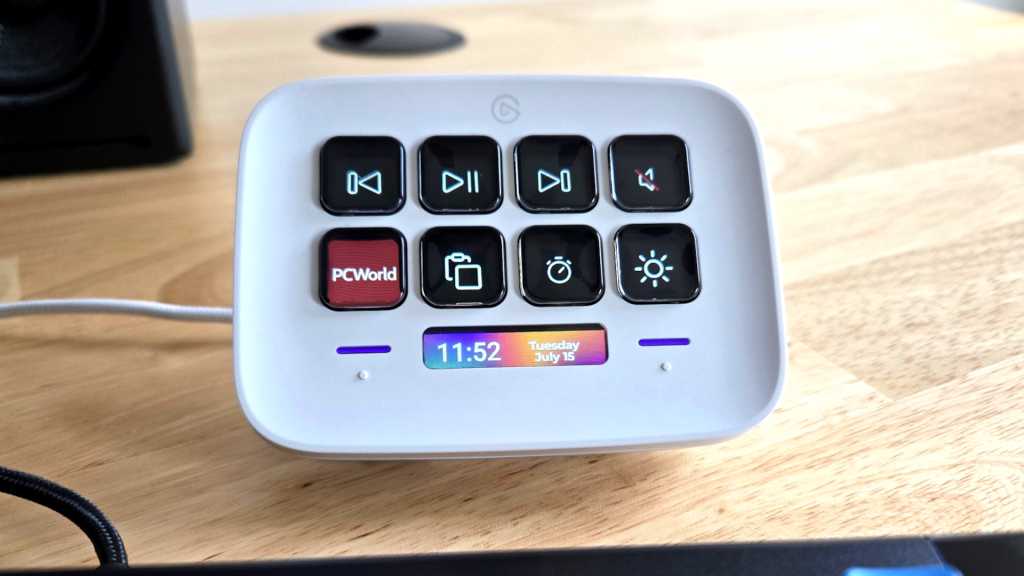
Twenty years later, I recommend grabbing a Stream Deck if that sort of thing sounds interesting. With its customizable keys, you can seriously boost your productivity by configuring each key to trigger actions, launch apps, automate tasks, and perform keyboard shortcuts.
I love the Stream Deck Neo, which is compact and feels just right next to my TKL keyboard that lacks bonus macro keys. For me, the Stream Deck Neo is an essential accessory that speeds up my workflow.
A comfortable mouse that fits your hand
I can’t tell you what the “right mouse” is for you, but I can tell you that finding the right mouse will make a world of difference. If you’re on the computer for hours every day, it’s critical that you’re using a mouse that’s actually comfortable in hand.
Are you already happy with your mouse? Perfect! Nothing to see here, hop on down to the next accessory. But if you aren’t happy with your mouse, it’s time to make that upgrade. You won’t regret it.
Check out PCWorld’s recommendations—best wireless gaming mice, best budget gaming mice, and best overall gaming mice—and try out mice in person at local stores if you can. The various shapes of mice will feel different depending on your grip style, and there’s a lot else that goes into comfort, including size, design, and button placement.
A fresh fabric mousepad
Not all mousepads are equal. In fact, most mousepads aren’t great. The average mousepad is designed more for looks than for performance. Meanwhile, there are uber-premium mousepads with built-in wireless charging that are luxurious but arguably overkill.
I recommend getting a mousepad with a fabric surface. I’m a big fan of SteelSeries QcK mousepads because they’re pretty inexpensive—as cheap as $11 for the medium-sized one I use. The cloth surface feels great and will help you move your mouse precisely and accurately. Learn more about the differences between hard and soft mousepads.
My first QcK mousepad lasted eight years before I replaced it with a new one. At this rate, I expect I’ll buy a third one in another eight years.
A stunningly beautiful 4K OLED monitor
It’s tempting to get a new PC and plug it straight into your existing monitor—and you can definitely do that if you want to. There’s no rule that says you have to buy a new monitor with a new PC. But if your monitor is dated or low-spec, an upgrade could be massive.
Things like 4K resolution, HDR technology, vivid OLED colors, and high refresh rates are more than just marketing terms. They’re actual benefits that you don’t want to miss out on, at least if you want a high-end PC experience while streaming videos or playing games.
And the best part? You can get an incredible PC monitor for a lot less than you might think. Check out our list of the best monitors and maybe even see a few displays in person at a local store to see how they compare.
Desktop speakers worthy of your PC
Speakers aren’t like most other PC peripherals. You can have a fantastic experience with the right PC speakers from decades ago. But the average pair of inexpensive speakers—and especially the speakers built into most PC monitors—don’t offer a great audio experience.
If you use speakers with your PC on the regular, consider investing in a better setup. I own a pair of Audioengine A2 Plus desktop speakers purchased nearly a decade ago, and they’re still going strong. They’re convenient for any desk—just two speakers with no subwoofer required, though you can add a subwoofer for more bass if you want.
Comfortable, high-quality headphones
How are your headphones? You don’t necessarily need modern headphones—if you have a pair you love, then great! Stick with ’em. And if you don’t use headphones at all, fine. Jump on down to the next item.
But if you’ve been settling for a lesser pair of headphones, you should make the upgrade. A high-quality set of cans will transform your audio experience, whether you’re listening to music or gaming. And unless you’re an audiophile, make sure to prioritize comfort over sound quality.
My Sennheiser headphones were on their last legs and I had already repaired them once with a soldering iron. It was time for something new, so I bought Beyerdynamic DT 900 Pro X headphones and love them! You don’t know what you’re missing out on until you get there.
Check out our list of the best gaming headsets, but if you don’t want an integrated microphone or wireless audio, you don’t need a gaming-specific headset. Headphones can be bulky, though, so I also recommend using an AnchorPro under-desk hook.
A microphone that sounds great
Microphones are often overlooked, but they shouldn’t be. Whether you’re participating in video meetings, recording videos, or just voice chatting while gaming, a good microphone is a solid upgrade.
After mixed experiences with microphones built into headsets, I bought a Logitech Blue Yeti a few years ago and haven’t looked back. It’s big, but the sound quality is amazing for the price range. You’ll see professionals using these in YouTube videos, and for good reason.
If you’d rather add a microphone to a headset you already love, there’s always the classic ModMic, too. It’s a microphone you can attach to your existing pair of preferred headphones.
A dongle-free gaming controller
If you’re a PC gamer who uses an older Xbox controller, it may be time to replace it. A modern Xbox controller connects to your PC wirelessly via Bluetooth, and you can also use it as a wired controller by plugging it in with a USB-C cable. Older ones rely on those obnoxious wireless receiver dongles, and who wants to deal with those anymore?
Meanwhile, if you don’t have a PC gaming controller, maybe it’s time to get one. Keyboard-and-mouse setups are fine, but sometimes it’s nice to kick back with a controller. Not sure where to begin? Check out our guide to buying a PC gaming controller you’ll love.
Further reading: The most life-changing PC desk accessories
