
Close Menu
TechUpdateAlert

    Subscribe to Updates

    Get the latest creative news from FooBar about art, design and business.

    What's Hot

    My Health Anxiety Means I Won’t Use Apple’s or Samsung’s Smartwatches. Here’s Why

    December 22, 2025

    You can now buy the OnePlus 15 in the US and score free earbuds if you hurry

    December 22, 2025

    Today’s NYT Connections: Sports Edition Hints, Answers for Dec. 22 #455

    December 22, 2025
    Facebook X (Twitter) Instagram
    Trending
    • My Health Anxiety Means I Won’t Use Apple’s or Samsung’s Smartwatches. Here’s Why
    • You can now buy the OnePlus 15 in the US and score free earbuds if you hurry
    • Today’s NYT Connections: Sports Edition Hints, Answers for Dec. 22 #455
    • Android might finally stop making you tap twice for Wi-Fi
    • Today’s NYT Mini Crossword Answers for Dec. 22
    • Waymo’s robotaxis didn’t know what to do when a city’s traffic lights failed
    • Today’s NYT Wordle Hints, Answer and Help for Dec. 22 #1647
    • You Asked: OLED Sunlight, VHS on 4K TVs, and HDMI Control Issues
    Facebook X (Twitter) Instagram Pinterest Vimeo
    TechUpdateAlertTechUpdateAlert
    • Home
    • Gaming
    • Laptops
    • Mobile
    • Software
    • Reviews
    • AI & Tech
    • Gadgets
    • How-To
    TechUpdateAlert
    Home»Laptops»Lenovo’s new Thunderbolt 5 Smart Dock is an 8K display buffet
    Laptops

    Lenovo’s new Thunderbolt 5 Smart Dock is an 8K display buffet

    techupdateadminBy techupdateadminSeptember 5, 2025No Comments7 Mins Read
    Share Facebook Twitter Pinterest LinkedIn Tumblr Reddit Telegram Email
    Lenovo's new Thunderbolt 5 Smart Dock is an 8K display buffet
    Share
    Facebook Twitter LinkedIn Pinterest Email

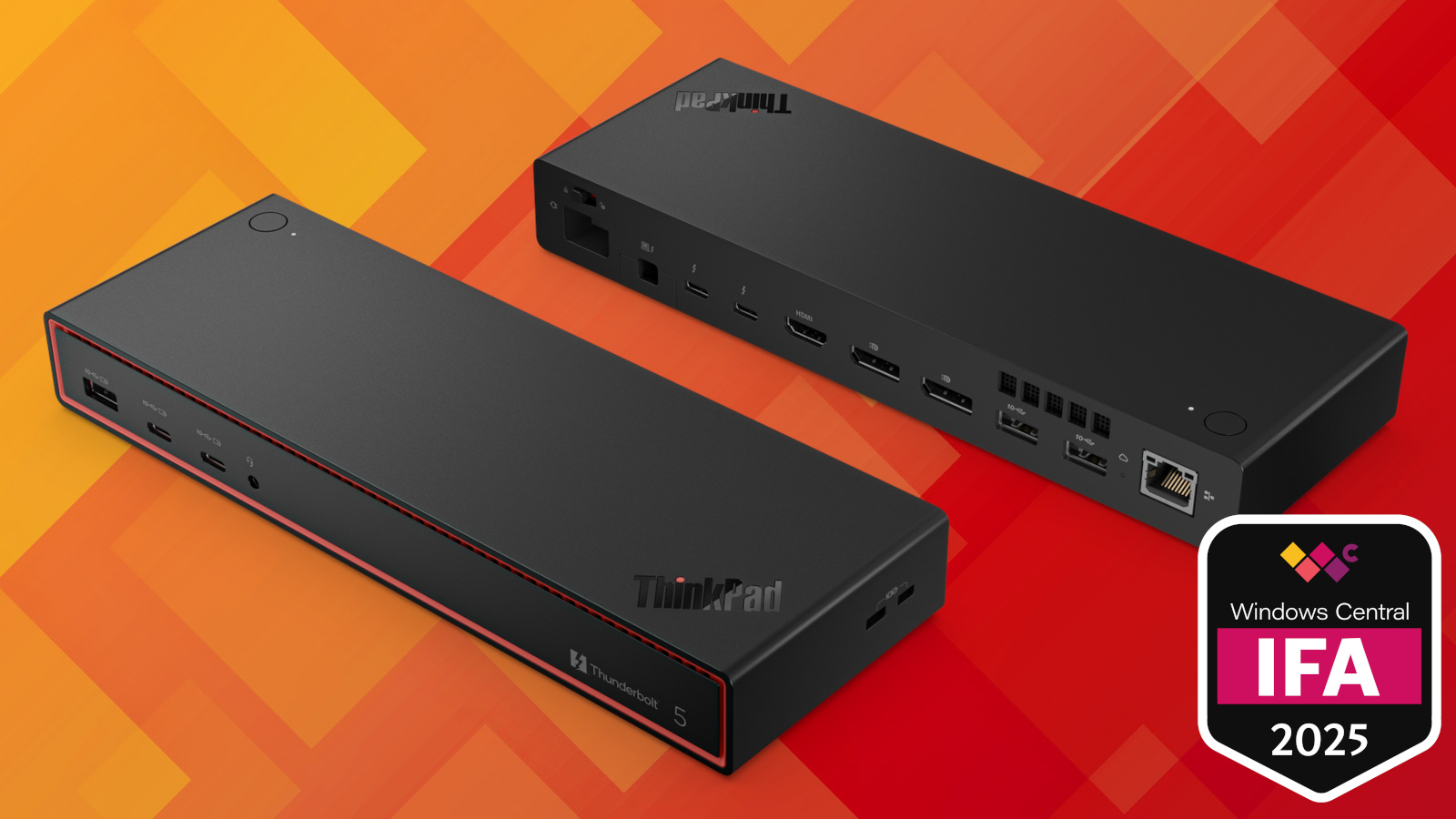
    Thunderbolt 5 is slowly (and I mean slowly) becoming the new standard for laptop connectivity, and Lenovo is looking to keep up with its adoption by announcing a new ThinkPad docking station.

    The Thunderbolt 5 Smart Dock 7500, which is expected to arrive in Q3 2025 at a whopping $549.99 price tag, is one of a trio of docks revealed at IFA 2025.

    Lenovo also showed off the ThinkPad Thunderbolt 4 Smart Dock Gen 2 7500 and the ThinkPad USB4 Smart Dock 5500. These docks are also expected in Q3 2025, but at more reasonable prices ($379.99 and $269.99, respectively).


    You may like

    Three 8K displays and more?

    Image 1 of 4

    A full look at the I/O on the ThinkPad Thunderbolt 5 Smart Dock 7500.(Image credit: Lenovo)

    Lenovo ThinkPad Thunderbolt 5 Smart Dock 7500
    A look at the embedded host cable section on the Lenovo ThinkPad Thunderbolt 5 Smart Dock 7500.(Image credit: Lenovo)

    Lenovo Thunderbolt 5 Smart Dock 7500
    A look at the embedded host cable section with cover removed on the Lenovo ThinkPad Thunderbolt 5 Smart Dock 7500.(Image credit: Lenovo)

    Lenovo Thunderbolt 5 Smart Dock 7500
    A look at the mounting slots on the bottom of the ThinkPad Thunderbolt 5 Smart Dock 7500.(Image credit: Lenovo)

    The two biggest draws to Lenovo’s new ThinkPad Thunderbolt 5 Smart Dock 7500 are likely the impressive display support and the cloud-based management tools.

    Thanks to the inclusion of dual DisplayPort 2.1, an HDMI 2.1 port, and dual downstream Thunderbolt 5 ports, the dock can handle up to three 8K displays each at a 60Hz refresh rate, plus a fourth 4K display also at a 60Hz refresh rate.

    Don’t have any 8K displays lying around? Lenovo says the dock will fall back to dual 4K displays each at 240Hz and two 4K displays each at 120Hz, simultaneously. That’s similar to Dell’s new Thunderbolt 5 Smart Dock (SD25TB5) that I’m eager to test out, capable of four 4K displays each at 120Hz.

    I reviewed the mighty CalDigit TS5 Thunderbolt 5 dock earlier this year, handing it a perfect five stars and a Windows Central Editor’s Choice award in the process. CalDigit’s dock, capable of handling dual 8K displays each at a 60Hz refresh rate, is easily outpaced by the new ThinkPad hardware.

    All the latest news, reviews, and guides for Windows and Xbox diehards.

    The ThinkPad Thunderbolt 5 Smart Dock 7500 likewise pulls ahead in terms of remote management capabilities. Makes sense, as this is a dock designed for professionals and enterprise users.

    Via the RJ45 2.5Gbps Ethernet port, the dock is compatible with Wake-On-Lan (WOL), PXE Boot, and MAC Address Passthrough when connected to a ThinkPad laptop.

    The dock can handle up to three 8K displays each at a 60Hz refresh rate, plus a fourth 4K display also at a 60Hz refresh rate.

    Lenovo says the dock can deliver up to 180W of charging power thanks to PD 3.1, although it doesn’t specify if that number includes USB charging or only host laptop charging.

    Charging capabilities include USB-A ports with up to 12W, USB-C ports with up to 15W, and downstream Thunderbolt 5 ports also with 15W. That’s more than enough to keep smaller accessories charged.

    One feature I love, which each dock includes, is a removable Thunderbolt 5 host cable that connects in a small cutout area, keeping the connection tight while in use. It’s not something I’ve seen on any other dock. You’ll also find mounting slots on the underside, allowing you to get the dock off your desktop without too much effort.

    Here’s a closer look at the specs that make up the ThinkPad Thunderbolt 5 Smart Dock 7500, as well as its two new siblings.

    Swipe to scroll horizontally
    Header Cell – Column 0

    ThinkPad Thunderbolt 5 Smart Dock 7500

    ThinkPad Thunderbolt 4 Smart Dock Gen 2 7500

    ThinkPad USB4 Smart Dock 5500

    Ports

    2x DisplayPort 2.1, 1x HDMI 2.1, 2x Thunderbolt 5, 3x USB-A 3.2 (Gen 2), 2x USB-C 3.2 (Gen 2), RJ45 Ethernet

    2x DisplayPort 1.4, 1x HDMI 2.1, 1x Thunderbolt 4, 2x USB-A 3.2 (Gen 2), 2x USB-C 3.2 (Gen 2), RJ45 Ethernet

    2x DisplayPort 1.4, 1x HDMI 2.1, 2x USB-C 3.2 (Gen 2), 4x USB-A 3.2 (Gen 2), Rj45 Ethernet

    Power

    Up to 180W power output; PD 3.1

    Up to 100W power output; PD 3.1

    Up to 100W power output; PD 3.1

    Display support

    3x 8K@60Hz + 1x 4K@60Hz or 2x 4K@240Hz + 2x 4K@120Hz

    1x 8K@60Hz or 2x 4K@144Hz or 4x 4K@60Hz

    1x 8K@60Hz or 2x 4K@144Hz or 4x 4K@60Hz

    Ethernet

    2.5Gbps; WOL, PXE Boot, MAC address passthrough for ThinkPad laptops

    2.5Gbps; WOL, PXE Boot, MAC address passthrough for ThinkPad laptops

    1Gbps; WOL, PXE Boot, MAC address passthrough for ThinkPad laptops

    Dimensions

    9.25 x 3.15 x 1.18 inches (235mm x 80mm x 30mm)

    8.66 x 3.15 x 1.18 inches (220mm x 80mm x 30mm)

    8.58 x 3.15 x 1.24 inches (218mm x 80mm x 31.5mm)

    Weight

    From 1.29 pounds (586g)

    From 1.21 pounds (547.5g)

    From 1.04 pounds (472g)

    Lenovo also has new ThinkPad docks for Thunderbolt 4 and USB4 laptops

    Image 1 of 3

    Lenovo ThinkPad Thunderbolt 4 Smart Dock Gen 2 7500
    A look at the front and rear ports on the new Lenovo ThinkPad Thunderbolt 4 Smart Dock Gen 2 7500.(Image credit: Lenovo)

    Lenovo ThinkPad Thunderbolt 4 Smart Dock Gen 2 7500
    An angled look at the front, back, and sides of the Lenovo ThinkPad Thunderbolt 4 Smart Dock Gen 2 7500.(Image credit: Lenovo)

    Lenovo ThinkPad Thunderbolt 4 Smart Dock Gen 2 7500
    A look at the lock slots on the end of the Lenovo ThinkPad Thunderbolt 4 Smart Dock Gen 2 7500, which are featured on all three docks.(Image credit: Lenovo)

    As mentioned, Thunderbolt 5’s slow adoption rate among laptops is keeping Thunderbolt 4 a viable alternative. Lenovo’s Thunderbolt 4 Smart Dock Gen 2 7500 (what a mouthful) is thus a better choice for those who don’t plan to upgrade to a TB5 laptop anytime soon or who don’t want to spend as much money.

    👉 Related: Thunderbolt 5 vs. Thunderbolt 4 vs. USB4

    The Thunderbolt 4 dock, with half of the bi-directional bandwidth as Thunderbolt 5 (and a third when TB5 has Bandwidth Boost enabled), supports just one 8K display at a 60Hz refresh rate.

    Should you connect a couple of 4K displays, you’ll get up to a 144Hz refresh rate in each. With four 4K displays, each monitor’s refresh rate tops out at 60Hz. Power delivery falls to a more modest 100W, but Lenovo keeps four USB ports on the front for easy charging at up to 15W.

    The same remote management tools — PXE Boot, WOL, and MAC address passthrough — are available when the Thunderbolt 4 Smart Dock Gen 2 7500 is connected to a ThinkPad laptop.

    Image 1 of 4

    Lenovo ThinkPad USB4 Smart Dock 5500
    A look at the Ethernet port on the Lenovo ThinkPad USB4 Smart Dock 5500.(Image credit: Lenovo)

    Lenovo ThinkPad USB4 Smart Dock 5500
    A look at the classic ThinkPad finish on the Lenovo ThinkPad USB4 Smart Dock 5500.(Image credit: Lenovo)

    Lenovo ThinkPad USB4 Smart Dock 5500
    A look at the front and rear ports on the Lenovo ThinkPad USB4 Smart Dock 5500.(Image credit: Lenovo)

    Lenovo ThinkPad USB4 Smart Dock 5500
    The Lenovo ThinkPad USB4 Smart Dock 5500 with front and rear ports in view.(Image credit: Lenovo)

    Thunderbolt is a proprietary Intel technology that must be licensed for use in laptops. While it has been found in some AMD-powered laptops, the vast majority of PCs without an Intel chip — including Qualcomm Snapdragon X laptops — inside rely on USB4.

    USB4 is essentially a no-name version of Thunderbolt 4, with similar capabilities and cross-compatibility. Lenovo’s ThinkPad USB4 Smart Dock 5500 makes the most of those abilities. It supports the same single 8K display at 60Hz, dual 4K displays at 144Hz, or four 4K displays at 60Hz.

    The USB4 version of the dock also hits 100W of power delivery, with quad USB-A ports at up to 12W of charging, and three USB-C ports at up to 7.5W of power.

    Considering the ThinkPad USB4 Smart Dock is expected to cost about $280 less than the Thunderbolt 5 version and about $110 less than the Thunderbolt 4 version, it should serve as an excellent alternative even if you have a Thunderbolt-equipped PC.

    All three of Lenovo’s new docks are said to support Accessories Fleet Manager, allowing connected IT teams to monitor and manage in real-time.

    buffet Display Dock Lenovos Smart Thunderbolt
    Share. Facebook Twitter Pinterest LinkedIn Tumblr Email
    Previous ArticleI called the MSI Claw an embarrassment, so imagine my surprise: its successor is the best Windows handheld yet
    Next Article Waiting for Wednesday season 3? I recommend streaming the best Addams Family movie using this Paramount+ deal
    techupdateadmin
    • Website

    Related Posts

    Mobile

    The OnePlus Pad Go 2 brings a bigger display and 5G, the OnePlus Watch Lite lasts up to 10 days

    December 17, 2025
    Gadgets

    Nanit Home Display Review: A Transformative Tablet

    December 14, 2025
    Gadgets

    Smart Glasses Are Coming for Your Face, With Wild Options for 2026

    December 14, 2025
    Add A Comment
    Leave A Reply Cancel Reply

    Top Posts

    NYT Strands hints and answers for Monday, August 11 (game #526)

    August 11, 202545 Views

    These 2 Cities Are Pushing Back on Data Centers. Here’s What They’re Worried About

    September 13, 202542 Views

    Today’s NYT Connections: Sports Edition Hints, Answers for Sept. 4 #346

    September 4, 202540 Views
    Stay In Touch
    • Facebook
    • YouTube
    • TikTok
    • WhatsApp
    • Twitter
    • Instagram
    Latest Reviews

    Subscribe to Updates

    Get the latest tech news from FooBar about tech, design and biz.

    Most Popular

    Best Fitbit fitness trackers and watches in 2025

    July 9, 20250 Views

    There are still 200+ Prime Day 2025 deals you can get

    July 9, 20250 Views

    The best earbuds we’ve tested for 2025

    July 9, 20250 Views
    Our Picks

    My Health Anxiety Means I Won’t Use Apple’s or Samsung’s Smartwatches. Here’s Why

    December 22, 2025

    You can now buy the OnePlus 15 in the US and score free earbuds if you hurry

    December 22, 2025

    Today’s NYT Connections: Sports Edition Hints, Answers for Dec. 22 #455

    December 22, 2025

    Subscribe to Updates

    Get the latest creative news from FooBar about art, design and business.

    Facebook X (Twitter) Instagram Pinterest
    • About Us
    • Contact us
    • Privacy Policy
    • Disclaimer
    • Terms and Conditions
    © 2026 techupdatealert. Designed by Pro.

    Type above and press Enter to search. Press Esc to cancel.