
Close Menu
TechUpdateAlert

    Subscribe to Updates

    Get the latest creative news from FooBar about art, design and business.

    What's Hot

    My Health Anxiety Means I Won’t Use Apple’s or Samsung’s Smartwatches. Here’s Why

    December 22, 2025

    You can now buy the OnePlus 15 in the US and score free earbuds if you hurry

    December 22, 2025

    Today’s NYT Connections: Sports Edition Hints, Answers for Dec. 22 #455

    December 22, 2025
    Facebook X (Twitter) Instagram
    Trending
    • My Health Anxiety Means I Won’t Use Apple’s or Samsung’s Smartwatches. Here’s Why
    • You can now buy the OnePlus 15 in the US and score free earbuds if you hurry
    • Today’s NYT Connections: Sports Edition Hints, Answers for Dec. 22 #455
    • Android might finally stop making you tap twice for Wi-Fi
    • Today’s NYT Mini Crossword Answers for Dec. 22
    • Waymo’s robotaxis didn’t know what to do when a city’s traffic lights failed
    • Today’s NYT Wordle Hints, Answer and Help for Dec. 22 #1647
    • You Asked: OLED Sunlight, VHS on 4K TVs, and HDMI Control Issues
    Facebook X (Twitter) Instagram Pinterest Vimeo
    TechUpdateAlertTechUpdateAlert
    • Home
    • Gaming
    • Laptops
    • Mobile
    • Software
    • Reviews
    • AI & Tech
    • Gadgets
    • How-To
    TechUpdateAlert
    Home»AI & Tech»Keep losing your mouse cursor? These easy tweaks help instantly
    AI & Tech

    Keep losing your mouse cursor? These easy tweaks help instantly

    techupdateadminBy techupdateadminOctober 18, 2025No Comments2 Mins Read
    Share Facebook Twitter Pinterest LinkedIn Tumblr Reddit Telegram Email
    Mouse pointer
    Share
    Facebook Twitter LinkedIn Pinterest Email

    When I’d use Windows on a small monitor, sometimes I’d have trouble finding my mouse cursor. Sometimes it would just get caught up in similar background shapes, other times the color would just melt into the white of the background rendering it almost invisible.

    When this happened, I’d tend to move my cursor back and forth to try to locate it. It worked most of the time, but I’d always lose a few seconds trying to find it.

    But the good news is that with a few simple settings tweaks in Windows I changed my cursor to be a lot more visible. Here’s how you can make your cursor a lot more visible too.

    What to do:

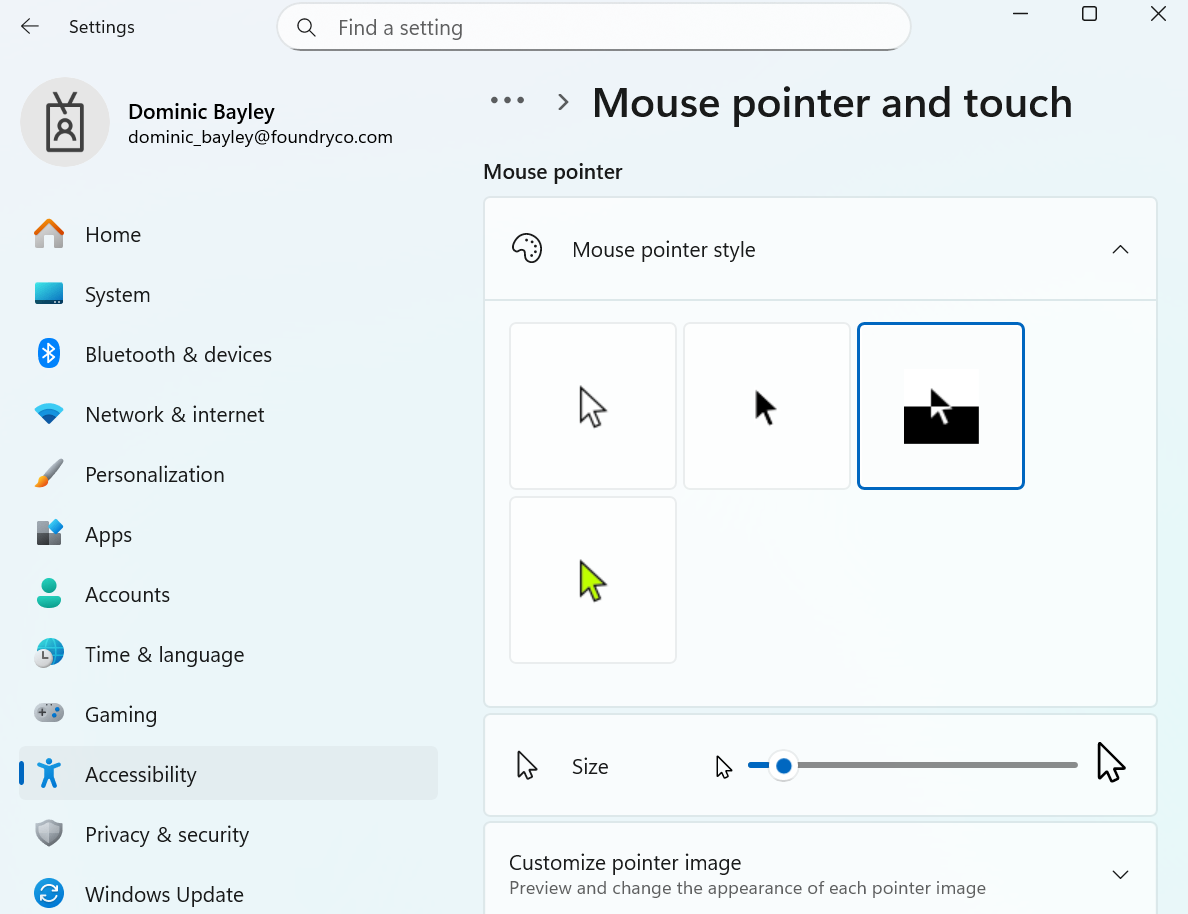
    • Open the “Settings” app and type mouse in the search box. Select Mouse Settings and navigate to Accessibility mouse settings > Mouse pointer.
    • Under Mouse pointer style select the third option (inverted) denoted by the half black half white box. This will invert the color of your mouse pointer to the opposite of the background color it’s hovering over so that you can see it better. For example, if your background is white, your mouse cursor will show black.
    • You can also increase the size of your mouse pointer to make it more visible. To do that under “Size” just slide the slider one step up to 2. Notice the size difference in your cursor now?

    Dominic Bayley / Foundry

    If you’ve made these changes correctly, your mouse cursor should be a whole lot more visible and a lot harder to lose.

    That’s a wrap for this Try This. If you’d like more tips and tricks like this one delivered to your inbox every week, be sure to subscribe to our Try This newsletter.

    cursor Easy Instantly losing mouse tweaks
    Share. Facebook Twitter Pinterest LinkedIn Tumblr Email
    Previous Article10 Foods You May Think Are Vegetarian, but Actually Aren’t
    Next Article The ARC Raiders Server Slam beta is off to a huge start
    techupdateadmin
    • Website

    Related Posts

    Gadgets

    KTC H27P3 5K monitor review: easy to spot the faults, not the pixels

    December 16, 2025
    Gadgets

    Microsoft makes theming your Windows 11 PC as easy as phones, but not as much fun

    December 15, 2025
    Gadgets

    EV, Hybrid, or Gas? We Know Which One Is Losing You Money Every Month

    December 8, 2025
    Add A Comment
    Leave A Reply Cancel Reply

    Top Posts

    NYT Strands hints and answers for Monday, August 11 (game #526)

    August 11, 202545 Views

    These 2 Cities Are Pushing Back on Data Centers. Here’s What They’re Worried About

    September 13, 202542 Views

    Today’s NYT Connections: Sports Edition Hints, Answers for Sept. 4 #346

    September 4, 202540 Views
    Stay In Touch
    • Facebook
    • YouTube
    • TikTok
    • WhatsApp
    • Twitter
    • Instagram
    Latest Reviews

    Subscribe to Updates

    Get the latest tech news from FooBar about tech, design and biz.

    Most Popular

    Best Fitbit fitness trackers and watches in 2025

    July 9, 20250 Views

    There are still 200+ Prime Day 2025 deals you can get

    July 9, 20250 Views

    The best earbuds we’ve tested for 2025

    July 9, 20250 Views
    Our Picks

    My Health Anxiety Means I Won’t Use Apple’s or Samsung’s Smartwatches. Here’s Why

    December 22, 2025

    You can now buy the OnePlus 15 in the US and score free earbuds if you hurry

    December 22, 2025

    Today’s NYT Connections: Sports Edition Hints, Answers for Dec. 22 #455

    December 22, 2025

    Subscribe to Updates

    Get the latest creative news from FooBar about art, design and business.

    Facebook X (Twitter) Instagram Pinterest
    • About Us
    • Contact us
    • Privacy Policy
    • Disclaimer
    • Terms and Conditions
    © 2026 techupdatealert. Designed by Pro.

    Type above and press Enter to search. Press Esc to cancel.