


I’ve had Instagram since I was in the ninth grade, back when filters like Valencia and X-Pro II were all the rage. Even though I’ve essentially grown up with the app, I’ve also grown a lot more cautious about what I share online. These days, privacy beats popularity for me and that includes keeping tabs on what data apps like Instagram collect in the background, especially when it comes to location.
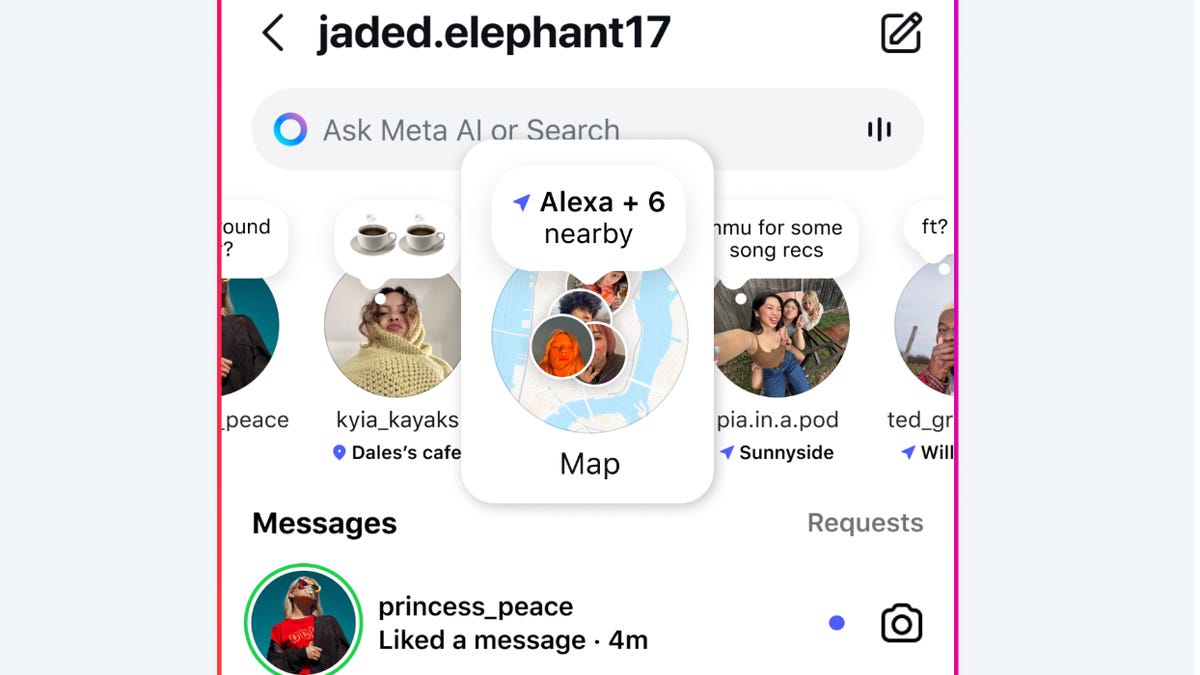
Whether you’re trying to avoid targeted ads, protect your privacy or just don’t want Instagram to know your every move, turning off location sharing is a smart step. With its latest update, Instagram added an interactive Map feature that makes it easier than ever to explore what’s trending nearby. Handy? Definitely. Potentially invasive? Also yes. That is unless you know how to take control and limit, or disable, the feature.
The Maps addition has sparked a wave of worry online, with users taking to X (formally Twitter) and TikTok to vent about their real-time location becoming exposed to strangers and to urge others to check their location sharing settings on the app. Instagram exec Adam Mosseri has responded to the warnings, noting that the Maps location sharing settings are not turned on by default and that you must opt-in for the feature to access your location. Still, Mosseri acknowledged the confusion and backlash, and confirmed that his team is working on “improvements” to roll out as early as next week.
Here’s what the new Instagram Map does, how to use it (or avoid it) and how to lock down your privacy settings.
Read also: You May See an AI Version of Yourself as an Instagram Post: Here’s How to Turn It Off
How does the Map feature work?
Instagram’s Map feature is essentially a social-powered discovery tool. It lets you browse a searchable, interactive map filled with popular tagged locations (restaurants, parks, tourist attractions, stores, coffee shops, bars and more) all pulled from public posts and Stories.
If you’ve enabled location sharing with someone, they’ll be able to see your location on the Map through tagged posts and within direct messages. Likewise, you can view the real-time locations of anyone who’s sharing theirs with you by just swiping up on the Map to see a list.
And if you’ve tagged a location in a Story or post and have a public account, your content might appear on the map for other users to explore. You can tap on a spot, see other photos or videos tagged there and filter by categories like “cafes” or “beauty salons.”
It’s kind of like Google Maps meets Yelp meets Snap Map, but via Instagram photos.
Can anyone see your real-time location?
You can customize exactly who sees your location, whether it’s friends you follow back, your Close Friends list, selected individuals or no one at all. Location sharing only works with accounts you follow and you can also exclude specific people if you’d rather keep your whereabouts private from certain followers.
According to Instagram, your location updates every time you open the app and automatically disappears after 24 hours if you haven’t been active.
How to access the Maps feature
You can access Instagram’s Map in two ways:
- From the Explore page: Tap the map icon in the top right corner of the Explore tab to launch the interactive map. It’ll show nearby tagged locations or ones that are currently popular.
- From a tagged location in a Story or post: Tap the location tag and Instagram will open the Map view for that place, letting you explore more content nearby.
If you’re allowing Instagram to access your location, the app will show trending spots near your current location. It may also use your location to tailor content recommendations and ads, which is something privacy-conscious users should be aware of.
Is Instagram location tracking on by default?
No, not exactly. Instagram doesn’t automatically turn on location services, which means the Maps feature is not turned on by default either. When you installed the Instagram app, you were asked whether you wanted to grant it location permissions. You could choose to deny it, allow it only while using the app or allow it once.
But if you gave it access once, like to tag your favorite vacation spot, that permission might still be active without you realizing it. That means Instagram could be sharing and collecting your location every time you open the app, unless you change your settings.
You can limit what you share with the Map, though. Even if you’ve used location tags in the past, you have some control over what shows up on Instagram’s Map.
If you want to avoid appearing on the Map:
- Don’t tag a location in your Stories or posts.
- Switch to a private account. Map content is primarily pulled from public posts. If your account is private, your tagged content won’t show up for strangers.
- Turn off location access in your device settings (more on that below).
- Limit who can see your location (You can select between Friends, Close Friends, Only these friends or No one).
You can also remove location tags from past posts by editing the post and deleting the tagged place, though Instagram hasn’t made this process super intuitive.
You can limit who can see your location. You can select between Friends, Close Friends, Only these friends or No one in settings.
How to turn off Instagram’s location access
If you want to stop Instagram from accessing your phone’s location entirely:
On iPhone:
- Go to Settings > Instagram > Location
- Choose Never or Ask Next Time
On Android:
- Go to Settings > Apps > Instagram > Permissions > Location
- Choose Deny
You can also disable Precise Location if you want Instagram to know your general area (like your city) but not your exact GPS coordinates.
Instagram’s new Map feature is a powerful way to explore what’s happening around you, but it also comes with privacy considerations. Just keep in mind that any time you give an app access to your location, there’s a trade-off between convenience and privacy.
Read more: Custom AI Posts in Our Instagram Feeds? No Thanks, Meta
