


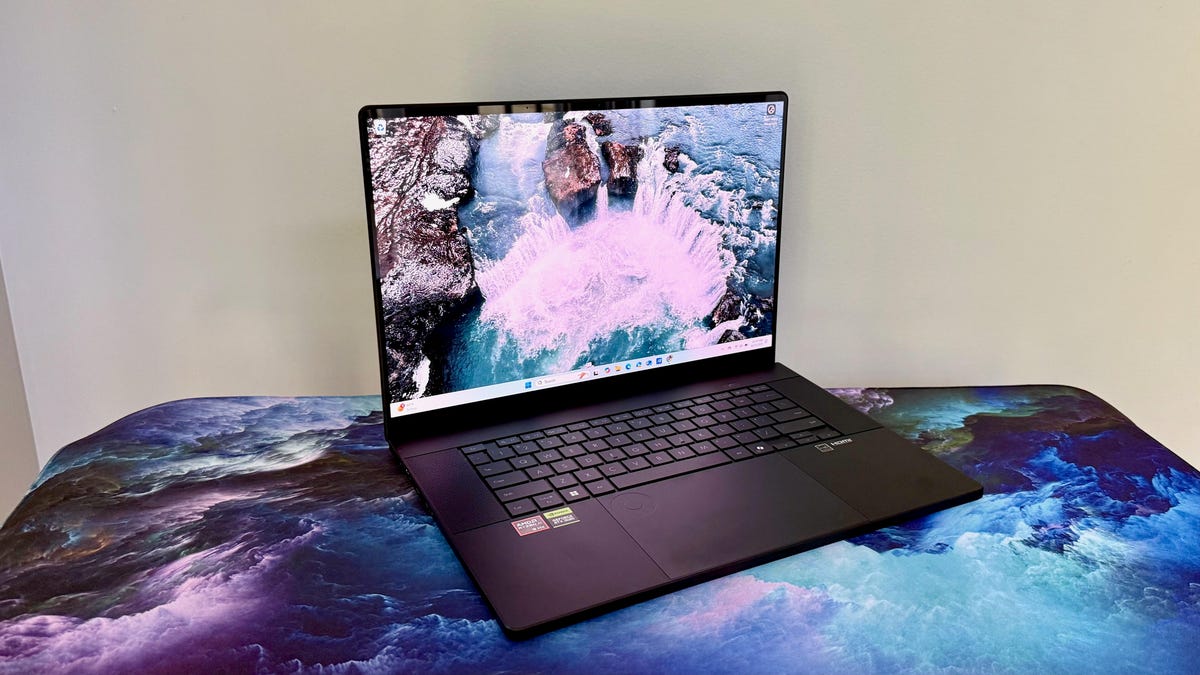
Pros
- Gorgeous 16-inch, 4K OLED touchscreen
- Strong component lineup, including RTX 5070 GPU
- Slim and light given the size and what’s under the hood
- DialPad controller on touchpad is useful
Cons
- Runs hot and loud
- 3D frame rates are good but not great
- Display bezels are a bit thick
- Stylus not included for the touchscreen
Asus ProArt laptops vary in price, size and capabilities, from the mighty Studiobook Pro mobile workstations to the smaller and more affordable PZ13 detachable two-in-ones. In the middle sits the P16, which attempts to be everything to everyone and, remarkably, succeeds more than it doesn’t.
As with all great laptops, the key to the ProArt P16’s success is balance. A beautiful display loses a lot of its value if it’s not paired with powerful enough components to make good use of it. And while packing a laptop with high-end components and an eye-catching screen sounds great on paper, the shine comes off quickly if the cost is more than the sum of its parts.
The ProArt P16 handles this juggling act with aplomb. It boasts a big, beautiful 16-inch 4K OLED alongside enough graphics horsepower to deliver the performance in Adobe and CapCut that creators crave inside a reasonably slender, lightweight chassis. And while it’s not cheap, the ProArt P16 is priced appropriately for what’s on offer. The end result: A laptop for creators we don’t have to think twice about recommending, and earning an Editors’ Choice award.
Asus ProArt P16
| Price as reviewed | $2,500 |
|---|---|
| Display size/resolution | 16-inch 3,840×2,400 OLED |
| CPU | AMD Ryzen AI 9 HX 370 |
| Memory | 32GB LPDDR5X |
| Graphics | Nvidia GeForce RTX 5070 |
| Storage | 2TB SSD |
| Ports | USB-C 4.0 Gen 3, USB-C 3.2 Gen 2, 2 x USB-A 3.2 Gen 2, HDMI 2.1, SD card reader, combo audio |
| Networking | Wi-Fi 7 and Bluetooth 5.4 |
| Operating system | Windows 11 Home |
| Weight | 4.08 lbs (1.85 kg) |
An impressive middle child
The P16 slots in between Asus’ pricey Studiobook and Studiobook Pro models and the entry-level PX13 and PZ13 units. There are a few different ProArt P16 models listed at Asus ranging in price from $2,200 to $2,900. My review configuration is available at Best Buy for $2,500.
The ProArt P16 series is built around an AMD Strix Point processor, the Ryzen AI 9 HX 370. While the Strix Point line was developed to accelerate AI processes, with an included NPU that can manage 50 TOPS on its own, the HX 370 is a solid processor well equipped to handle heavier CPU loads. Alongside my test system’s RTX 5070, the HX 370 brings a Radeon 890M to the table to handle lightweight graphics processing without spinning up the discrete GPU and its accompanying heat and noise, and likely helping with battery life.
Our P16 test system also features an ample 32GB of RAM and a roomy 2TB SSD, a welcome inclusion for video editors and gamers who both tend to require capacious storage. The 16-inch OLED display features a 4K (3,840×2,400-pixel) resolution and touch support. The port selection is fairly standard, but includes an SD card slot — something creators will appreciate.
The Asus ProArt P16 starts at £2,500 in the UK and AU$4,599 in Australia.
Asus ProArt P16 performance
AMD’s Strix Point processors (the Ryzen AI 300 series) are designed to balance performance, when required, against efficiency, when possible, to reduce power requirements and maximize battery life. As our benchmark suite and battery test (the P16 ran for 10 hours and 52 minutes) show, the HX 370 masterfully executes. However, while it was no surprise that the P16 was competitive in CPU testing against similarly positioned laptops, the graphics/GPU tests yielded slightly more mixed results.
The P16 largely delivered the sort of 1080p gaming experience you’d expect from a laptop packing an RTX 5070, but some aberrations stood out. For instance, in the Guardians of the Galaxy benchmark (at 1920×1080, High settings), the P16 delivered the lowest FPS in the group, troubling given that its GPU was the most capable, and that the test included two laptops with a previous-gen RTX 4070 and one with an RTX 5050. It also consistently delivered the lowest frame rates in our Assassin’s Creed Shadows testing, regardless of settings, against machines with an RTX 5050 or 5060.
The graphics chip isn’t the only factor in a gaming benchmark, and many of the competitors packed Intel CPUs rather than AMD equivalents. That said, the specs are quite similar across the laptops you’ll see in the performance charts below, or advantageous for the P16, in other categories, so its underwhelming gaming performance is a bit troubling. My disappointment was mitigated, however, because it still delivered roughly the kind of gaming performance I’d expect from a machine meant for content creation. That is, solid but not blazing frame rates.
Speaking of blazing, the P16 can run hot. Despite a lower plate that’s more than 60% vent, the P16 gets pretty sweltering, pretty fast. If you plan to actually use the P16 in your lap even for slightly intensive tasks, you may need to limit your session length, especially if you’re susceptible to aural distraction. When the fans kick on, they’re impossible to ignore, and they tend to run frequently under any kind of moderate to heavy load.
Welcomed simplicity
In another life, I spent many years reviewing gaming hardware and peripherals, and that experience may have left me with a bias toward flashing RGB LED rainbow lighting and over-the-top, flashy designs. That said, I found the P16’s simple, understated design very refreshing.
The majority of the machine is the matte black of a sleek alien obelisk, and I love it. The only relief is the small ProArt logo and name tucked into a corner of the lid, and even the lettering there is black on black. The keyboard is backlit by default, though not obnoxiously so, and the lighting can be customized or disabled. One small ding is the width of the bezel around that otherwise near-perfect OLED; the bottom bezel, in particular, is aggressively thick.
The thoughtful design is also showcased by the P16’s dimensions. It fits easily in a backpack or messenger bag, coming in at a mere 14 inches wide by 9.7 inches deep and well less than an inch thick, tapering from 0.7 inches to 0.6 inches in thickness. And it weighs only a little more than 4 pounds. It’s impressively slim and light for a high-performance 16-inch laptop. I do wonder, however, if the desire to keep the P16 so compact contributed to its heat output and subsequent fan noise.
The keyboard and touchpad are also winners. Though I prefer a deck with a number pad on such a large laptop and one that’s positioned a little lower on the keyboard deck, I did love the large individual keys and their responsiveness. Palm rejection helps with the keyboard being tucked so far up, and it’s hard to begrudge the touchpad its extra real estate, given how well it’s designed.
Though it’s mechanical and not the slick haptic glass of some high-end creator laptops, the touchpad nonetheless delivers a premium feel. It also includes an Asus DialPad, a feature that could be dismissed as a gimmick, but instead proved itself a genuine value add.
The DialPad sits in the upper left corner of the trackpad (a major reason why the generous size of the pad is so key). Its circular design allows you to call up a radial menu of options for any number of apps, and it’s a great, easy-to-access replacement for hotkeys. Many apps, including creator favorites like Adobe Premiere, come with handy preset functions, but you can also map custom commands. Beyond quick calling commands, the DialPad can also be used to adjust system volume, scrub through video footage or a number of other dial/wheel/scrollbar-based actions.
A gorgeous, creative portal
Part of why I like the simple, all-black design is that it helps highlight the most arresting piece of the P16: the display. It’s a 4K, 16:10 HDR OLED touchscreen that is genuinely striking, particularly for visual showcases like landscape stills or high-resolution screenshots from fantasy/sci-fi films and games. As I’ve come to expect from the latest generation of OLED technology, the deep blacks and vivid colors are astonishing.
It’s rated for 500 nits of HDR peak brightness, but it came up short of that figure. In our tests with a Spyder X Elite colorimeter, it managed to hit a maximum of 397 nits in HDR mode (and 368 nits in SDR). With its deep blacks and incredible contrast, the OLED panel still looked stunning even if it couldn’t match its brightness rating. Its color performance was outstanding, with 100% coverage of the sRGB and P3 gamuts and 95% of AdobeRGB.
Another knock against the display is its refresh rate, which is just the standard 60Hz. For a panel backed up by such impressive hardware, I’d like to see at least double that. It may not be as vital for creators, but gamers will be disappointed to be locked to a 60 frames per second max. This limitation is likely one of the ways Asus combats the price bloat we see in other high-end OLED laptops. Another cost-cutting method is the P16’s baffling lack of a stylus.
The webcam tucked into the top bezel delivers quality visuals. It’s a 1080p camera that provides vibrant colors and is a great fit both for quick selfies and video calls.
While a lot of creator laptops come loaded with cumbersome bloatware that you’ll uninstall as soon as you hit the desktop, the P16 includes some genuinely useful tools. The heart of the software package is the ProArt Creator Hub. It does double duty as a system monitor, with creator-focused features like a color management panel, as well as a launchpad for other apps. In the Creative Land tab, you can quickly launch Adobe’s Creative Cloud suite and Asus’ own MuseTree (an AI image generator), StoryCube (media storage management) and more.
Is the Asus ProArt P16 worth buying?
For creators with the requisite bankroll, the ProArt P16 is an easy recommendation. It’s purpose-built to help creators transform their vision into reality, from the macro (the big, beautiful OLED) to the micro (the touchpad’s helpful DialPad). Backed by Nvidia GeForce RTX 5070 graphics, it’s an extremely capable workday companion that can double as a suitable gaming machine for anything short of 4K. While I wouldn’t recommend it for someone explicitly shopping for a gaming laptop, if you’re a creator with a day job who likes to gun down aliens after a long work session, the P16 covers both ends of that equation.
The review process for laptops, desktops, tablets and other computerlike devices consists of two parts: performance testing under controlled conditions in the CNET Labs and extensive hands-on use by our expert reviewers. This includes evaluating a device’s aesthetics, ergonomics and features. A final review verdict is a combination of both objective and subjective judgments.
The list of benchmarking software we use changes over time as the devices we test evolve. The most important core tests we’re currently running on every compatible computer include Primate Labs Geekbench 6, Cinebench R23, PCMark 10 and 3DMark Fire Strike Ultra.
A more detailed description of each benchmark and how we use it can be found on our How We Test Computers page.
Geekbench 6 CPU (multi-core)
Lenovo Legion 5i 15IRX10 17711Asus ProArt P16 15377MSI Katana 15 HX B14W 14587Acer Swift X 14 13349Dell XPS 16 9640 12855Acer Nitro V 16S AI 12787
Geekbench 6 CPU (single-core)
Asus ProArt P16 2905Lenovo Legion 5i 15IRX10 2895MSI Katana 15 HX B14W 2738Acer Nitro V 16S AI 2607Acer Swift X 14 2402Dell XPS 16 9640 2226
Cinebench 2024 CPU (multi-core)
Lenovo Legion 5i 15IRX10 1407MSI Katana 15 HX B14W 1220Asus ProArt P16 1188Acer Nitro V 16S AI 867Dell XPS 16 9640 793Acer Swift X 14 749
Cinebench 2024 CPU (single-core)
Lenovo Legion 5i 15IRX10 121MSI Katana 15 HX B14W 117Asus ProArt P16 115Acer Swift X 14 106Dell XPS 16 9640 105Acer Nitro V 16S AI 104
PCMark 10 Pro Edition
Lenovo Legion 5i 15IRX10 8056Asus ProArt P16 7857Acer Nitro V 16S AI 7509MSI Katana 15 HX B14W 7024Acer Swift X 14 6774Dell XPS 16 9640 6667
3DMark Fire Strike Ultra
Lenovo Legion 5i 15IRX10 8015Asus ProArt P16 7530Acer Nitro V 16S AI 6413MSI Katana 15 HX B14W 6285Dell XPS 16 9640 5239Acer Swift X 14 4608
Shadow of the Tomb Raider (Highest @ 1920 x 1080)
Lenovo Legion 5i 15IRX10 172MSI Katana 15 HX B14W 155Asus ProArt P16 150Acer Nitro V 16S AI 143Dell XPS 16 9640 109Acer Swift X 14 104
Guardians of the Galaxy (High @1920 x 1080)
Lenovo Legion 5i 15IRX10 195MSI Katana 15 HX B14W 159Acer Nitro V 16S AI 133Acer Swift X 14 126Asus ProArt P16 124Dell XPS 16 9640 124
Assasin’s Creed Shadows (1920×1080 @ High)
Acer Nitro V 16S AI 62Lenovo Legion 5i 15IRX10 61MSI Katana 15 HX B14W 53Asus ProArt P16 52
F1 24 (1920×1080 @ Ultra High)
MSI Katana 15 HX B14W 104Asus ProArt P16 87Lenovo Legion 5i 15IRX10 82Acer Nitro V 16S AI 74
Online streaming battery drain test
Dell XPS 16 9640 11:42Asus ProArt P16 10:52Acer Swift X 14 8:28Acer Nitro V 16S AI 8:32MSI Katana 15 HX B14W 6:14Lenovo Legion 5i 15IRX10 5:25
System configurations
| Asus ProArt P16 | Windows 11 Home; AMD Ryzen AI 9 HX 370; 32GB DDR5 5,600MHz RAM; Nvidia GeForce RTX 5070; 2TB SSD |
|---|---|
| MSI Katana 15 HX B14W | Windows 11 Home; Intel Core i7-14650HX; 16GB DDR5 5,600MHz RAM; Nvidia GeForce RTX 5050; 512GB SSD |
| Lenovo Legion 5i 15IRX10 | Windows 11 Home; Intel Core i7-14700HX; 32GB DDR5 5,600MHz RAM; Nvidia GeForce RTX 5060; 1TB SSD |
| Acer Nitro V 16S AI | Windows 11 Home; AMD Ryzen 7 260; 32GB DDR5 5,600MHz RAM; Nvidia GeForce RTX 5060; 1TB SSD |
| Acer Swift X 14 | Windows 11 Home; Intel Core 7 Ultra 155H; 32GB LPDDR5 6,400MHz RAM; 8GB Nvidia GeForce RTX 4070; 1TB SSD |
| Dell XPS 16 9640 | Windows 11 Home; Intel Core 7 Ultra 155H; 16GB DDR5 7,467MHz RAM; 8GB Nvidia GeForce RTX 4070; 1TB SSD |
