


I never thought that a simple USB hub or USB docking station would excite me so much. I’ve been working with several notebooks and different operating systems for years, constantly switching between the office, home, and travelling. But something was always missing: the right connection, a second monitor, enough USB ports or simply a LAN port. This LIONWEI compact USB-C hub solves all these problems. Despite its light weight and small size, it offers more than enough connections.
I used to use an original docking station: expensive, large and supposedly perfectly matched to my system. In practice, however, there were constant problems—a monitor remained black, the network connection failed, USB devices were only recognized sporadically. At some point, I resigned myself to this. Until, more out of frustration than hope, I tried out this little USB-C hub. And now? I don’t want to work without it anymore.
What is particularly practical is the fact that the ports are easily accessible. This is a cumbersome solution with many docking stations, and there are often too few ports anyway.
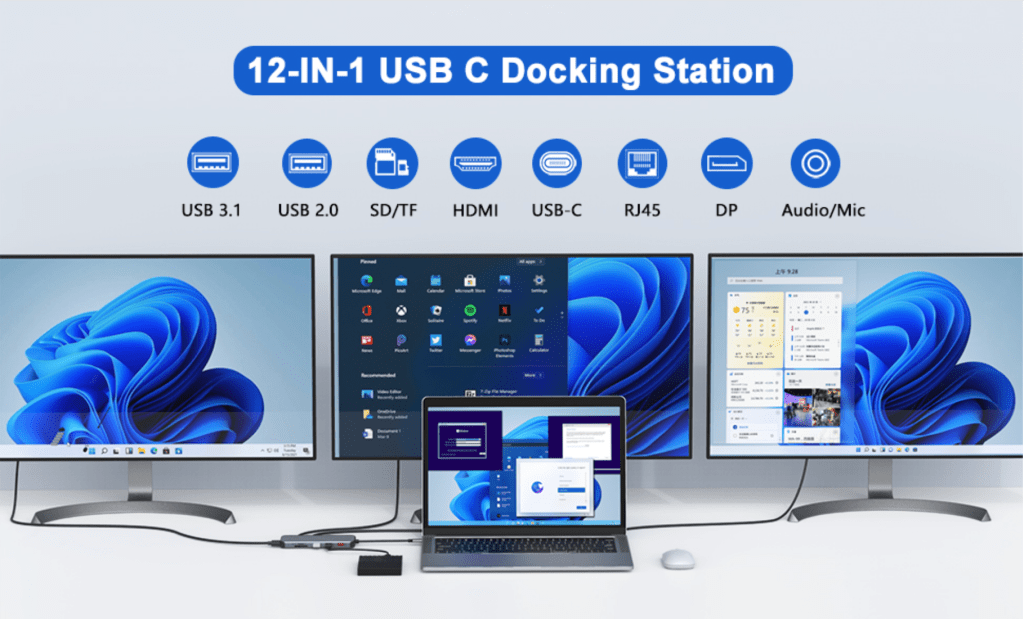
Three screens, perfect connection, zero effort
The version I use comes with 12-in-1 connections, but they have since expanded it with a VGA port in the latest version.
Sam Singleton
An HDMI output with 8K plus two Display Port connections in one device—that promises a lot, and here it delivers. I run two 28-inch displays on a daily basis, sometimes a third screen as well. All at the same time. No stuttering, no misalignment, no limitation on mirroring—except with macOS, where Apple itself is known to put a stop to it.
I now have a real triple monitor operation on my Windows notebook. I can even have a USB stick, Ethernet, headset, SD card, and external hard drive connected at the same time. And the whole thing is connected to my notebook via just one cable.
All I have to do in the morning is switch on my notebook and the complete set-up is ready in just a few seconds. I used to need a mixture of docking station, USB hub, and two adapters—all bulky, error-prone, and expensive. The LIONWEI hub replaces the entire solution, but costs under $60.
The mini docking station with heaps of connections
I’ve been using the hub—or rather this mini docking station—for several months now. It runs smoothly on various devices: Windows 10, Windows 11, several Linux distributions, and two MacBooks. Not a single failure, and I’ve never had to install any drivers. The transfer rates via USB-C 3.1 are noticeably high: large files land on my external SSD at over 900 MB/s. The card reader recognizes microSD and SD cards quickly and reliably with no fiddling or waiting.
The HDMI output delivers up to 8K at 60 Hz, depending on the graphics card. My work notebook manages a maximum of 4K, which is down to the device, not the hub. If you want, you can connect one or two monitors—the system recognizes everything correctly, even during operation.
The LAN connection is practical for test environments or stationary use: simply connect the hub, plug in the LAN cable, and the network is immediately available with up to 10 Gbit/s. This even works smoothly under macOS without the need to install additional drivers.
Flexibility when travelling and in everyday life
I almost always have the device with me. It fits in any notebook bag, weighs almost nothing and replaces everything I need on site. Even for customer presentations, one cable is enough, the rest is done via the hub. My audio interface, a USB microphone, an external SSD, my mouse and keyboard, sometimes a second power supply unit or a power bank—everything is simultaneously connected.
The power supply is stable. The hub draws up to 100 watts, which is enough for all my devices, even when used intensively.
When I’m travelling, I sometimes work with a Macbook, sometimes with my Linux notebook, depending on what the job requires. The LIONWEI hub can handle anything as long as the USB-C port supports DP Alt mode or Thunderbolt.
I didn’t have to install anything, configure anything, or tweak anything. And it also looks solid. No cheap plastic, no wobbly ports, nothing rattles. The hub feels really sturdy.
A docking station that simply works
I’ve tried a lot of things, especially in my home office. The big brand solutions, which are supposed to be perfectly harmonized, quickly cost four to five times as much and don’t deliver any more. Quite the opposite. Some restrict the choice of monitor, others require their own power supply units or install unsolicited drivers that slow down the system. They are also usually too large.
There is only one detail missing from this hub: there is no power button to start the notebook directly via the docking station. My original dock could do that. But honestly, that’s the only thing I miss. Everything else runs smoothly, every day, under all conditions.
My conclusion: A small solution with a big impact
The USB-C hub from LIONWEI has become a daily tool for me. I can use my monitors flexibly, am no longer reliant on specific brands or drivers and finally have enough ports for everything I need. And all for under $60.
Today, I switch on my notebook and a complete workstation setup is connected to it via just one cable. If you frequently work with different devices, want to stay productive while travelling, or simply appreciate a tidy, efficient workstation, this hub is a must-have. I, for one, have been using my notebook exclusively with it ever since.
This article originally appeared on our sister publication PC-WELT and was translated and localized from German.
