



At a glance
Expert’s Rating
Pros
- Great combination of CPU performance and battery life
- Premium build quality
- Runs Copilot+ PC features with full x86 app compatibility
- Nice keyboard
Cons
- HP should upgrade this display
- Many G1a models aren’t Copilot+ PCs
- GPU performance lags
- Unimpressive speakers
Our Verdict
The HP EliteBook 8 G1a is a Copilot+ PC with an excellent mix of CPU performance and battery life. It’s a solid package, but the display drags down the experience, and the GPU just can’t keep up with the rest of the hardware.
Price When Reviewed
This value will show the geolocated pricing text for product undefined
Best Pricing Today
Best Prices Today: HP EliteBook 8 G1a
£1547.99

The HP EliteBook 8 G1a is a 16-inch Copilot+ PC laptop aimed at businesses and professionals. It has an AMD CPU, so it marries a speedy CPU with a neural processing unit that can deliver Copilot+ PC features on some models. Plus, unlike a Qualcomm Snapdragon X Arm PC, this is a traditional x86 PC that is guaranteed to run existing business apps and drivers that may not run perfectly on an Arm PC.
But, although HP proudly markets this as a “next-generation AI PC,” it’s not just about AI features. Overall, it’s a solid laptop that most people would be happy to use for work, although the display doesn’t keep pace with the rest of the experience.
HP recently redesigned its product names, and the EliteBook is HP’s line of laptops aimed at business users. The 8 Series is the entry-level line of EliteBooks, and the “G1a” here means this is a first-generation model in the new lineup with an AMD CPU.
Overall, the HP EliteBook 8 G1a shows how strong AMD’s offerings are right now: Solid CPU performance and an NPU fast enough for Copilot+ PC features at a very competitive price.
HP EliteBook 8 G1a: Specs
The HP EliteBook 8 G1a has an AMD Ryzen AI processor — our review model included AMD Ryzen AI 7 PRO 350 hardware. That’s an x86 processor with a 50 TOPS NPU for AI features. However, it’s worth noting that not all the models have an NPU fast enough for Copilot+ PC features. HP has a variety of G1a models, and machines like the base AMD Ryzen 5 230 machine deliver up to 16 TOPS. That means they can’t run Microsoft’s Copilot+ PC features and, if your business does have an NPU-powered AI application, it’ll run much slower than on the models with faster NPUs.
But the processor isn’t the only thing that differs from machine to machine. HP offers a range of configuration options during the purchase process, so you can get a model that’s very different from the below specs.
Our review model had AMD Radeon 860M graphics. While AMD produces a lot of strong discrete GPUs, this is still integrated graphics and it’s not particularly fast.
The RAM in this machine is user-upgradable and swappable, which is great to see on a business laptop. (The Intel-powered EliteBook 8 G1i I reviewed at the same time has soldered RAM.)
- Model number: HP EliteBook 8 G1a 16-inch
- CPU: AMD Ryzen AI 7 PRO 350
- Memory: 32GB DDR5 RAM
- Graphics/GPU: AMD Radeon 860M
- NPU: AMD NPU Compute Accelerator Device (up to 50 TOPS)
- Display: 16-inch 1920×1200 IPS display with 60Hz refresh rate
- Storage: 512GB PCIe NVMe SSD
- Webcam: 1440p webcam
- Connectivity: 2x Thunderbolt 4 (USB Type-C 40 Gbps), 1x USB Type-C (10 Gbps), 1x HDMI 2.1 out, 1x combo audio jack, 1x security lock slot, 1x USB Type-A (5 Gbps)
- Networking: Wi-Fi 7, Bluetooth 5.4
- Biometrics: Fingerprint reader and IR camera for facial recognition
- Battery capacity: 77 Watt-hour battery
- Dimensions: 14.13 x 9.84 x 0.61 inches
- Weight: 3.73 pounds
- MSRP: $1,799 as tested
HP EliteBook 8 G1a: Design and build quality
Foundry / Chris Hoffman
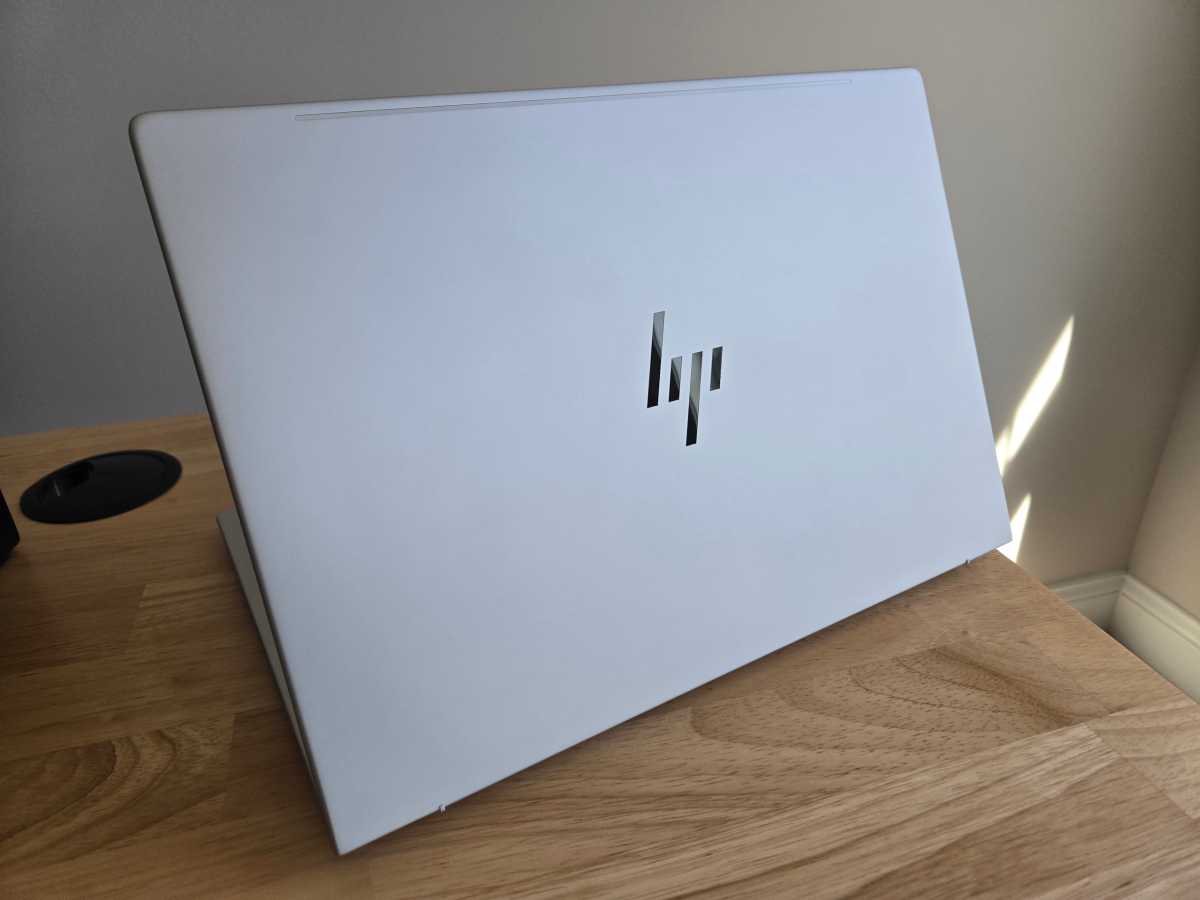
The 16-inch HP EliteBook 8 G1a has a premium-feeling metal chassis in a “Glacial Silver” color. At 3.73 pounds, it’s a little heavier than some laptops, but it feels solid and durable thanks to that metal build.
The design here is minimal: Dark gray keyboard, black bezel, and silver metal elsewhere. There are a few HP logos (on the lid and just below the screen) and that’s about it. The hinge feels good to use, although I had to use a second hand to hold down the front of the laptop while opening it. It’s a solid hinge and the screen doesn’t move around while you type.
HP bundles HP Wolf security with this machine, and that will be convenient for businesses who want to remotely manage this laptop in a fleet. As an individual knowledge worker, however, I didn’t like the end-user experience. I had to click through extra security dialogs to run PCWorld’s normal benchmark tools, for example — many people will want to disable this, or businesses will want to tune it so it doesn’t nag employees about their business apps.
HP EliteBook 8 G1a: Keyboard and trackpad
Foundry / Chris Hoffman
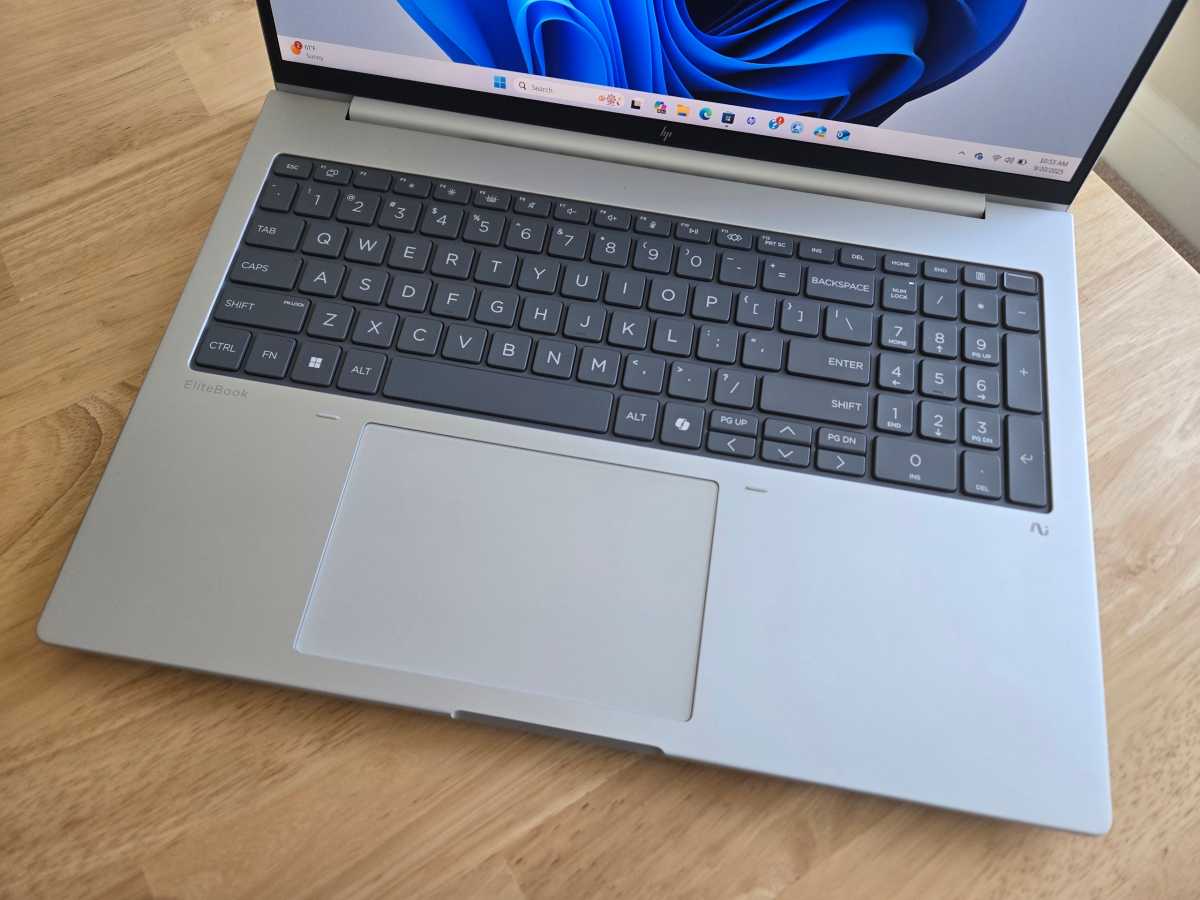
The HP EliteBook 8 G1a has a full-size keyboard complete with a number pad. It’s spacious and feels like it has a good amount of key travel — more than the 13-inch HP EliteBook 8 Flip G1i I reviewed at the same time. It’s quiet and doesn’t click with the snap of a mechanical keyboard, but it’s still snappy. This is a good keyboard that you can get a lot of typing done on. But I always wish the arrow keys on laptops were full-size.
This machine has a large trackpad that feels smooth to glide your finger over and clicks down with a clean “thunk.” I would prefer seeing a haptic touchpad, but this trackpad is solid. This isn’t a glass trackpad — those feel smoother, but those are premium touches reserved for higher-end laptops. Both the keyboard and trackpad are fairly quiet, which is important for a business laptop.
HP EliteBook 8 G1a: Display and speakers
Foundry / Chris Hoffman
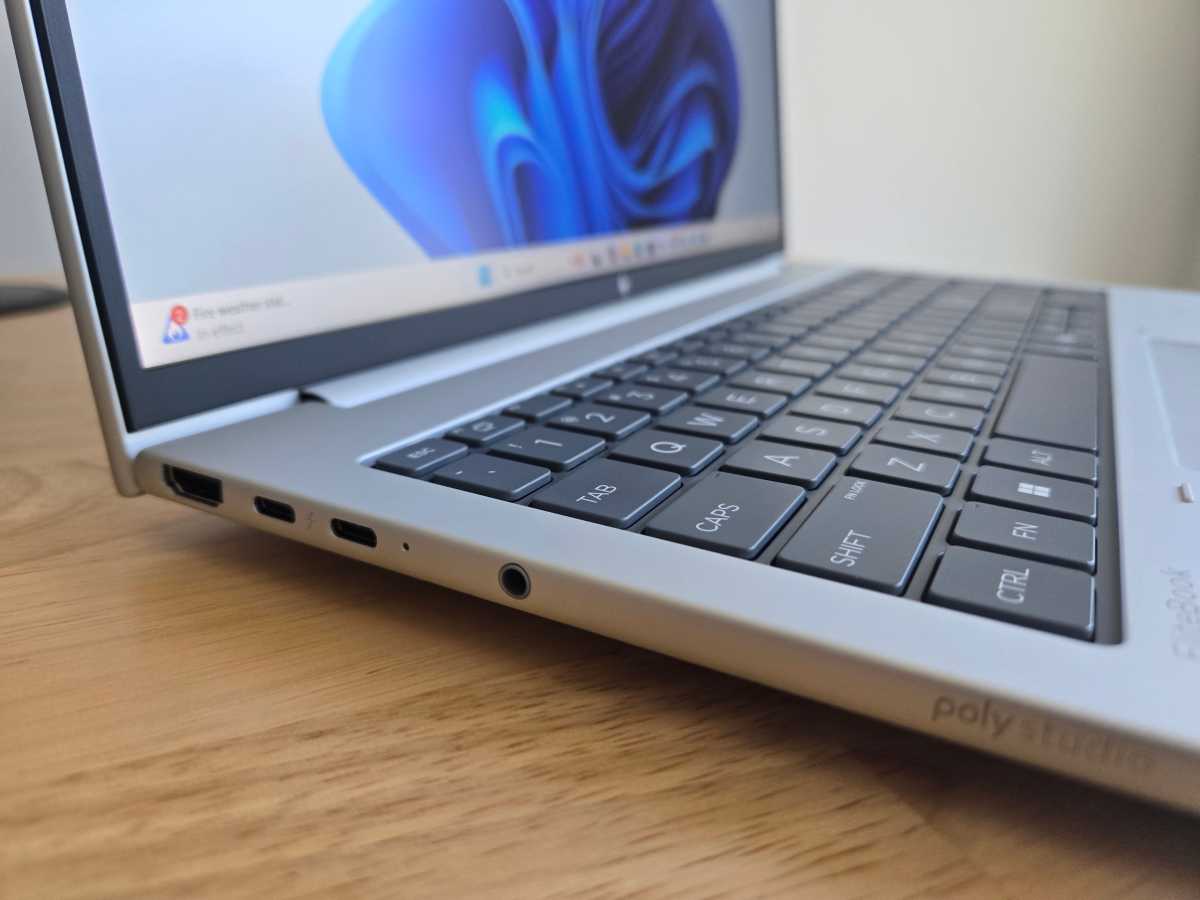
The HP EliteBook 8 G1a has a 16-inch 1920×1200 IPS display with a 60Hz refresh rate and 400 nits of brightness. That’s just nothing special, and that resolution stings on a 16-inch display, especially one in this price range. It’s an anti-glare display, which is nice to see. But HP offers the base model with 300 nits of brightness, which I’d recommend avoiding.
HP does offer a variant of this laptop with a 2560×1600 display with a 120Hz variable refresh rate, and I’d love to see what that machine looks like. But it likely won’t have as much battery life and it’ll be more expensive.
The display here is the one feature that feels the most lacking on this laptop, especially compared to consumer laptops in a similar price range.
The stereo speakers on this machine are okay for a business laptop but, like the display, they feel more serviceable than special. They can get pretty loud, and the sound is clear, but the audio lacks some depth. They’ll do a fine job in video meetings. I test each laptop I review by playing Steely Dan’s Aja and Daft Punk’s Get Lucky. The instrument separation in Aja was reasonable, but a lot of the high notes weren’t particularly crisp. In Get Lucky, the sound was reasonably fun, but more bass would’ve been nice. Pack a good pair of headphones for music.
HP EliteBook 8 G1a: Webcam, microphone, biometrics
The HP EliteBook 8 G1a has a 1440p webcam. Business laptops tend to have solid webcams, so I was expecting a bit more here. It’s nothing special for a business laptop: It’s a little noisy and seems to do much better in ideal lighting. This is the kind of webcam that will look fine in a business meeting, but you’ll want to get an external webcam if you’ll be recording videos for YouTube or social media. HP also built in a privacy shutter above the display, and you can slide it to block the webcam.
The dual-array microphone setup in this machine was clear and did a good job of removing background noise. It’s solid for a business laptop, but it’s not particularly high-end. If you’re participating in meetings all day and you want the best voice quality possible, you may still want an external mic.
The EliteBook 8 G1a has both facial recognition hardware and a fingerprint reader in the power button on the keyboard. You can use Windows Hello to sign into Windows with either your fingerprint or your face, and both work well.
HP EliteBook 8 G1a: Connectivity
Foundry / Chris Hoffman
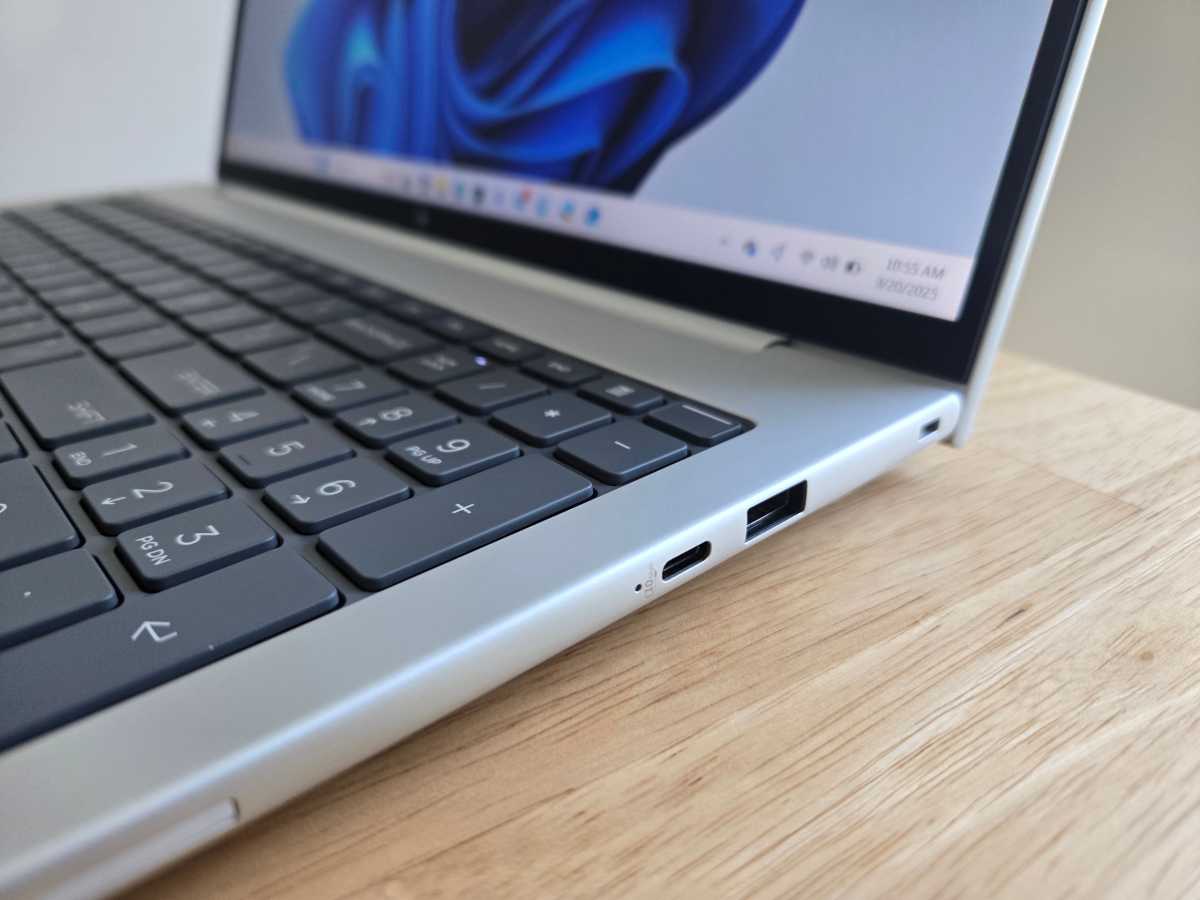
The HP EliteBook 8 G1a offers a good number of ports, including three USB Type-C ports and two of them are Thunderbolt 4 ports.
On the left side, this laptop has an HDMI 2.1 out port, two Thunderbolt 4 (USB Type-C 40 Gbps) ports, and a combo audio jack. On the right side, there’s a third USB Type-C port (10 Gbps), a USB Type-A (5 Gbps) port, and a security lock slot.
Since each side of the laptop has a USB Type-C port, you can plug this laptop’s USB-C charger into other side of the laptop. That’s the kind of thing that’s easy to overlook on a spec sheet but makes the laptop much nicer to use in the real world.
You can also get models of this laptop with optional extra ports: RJ-45 Ethernet, a Smart Card reader, and a nano SIM card slot for cellular connectivity. Unfortunately, it doesn’t have an SD card reader option.
Our review unit had future-proof Wi-Fi 7 and Bluetooth 5.4 wireless networking, and I had no problems with it.
HP EliteBook 8 G1a: Performance
The HP EliteBook 8 G1a has an AMD Ryzen AI 7 PRO 350 processor, and it performed well in web browsers, communication apps, productivity tools, and the apps you’d run on a Windows desktop.
As always, though we ran the HP EliteBook 8 G1a through our standard benchmarks to see how it performs.
Foundry / Chris Hoffman
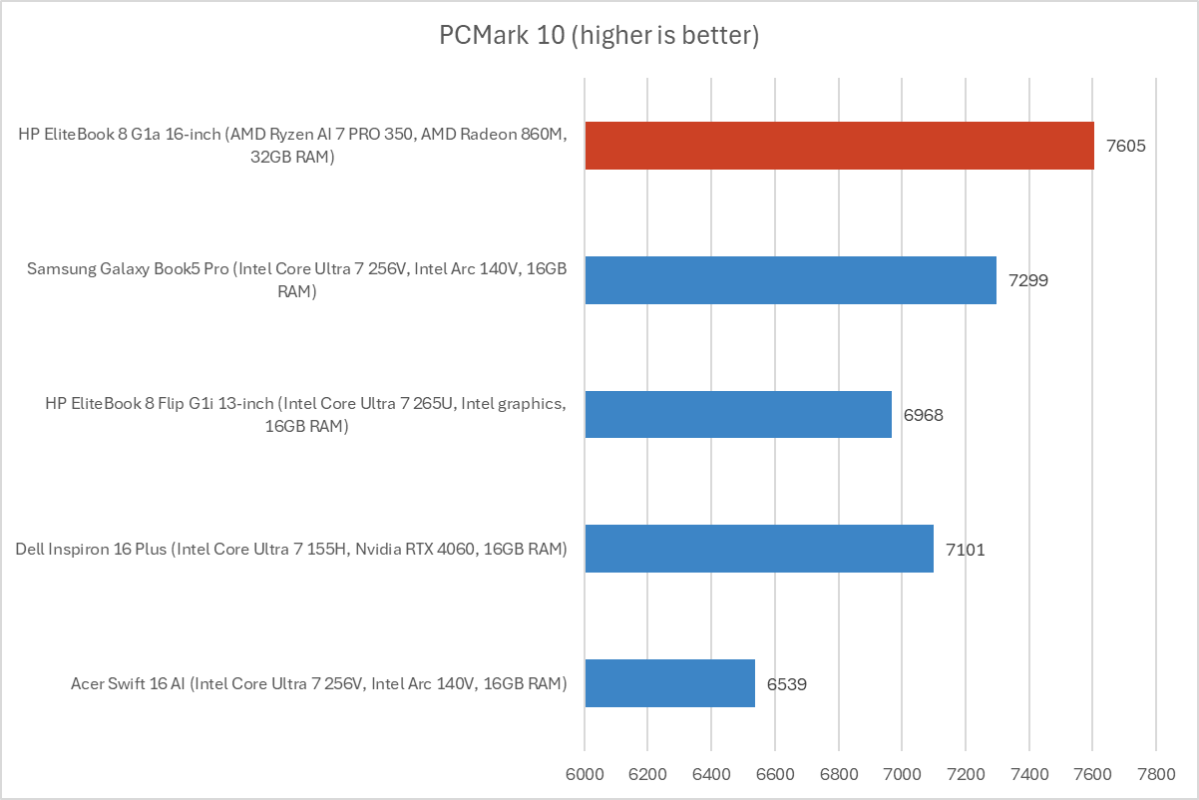
First, we run PCMark 10 to get an idea of overall system performance. With an overall PCMark 10 score of 7,605, this AMD-powered machine surpassed similar laptops with recent Intel Core Ultra processors. (And, as we’ll see below, it had similar battery life.)
Foundry / Chris Hoffman
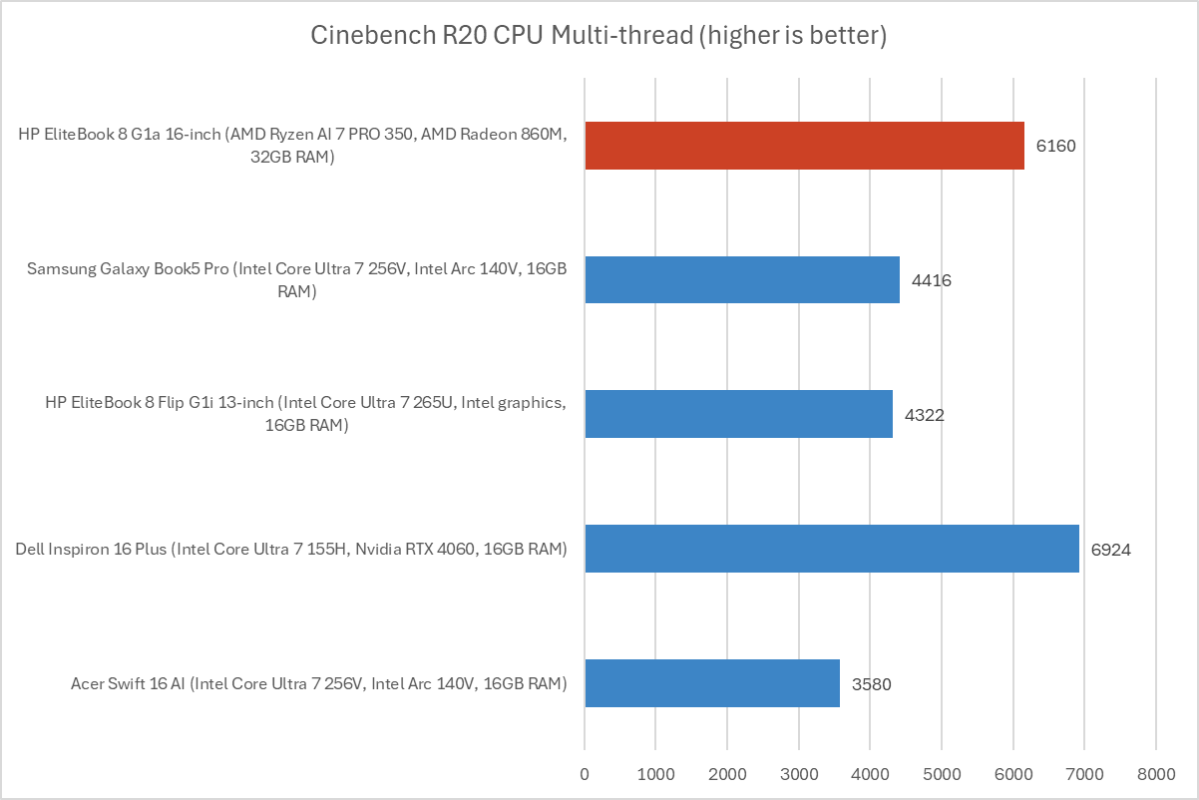
Next, we run Cinebench R20. This is a heavily multithreaded benchmark that focuses on overall CPU performance. It’s a quick benchmark, so cooling under extended workloads isn’t a factor. But, since it’s heavily multithreaded, CPUs with more cores have a huge advantage.
With a multithreaded Cinebench R20 score of 6,160, the AMD hardware here ran faster than Intel Arrow Lake and Lunar Lake chips.
Foundry / Chris Hoffman
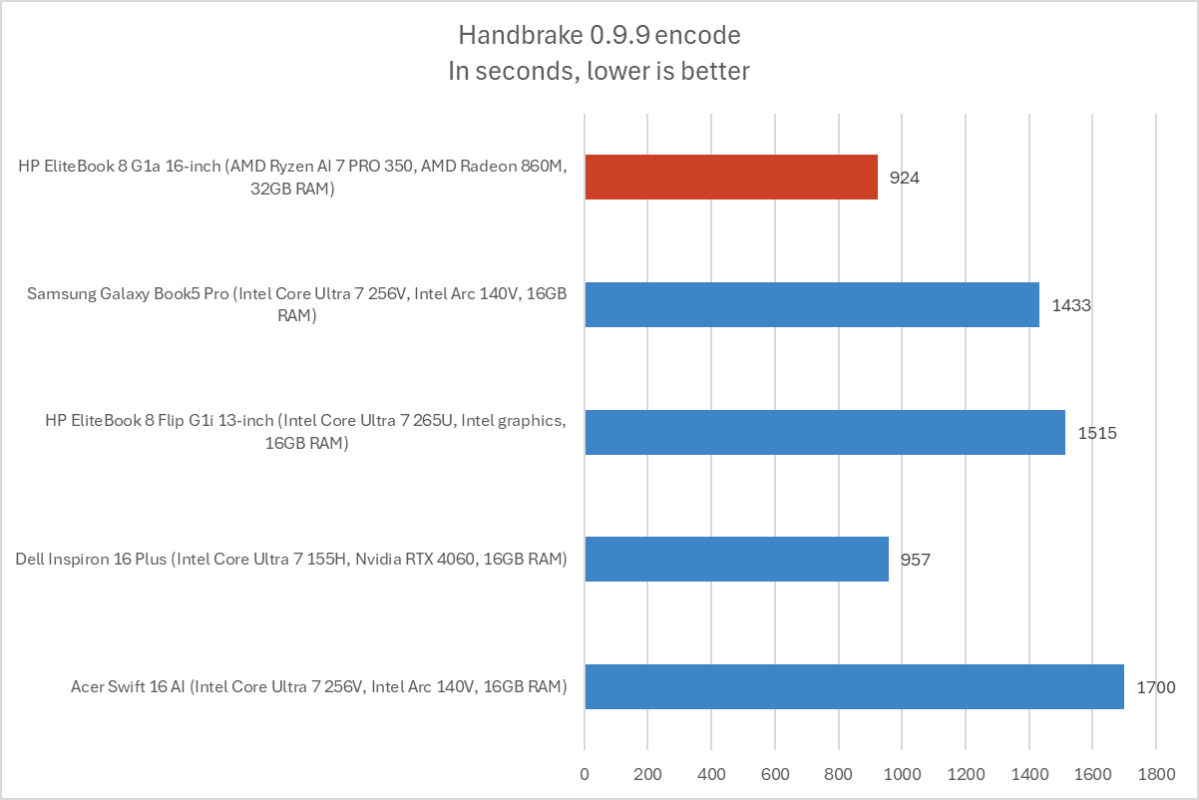
We also run an encode with Handbrake. This is another heavily multithreaded benchmark, but it runs over an extended period. This demands the laptop’s cooling kick in, and many laptops will throttle and slow down under load.
The HP EliteBook 8 G1a completed the encode process in an average of 924 seconds — that’s over 15 minutes. This machine can put out some serious CPU performance when it needs to, and it’s a good compromise of performance and power efficiency.
Foundry / Chris Hoffman
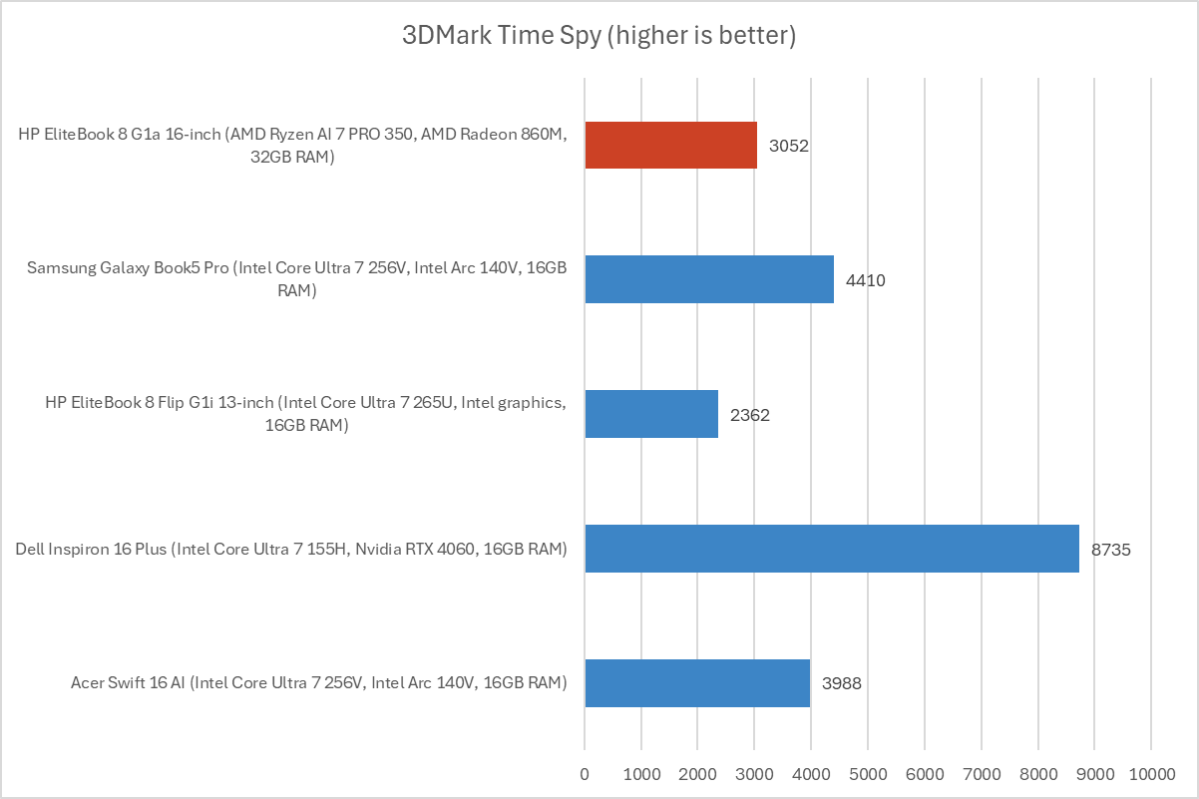
Next, we run a graphical benchmark. This isn’t a gaming laptop, but it’s still good to check how the GPU performs. We run 3DMark Time Spy, a graphical benchmark that focuses on GPU performance.
With a 3DMark Time Spy score of 3,052, the AMD Radeon 860M graphics in this machine weren’t particularly impressive. It’s slower than Intel’s Arc graphics and is on the lower end for AMD’s graphics hardware.
To be honest, I think most people — including business users — would prefer a laptop with a faster GPU. Lots of businesses use GPU-accelerated tools. I’d prefer to see a faster GPU here, even at the expense of NPU features.
Overall, the HP EliteBook 8 G1a shows how strong AMD’s offerings are right now: Solid CPU performance and an NPU fast enough for Copilot+ PC features at a very competitive price. But this machine cuts a corner when it comes to the GPU, and anyone who uses a GPU-accelerated professional application will want to look elsewhere.
HP EliteBook 8 G1a: Battery life
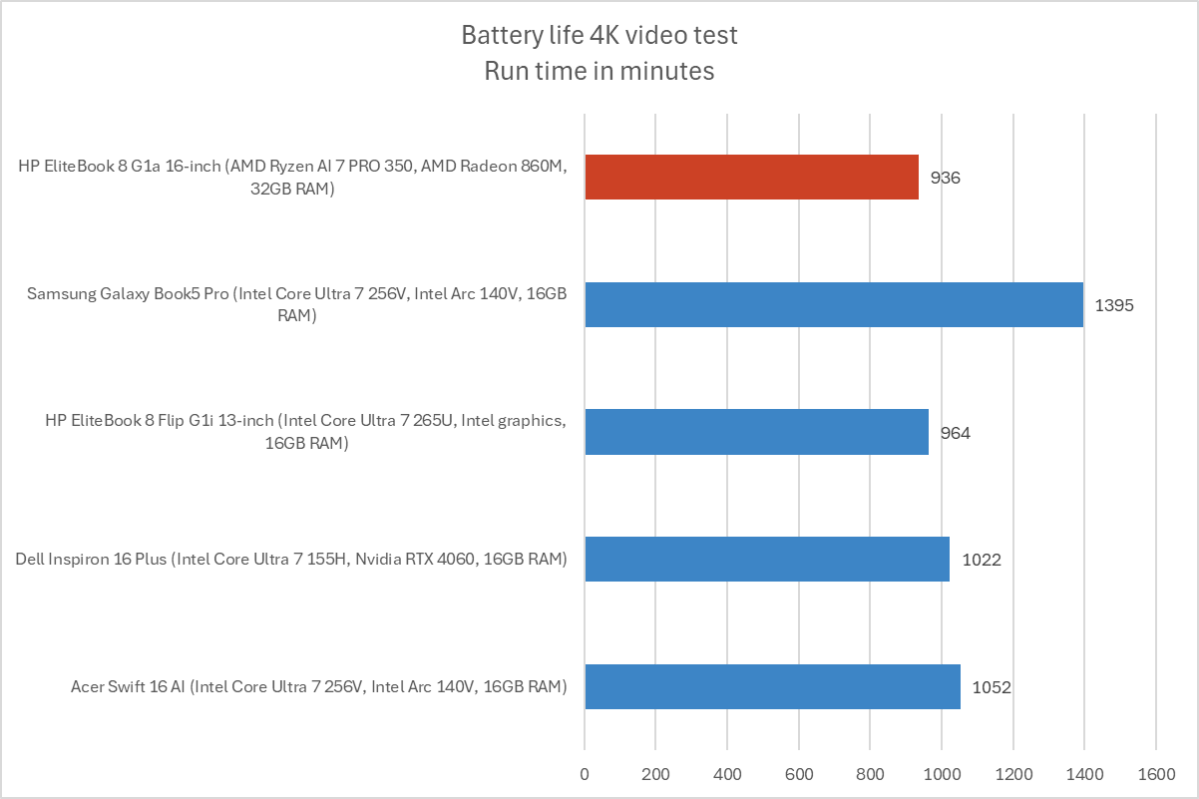
The HP EliteBook 8 G1a has a 77 Watt-hour battery, which is a good size for a 16-inch laptop. It delivered a good combination of battery life and performance.
Foundry / Chris Hoffman
To benchmark the battery life, we play a 4K copy of Tears of Steel on repeat on Windows 11 with airplane mode enabled until the laptop suspends itself. We set the screen to 250 nits of brightness for our battery benchmarks. This is a best-case scenario for any laptop since local video playback is so efficient, and real battery life in day-to-day use is always going to be less than this.
The HP EliteBook 8 G1a lasted an average of 936 minutes in our benchmarks — that’s nearly 16 hours. While you’ll get less in day-to-day computer use, this is likely enough juice for all-workday battery life, which is what really matters for a business laptop.
HP EliteBook 8 G1a: Conclusion
The HP EliteBook 8 G1a combines a premium metal build quality with AMD Ryzen AI 7 PRO 350 hardware. In many ways, the result is an excellent, well-balanced machine.
AMD’s chips are highly underrated right now. They don’t match the CPU performance you’ll find in a high-end workstation or the battery life you’ll find in a thin-and-light laptop, but they offer an excellent mix of both. Plus, this delivers an NPU fast enough for Copilot+ PC features, so the AI features here aren’t just marketing. If apps ever start taking more advantage of NPUs, you’ll want a fast one like the 50 TOPS NPU here — not the 12 TOPS NPU Intel is still delivering in most PCs.
But this isn’t the be-all, end-all business laptop. The display drags down the overall experience, and the graphics performance just isn’t up there with the CPU and NPU performance. While it’s a good laptop, it’s not the right pick for everyone. But I’m happy my review model had AMD hardware, and I think you’d prefer the AMD hardware here to Intel’s current offerings, too.
