
Close Menu
TechUpdateAlert

    Subscribe to Updates

    Get the latest creative news from FooBar about art, design and business.

    What's Hot

    My Health Anxiety Means I Won’t Use Apple’s or Samsung’s Smartwatches. Here’s Why

    December 22, 2025

    You can now buy the OnePlus 15 in the US and score free earbuds if you hurry

    December 22, 2025

    Today’s NYT Connections: Sports Edition Hints, Answers for Dec. 22 #455

    December 22, 2025
    Facebook X (Twitter) Instagram
    Trending
    • My Health Anxiety Means I Won’t Use Apple’s or Samsung’s Smartwatches. Here’s Why
    • You can now buy the OnePlus 15 in the US and score free earbuds if you hurry
    • Today’s NYT Connections: Sports Edition Hints, Answers for Dec. 22 #455
    • Android might finally stop making you tap twice for Wi-Fi
    • Today’s NYT Mini Crossword Answers for Dec. 22
    • Waymo’s robotaxis didn’t know what to do when a city’s traffic lights failed
    • Today’s NYT Wordle Hints, Answer and Help for Dec. 22 #1647
    • You Asked: OLED Sunlight, VHS on 4K TVs, and HDMI Control Issues
    Facebook X (Twitter) Instagram Pinterest Vimeo
    TechUpdateAlertTechUpdateAlert
    • Home
    • Gaming
    • Laptops
    • Mobile
    • Software
    • Reviews
    • AI & Tech
    • Gadgets
    • How-To
    TechUpdateAlert
    Home»Mobile»How to Get the Map in Silksong and Unlock Shakra’s Full Shop
    Mobile

    How to Get the Map in Silksong and Unlock Shakra’s Full Shop

    techupdateadminBy techupdateadminSeptember 7, 2025No Comments4 Mins Read
    Share Facebook Twitter Pinterest LinkedIn Tumblr Reddit Telegram Email
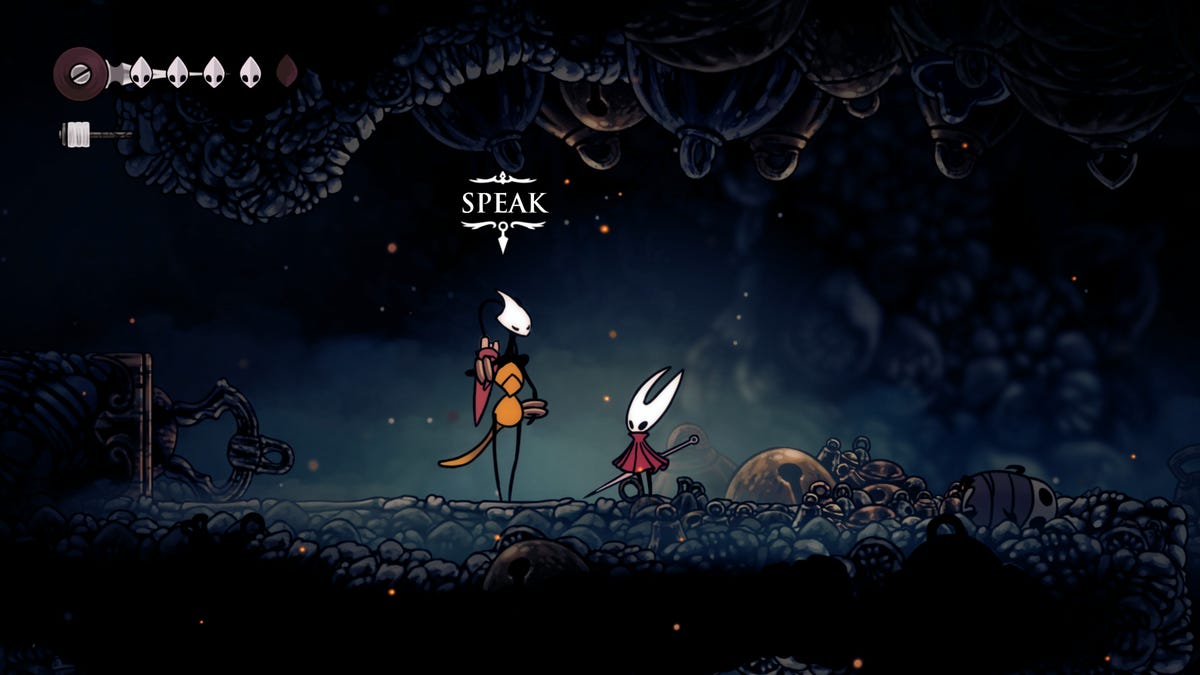
    Hornet in silksong meets a tall bug, Shakra
    Share
    Facebook Twitter LinkedIn Pinterest Email

    When it comes to Metroidvania games like Hollow Knight: Silksong, the map is arguably the most important item to have, as it shows where you’ve explored and where you need to go next. And, like a lot of aspects of this game, it’s not meant to be easy. 

    Silksong, like its predecessor Hollow Knight, has a map feature you can expand as you play, but you have to find one particular NPC to unlock it. Once you find that character, the game will feel slightly easier in getting around its nooks and crannies — until it crushes you with difficult sequences and boss fights.

    Read more: Hollow Knight Silksong Guide: Read These 11 Tips Before Starting

    How to find the map in Silksong? 

    To get a map, you’ll need to go from the hub center of Bone Bottom to The Marrow, which is directly to the east. While exploring the area, the sound of someone singing will quietly echo. Following the singing will take you to Shakra, the bug warrior who also does cartography. 

    Shakra will introduce herself, and if you continue to talk to her, she will tell you about her map-making skills. This is when she’ll officially become a merchant and sell all the map items you could want. 

    a screenshot of silksong showing the game's map

    This in part of the map where you’ll find Shakra.

    Screenshot by Oscar Gonzalez/CNET

    What does Shakra sell? 

    At the start, Shakra has several items for sale, but the most important ones are maps, a Compass and the Quill. 

    There will be two maps for sale when you first meet Shakra: The Mosslands map and The Marrow map. The first will cost you 40 rosaries — the in-game currency — and the other will cost 50 rosaries. As you progress into a new area of the game, return to Shakra, and she will have the map for that area available for purchase. 

    The next item to buy from Shakra is the Quill. It costs 50 rosaries, and whenever you rest at a bench, Hornet will quickly mark on the map where she’s been. 

    The last item you’ll want to buy is the Compass. It’s an equipable tool that will show an icon of Hornet’s current location on the map, giving you a clear idea of where you are. This will cost 70 rosaries. 

    shakra sits on the ground and a menu of her items she is selling are shown

    Shakra has some very important items to sell you.

    Screenshot by Oscar Gonzalez/CNET

    Shakra also has other items available to buy, such as Bench Pins that show where you can rest at a bench and Shell Markers to indicate where something important is on the map. 

    This will cost a lot of rosaries to get them all, but luckily, if you continue exploring The Marrow, you will find a bench as well as a passage to loop back to the Mosslands, where a shortcut to Bone Bottom will be waiting. This creates an easy setup to kill enemies for rosaries, rest and repeat. This is a good opportunity to get these important items without risking much and also developing your combat skills. 

    How does the map work? 

    Depending on the platform, there is a map button (it’s left bumper on the Xbox). Hold the button and the map overlay will appear. You can even move Hornet around while you’re viewing the map. 

    One thing to note is that the map doesn’t auto-populate as you explore. Maps come with an outline of the area, and you still need to go through the area to fill it in. Once Hornet rests at a bench, she will mark up the map to indicate where she’s been, what markers she’s come across and so on. 

    How do I find more maps and pins? 

    When you take out the next boss, the Bell Beast, Shakra will move her store to Bone Bottom. She’ll be located in a section above the other denizens that you can reach by following the hanging metal rings. She will hang out here until you find her again throughout the game. Even when you meet her somewhere else, once you finish interacting with her and rest at a bench or die, she will head back to the Bone Bottom. 

    As you explore more areas, Shakra will also have more maps and more items, so always make sure to head back to Bone Bottom. 

    Hollow Knight: Silksong is out now on PC, Switch, Switch 2, Xbox One, Xbox Series X and Series S, PS4 and PS5. It’s also available for Xbox Game Pass subscribers. 

    Watch this: iPhone Air Is a Wild Card – and Starts a Big Change for Apple

    06:39

    Full Map Shakras Shop Silksong Unlock
    Share. Facebook Twitter Pinterest LinkedIn Tumblr Email
    Previous ArticleGetting Started With ChatGPT: A Beginner’s Guide to the Popular AI Chatbot
    Next Article The budget-friendly Samsung Galaxy Tab S10 FE hits a record-low price on Amazon
    techupdateadmin
    • Website

    Related Posts

    Mobile

    Today’s NYT Wordle Hints, Answer and Help for Dec. 21 #1646

    December 21, 2025
    Mobile

    OnePlus 15T’s specs tipped – GSMArena.com news

    December 21, 2025
    Mobile

    TikTok is not getting banned in the US, after all

    December 21, 2025
    Add A Comment
    Leave A Reply Cancel Reply

    Top Posts

    NYT Strands hints and answers for Monday, August 11 (game #526)

    August 11, 202545 Views

    These 2 Cities Are Pushing Back on Data Centers. Here’s What They’re Worried About

    September 13, 202542 Views

    Today’s NYT Connections: Sports Edition Hints, Answers for Sept. 4 #346

    September 4, 202540 Views
    Stay In Touch
    • Facebook
    • YouTube
    • TikTok
    • WhatsApp
    • Twitter
    • Instagram
    Latest Reviews

    Subscribe to Updates

    Get the latest tech news from FooBar about tech, design and biz.

    Most Popular

    Best Fitbit fitness trackers and watches in 2025

    July 9, 20250 Views

    There are still 200+ Prime Day 2025 deals you can get

    July 9, 20250 Views

    The best earbuds we’ve tested for 2025

    July 9, 20250 Views
    Our Picks

    My Health Anxiety Means I Won’t Use Apple’s or Samsung’s Smartwatches. Here’s Why

    December 22, 2025

    You can now buy the OnePlus 15 in the US and score free earbuds if you hurry

    December 22, 2025

    Today’s NYT Connections: Sports Edition Hints, Answers for Dec. 22 #455

    December 22, 2025

    Subscribe to Updates

    Get the latest creative news from FooBar about art, design and business.

    Facebook X (Twitter) Instagram Pinterest
    • About Us
    • Contact us
    • Privacy Policy
    • Disclaimer
    • Terms and Conditions
    © 2026 techupdatealert. Designed by Pro.

    Type above and press Enter to search. Press Esc to cancel.