
Close Menu
TechUpdateAlert

    Subscribe to Updates

    Get the latest creative news from FooBar about art, design and business.

    What's Hot

    My Health Anxiety Means I Won’t Use Apple’s or Samsung’s Smartwatches. Here’s Why

    December 22, 2025

    You can now buy the OnePlus 15 in the US and score free earbuds if you hurry

    December 22, 2025

    Today’s NYT Connections: Sports Edition Hints, Answers for Dec. 22 #455

    December 22, 2025
    Facebook X (Twitter) Instagram
    Trending
    • My Health Anxiety Means I Won’t Use Apple’s or Samsung’s Smartwatches. Here’s Why
    • You can now buy the OnePlus 15 in the US and score free earbuds if you hurry
    • Today’s NYT Connections: Sports Edition Hints, Answers for Dec. 22 #455
    • Android might finally stop making you tap twice for Wi-Fi
    • Today’s NYT Mini Crossword Answers for Dec. 22
    • Waymo’s robotaxis didn’t know what to do when a city’s traffic lights failed
    • Today’s NYT Wordle Hints, Answer and Help for Dec. 22 #1647
    • You Asked: OLED Sunlight, VHS on 4K TVs, and HDMI Control Issues
    Facebook X (Twitter) Instagram Pinterest Vimeo
    TechUpdateAlertTechUpdateAlert
    • Home
    • Gaming
    • Laptops
    • Mobile
    • Software
    • Reviews
    • AI & Tech
    • Gadgets
    • How-To
    TechUpdateAlert
    Home»How-To»How to enable expanded dark theme in Android 16 QPR2 Beta 1
    How-To

    How to enable expanded dark theme in Android 16 QPR2 Beta 1

    techupdateadminBy techupdateadminAugust 27, 2025No Comments4 Mins Read
    Share Facebook Twitter Pinterest LinkedIn Tumblr Reddit Telegram Email
    How to enable expanded dark theme in Android 16 QPR2 Beta 1
    Share
    Facebook Twitter LinkedIn Pinterest Email

    Android 16 QPR2 Beta 1 was released for Pixel phones on August 20. The latest beta build previews some of the features coming to Pixels and AOSP in Android’s second quarterly platform release, expected to roll out in stable this December.

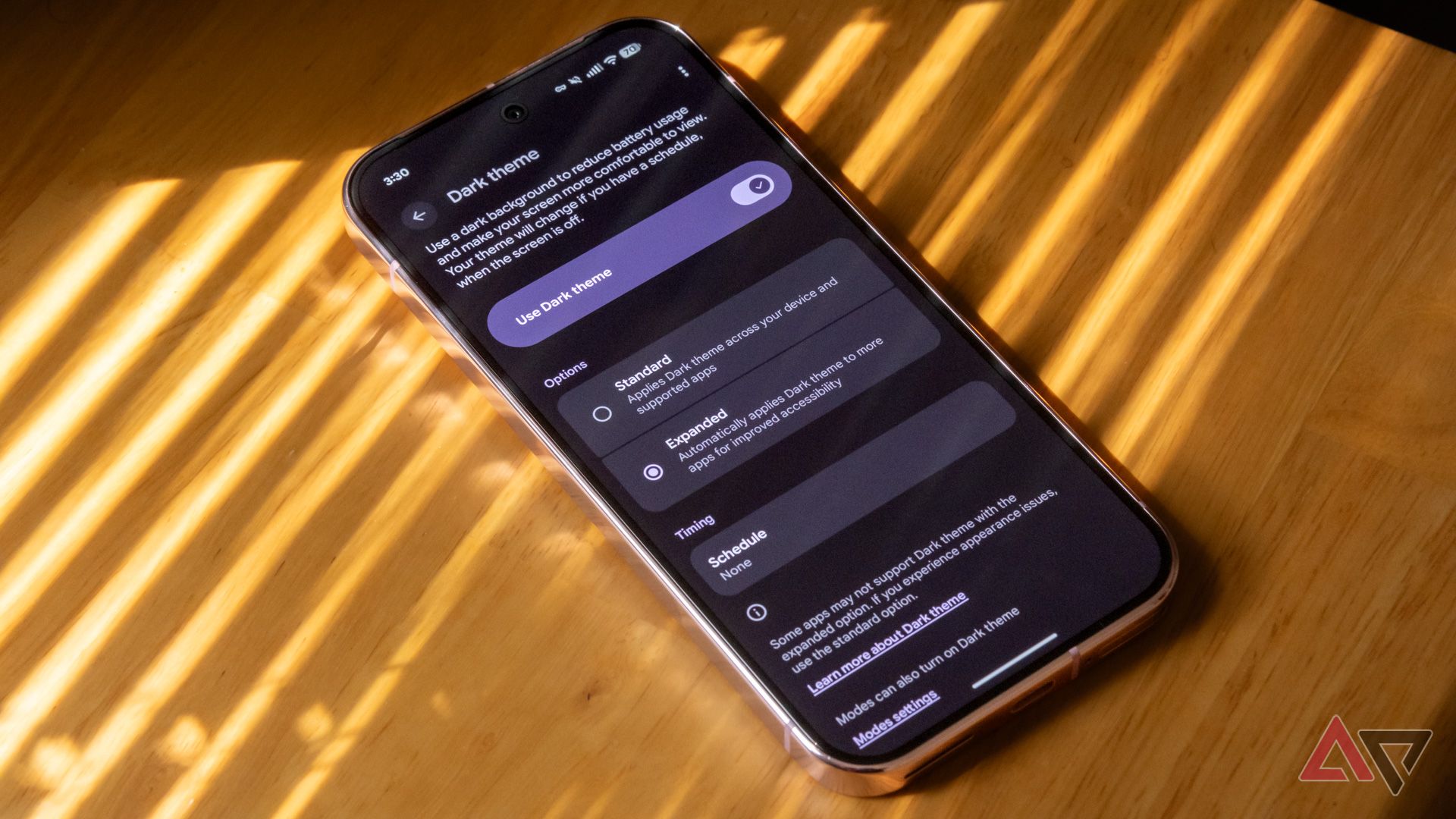
    Among the more noteworthy new features is what Google’s calling expanded dark theme. When enabled, expanded dark theme forces all your apps to display in a dark theme, even those whose developers haven’t manually created dark themes.

    Here’s what you need to know about expanded dark theme and how to enable it on your own device.

    What is expanded dark theme?

    Source: Android Developers Blog

    Android has offered a system-level dark theme that renders negative space in many views in black or dark gray since Android 10. Up to now, though, app developers have had to manually create dark theme interfaces for their apps.

    Expanded dark theme is an option in Android 16 QPR2 Beta 1 that automatically creates dark theme interfaces for apps that don’t have them built in.

    It works by inverting the background and text colors in most app views, so black text on a white background becomes white text on a black background.

    Generally speaking, app developers don’t need to do anything to enable this feature.

    With expanded dark theme enabled by the user, if the system detects that an app doesn’t have a bespoke dark mode built in, it automatically changes how certain elements are rendered to create one on the fly.

    Apps with custom rendering engines, including games, aren’t affected by expanded dark theme.

    A Pixel 9 Pro showing the Ecovacs app in expanded dark theme

    Anecdotally, expanded dark theme works with all the apps on my device that don’t have a manually created dark theme. This includes Airbnb, Credit Karma, DoorDash, FedEx, Fitbit, and more.

    The apps I’ve tested generally work well and look good with automatic dark themes turned on, but expanded dark theme’s results will vary by app. The Ecovacs app, for example, is still functional, but doesn’t look great.

    Because of the possibility of visual glitches or text that’s hard to read in an automatically inverted interface, Google’s guidance for app developers is that they should still create native dark themes for their apps.

    How to turn on expanded dark theme in Android 16 QPR2 Beta 1

    A Pixel 9 Pro showing the Airbnb app in expanded dark theme

    Expanded dark theme is currently only available in Android 16 QPR2 Beta 1. It’s nested a couple of layers deep in Android’s display settings.

    Here’s how to turn it on:

    1. Open your phone’s Settings.
    2. Tap Display & touch.
    3. Under Options, select Expanded.

    And that’s it. With expanded dark theme selected, the majority of apps on your device that don’t have their own bespoke dark-themed interfaces will automatically have their background and text colors inverted to create a dark theme.

    Again, though, because expanded dark theme is an automated process, it’s possible that not every app’s existing interface will translate well.

    How to get Android 16 QPR2 Beta 1

    If you’re looking to get Android 16 QPR2 Beta 1 to try expanded dark theme, it’s a snap.

    If you have a Pixel 6 or newer, go to Google’s Android beta website and follow the instructions to get an over-the-air update to the latest beta.

    The type of little changes we like to see

    A Pixel 9 Pro running Android 16 QPR1, showing notifications on the lock screen

    Android 16’s initial stable release was pretty light on new, user-facing features, but the first two quarterly platform release updates are a little more exciting.

    Android 16 QPR1 brought a bunch of Material 3 Expressive changes to the interface. QPR2 includes both expanded dark theme and the option to force app icons to adhere to your system theme.

    Manufacturers like Samsung and OnePlus are free to make changes to AOSP before incorporating the latest updates into their own software releases, so if you’re not using a Pixel, expanded dark theme may not make it to your device in this exact form.

    Given how useful it is, though, I’d expect plenty of OEMs to follow suit.

    QPR2 Beta 1 is available on Pixels right now. We’re expecting QPR2 to be released in stable form to both Pixel phones and AOSP in December.

    Android beta Dark Enable Expanded QPR2 theme
    Share. Facebook Twitter Pinterest LinkedIn Tumblr Email
    Previous ArticleTim Sweeney explains why some Unreal Engine 5 games struggle
    Next Article If These 8 Rumored iPhone 17 Pro Max Features Turn Out to Be True, I Just Might Switch
    techupdateadmin
    • Website

    Related Posts

    Gadgets

    Android might finally stop making you tap twice for Wi-Fi

    December 22, 2025
    Mobile

    Gemini isn’t replacing Google Assistant on Android just yet

    December 20, 2025
    Mobile

    What You Need to Play Red Dead Redemption on iOS and Android

    December 19, 2025
    Add A Comment
    Leave A Reply Cancel Reply

    Top Posts

    NYT Strands hints and answers for Monday, August 11 (game #526)

    August 11, 202545 Views

    These 2 Cities Are Pushing Back on Data Centers. Here’s What They’re Worried About

    September 13, 202542 Views

    Today’s NYT Connections: Sports Edition Hints, Answers for Sept. 4 #346

    September 4, 202540 Views
    Stay In Touch
    • Facebook
    • YouTube
    • TikTok
    • WhatsApp
    • Twitter
    • Instagram
    Latest Reviews

    Subscribe to Updates

    Get the latest tech news from FooBar about tech, design and biz.

    Most Popular

    Best Fitbit fitness trackers and watches in 2025

    July 9, 20250 Views

    There are still 200+ Prime Day 2025 deals you can get

    July 9, 20250 Views

    The best earbuds we’ve tested for 2025

    July 9, 20250 Views
    Our Picks

    My Health Anxiety Means I Won’t Use Apple’s or Samsung’s Smartwatches. Here’s Why

    December 22, 2025

    You can now buy the OnePlus 15 in the US and score free earbuds if you hurry

    December 22, 2025

    Today’s NYT Connections: Sports Edition Hints, Answers for Dec. 22 #455

    December 22, 2025

    Subscribe to Updates

    Get the latest creative news from FooBar about art, design and business.

    Facebook X (Twitter) Instagram Pinterest
    • About Us
    • Contact us
    • Privacy Policy
    • Disclaimer
    • Terms and Conditions
    © 2026 techupdatealert. Designed by Pro.

    Type above and press Enter to search. Press Esc to cancel.