
Close Menu
TechUpdateAlert

    Subscribe to Updates

    Get the latest creative news from FooBar about art, design and business.

    What's Hot

    My Health Anxiety Means I Won’t Use Apple’s or Samsung’s Smartwatches. Here’s Why

    December 22, 2025

    You can now buy the OnePlus 15 in the US and score free earbuds if you hurry

    December 22, 2025

    Today’s NYT Connections: Sports Edition Hints, Answers for Dec. 22 #455

    December 22, 2025
    Facebook X (Twitter) Instagram
    Trending
    • My Health Anxiety Means I Won’t Use Apple’s or Samsung’s Smartwatches. Here’s Why
    • You can now buy the OnePlus 15 in the US and score free earbuds if you hurry
    • Today’s NYT Connections: Sports Edition Hints, Answers for Dec. 22 #455
    • Android might finally stop making you tap twice for Wi-Fi
    • Today’s NYT Mini Crossword Answers for Dec. 22
    • Waymo’s robotaxis didn’t know what to do when a city’s traffic lights failed
    • Today’s NYT Wordle Hints, Answer and Help for Dec. 22 #1647
    • You Asked: OLED Sunlight, VHS on 4K TVs, and HDMI Control Issues
    Facebook X (Twitter) Instagram Pinterest Vimeo
    TechUpdateAlertTechUpdateAlert
    • Home
    • Gaming
    • Laptops
    • Mobile
    • Software
    • Reviews
    • AI & Tech
    • Gadgets
    • How-To
    TechUpdateAlert
    Home»Reviews»How to avoid seeing videos of Charlie Kirk’s death in your social feeds
    Reviews

    How to avoid seeing videos of Charlie Kirk’s death in your social feeds

    techupdateadminBy techupdateadminSeptember 12, 2025No Comments2 Mins Read
    Share Facebook Twitter Pinterest LinkedIn Tumblr Reddit Telegram Email
    Facebook
    Share
    Facebook Twitter LinkedIn Pinterest Email

    Conservative influencer Charlie Kirk was murdered yesterday, and graphic clips of his death are circulating like wildfire on social media. Even worse, virtually all social networks now default to autoplaying embedded videos — meaning you can wind up watching Kirk’s death without intending to.

    I accidentally came across one of these videos on Facebook and strongly advise against watching or sharing it. If you don’t want to see disturbing clips in your social feed, here’s how to disable it:

    How to disable autoplay videos on Facebook (mobile + desktop) 

    Mobile (Android / iOS):

    • Open the Facebook app.
    • Tap your profile picture.
    • Scroll down to Settings and Privacy. Open Settings.
    • Scroll to Preferences > Media (sometimes called Media and Contacts) > Media.
    • Under Autoplay in Feed and Stories, select Never.

    Desktop (web):

    • Click on your profile picture (located at the top right of the screen) > Settings & Privacy > Settings.
    • In the left menu, select Preferences (or Media).
    • Find Autoplay Animations and flip it to the off position. 

    How to disable autoplay videos on Bluesky 

    Mobile & desktop:

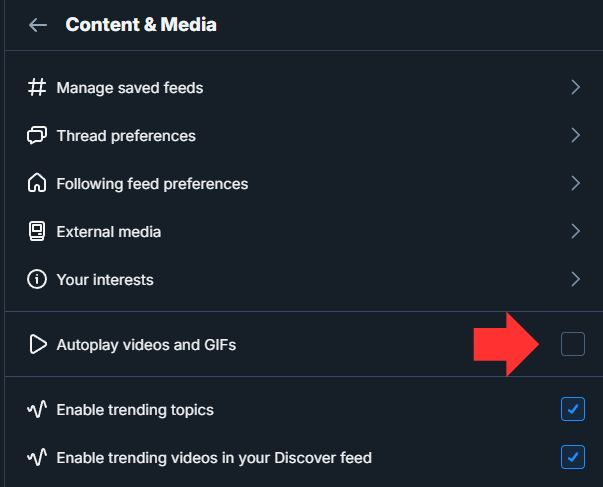
    • Open the Bluesky app or bluesky.social on the web.
    • Go to Settings (gear icon) > Content and Media.
    • Uncheck the box next to Autoplay Videos and GIFs.
    How to disable autoplay videos on Instagram

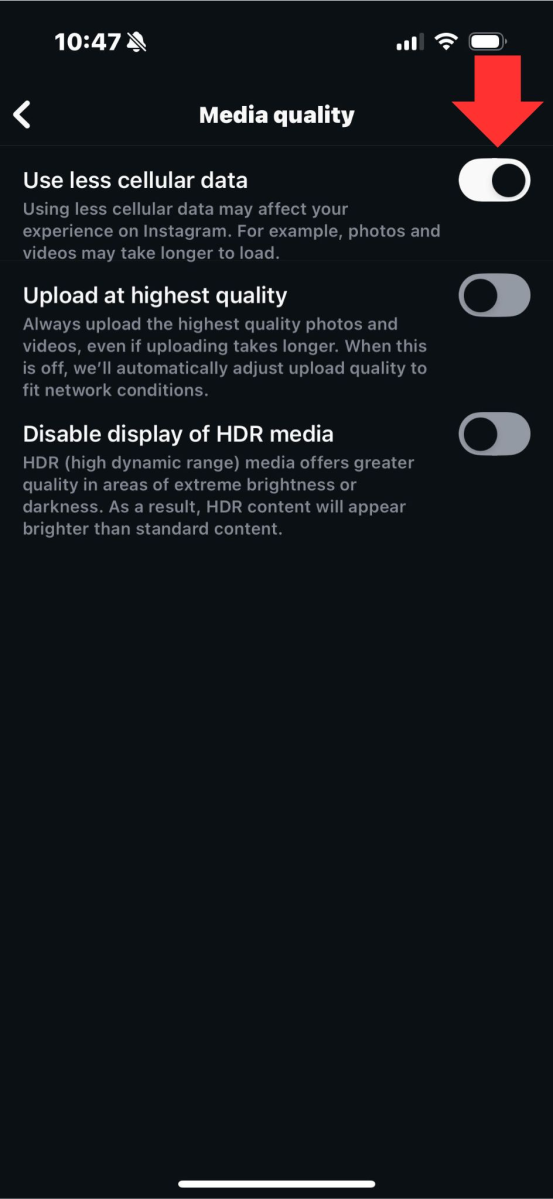
    Instagram doesn’t let you turn off autoplay completely. You can enable a setting that stops videos from loading automatically on mobile data, which reduces unexpected playback. That said, videos may still play when you scroll through your feed while you’re on Wi-Fi.

    Mobile:

    • Open Instagram.
    • Tap the menu (look for the three lines).
    • Scroll down and click Media Quality.
    • Click on Use Less Cellular Data and flip it to the on position.
    How to disable autoplay videos on X

    • Click on your profile picture in the upper-left.
    • Select Settings and Privacy.
    • Navigate to Accessibility, Display and Languages and then click Data Usage.
    • Open the Autoplay menu and select Never.
    Avoid Charlie Death feeds Kirks Social videos
    Share. Facebook Twitter Pinterest LinkedIn Tumblr Email
    Previous ArticleHow China’s Propaganda and Surveillance Systems Really Operate
    Next Article Peacemaker season 2 episode 4 changes what I thought I knew about the origins of the Quantum Unfolding Chamber
    techupdateadmin
    • Website

    Related Posts

    Mobile

    Launching my first NotebookLM AI-generated podcast taught me one thing you must avoid

    December 20, 2025
    Gadgets

    Adobe’s Firefly AI now lets you edit videos by describing changes

    December 16, 2025
    Gadgets

    I used Nano Banana Pro to create 20 social media posts, the response they got was shocking

    December 13, 2025
    Add A Comment
    Leave A Reply Cancel Reply

    Top Posts

    NYT Strands hints and answers for Monday, August 11 (game #526)

    August 11, 202545 Views

    These 2 Cities Are Pushing Back on Data Centers. Here’s What They’re Worried About

    September 13, 202542 Views

    Today’s NYT Connections: Sports Edition Hints, Answers for Sept. 4 #346

    September 4, 202540 Views
    Stay In Touch
    • Facebook
    • YouTube
    • TikTok
    • WhatsApp
    • Twitter
    • Instagram
    Latest Reviews

    Subscribe to Updates

    Get the latest tech news from FooBar about tech, design and biz.

    Most Popular

    Best Fitbit fitness trackers and watches in 2025

    July 9, 20250 Views

    There are still 200+ Prime Day 2025 deals you can get

    July 9, 20250 Views

    The best earbuds we’ve tested for 2025

    July 9, 20250 Views
    Our Picks

    My Health Anxiety Means I Won’t Use Apple’s or Samsung’s Smartwatches. Here’s Why

    December 22, 2025

    You can now buy the OnePlus 15 in the US and score free earbuds if you hurry

    December 22, 2025

    Today’s NYT Connections: Sports Edition Hints, Answers for Dec. 22 #455

    December 22, 2025

    Subscribe to Updates

    Get the latest creative news from FooBar about art, design and business.

    Facebook X (Twitter) Instagram Pinterest
    • About Us
    • Contact us
    • Privacy Policy
    • Disclaimer
    • Terms and Conditions
    © 2026 techupdatealert. Designed by Pro.

    Type above and press Enter to search. Press Esc to cancel.