


Don’t toss that tube TV! By connecting an aging TV to a soundbar, you can give your older set a massive audio boost, complete with thumping bass and even virtualized 3D sound. And if your ancient flat-screen or tube TV has the right outputs, hooking it up to a new soundbar will be a snap.
While most modern soundbars rely on an HDMI cable to connect to HDTVs and 4K TVs, there are still plenty of soundbars on the market with legacy audio inputs that will work with older TVs—and yes, that includes many CRT (aka “tube”) TVs that are decades old.
Here’s how to get started.
Look for optical or RCA audio outputs
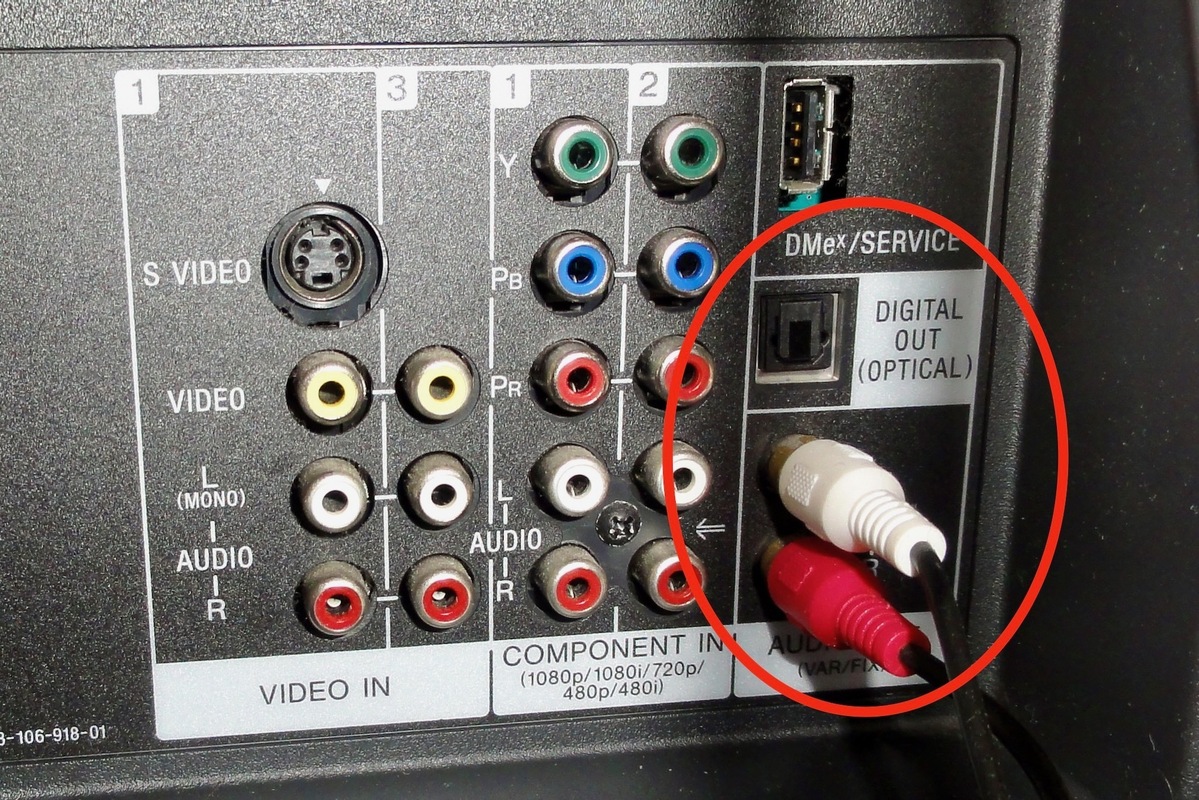
The first step is to check the back of your old TV to see what kind of audio outputs are available. Even if your aging TV lacks HDMI, it might have an optical (or Toslink) audio port, which has a squarish opening with a pair of small notches on each side.
Not only can optical audio connections handle compressed (but not lossless) 5.1- and even 7.1-channel Dolby Digital and DTS sound, they’re also widely supported by the latest soundbars.
Many older TVs have at least analog stereo RCA audio outputs or even a multi-channel optical digital audio output.
No sign of an optical output? Then look for a stereo pair of RCA audio outputs, one for the left channel (commonly white and marked “L”) and a second for the right channel (commonly red and marked “R”).
Many older TVs—even those as far back as the 1980s—will have these familiar-looking RCA plugs situated on their rear input/output panels, which can deliver analog stereo audio signals.
Pick the right soundbar
Once you’ve determined that your older TV has either optical or RCA analog audio outputs, you’re ready to go soundbar shopping.
As you’re browsing soundbars, keep an eye out for those with audio inputs that match your TV’s outputs. If your set has an optical audio output, good news: soundbars with optical inputs are (as we mentioned earlier) easy to find. That said, there are more and more soundbars (particularly newer ones) that have only HDMI ports, so be sure to look carefully.

You’ll find plenty of soundbars on the market with optical and 3.5mm analog audio inputs that will work with older TVs.
You’ll see fewer current soundbars with an analog audio inputs than with optical connectors, but they’re still reasonably easy to find, particularly when it comes to budget soundbars in the sub-$200 range.
What you’re looking for is a 3.5mm audio jack (generally labeled “AUX In”) that connects to the twin RCA connectors on your TV via a Y-shaped adapter cable (read on for help with picking the right cables).
Look for virtualized 3D sound modes
Besides having the right connectors, you should also consider a soundbar with a virtual surround or 3D mode. Many of the latest soundbars have become remarkably adept at teasing surround and 3D audio–complete with height effects–out of 5.1- or even 2.0-channel audio sources.
In particular, DTS Virtual:X is impressively effective at tricking your ears into thinking they’re hearing sound from behind and even above your head, even when the original audio is only in stereo (which will be the case if your TV only has RCA-style analog audio outputs). And here’s the really good news: you can find DTS Virtual:X processing in soundbars that cost well south of $200.
Use the correct optical or 3.5mm-to-RCA cables
Once you’ve matched the optical and/or RCA-style audio outputs on your TV to the matching inputs on a soundbar, all you need to do is connect them using the proper cables. Most soundbar manufactures will include the proper optical cables (the ones that come with soundbars are generally quite short and thin) and RCA-to-3.5mm Y-cables.
No cables in the box? Don’t fret; both optical audio cables and RCA-to-3.5mm Y-cables are readily available through Amazon and other online retailers. Expect to spend about $15 or so for an optical cable, while RCA-to-3.5mm cables can be scooped up for less than $10.

Optical audio cables and RCA-to-3.5mm Y-cables (pictured) are readily available on Amazon, typically for less than $10 each.
Tweak your TV’s audio output settings
You might also need to make some adjustments to your TV’s audio settings. While some TVs may pipe sound through their audio-out ports automatically, others may require you to tinker with their audio settings Just start digging around in the TV’s settings menu.
You should also keep an eye out for a setting that switches your TV from “fixed” audio output (which will allow the soundbar to control the volume) to “variable” output (where the TV controls the volume). If the option exists, consider going for the “variable” setting, which means you won’t need to switch back and forth between your soundbar and TV remotes each time you want to adjust the volume.
