



At a glance
Expert’s Rating
Pros
- Powerful processor with AI functions
- Many USB ports
- Two 2.5 Gbit Ethernet ports
- Up to four 8K monitors can be connected
- Wi-Fi 7 and Bluetooth 5.4
Cons
- Revs up abruptly and gets loud
- Second SSD only possible as M.2-2230
Our Verdict
The sleek metal Geekom A9 Max, powered by AMD’s Ryzen AI 9 HX 370 with Zen 5, handles everyday tasks and Windows 11 AI features effortlessly, and with its multiple connections and four-monitor support, offers a compelling alternative to bulky desktop PCs.
Price When Reviewed
This value will show the geolocated pricing text for product undefined
Best Pricing Today
Best Prices Today: Geekom A9 Max

Desktop PCs have been under my desk for almost 30 years. Early last year, after issues with the Intel Core i9-14900KF, the CSL VenomBox was my first mini PC, and I haven’t regretted it.
As I want to stay up-to-date with AI, I needed a suitable mini PC. I chose the Geekom A9 Max with the Ryzen AI 9 HX 370 processor, which is a moderate performance upgrade over the AMD Ryzen 7 7840HS in the CSL VenomBox, while also providing the necessary AI support and updated connectivity.
Geekom A9 Max: Specs
- Dimensions: 135 × 132 × 46.9 mm (W × D × H)
- Processor: AMD Ryzen AI 9 HX 370
- GPU: AMD Radeon 890M
- Memory: 2 × 16 GB Wodposit Dual-Channel DDR5 5600MHz
- Internal storage: Lexar LNQ7A1X002T, M.2 2280 PCIe 4.0 ×4 NVMe SSD
- SSD upgradeability: 1 × M.2 2230 PCIe 4.0 ×4 NVMe, up to 4 TB
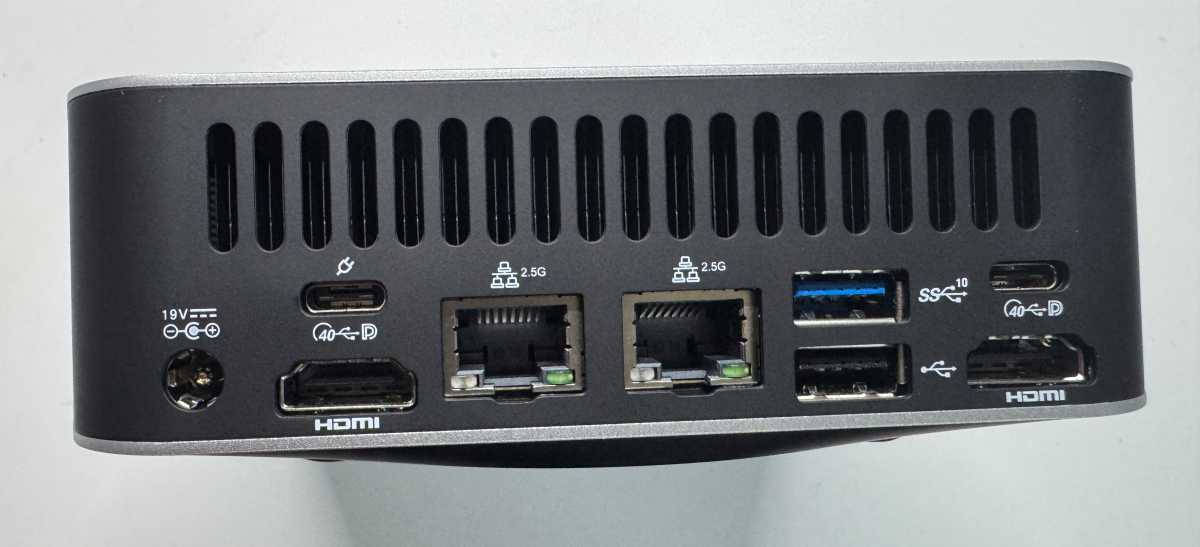
- Rear connections: 1 × USB 3.2 Gen 2 Type-A, 1 × USB 2.0 Type-A, 1 × USB 4.0 Type-C DP-Alt-Mode / PD-In, 1 × USB 4.0 Type-C DP-Alt-Mode, 2 × Ethernet RJ45 2.5 Gbit/s, 2 × HDMI 2.1 FRL, 1 × DC-In
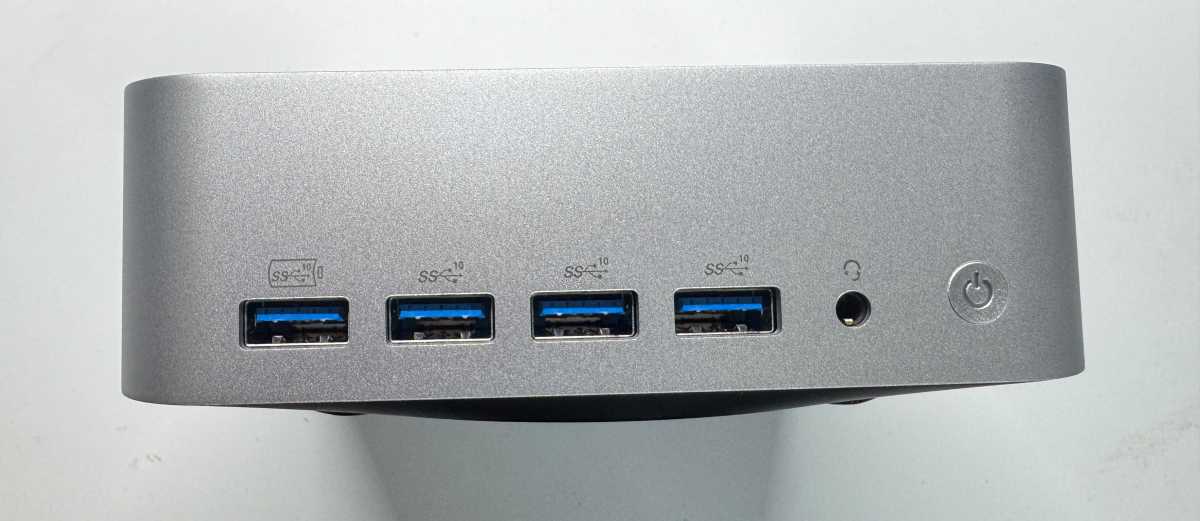
- Front connections: 3 × USB 3.2 Gen 2 Type-A, 1 × USB 3.2 Gen 2 Type-A Always On, 1 × 3.5 mm headphone jack, 1 × SD card reader 4.0
- Connectivity: Wi-Fi 7, Bluetooth 5.4
- Operating system: Microsoft Windows 11 24H2 (64-bit)
- Accessories: VESA mount (121.8 × 116.5 × 1.0 mm)
The Geekom A9 Max is a good choice for users seeking AI functions and above-average performance.
Geekom A9 Max: Design and features
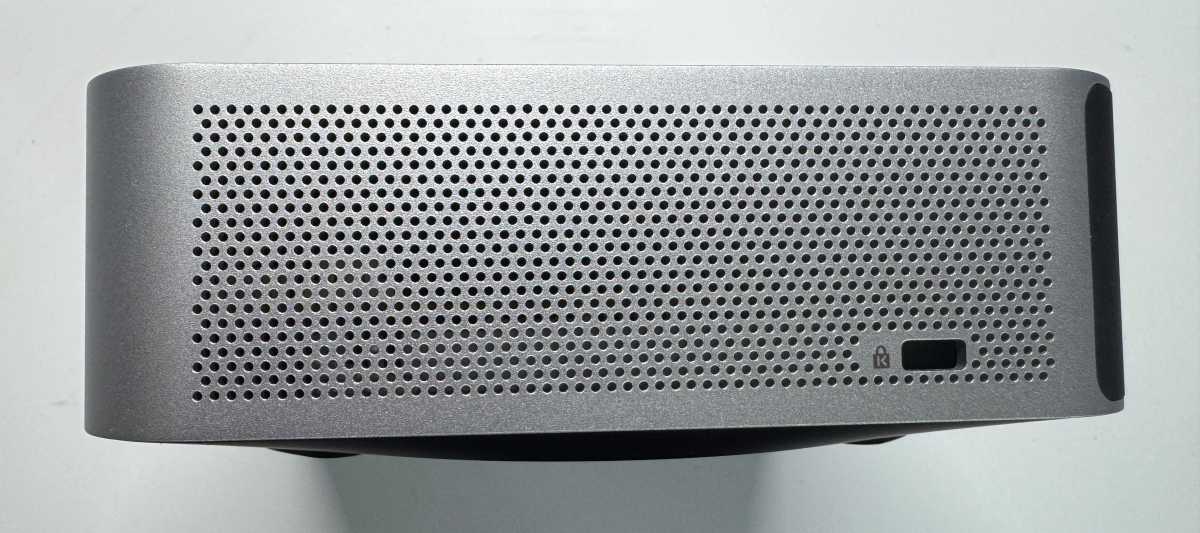
The A9 Max mini PC, which has only been available for a few weeks, was unveiled at CES earlier this year. Geekom packs the hardware into an attractively designed metal housing that’s supposed to withstand up to 200 kilograms of pressure. We haven’t tested this claim, but we can attest to the high stability of the housing.
Christoph Hoffmann
With dimensions of 135 x 132 x 46.9 millimeters, the A9 Max fits easily on any desk. It can also be attached to the back of a monitor using a VESA mount, which doesn’t make sense with my setup with three 27-inch monitors on a single rail.
As is typical for a mini PC, there are connections available on the front and rear, although the computer’s orientation on the desk doesn’t really matter. The front is marked by the on/off switch. Geekom hasn’t been stingy with ports and leaves nothing to be desired: supporting up to four monitors with 8K, there are two USB4 ports with DisplayPort 1.4 each, plus two HDMI 2.1 ports.
Christoph Hoffmann
One highlight is the two 2.5 Gbit Ethernet ports, which become useful when paired with a compatible router or switch and a NAS, such as the Ugreen DX4800 Plus (more on this later).
Christoph Hoffmann
There are also additional USB ports, totaling eight in various versions–from USB 2.0 and USB 3.2 Gen 2 to USB 4.0 Type-C. This setup also allows storage devices to be connected at high speed.
Geekom A9 Max: Processor, GPU, RAM, and SSD
At the heart of the Geekom A9 Max is the AMD Ryzen AI 9 HX 370, a high-end processor from the AMD Ryzen AI 300 series, developed for both laptops and desktops.
It has 12 cores (4 × Zen 5 and 8 × Zen 5c) and supports up to 24 threads thanks to SMT. AMD’s Radeon 890M graphics and an integrated AI engine deliver up to 80 TOPS in total, 50 TOPS of which come via the NPU, meaning the CPU is specifically designed for AI applications and acceleration.
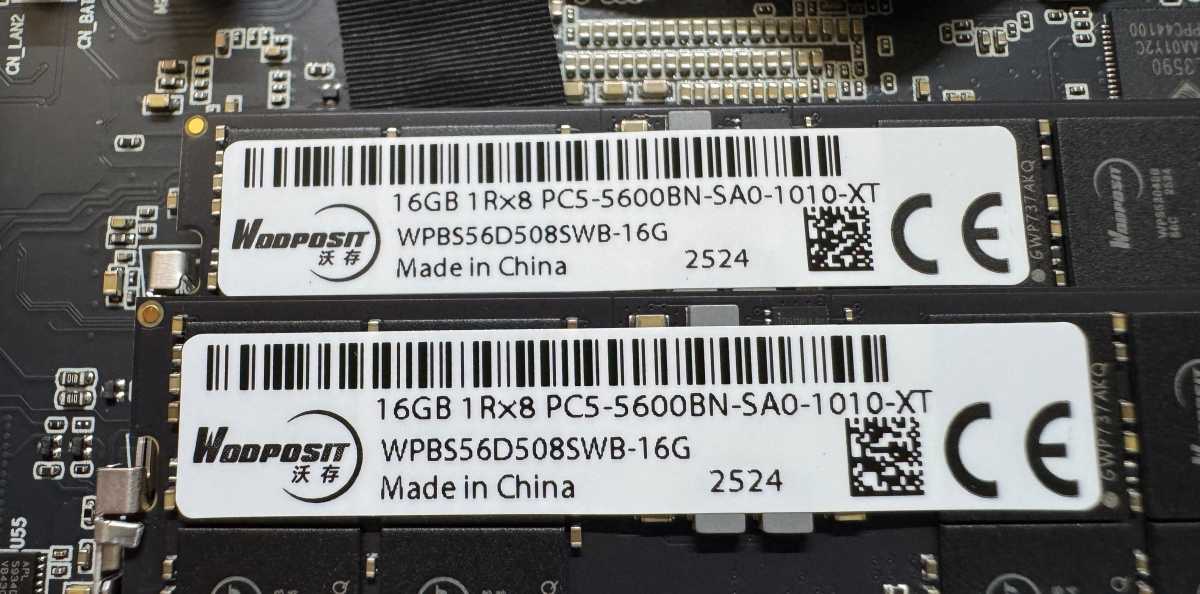
The system in includes 32 GB of DDR5 RAM (5,600 MT/s) in two 16 GB modules. A single 32 GB module would have been more favorable for a future upgrade to 64 GB, since both modules would otherwise need to be replaced. The manufacturer is Wodposit Technology from Shenzhen, China–little is known about the company itself, but it has been a hardware partner of Geekom for some time.
Christoph Hoffmann
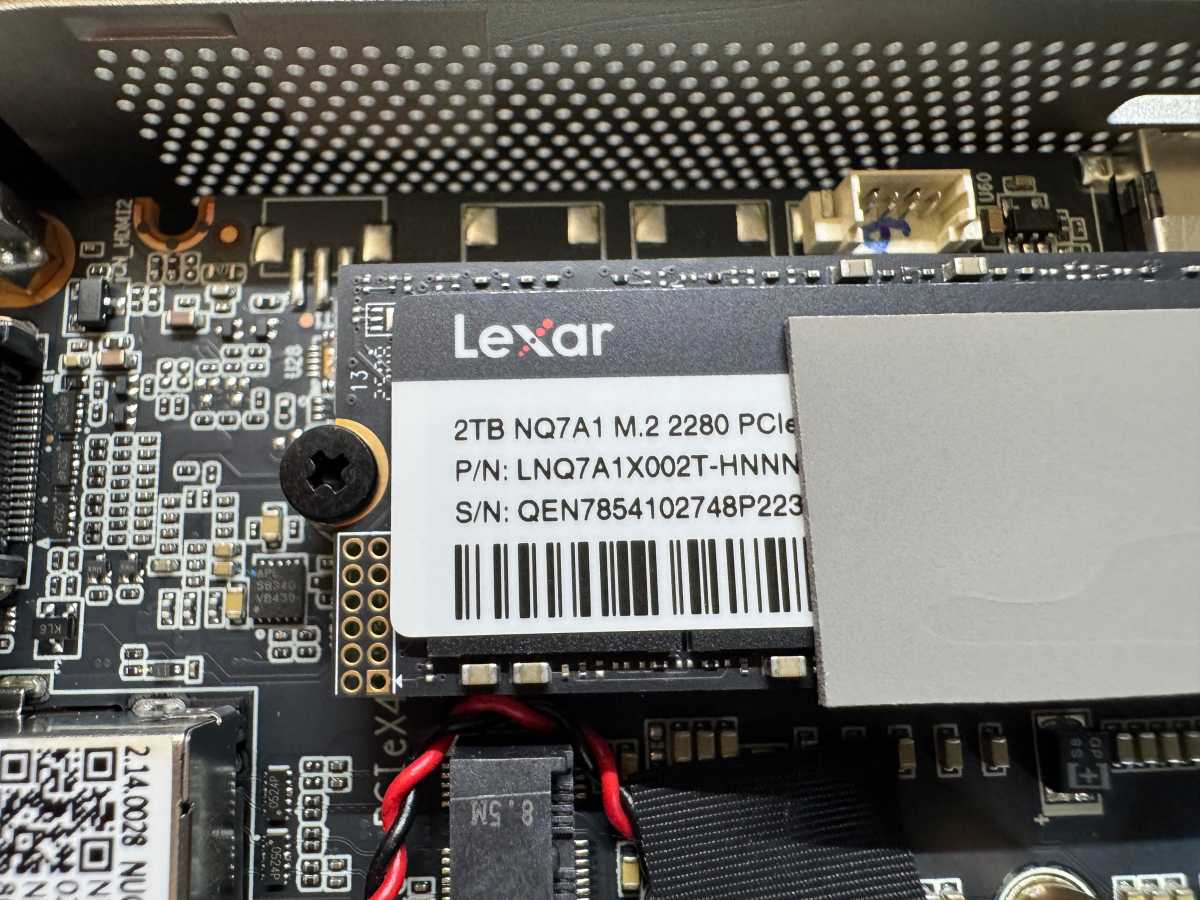
The NVMe SSD installed in our A9 Max has a 2 TB capacity and comes from Lexar, labeled LNQ7A1X002T. It’s also possible that SSDs from other manufacturers are used in other A9 units.
Christoph Hoffmann
There is a short M.2 interface (M.2-2230) for an additional SSD, though the choice of compatible drives is limited. For our upgrade, we opted for the Crucial P310 SSD 2 TB M.2.
Geekom A9 Max: Windows 11 version 24H2 comes pre-installed
The A9 Max comes with a hardware-bound license for Windows 11. When booting the mini PC for the first time, the Windows installation begins, the Windows installation begins and takes around 50 minutes. Updates are loaded during the set-up, but Windows offers further updates later on.
In our test setup, a 27-inch Dell monitor is connected to the A9 Max, along with a wired Cherry keyboard and a Microsoft mouse with dongle. The mini PC is connected to the network via an Ethernet cable to the 2.5 Gbit/s BrosTrend 8X switch.
We won’t go into further detail about Windows, but we observed that many of the operating system’s AI features are supported.
Geekom A9 Max: Performance
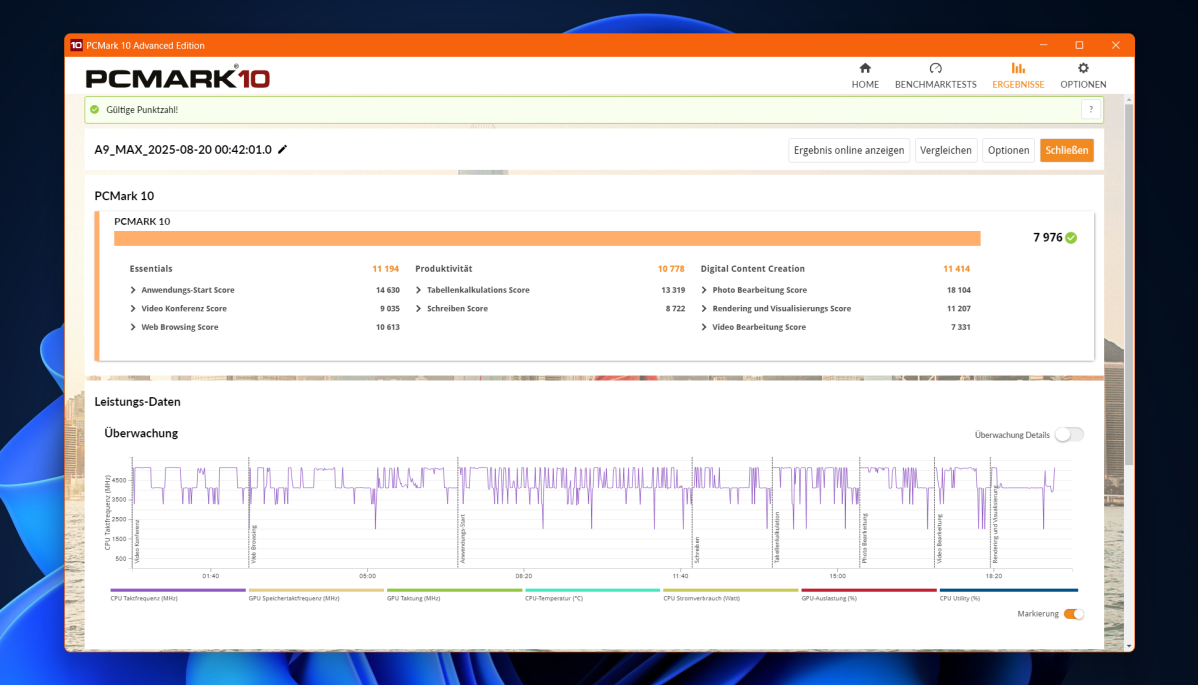
Given the strong hardware for a mini PC in this price range, we were eager to see the performance test results. We used the PCMark 10 benchmark test to evaluate actual performance, which provides realistic values by running everyday tasks sequentially.
Scoring 7,976, the A9 easily lands in the top shirt. For comparison, the Asus ZenBook 14 OLED with its Ryzen 7 7730U processor scores a total of 6,722 points. This shows just how the Ryzen AI 9 HX 370 stacks up against Qualcomm and Intel CPUs.
Christoph Hoffmann
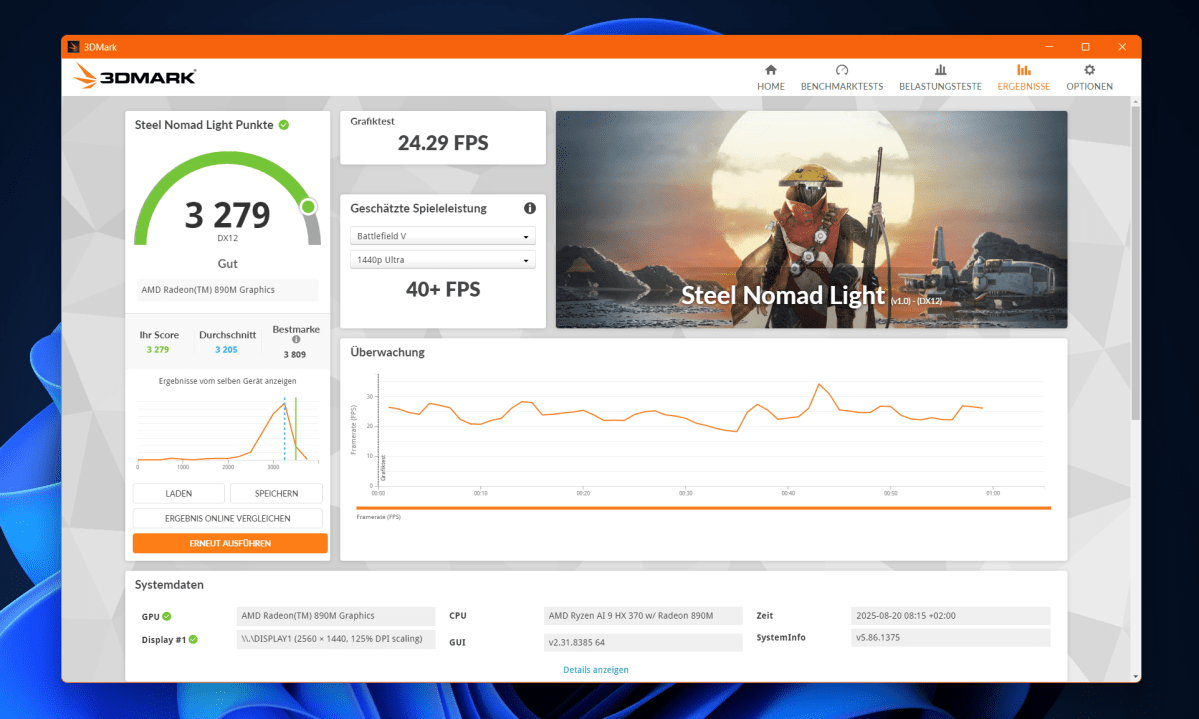
The Geekom A9 Max scores 3,279 points in 3DMark’s Steel Nomad Light benchmark, placing it in the “good” range and slightly above average. It also performs solidly in the Time Spy benchmark, with 3,701 points.
Christoph Hoffmann
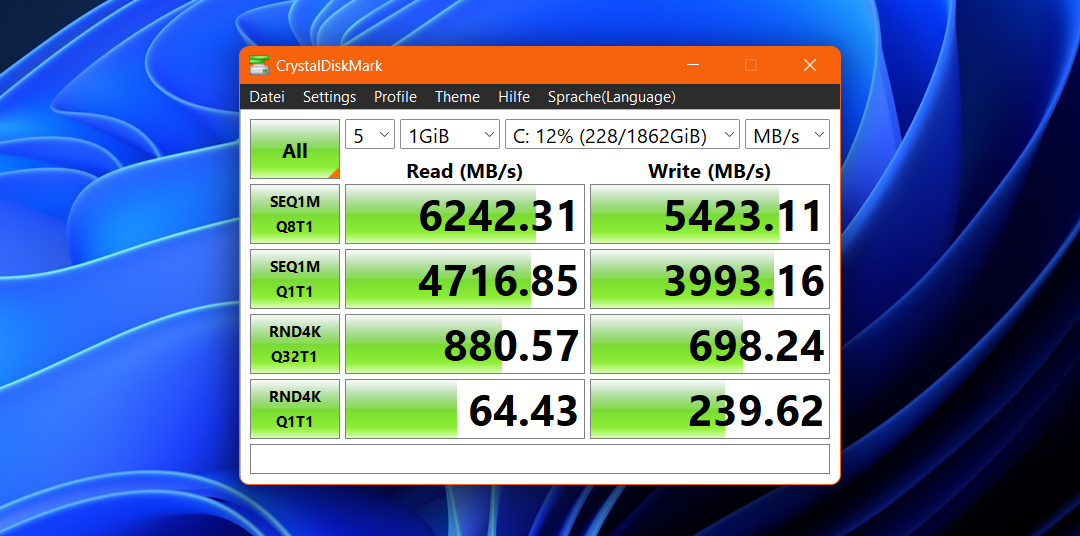
The M.2 NVMe SSD from Lexar delivers a read speed of 6,242 MB/s and a write speed of 5,423 MB/s in the Crystal Disk Mark benchmark. This is an above average value for a PCIe 4.0 SSD. By comparison, the retrofitted Crucial P310 SSD 2 TB achieves even higher speeds, with 7,000 read and 4,614 MB/s write.
Christoph Hoffmann
Another point of interest is the dual Ethernet setup with 2 x 2.5 Gbit/s ports. In short, there’s no speed boost form using a single LAN port; the main advantage is the ability to connect to two wired networks in parallel.
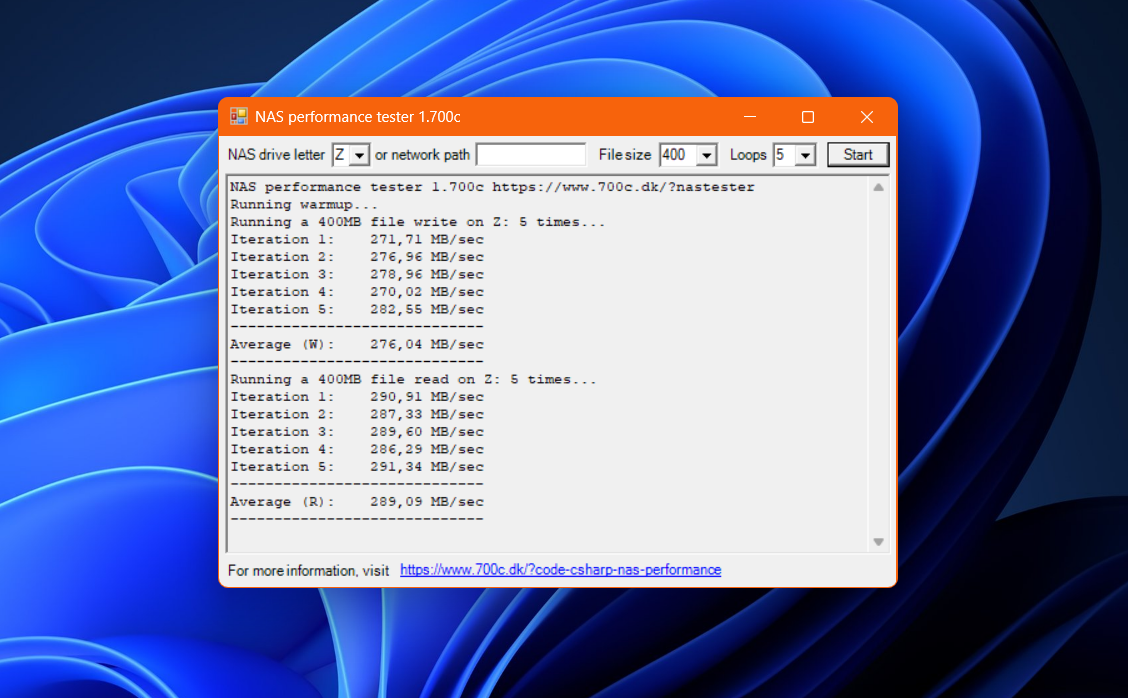
Regarding speed, we connected the A9 Max to the network using two category eight network cables and used Windows File Explorer to copy a video file of nearly 5.8 GB to and from the Ugreen NAS DX4800 Plus, which also has two 2.5 Gbit/s ports.
The average bandwidth was 278 MB/s, whether one or both Ethernet ports were connected. The NAS Performance Tester produced similar results, recording average speeds of 276.04 MB/s for reading and 289.09 MB/s for writing.
Christoph Hoffmann
Geekom A9 Max: Conclusion
The Geekom A9 Max is a good choice for users seeking AI functions and above-average performance. With its comprehensive features and multi-monitor support, the mini PC is well-suited for office use and also appeals to developers and graphic designers.
Geekom’s pricing policy, however, is somewhat unfortunate. In the U.S., the A9 Max is currently goes for $999, which is down from its original $1,199. That’s not a bad discount right there, but you may see the price fluctuate due to the occasional promotion on Geekom’s website.
This article originally appeared on our sister publication PC-WELT and was translated and localized from German.
