


Why you can trust TechRadar
We spend hours testing every product or service we review, so you can be sure you’re buying the best. Find out more about how we test.
One-minute review
However, these are small niggles: generally speaking, the watch performs admirably. While the lack of full-color directional maps is disappointing, the interface works just fine when following courses during runs, and the voice assistant is as responsive as Siri, if not as sophisticated as on-device AI such as Gemini. The battery, said to be up to 12 days of use in smartwatch mode, is an accurate measurement: I wore the watch for around 10 days before needing to charge it, with quite a bit of working out. The heart rate readings from Garmin’s Elevate V5 sensor are accurate enough for all but elite athletes, but I’ll touch on that more in the Performance section of the review.
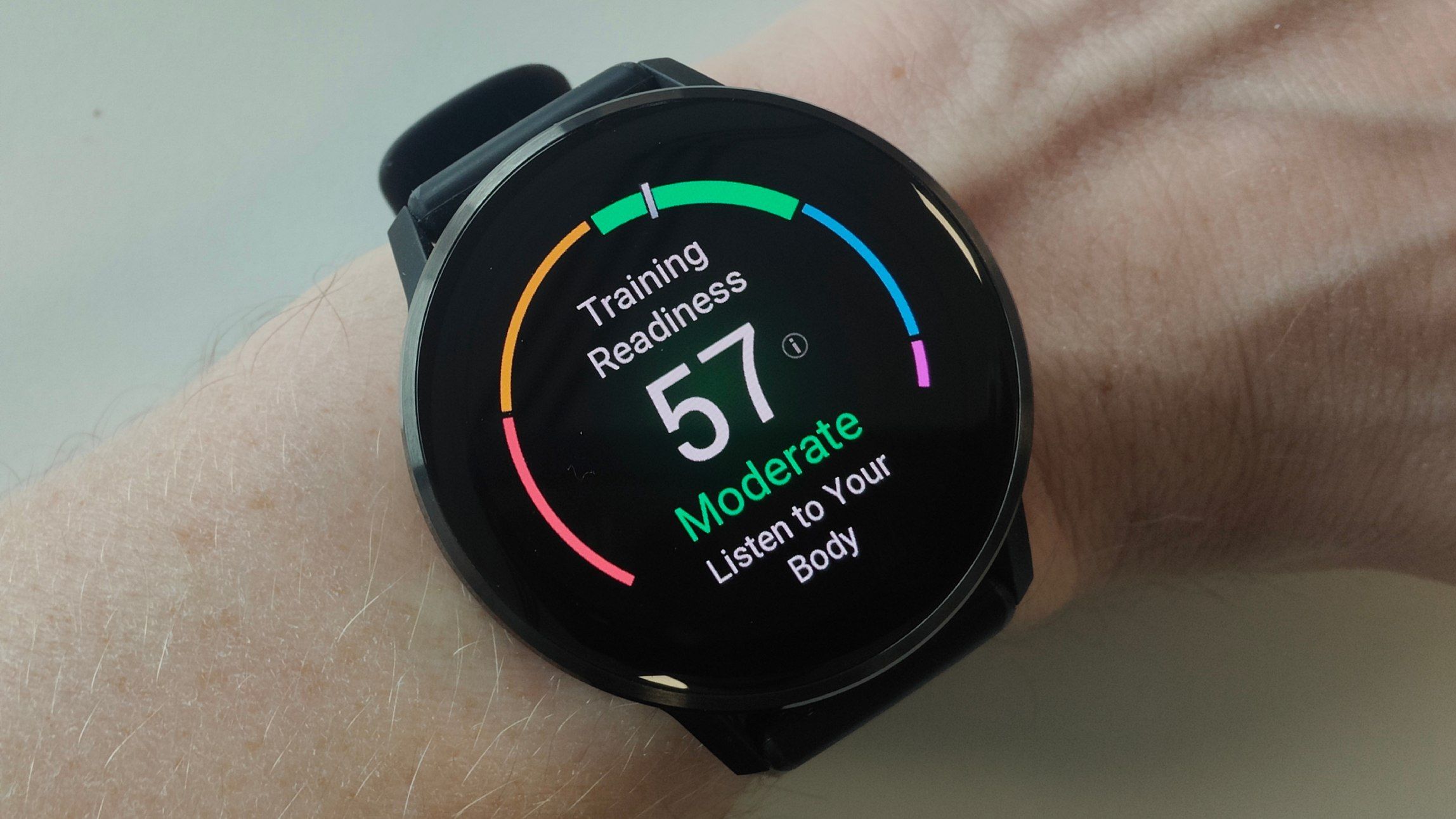
New health tools such as Lifestyle Logging and Health Status are useful, especially the self-reporting Lifestyle Logging structure, which allows you to assign tags to your day (caffeine, alcohol, healthy meals, heavy meals and so on) to show the effects of different stimuli on your metrics.
Garmin’s usual suite of outstanding metrics are present and correct: as a regular runner, I find stride length, cadence and so on useful for tweaking my technique, and Garmin’s Race Calendar and Primary Race widgets are second to none. It’s a worthy buy for anyone who wants a Garmin, but doesn’t like the outdoorsy look so many of them share.
Garmin Venu 4: Price and availability
- $549.99 in the US
- £469.99 in the UK
- AU$949 in Australia
The Garmin Venu 4 costs $549.99 / £469.99 / AU$949, and this is true for both the 41mm and 45mm sizes. You get the choice of Silver, Slate and Lunar Gold colors – I have the Slate option, and it looks great – and you can pay an additional $50 / £50 /AU$69 for other bands. I’m seriously considering splashing out on a brown leather band, which would really set off the look of the Slate.
Value-wise, this is around the price of a more expensive Apple or Samsung Galaxy Watch8 Classic, and I’d say that’s about right for where this sits in the market; what it lacks in smart communication credentials, it makes up for in battery life and fitness features. There’s no getting around this is a price rise over the older Venu 3, but the premium metal body and additional features make it worth the tradeoff.
Value score: 4/5
Garmin Venu 4: Specifications
|
Component |
Garmin Venu 4 (41mm) |
Garmin Venu 4 (45mm) |
|
Price |
$549.99 / £469.99 / AU$949 |
$549.99 / £469.99 / AU$949 |
|
Dimensions |
41 x 41 x 12 mm |
45 x 45 x 12 mm |
|
Weight |
46g with band |
56g with band |
|
Case/bezel |
Stainless steel/Polymer |
Stainless steel/Polymer |
|
Display |
390 x 390px 1.2-in AMOLED display |
454 x 454px 1.4-in AMOLED display |
|
GPS |
GPS, Galileo, GLONASS, Beidou, QZSS, SatIQ |
GPS, Galileo, GLONASS, Beidou, QZSS, SatIQ |
|
Battery life |
Up to 10 days |
Up to 12 days |
|
Connection |
Bluetooth, Wi-Fi |
Bluetooth, Wi-Fi |
|
Water resistant |
Yes, 5ATM |
Yes, 5ATM |
Garmin Venu 4: Design

- Stainless steel body upgrade
- Redesigned UI
- Brighter screen – but bezels are thick
If you’ve got this far in our review, you’ll know I like the look of the Garmin Venu 4. Whereas the stainless steel element of the 3 was confined to the bezel, with the case itself made of plastic, Garmin has expanded its use of steel to include the case as well, and it looks all the better for it. The dark metal of my Slate model is understated and classy, and I can’t wait to pair it with a leather strap. The screen is bright, but the bezels could be slightly thinner for my taste. Still, it’s hard to complain about the looks of this watch.
As opposed to its more outdoor-oriented watches such as the Fenix, Forerunner and Instinct series, the Garmin Venu 4 has two buttons instead of five. Its snappy and responsive touchscreen does most of the heavy-lifting when it comes to navigating, although you can configure the buttons to operate on long and short presses. A long press on my “back” button ignites the LED torch (a great addition on all the best Garmin watches now), while a long press on my upper “start” button summons the Controls tab, through which I can activate the Voice Assistant, Find my Phone, DND and other functionalities quickly. It’s a nice system.
The redesigned UI isn’t quite as smooth and seamless as watchOS or Wear OS, but it isn’t far off. Garmin used to look downright basic in comparison (which I think had a charm all by itself to be honest, and part of me misses it), but it looks great and works well in practice when you’re swiping through widgets or teeing up a workout. Garmin users who choose to upgrade will find the new setup intuitive to use, as will first-timers.
Design score: 5/5
Garmin Venu 4: Features

- New Health Status and Lifestyle Logging
- Usual suite of excellent fitness tracking features
- Speaker, microphone and LED torch
Tons of great features abound here. The new Health Status feature looks at five key metrics during sleep: heart rate, HRV, respiration, pulse ox and skin temperature. It details whether all of your metrics are in their normal range, and if one or more is out of whack, something is afoot.
Often, this can be combined with the Lifestyle Logging feature to self-diagnose potential issues. Lifestyle Logging allows you to tag your day with the amount of caffeinated drinks, meditation, alcohol, healthy meals, heavy meals, cold showers, or other custom tags you might care to add. If your skin temperature is outside your healthy range and you logged some alcoholic drinks at a party the day before, or your HRV is off after a day of too much caffeine, you’ll know what to change to bring yourself back in line. Still, it will be a cold day in hell before Garmin makes me give up my morning coffee.
The usual suite of wellness and fitness features are present, with the Venu 4 – like the rest of the best Garmin watches – excelling at running and cycling, in particular. Training plans from Garmin Coach, local courses generated in the Garmin Connect app and upcoming races can be loaded onto your watch to turn it into a training powerhouse. Advanced metrics such as power for cyclists, and ground contact time or vertical oscillation for runners really empower the watch to be particularly helpful for connoisseurs. I also use it to time my rest periods in the gym between sets – a useful feature in the Strength workout profile to keep my mind on my workout. I’m missing full-color maps here, but the basic follow-along directional arrow for longer courses will be good enough for most.
Smarts-wise, the Controls tab features the Find my Phone and Voice Assistant functionalities, which are serviceable and useful but pretty basic. There are no on-device AI smarts here, but I can set a timer easily enough. The LED torch is eminently useful in three tiers of powerful white light and a less aggressive red option for night runs. A speaker and microphone allow you to take calls on-wrist, which is useful in a pinch. However, without the option to connect the watch to your network without a phone via LTE, it’s a convenience rather than a necessity.
Features score: 4.5/5
Garmin Venu 4: Performance

- Elevate V5 sensor is accurate compared to industry-standard heart rate monitor
- Battery life performs as described
- The watch was comfortable and useful throughout the testing process
I compared the Garmin Venu 4’s Elevate V5 heart rate sensor to a chest strap – the Polar H10, described as the most accurate heart rate monitor available to most people, and used by professional and amateur athletes alike – during a couple of workouts.
During my tests, after a brief bit of initial variation, the Garmin Venu 4 tightened up and matched the Polar H10’s readings very closely. After a 30-minute run, the Polar H10’s average beats-per-minute for my heart rate registered as 156bpm. The Garmin Venu 4 registered 151bpm.
For training purposes, that’s certainly close enough for most – it isn’t really a serious statistical outlier – although I suppose it could be closer. The Apple Watch Ultra 3, which I also wore during this run, registered 155bpm. Still, 5bpm out across the entirety of the workout isn’t anything to worry about, and a good enough estimation to indicate the Elevate V5’s accuracy.
Battery life performs as described, too: the watch lasted a full 10 days with multiple workouts before needing a top-up. The Venu 4 was comfortable to use and better to sleep in than a lumpy Fenix – I hardly took it off all week.
Performance score: 4.5/5
Garmin Venu 4: Scorecard
|
Attribute |
Comments |
Score |
|---|---|---|
|
Value |
About right for its place in the lineup, but not a huge bargain |
4 |
|
Design |
Looks great and is intuitive to use. Top marks |
5 |
|
Features |
I would have loved LTE and full-color maps, but they’re my only quibbles |
4.5 |
|
Performance |
Accurate, long-lasting and looks great on wrist in the office. Enough smarts for most. |
4.5 |
Garmin Venu 4: Should I buy?
Buy it if…
Don’t buy it if…
Also consider
|
Component |
Garmin Venu 4 (41mm) |
Apple Watch Series 11 (42mm) |
Samsung Galaxy Watch8 (40mm) |
|
Price |
$549.99 / £469.99 / AU$949 |
From $399 / £369 / AU$679 |
From $349.99 / £319 / AU$649 |
|
Dimensions |
41 x 41 x 12 mm |
42mm x 36mm x 9.7mm |
42.7 x 40.4 x 8.6mm |
|
Weight |
46g with band |
30.3g (42mm) |
30g |
|
Case/bezel |
Stainless steel/Polymer |
Aluminum with a metal back or Titanium (100% recycled) |
Armor Aluminum |
|
Display |
390 x 390px 1.2-in AMOLED display |
Always-on Retina LTPO3 display Wide-angle OLED at 374 by 446 (42mm) |
1.3-in super AMOLED |
|
GPS |
GPS, Galileo, GLONASS, Beidou, QZSS, SatIQ |
L1 GPS, GNSS, Galileo, and BeiDou |
GPS, Glonass, Beidou, Galileo |
|
Battery life |
Up to 10 days |
24 hours, 38 hours in Low Power Mode |
Up to 30 hours |
|
Connection |
Bluetooth, Wi-Fi |
Bluetooth 5.3, Wi-Fi, second-generation ultra-wideband chip, and 5G (Optional) |
Wi-Fi, NFC, Bluetooth 5.3 |
|
Water resistant |
Yes, 5ATM |
WR50 and IP7X |
Yes, 5ATM |
How I tested
I wore the Garmin Venu 4 for two weeks, drained the battery down while completing gym, running and hiking workouts. I used features such as Lifestyle Logging, tested the Voice Assistant, ECG functionality, ran at night with the torch enabled, and conducted an accuracy test against the Polar H10 heart rate monitor and Apple Watch Ultra 3.
