


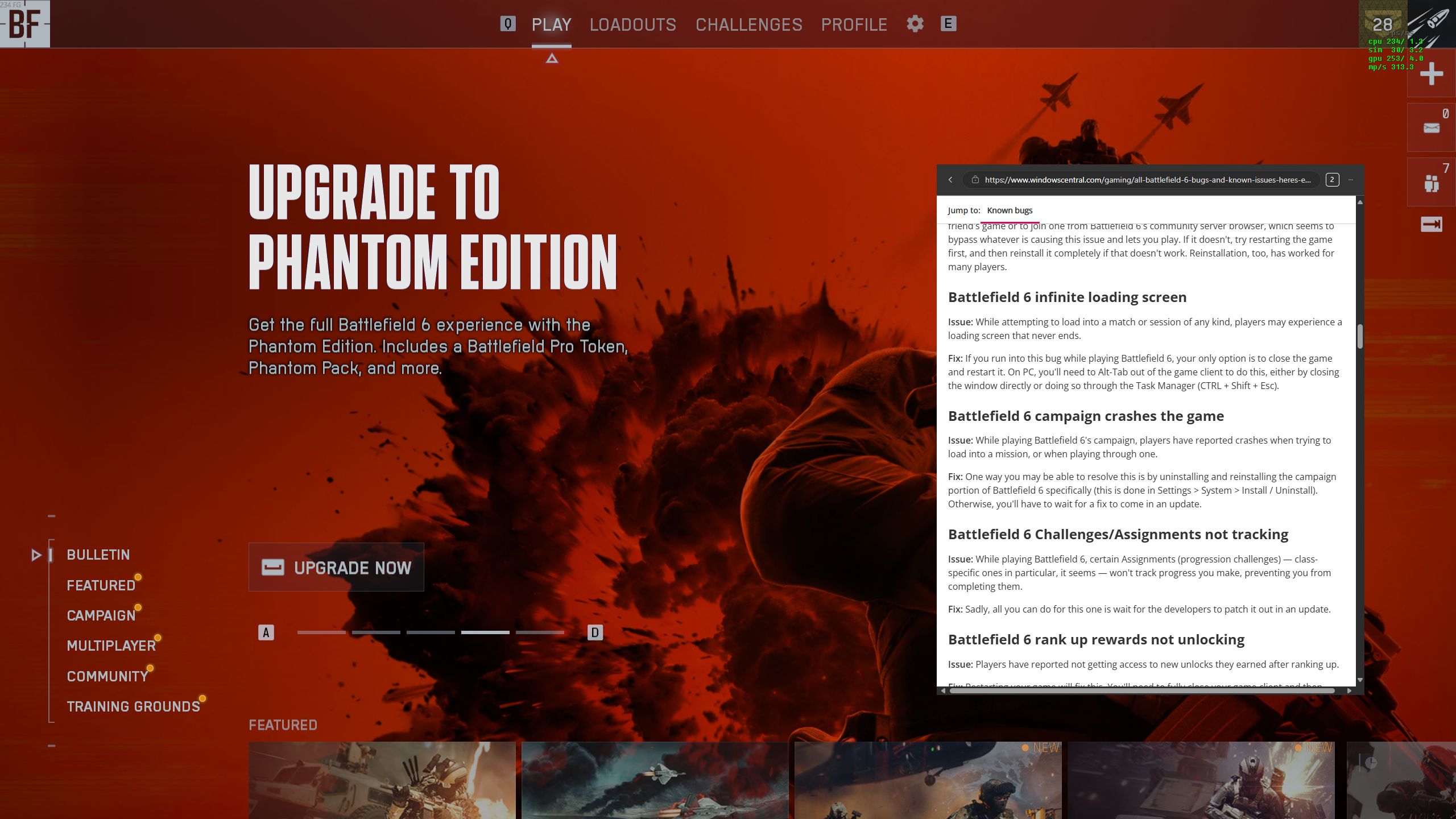
Microsoft is always looking for ways to improve Windows 11 for gamers, especially now that Windows 10 support has reached End-of-Life. While Windows 11 largely delivers the same level of gaming performance compared to Windows 10, many gamers remain reticent to upgrade.
One of the company’s more recent gamer-focused additions — launched for all Windows 11 users in January 2025 — is Microsoft Edge Game Assist, a tool designed to remove the ol’ Alt-Tab trick when looking up guides, navigating Discord or Spotify, or watching videos while you game.
Edge Game Assist has received regular updates since it was first introduced to Insiders in November 2024, and October 2025 is no different.
The latest update adds a long list of new titles to the Enhanced Game Assist package, it adds an option to close Game Assist through the Windows 11 Settings menu, and it squashes some bugs, namely one that allowed Game Assist to be installed multiple times on the same PC with multiple user accounts.
The new Edge Game Assist update is going out to Edge Insiders on the Canary and Dev channels, and Microsoft says they will “eventually” arrive in Beta and Stable channels.
Which games were added to Enhanced Game Assist in October?
Enhanced Game Assist is an elevated section of the PC gaming tool that provides specific tips and guides for popular games. While Edge Game Assist can run with any game due to how it’s tied into the Xbox Game Bar, only specific titles will have the boosted content.
With this October update, Microsoft has added boosted support for 23 new games, bringing to total to more than 275. Here’s a list of the new games with Enhanced support.
- Assassin’s Creed IV: Black Flag
- Assassin’s Creed Origins
- Assassin’s Creed Unity
- Assassin’s Creed Valhalla
- Battlefield 6
- BioShock Infinite
- Borderlands 4
- Call of Duty: Infinite Warfare
- Call of Duty: Modern Warfare (2019)
- Call of Duty: Modern Warfare II (2022)
- Call of Duty: Modern Warfare III (2023)
- Call of Duty: Warzone
- Dead Rising 4
- Deep Rock Galactic
- Devil May Cry 4: Special Edition
- Dying Light: The Beast
- Hollow Knight: Silksong
- Little Nightmares III
- Nier Automata
- Remnant II
- The Outlast Trials
- theHunter: Call of the Wild
- World of Warcraft Mists of Pandaria Classic
How does Edge Game Assist work, and is it worth trying out?
Edge Game Assist is essentially a miniature version of Windows 11’s web browser that’s built into the Xbox Game Bar, accessible via the Win+G keyboard shortcut. It’s designed to act as an overlay while you game, removing the need to constantly Alt+Tab to other windows.
It was added to Windows 11 in response to Microsoft’s findings that roughly 88% of PC gamers look up guides, track game progress, listen to music, and chat with friends while gaming.
The Game Bar widget can automatically detect which game you’re playing in order to offer specialized tips and guides, but because it’s a mini version of Edge, it can also be used as a standard browser to look up guides and videos without losing focus on your current game.
👉 Related: How to set up Microsoft Edge Game Assist on Windows 11
Perhaps the best part is that Edge Game Assist is conveniently compatible with other PC gamer standby websites, including Discord, Spotify, and Twitch.
I’ve yet to give Edge Game Assist a shot personally — I’ve been too busy forcing Gaming Copilot and NVIDIA Project G-Assist to fight for AI gaming supremacy — but my colleague Sean Endicott praised its abilities even when it was still a very new feature without as many tools as it does now.
Considering Edge Game Assist is a free addition to Windows 11, there’s really nothing to lose by giving it a shot. Of course, a second monitor can largely achieve the same basic idea of having guides visible while you game, but the additional tips and tricks for games on the Enhanced list might just be handier than you were expecting.
Don’t forget about ad blockers in your Edge Game Assist overlay
One of the first issues with Edge Game Assist was the ads that constantly interfered with game guides overlaid on your screen. Microsoft quickly updated Game Assist in March 2025 with browser extension support, allowing for ad blockers to be installed.
It’s not just ad blockers, either. Game Assist supports quite a few browser extensions, and they can be managed via the standard desktop version of the Edge app.
If you’d like to give Edge Game Assist a shot, you might find that it’s already installed on your system. If it’s not, the widget can be added to the Xbox Game Bar via the Edge settings menu.

Follow Windows Central on Google News to keep our latest news, insights, and features at the top of your feeds!
