


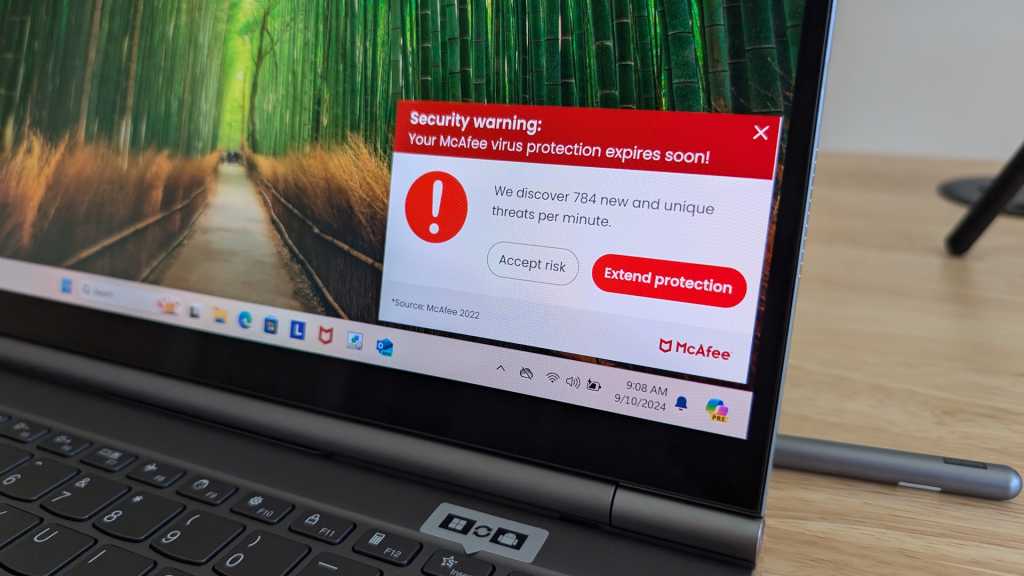
I review a lot of laptops and I’ve noticed many of them come with a “free trial” of McAfee antivirus preinstalled. I’ve clicked through so many warnings about how my PC will be “at risk” unless I pay up for extended protection, and those McAfee alerts are in a stark red color that’s surely designed to scare me. It’s too much!
It’s not just a problem on budget laptops, either. I even see it on high-end PCs, like the world’s first rollable laptop from Lenovo that I recently reviewed. That’s a $3,299 machine! Yet despite its lofty price tag and sci-fi-esque hardware, it still subjected me to scary messages encouraging me to pay for McAfee antivirus. What a bad experience.
But don’t take my word for it. I’ll show you screenshots of these preinstalled McAfee antivirus messages on brand-new Windows 11 PCs, what to look out for, and why you shouldn’t be tricked by them.
McAfee’s antivirus is fine, but its marketing techniques aren’t
On the whole, McAfee’s antivirus software is fine. It’s far from our favorite antivirus program, but it’ll definitely do the job.
The problem is how McAfee sells it. On many new PCs, McAfee’s antivirus prompts are seriously misleading. They make the new PC experience more obnoxious, and they not-so-subtly nudge less-knowledgeable PC users into handing over their credit card numbers.
Chris Hoffman / Foundry
While I’m setting up a new PC, I often see “security warning” pop-ups with messages like “Real-time protection is about to expire.” I find myself clicking a lot of scary-sounding “Accept risk” buttons to dismiss them. I’ve seen so many variations of these—and I imagine McAfee’s marketing team has A/B tested to see which wordings result in the most signups.
McAfee and its partnered PC manufacturers like Lenovo seem okay with this approach, but I think it’s unethical. You can make up your own mind on the morals of McAfee’s marketing campaign.
Don’t worry! Your PC is protected with or without McAfee
McAfee’s warnings are deceptively tricky because they imply that McAfee’s software is the only protection on your PC, and that extending McAfee’s protection is the only way to keep your PC secure. It implies that if you skip the extension, you’ll be left totally vulnerable.
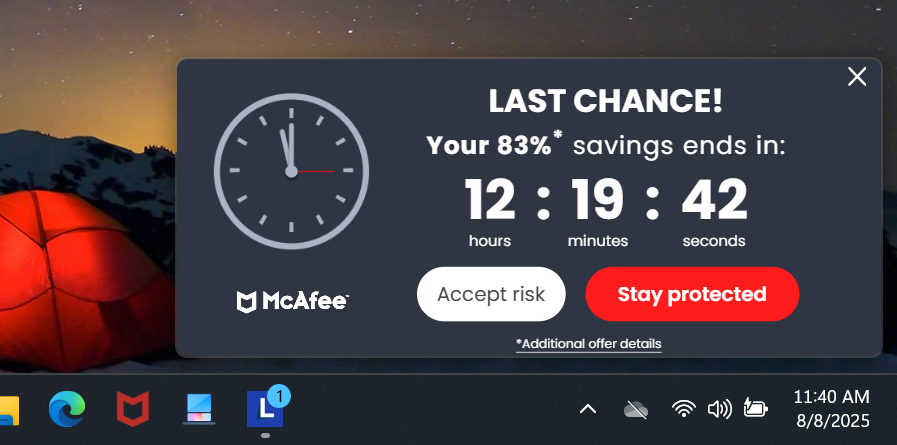
But here’s the problem with that: Windows already has built-in real-time antivirus protection. Yes, even if that urgent-looking “Last chance!” countdown clock with “Accept risk” and “Stay protected” buttons counts down to zero, your PC will remain protected.
Chris Hoffman / Foundry
You can find the built-in antivirus in the Windows Security app. Microsoft’s antivirus—previously called Windows Defender and now called Microsoft Defender Antivirus—is totally free and it’ll automatically enable itself if you don’t have another antivirus installed.
So, when McAfee says your PC’s “real-time protection is about to expire,” McAfee is telling a half-truth: McAfee’s real-time protection is about to expire. But when it does, Microsoft Defender Antivirus will fill in the gap and take over protecting your PC from viruses and malware in real time. When McAfee says you need to extend your subscription to “stay protected,” you can safely ignore it. You’ll remain protected either way—just by Microsoft’s antivirus and not McAfee’s.
And don’t be fooled by the pop-ups saying that McAfee is “Recommended by Lenovo” or whoever your PC manufacturer happens to be. Those PC makers are gaining financial benefits from preinstalling and recommending the program.
It’s obnoxious, but even Apple is spamming users
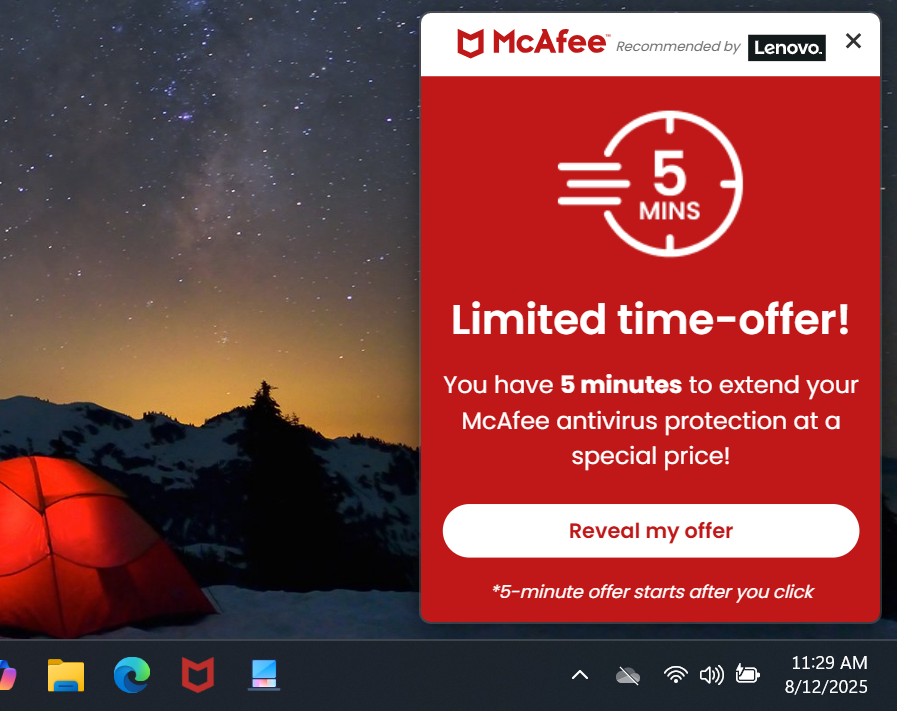
Once you skip the first prompt or two, McAfee switches gears and tries to entice you with FOMO and time pressure: a limited-time deal that’s surely too good to pass up. The previously mentioned “Last chance!” offer is one example. The “You have 5 minutes!” offer is another.
These desperate messages are obnoxious than scary, and they’re pretty easy to see through despite their urgent-looking red coloration complete with a crosshair. Even so, I feel disrespected when a “You have 5 minutes!” message pops up while I’m busy with something else. McAfee clearly just wants to extract cash out of me and will annoy me to get it.
Chris Hoffman / Foundry
While I’m definitely a PC and not a Mac, when I see marketing tactics like this on $3,000+ PCs, I wonder if Mac users have a point: at least Apple’s macOS isn’t packed with obnoxious junk like this. At least, that’s what I would’ve wondered a few years ago. But in 2025, we live in a world where even Apple is sending push notification ads promoting discounted tickets to “F1 the Movie” to iPhones.
Across the tech industry, more and more obnoxious ads are popping up and promotions are getting increasingly intrusive. “Enshittification” seems to spare no industry. Yes, even the great Apple has fallen, so there isn’t much point in thinking about whether the grass is greener on another platform when you can clean things up in a few clicks.
The solution? Just uninstall McAfee
The saving grace of the obnoxious McAfee trial software on new PCs is that it’s easy to uninstall. You can uninstall McAfee right from the list of installed apps on your PC—in the Settings app or the Control Panel—just like you would any other installed program.
After a few clicks, it’s gone and you won’t see any more nags. The built-in Windows antivirus will activate itself and protect your PC, or you can install another antivirus if you prefer a different solution.
Or you could keep McAfee and pay for it. Again, it’s fine—it’s a real antivirus program and not a scam. But I’d personally hate to support sales tactics like this. It’s one thing to preinstall an antivirus trial, but fear-based campaigns cross a line… even if they are profitable.
Also, be sure to turn off all those annoying ads in Windows, too. It doesn’t take long to set up a PC so that it respects your time and attention.
If only software was more user-friendly
The PC industry can build amazing hardware. I just wish they could also create software that feels good to use out of the box when I set up a $3,000+ laptop. McAfee’s scaremongering sales tactics are just one example of a larger trend.
Sure, it’s okay because we can uninstall McAfee, turn off a bunch of ad settings in Windows, and configure the apps we use to be less obnoxious. But it would be nice if we could all have a great experience without worrying about tweaks and settings. Is that too much to ask?
