


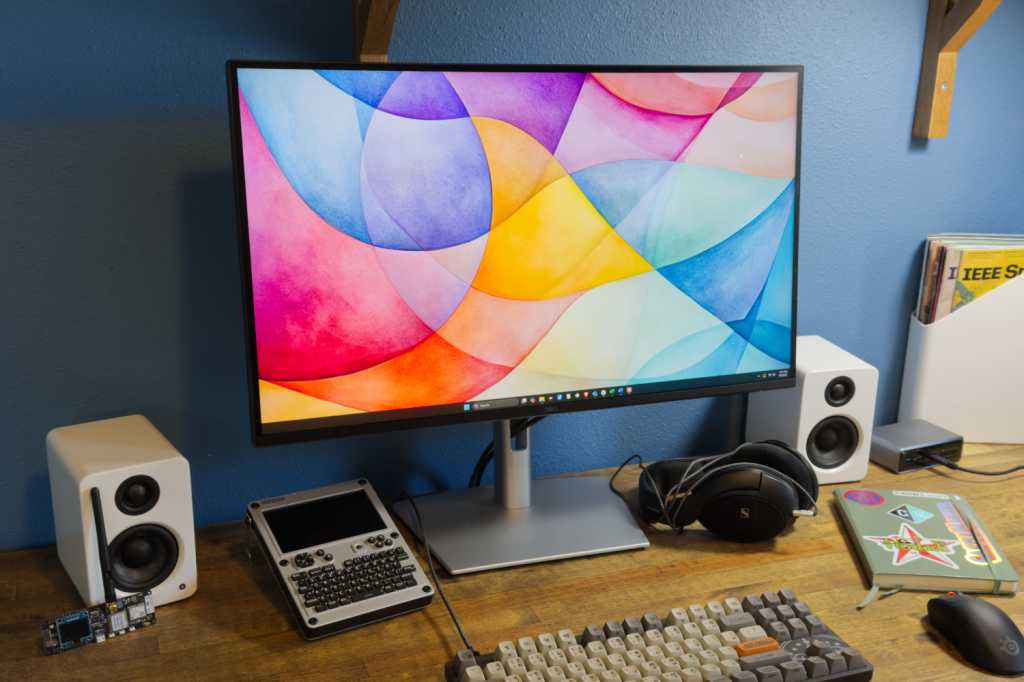
Expert’s Rating
Pros
- Stand supports good range of ergonomic adjustment
- Good range of USB-C connectivity with power delivery
- Includes Gigabit Ethernet (RJ45)
- Sharp, bright 4K image
Cons
- Design doesn’t look cohesive
- USB ports have 5Gbps data rates
- Modest contrast ratio
Our Verdict
The Dell Pro 27 Plus is a sharp 4K monitor that’s solid for work and productivity, but its USB-C hub is the star of the show.
Price When Reviewed
This value will show the geolocated pricing text for product undefined
Best Pricing Today
Best Prices Today: Dell Pro 27 Plus
$519.99

Sometimes a monitor is more than just a computer display. And sometimes, the display itself feels like an accessory to its other features.
That’s certainly the case with the Dell Pro 27 Plus. The monitor has a bright, colorful 4K display. Yet for most people, the headline feature is likely the monitor’s extensive USB connectivity and Ethernet support. It’s an office monitor built specifically for use with mid-range business and productivity laptops that have modern USB-C connectivity. And, in that role, it’s great.
Read on to learn more, then see our roundup of the best USB-C monitors for comparison.
Dell Pro 27 Plus (P2725QE) specs and features
The Dell Pro 27 Plus P2725QE’s basic specifications are precisely what I expect from a mid-range to high-end productivity monitor. It’s a 27-inch IPS panel with 4K resolution. The one highlight is the 100Hz refresh rate — though, regrettably, it’s not paired with Adaptive Sync.
- Display size: 27-inch 16:9 aspect ratio
- Native resolution: 3840×2160
- Panel type: IPS LCD
- Refresh rate: Up to 100Hz
- Adaptive sync: No
- HDR: None
- Ports: 1x HDMI 2.1, 1x DisplayPort 1.4, 1x USB Type-C 5Gbps upstream with DisplayPort 1.4 and 90-watt USB Power Delivery, 3x USB-A 5Gbps downstream, 1x USB-C 5Gbps downstream data only, Gigabit Ethernet (RJ45)
- Audio: Slots for optional soundbar
- Price: $519.99 MSRP
Still, the specifications list makes it clear that ports, not the display panel, are the priority. The monitor has three video inputs including a USB-C port with DisplayPort and Power Delivery. There are four additional downstream USB ports (three USB-A, one USB-C), plus Gigabit Ethernet.
Dell Pro 27 Plus P2725QE design
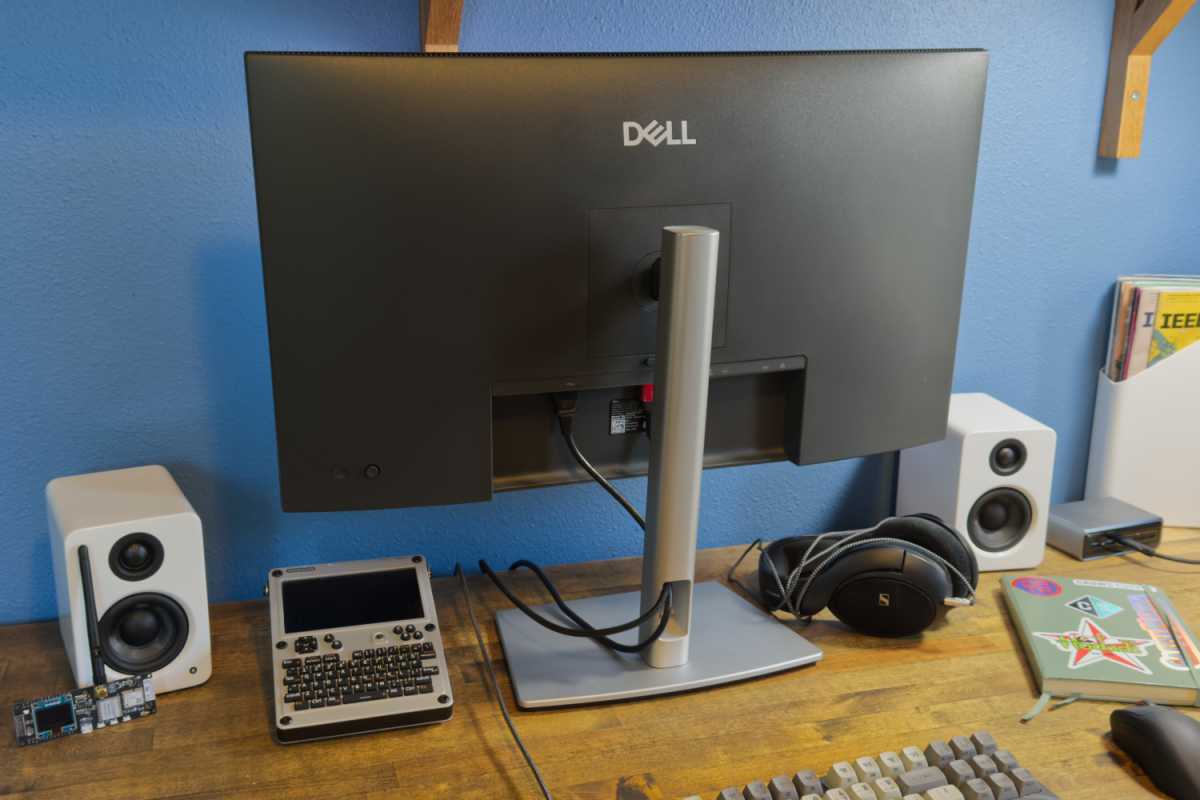
The Dell Pro 27 Plus P2725QE, like several other recent Dell productivity monitors, differs from its predecessors by ditching the silver or white rear panel design in favor of a matte black look. It’s professional, to be sure, but the stand is still silver. I find that an odd choice, as it gives the impression that the stand wasn’t made to ship with this monitor.
Matthew Smith / Foundry
Looks aside, the stand is decent. It’s heavy and sturdy but has a flat, compact base that minimizes its footprint on a desk. The stand also has a good range of ergonomic adjustment: 25 degrees of tilt, 90 degrees of swivel, and 150mm of height adjustment. It rotates 90 degrees into a portrait orientation, too. All of this is typical for a high-end office and productivity monitor, though the height adjustment is at the upper end of what’s common (some competitors stick to 110mm).
The monitor also has a 100x100mm VESA mount for use with third-party monitor stands and arms. It weighs about 10 pounds without the stand, so it’s light enough that most stands and arms can hold it.
Dell Pro 27 Plus P2725QE connectivity
Dell made a clear (and, in my opinion, accurate) bet that, for many office and home office workers, a monitor’s connectivity is more important than its image quality. Because of that, the Dell Pro 27 Plus is packed with ports.
Video connectivity spans DisplayPort 1.4, HDMI 2.1, and a USB-C port with DisplayPort alternate mode. That’s typical for most monitors that support USB-C.
However, the USB-C port expands connectivity to four additional USB ports. Three of these are USB-A and one is USB-C. The monitor also has Gigabit Ethernet. That’s a lot of ports, and it’s useful if you own a Windows or Mac with a USB-C port. Connecting a laptop to the Dell Pro 27 Plus immediately adds four USB ports and Ethernet.
One of the downstream USB-A ports, and the only downstream USB-C port, are found in a pop-out hub on the monitor’s chin. It feels flimsy, but it allows for quick, easy connections without fumbling around behind the monitor.
While the Dell Pro 27 Plus has a wide range of connectivity, it’s not without drawbacks. The monitor relies on USB with a data rate of just 5Gbps, so it’s not a good fit if you use high-speed external storage. People who need high-speed connectivity should consider a Thunderbolt 4 monitor like the Dell Ultrasharp 27 U2724DE or BenQ PD3226G (though those are more expensive).
Dell made a clear bet that, for many office and home office workers, a monitor’s connectivity is more important than its image quality.
Dell Pro 27 Plus P2725QE menus and features
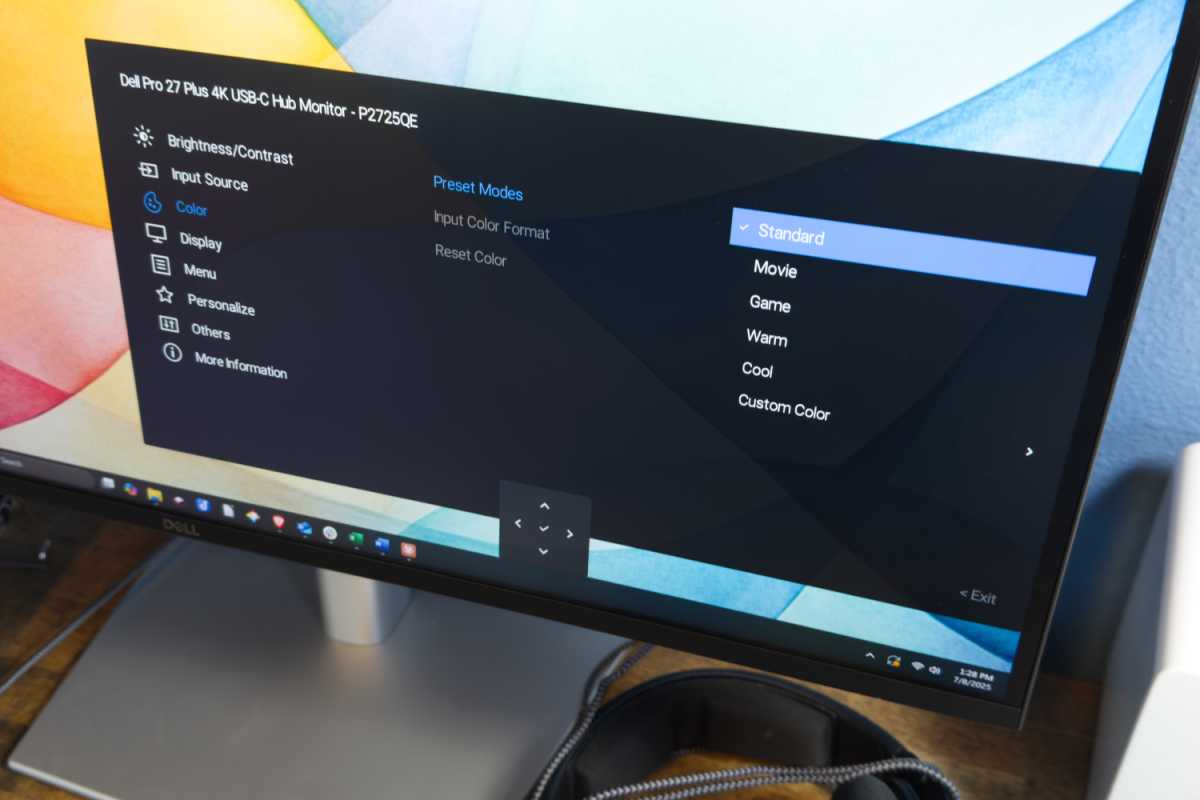
Owners can access the Dell Pro 27 Plus P2725QE’s menu system with a joystick hidden around the right side of the monitor. It provides quick, responsive access to menu options. The menu is easy to navigate and has a large font, so it’s easy to read. Alternatively, owners can access and change menu settings with Dell’s Display and Peripheral Manager (DPPM) software.
The monitor’s options are limited, though. The monitor has just a handful of color modes and doesn’t target specific color gamuts, color temperatures, or gamma values. The menu system instead focuses more on controlling connectivity like USB-C charging and data rates.
Matthew Smith / Foundry
Dell doesn’t provide speakers with the Dell Pro 27 Plus. The monitor instead supports an optional soundbar. Strangely, though, the monitor’s product page doesn’t mention which soundbar is supported. The manual also lacks that information. In any case, Dell didn’t provide it for review, so I can’t comment on its quality.
Dell Pro 27 Plus P2725QE SDR image quality
The Dell Pro 27 Plus is all about SDR image quality. It doesn’t support HDR, and even if it did, the work and productivity apps this monitor is designed for (I’m talking Microsoft Word, VSCode, and Notion, among many others) aren’t meant for use with HDR turned on.
Matthew Smith / Foundry
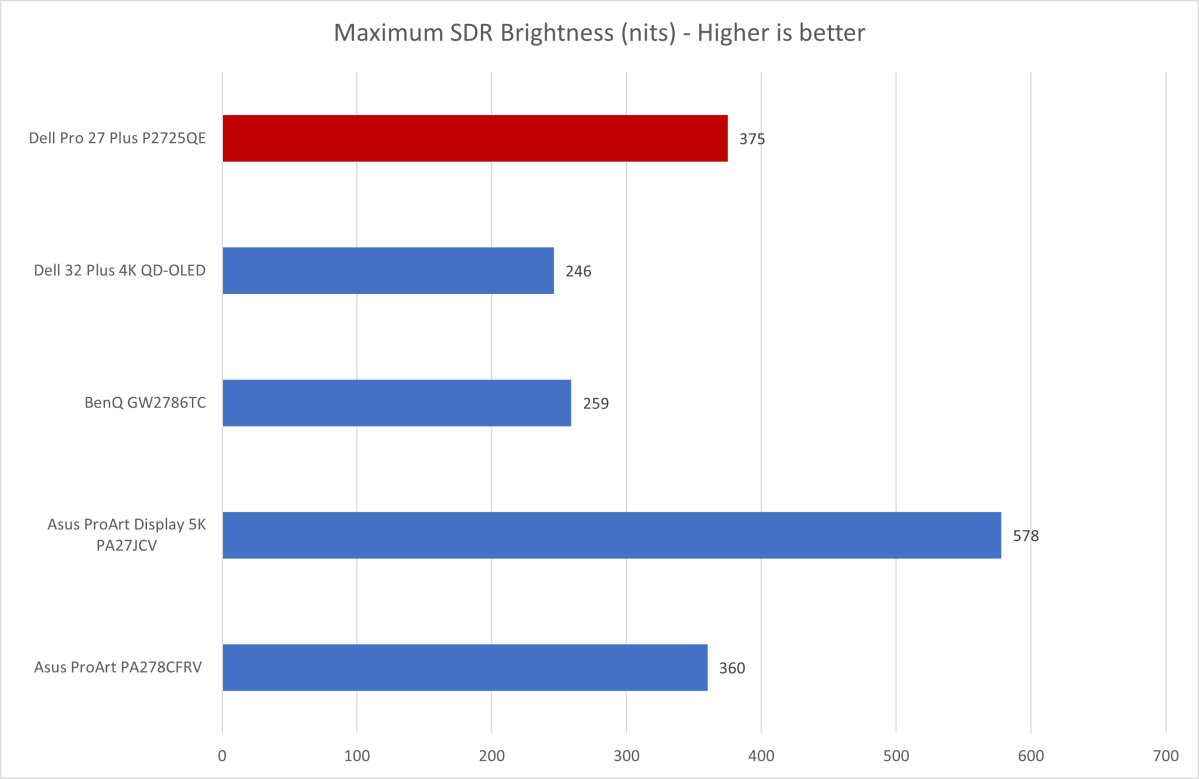
First up is SDR brightness which, among all monitor categories, is arguably most important to those built for work and productivity. That’s because office monitors are likely to be used in a well-lit spaces.
The Dell Pro 27 Plus does well here with a brightness of about 375 nits. Though not the brightest monitor available, it’s more than bright enough for use in most situations. In my home office, which has several windows that don’t receive direct sunlight, I found the monitor comfortable at 50 to 60 percent of its maximum brightness.
A semi-gloss coat keeps glare to a minimum. It’s not fully matte, though, so bright light sources are still noticeable.
Matthew Smith / Foundry
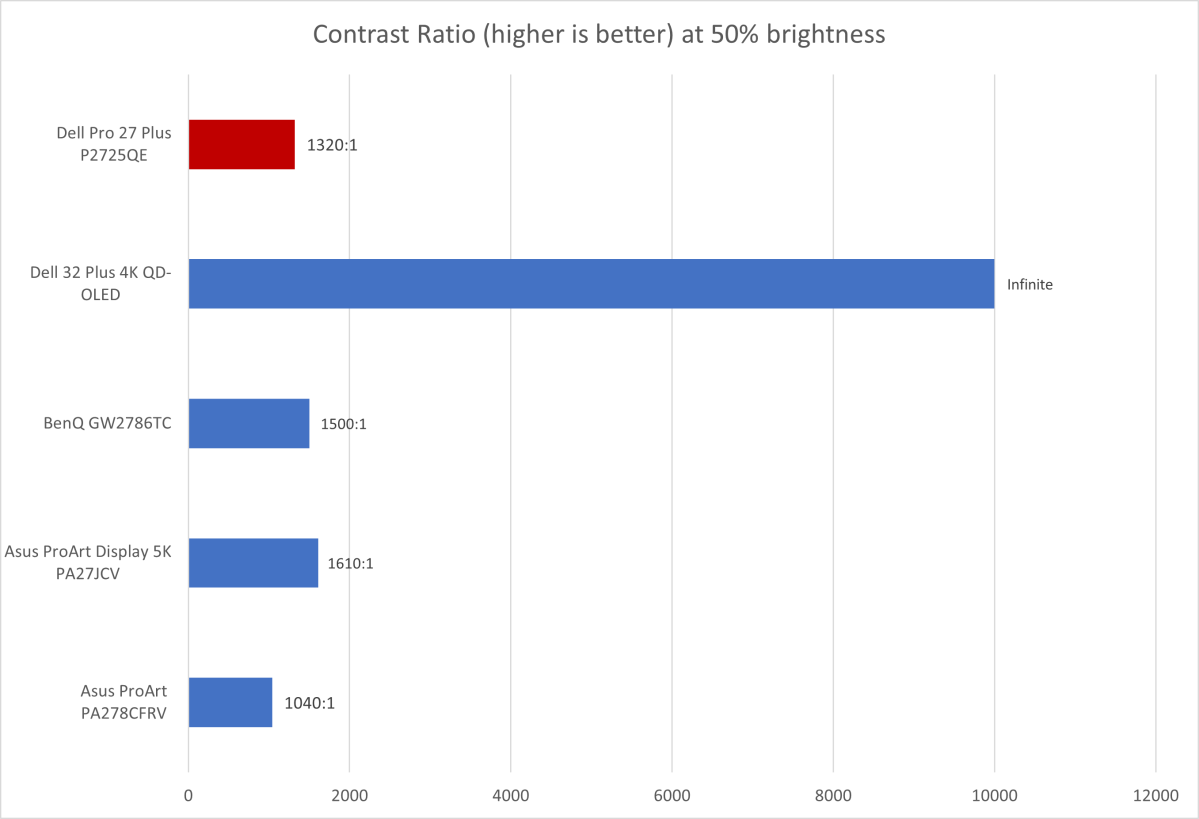
Contrast is the weakness of the Dell Pro 27 Plus. It’s not bad for an IPS panel but in 2025, with OLED, VA, Mini-LED, and IPS Black panels on the market, it’s among the least contrast-rich and immersive display technologies available.
That doesn’t matter in Word, but it’s noticeable when playing a game or watching a movie. The image looks flat and dull compared to the high-contrast alternatives.
Matthew Smith / Foundry
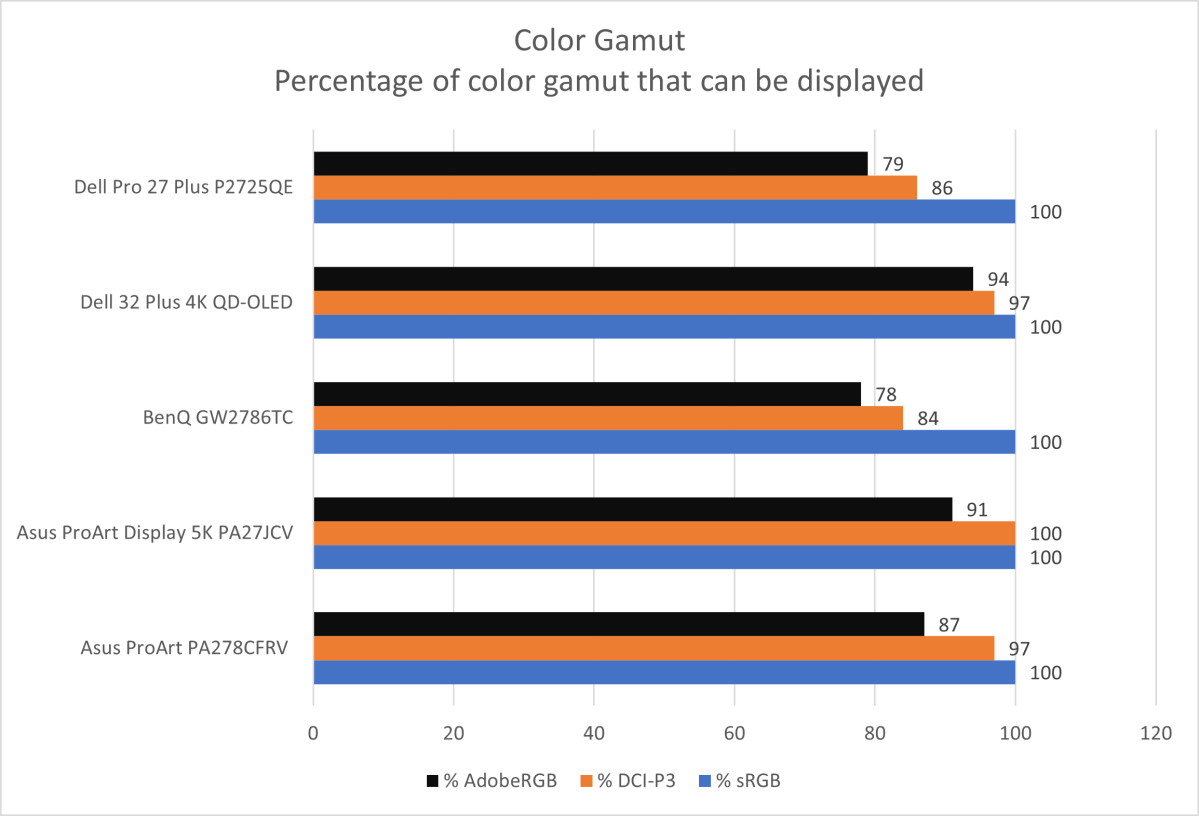
The Dell Pro 27 Plus has reasonable color gamut performance. However, as the graph shows, the Dell Pro 27 Plus is well behind some high-end alternatives, like the Dell 32 Plus 4K QD-OLED and the BenQ PD3226G.
That’s an important point. The Dell Pro 27 Plus is meant for office work and productivity, not content creation (such as photo, video, and digital art, among other digital media). If you care about color grading or tone mapping, you’ll want to set your sights on a more expensive alternative.
Matthew Smith / Foundry
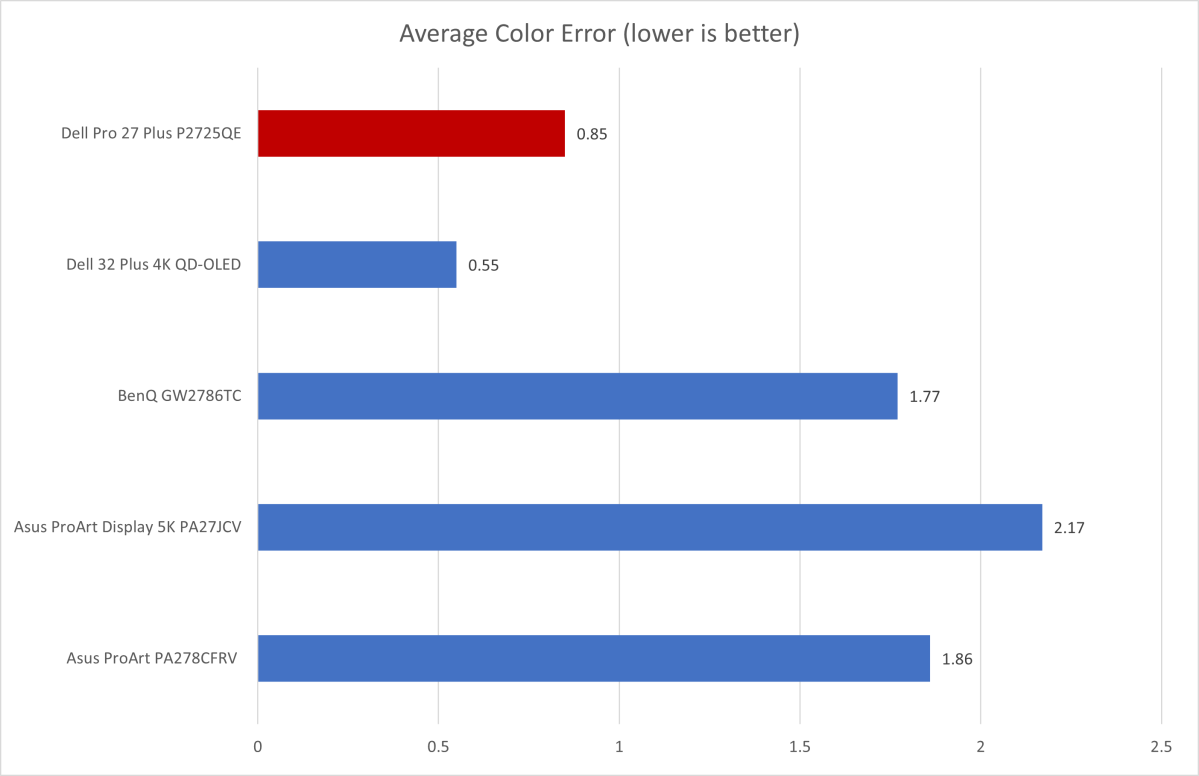
I was surprised, then, by the Dell Pro 27 Plus’ excellent color accuracy. Though not a leader, it delivered results on par with monitors meant for content creation. The only significant color error was in cyan (a common result for IPS LED backlight monitors). I felt that led to a slight blue push in green and blue-green hues but, to my eyes, it was subtle.
The Dell Pro 27 Plus also did well in color temperature (6400K, slightly below the target of 6500K) and gamma (2.2, right on target). That means the color temperature looks much as expected and that content looks about as luminous as intended.
Sharpness is a perk. Spreading 3840×2160 resolution across a 27-inch display results in a pixel density of about 163 pixels per inch. Small fonts look crisp and high-contrast edges show little to no aliasing. There are sharper monitors, to be sure (like the Asus ProArt Display 5K), but they tend to be much more expensive.
The Dell Pro 27 Plus has solid SDR image quality. With that said, it also feels like what I described earlier: a USB hub with a display attached. The display is good, but it’s more like a bonus than the main reason to buy the monitor.
Dell Pro 27 Plus P2725QE HDR image quality
HDR is not supported by the Dell Pro 27 Plus. That might seem unusual for a monitor that has a retail MSRP above $500, and it is. With that said, I don’t think most people buying the Dell Pro 27 Plus will need HDR, since it’s meant primarily for day-to-day office productivity.
Dell Pro 27 Plus P2725QE motion performance
Though not meant for gaming, the Dell Pro 27 Plus has a refresh rate of 100Hz. That means the monitor will have less motion blur than 60Hz alternatives. Scrolling text, for example, is easier to read.
Adaptive Sync is not supported, however. That’s a huge bummer. The lack of it means the monitor can’t sync its refresh rate with the output of a video source for smooth gameplay in 3D games. While the P2725QE isn’t a gaming monitor, it would be nice to have the option to enjoy smooth gameplay if needed.
Should you buy the Dell Pro 27 Plus P2725QE?
The Dell Pro 27 Plus P2725QE is a boring monitor. But if you want a monitor for office productivity, coding, or any other use case that’s mostly about browsing the web or working with text, it’s a safe bet. It combines a bright, crisp 4K IPS panel with USB-C connectivity that makes it a good companion for a thin-and-light Windows or Mac laptop.
