



At a glance
Expert’s Rating
Pros
- Small form-factor
- MagSafe magnetic mounting
- Good 10Gbps performance
Our Verdict
If you want a good-performing SSD that you can stick to the back of your MagSafe device, then the 10Gbps EX300U is the more affordable (albeit slower) choice than the company’s USB4 EX400U.
Price When Reviewed
This value will show the geolocated pricing text for product undefined
Best Pricing Today
Best Prices Today: Corsair EX300U
Small, thin, and squarish SSDs seem to be in vogue these days, with Corsair as active in producing them as any company. Witness the EX300U, a less expensive, 10Gbps alternative to the USB4 (40Gbps) EX400U I reviewed about six months back.
It shares its sibling’s MagSafe magnetic circle on back for easy attachment to devices that allow it, though not its speed.
What are the EX300U’s features?
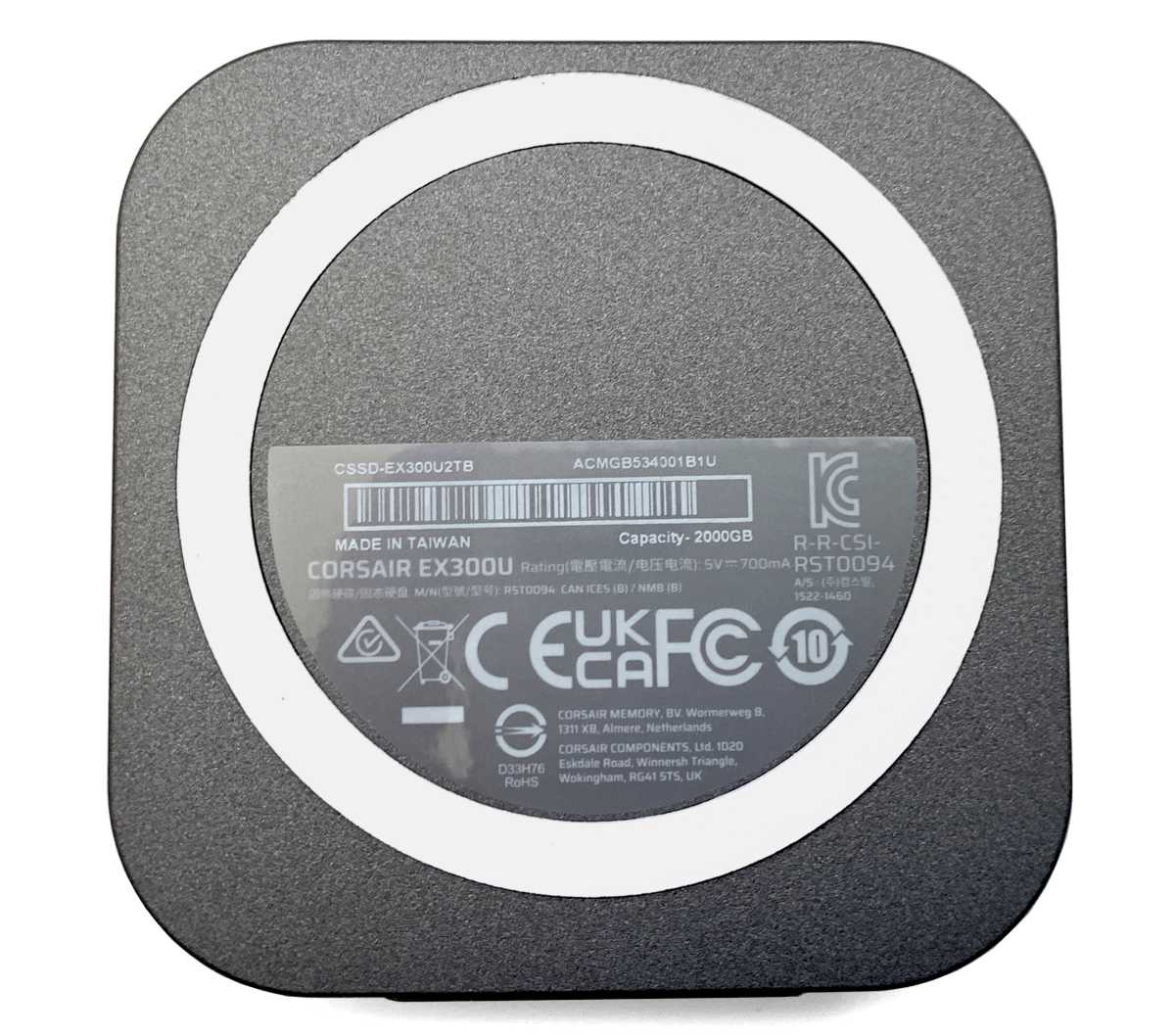
The EX300U is a 10Gbps USB drive inside a 2.5-inch square that’s roughly 0.5-inch thick. In appearance, it’s exactly like the faster EX400U, with the exception of the model number on the back label.
There’s the same circular MagSafe magnet on the back that will attach to any suitable surface, including many phones. Yes, auxiliary storage for many amateur videographers.
The only other difference is the weight — at only 1.4 ounces, the EX300U is palpably lighter than the 1.8-ounce EX400U. I was a bit surprised I could feel the difference, but I did.
The controller is a Phison PS2217-17 and the NAND is 3D, of course. Corsair wasn’t specific as to whether it’s TLC or QLC, but the minimum write rate in my tests was 450MBps so whatever it is (my guess is the latest QLC), the native write rate isn’t tragic.
Corsair includes a handy short, gray Type-C to Type-C cable with one of the connectors angled for a less obtrusive connection to phones and the like.
The warranty on the EX300U is three years, which is the usual for external SSDs, but the 250TBW (terabytes that can be written) per terabyte of capacity is a little stingy. Still, the odds of anyone exceeding that limit is rather low in a light-duty external 10Gbps USB SSD.
A three-year/250TBW warranty is more concerning in the EX400U, which is fast enough to see some heavy-duty write loads.
How much does the EX300U cost?
The EX300U is available in 1TB/$100, 2TB/$180, and 4TB/$340 capacities. At the time of this writing, that’s $10 cheaper than the 1TB EX400U, and $20 cheaper at the 2TB and 4TB capacities.
While a penny saved is a penny earned, I was honestly hoping that the EX300U would save you a few more given the reduced performance. Still, if you don’t have the faster port to take advantage of a USB 3.2×2 or USB4 SSD, you might as well save what you can.
How fast is the EX300U?
The EX300U is a good performer for a 10Gbps SSD. It’s different in shape, but comparable in size and weight to the two 10Gbps thumb drives (the Seagate Ultra Compact SSD and SK Hynix Tube T31) it’s compared to in the charts.
As already mentioned, the EX300U is, quite logically, far slower than its 40Gbps EX400U sibling. Even though that drive is itself slow for a USB4 SSD.
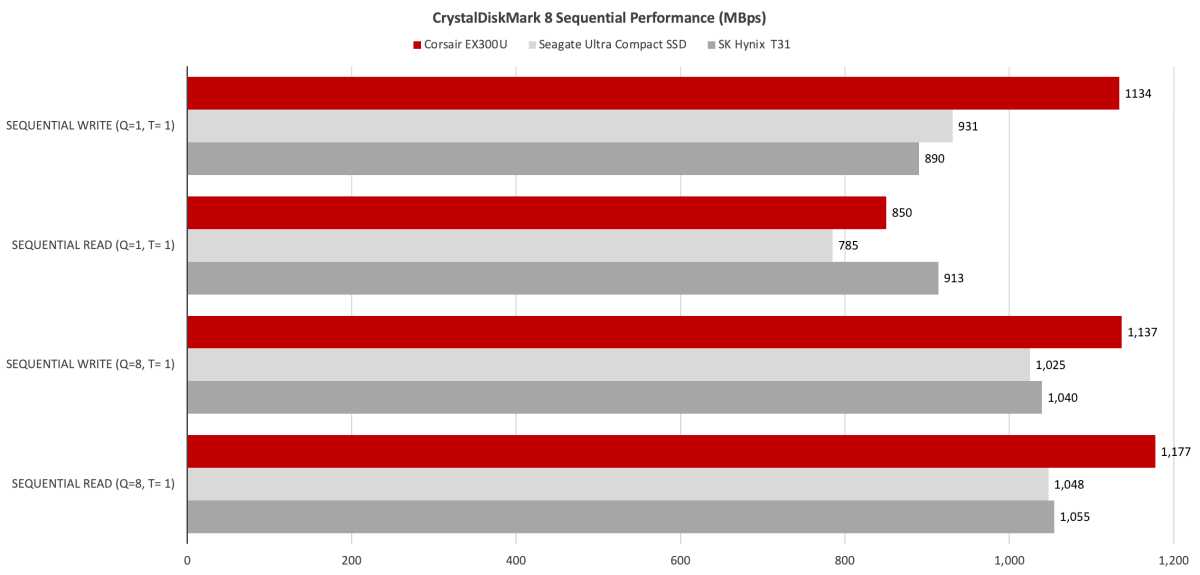
Regardless, the EX300U was easily faster in CrystalDiskMark 8’s sequential tests than the aforementioned 10Gbps competition.
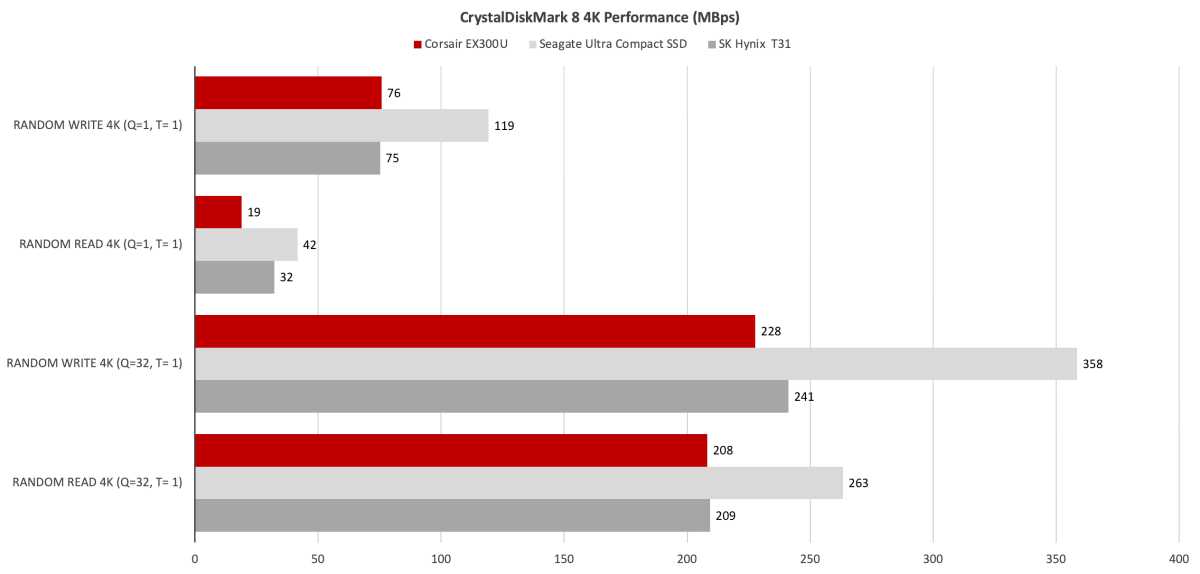
In CrystalDiskMark 8’s random tests, however, the Ultra Compact SSD cleaned the EX300U’s clock.
In our real-life 48GB transfers, the EX300U was back on top of the competition in many tests, though fell short in others. Totaled up, it’s still a win for the EX300U.
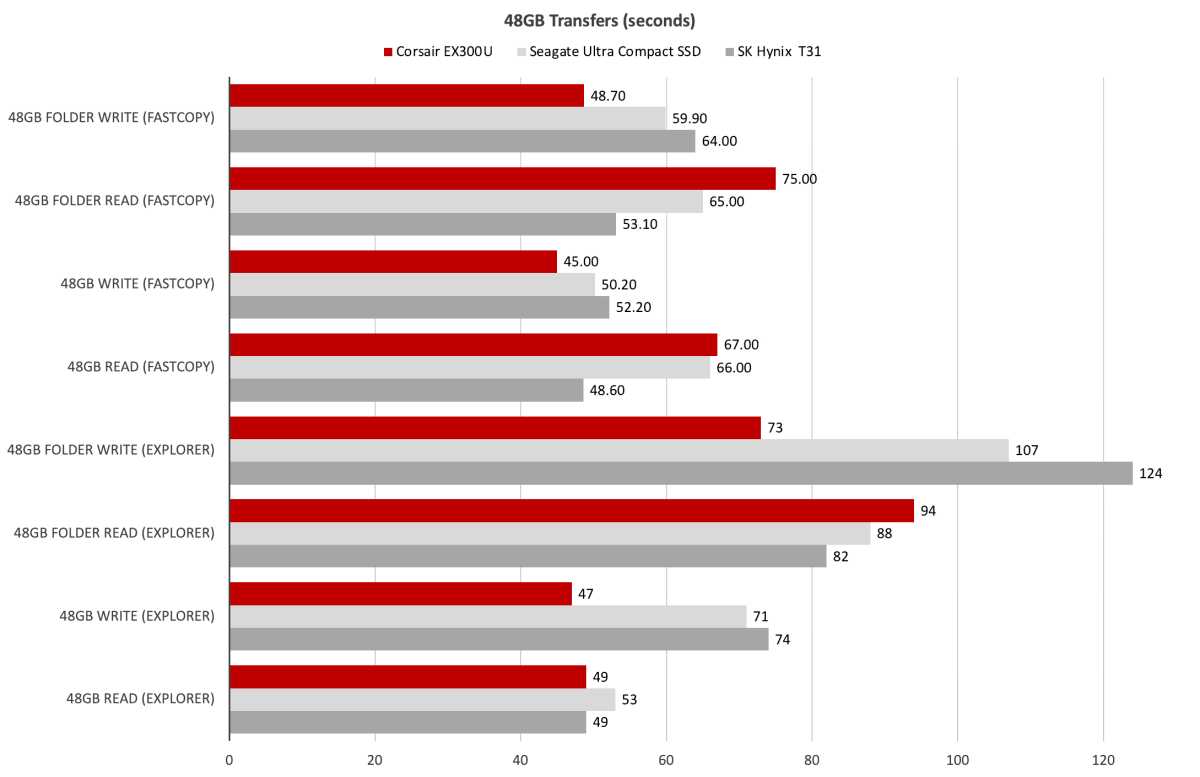
While the T31 was a touch faster with FastCopy, the EX300U was tops with Windows Explorer in writing 450GB to its cells.
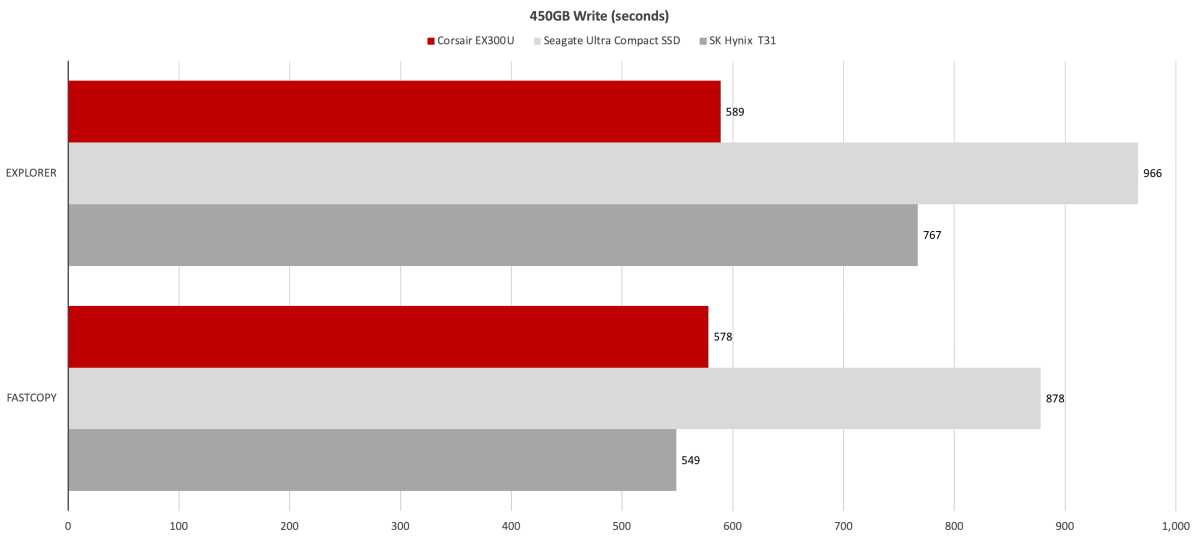
Overall, I saw better performance from the EX300U than from the competition.
One aberration: CrystalDiskMark 8 wouldn’t run when the EX300U was attached to my Thunderbolt 5 port. It created the 64GiB file, but the numbers never changed from 0. Whether this was the BIOS, Thunderbolt 5/USB4 implementation, or the SSD is anyone’s guess and Corsair hadn’t determined the cause of the issue by the time of this writing. All my copy tests over Thunderbolt 5 went off without a hitch.
The EX300U also performed as expected with all the synthetic benchmarks when attached to the 10Gbps and 20Gbps USB ports.
Should you buy the Corsair EX300U?
Though not as quick as its 40Gbps EX400U cousin, the EX300U is easily fast enough for most users and most portable devices. And, it’s more affordable than the 20/40Gbps competition, albeit not by as much as I’d hope.
So, yes, if price is paramount or you have no faster USB ports to take advantage of faster drives, think EX300. But go with the EX400U if you want really top-notch small-and-square performance.
How we test
Drive tests currently utilize Windows 11 24H2, 64-bit running off of a PCIe 4.0 Samsung 990 Pro in an Asus Z890-Creator WiFi (PCIe 4.0/5.0) motherboard. The CPU is a Core Ultra i5 225 feeding/fed by two Crucial 64GB DDR5 4800MHz modules (128GB of memory total).
Both 20Gbps USB and Thunderbolt 5 are integrated into the motherboard and Intel CPU/GPU graphics are used. Internal PCIe 5.0 SSDs involved in testing are mounted in a Asus Hyper M.2 x16 Gen5 adapter card.
We run the CrystalDiskMark 8.04 (and 9), AS SSD 2, and ATTO 4 synthetic benchmarks (to keep article length down, we only report one) to find the storage device’s potential performance, then a series of 48GB and 450GB transfers tests using Windows Explorer drag and drop to show what users will see during routine copy operations, as well as the far faster FastCopy run as administrator to show what’s possible.
A 20GBps two-SSD RAID 0 array on the aforementioned Asus Hyper M.2 x16 Gen5 is used as the second drive in our transfer tests. Formerly the 48GB tests were done with a RAM disk serving that purpose.
Each test is performed on a NTFS-formatted and newly TRIM’d drive so the results are optimal. Note that in normal use, as a drive fills up, performance may decrease due to less NAND for secondary caching, as well as other factors. This issue has abated somewhat with the current crop of SSDs utilizing more mature controllers and far faster, late-generation NAND.
Note that our testing MO evolves and these results may not match those from previous articles. Only comparisons inside the article are 100% valid as those results are gathered using the current hardware and MO.
