


Pros
- Strong 4K performance
- Filtered air intakes
- Reasonably priced configuration options
- No more proprietary madness
Cons
- Absolutely huge
- Leaves performance on the table at 1080p
- Still expensive
The Alienware Area-51 (AAT2250) is quite something. Its monstrous size and weight may make it a lot to deal with, but it also moves away from some of the chaotic proprietary componentry that made earlier Alienware products harder to recommend.
Once you get past its enormity, you’ll find a serious gaming and content-creation machine that readily handles most of what you might throw at it. While its CPU is fast, it still bottlenecks the RTX 5080 at 1080p, leaving a lot of performance on the table. At 4K, you’ll end up making the most of the system, even if some of the gains are marginal over previous-generation hardware.
The Alienware Area-51 doesn’t quite get the edge over the similarly priced Velocity Micro SX3 Raptor Z95A in gaming, as that system’s CPU helps it stay ahead. Alienware may have the edge in productivity, though, with better multicore performance. It also definitely wins for style. Still, with an as-tested price of $4,328, it’s a premium machine that pushes into that “diminishing-returns” area of performance, especially compared to prior-gen machines like the $2,549 Dell XPS 8960 (now called the Dell Tower Plus). However, if you’re after every scrap of performance and don’t want to fuss with a DIY build, the Alienware Area-51 doesn’t disappoint.
Alienware Area-51 specs
| Price as reviewed | $4,328 |
|---|---|
| Size | 34-liter ATX (8.3 x 18.3 x 19.4 in/211 x 464 x 494 mm) |
| Motherboard | Alienware custom ATX Z890 |
| CPU | 3700MHz Intel Core Ultra 9 285K |
| Memory | 64GB DDR5-6400 |
| Graphics | Nvidia RTX 5080 |
| Storage | 2TB NVMe M.2 PCIe Gen 4 SSD (boot) (SKHynix PC811) |
| Networking | 2.5GbE, Intel Wi-Fi 7 BE1750x 802.11be, Bluetooth 5.4 |
| Connections | USB 3.2 Gen 1 Type-A (x2 top, x1 rear), USB 3.2 Gen 2 Type-C (x2 top, x2 rear), USB 2.0 Type-A (x5 rear), Thunderbolt 5 (x2 rear), 3.5mm audio connector (x2 front, x2 rear), SPDIF, 2.5Gb Ethernet, HDMI 2.1b (x1 on GPU), DisplayPort 2.1ba (x3 on GPU) |
| Operating system | Windows 11 Pro |
The Alienware Area-51 is available with a wide range of configurations, going from mid-tier to top-tier in price and performance. In its base configuration, it costs $2,969 and comes with an Intel Core Ultra 7 265, 32GB of memory, RTX 5070 12GB graphics, 1TB of PCIe Gen 4 solid-state storage, an 850-watt power supply and a 240mm CPU radiator. From there, the upgrade options are surprisingly reasonable, for Dell anyway, with prices that correspond reasonably close to what you might pay doing aftermarket upgrades on your own. They offer bumps to the CPU, GPU, memory, storage and power supply, and there’s also a liquid-cooling setup.
As tested, our Alienware Area-51 mixed a combination of the top specs available for the CPU, memory and power supply, along with an Nvidia RTX 5080 and a 2TB SSD. With Windows 11 Pro tacked on, my test system came to a hefty $4,328. Dell’s setup may still cost more than if you built a similar system yourself, but the Alienware case is an interesting one; it comes well-managed in terms of wires and it requires no additional setup or hunting for fair-priced graphics cards.
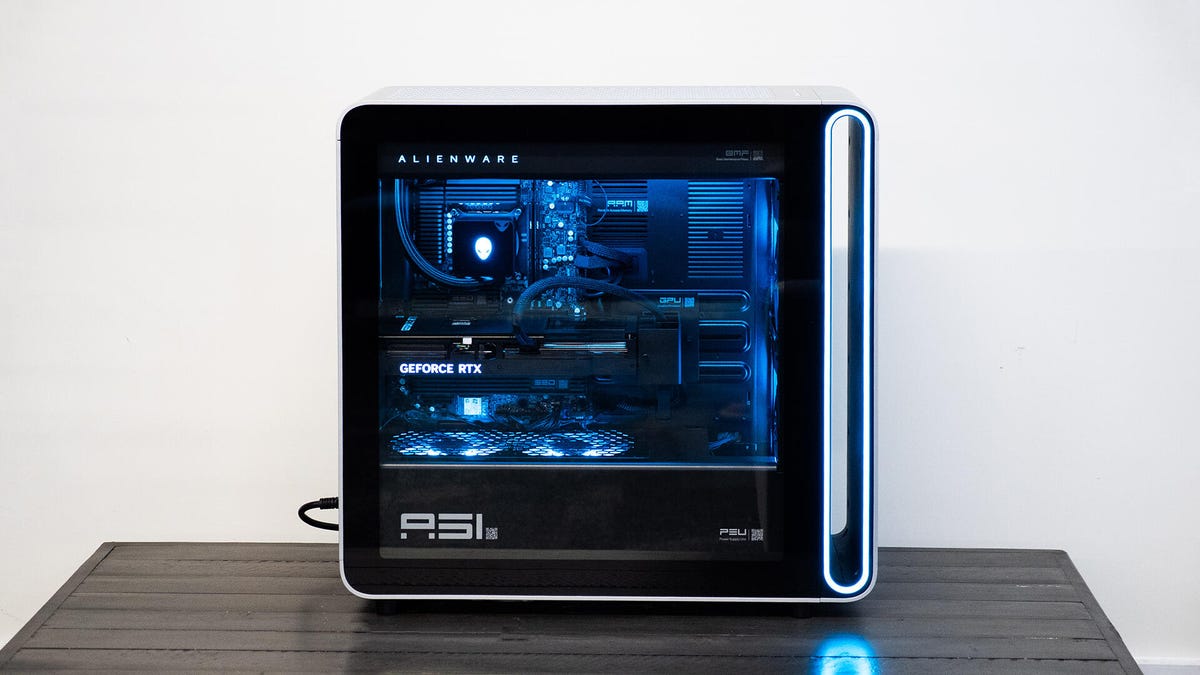
The glass side panel gives you a good look at the insides.
The cutting edge calls for 4K
You can expect nothing less than extreme performance out of the Alienware Area-51. Its CPU is respectably fast, trading blows with the AMD Ryzen 7 9800X3D-equipped Velocity Micro SX3 Raptor Z95A in Cinebench and Geekbench for single-core performance and using its extra cores to step ahead in multicore benchmarks. It doesn’t quite have the same muscle for gaming as the Z95A gets, thanks to AMD’s special 3D V-cache that helps it do better with 1080p gaming. However, with an RTX 5080 inside, 1080p gaming isn’t really the aim of the Alienware Area-51. In fact, it would be wasted on 1080p in many cases, as our game benchmarks show it losing more often than winning against last year’s more office-friendly Dell XPS 8960, which offered an Intel Core i7-14700K and RTX 4080 Super but was only $2,549 when we reviewed it.
All the vents help keep the Area-51 cool and quiet.
At 4K, the Alienware Area-51 performs more comparably to the Velocity Micro SX3 Raptor Z95A. It musters 153 frames per second in Shadow of the Tomb Raider and 177fps in Guardians of the Galaxy. It even proved capable of running the demanding Monster Hunter Wilds benchmark at an average of 54% in 4K with Ultra settings, DLAA (that is, with no upscaling from a lower native resolution) and Ray Tracing set to High. Next to the Raptor Z95A, there’s still some room for improvement, but at least bumping up to 4K helped it gain some distance from the Dell XPS 8960.
Some of the gains might seem marginal, but that’s the truth of working at the cutting edge of what consumer hardware has to offer. You’ll end up paying a high premium for every little extra bit of performance. On the positive side, the Area-51 proves capable of sustaining that performance quite well. Across all my testing, it made just barely audible sounds and yet was able to run the Steel Nomad Light Stress Test (a 20-run cycle) with 99% consistent results. This saw the GPU level off in the low 70s Celsius and the GPU in the low 50s.
Enlarge Image
There are a fair amount of connection options on the back.
In my test configuration, Dell didn’t skimp on the storage either. While it may only be a PCIe 4.0 x4 drive, it takes full advantage of the available bandwidth, hitting over 7,000MB/s and over 6,500MB/s in CrystalDiskMark’s Q8T1 sequential read and write tests, respectively. Dell’s motherboard has spots for two more M.2 drives as well, and one of them supports PCIe 5.0 bandwidth.
It only took 80 liters of space to avoid proprietary madness
Though not unsightly, the Alienware Area-51 is a monster. While Dell might call this a desktop, I could just barely fit it under my desk. This is an 80-liter, nearly 80-pound behemoth, built to hold the biggest PC gaming hardware on the market today while also anticipating an obscene future with even bigger hardware like 450mm, quad-slot graphics cards. As built here, this largely decked-out system still boasts a ton of empty space. Conveniently, that means there’s little to obstruct airflow.
Much of the cabling is hidden behind a panel.
The Area-51 has a similar design to earlier models, such as the Aurora R16 desktop, with a large vent at the front of the system. Behind this are two big 180mm fans pulling fresh air into the case. A power supply chamber at the bottom of the case has a pair of 120mm fans also pulling air into the main cavity, though this isn’t completely fresh as it carries a modicum of the 1,500-watt power supply’s heat (most of its heat out the back).
Our test configuration featured a 360mm radiator at the top to cool the CPU, pulling filtered air into the case with three more fans. As CNET’s Josh Goldman explored at CES, the Alienware Area-51 airflow design creates positive pressure inside the case, forcing air out through the rear vents without additional fans. Since all of the air intakes are filtered (removable, cleanable filters on top, underneath and at the front), this should prevent serious dust accumulation, which is a common airflow issue I’ve encountered on prebuilt machines.
Dell managed the interior of the case well with mostly clean cable runs. The motherboard’s various cables all sneak in with short runs to smart cable routing holes. Dell has a clever rail-mounted graphics card bracket that not only helps route the power cables but also slides into place to support the graphics card and future cards of varying lengths and thicknesses. The system has a ton of I/O as well, including six USB-C ports, two of which are Thunderbolt 5.
Naturally, RGB LED lighting is on deck here, offering an excellent contrast against the largely blacked-out interior and with a big glass side panel showing it all off. The “stadium” vent at the front, plus the front fans, power supply chamber fans and a strip along the radiator, all get RGB lighting, as do the Alien head logos on the front of the case and CPU water pump. The word “Alienware” on the side of the radiator also gets the RGB treatment. The CPU water cooler’s hoses don’t obstruct any of the lighting. Alas, the “GeForce RTX” branding on the side of the graphics card is left out, illuminated in a simple white.
As tidy and tight as the cable management inside is, Dell has also set the system up nicely for future upgrades. Behind the motherboard, underneath an easily removed panel, the case offers up two 2.5-inch drive bays and a single 3.5-inch drive bay, all of which have the necessary cables in place.
Lastly, credit to Dell for opting for RAM modules with heat spreaders instead of cheap, bare PCBs — though for this price, you’d hope so.
Geekbench 6 (single core)
Lenovo LOQ Tower 17IRR9 (90WY0000US) 2,273Lenovo Legion Tower 5i 26IRB8 (90UT001AUS) 2,427HP Omen 35L 2,656Minisforum AtomMan G7 Ti 2,833Dell XPS 8960 2,948Lenovo Legion Tower 7i Gen 8 34IRZ8 3,062Alienware Area-51 3,149Velocity Micro Raptor Z95A 3,303
Geekbench 6 (multicore)
Lenovo Legion Tower 5i 26IRB8 (90UT001AUS) 12,091HP Omen 35L 12,745Minisforum AtomMan G7 Ti 16,959Velocity Micro Raptor Z95A 18,338Dell XPS 8960 18,699Lenovo Legion Tower 7i Gen 8 34IRZ8 18,735Alienware Area-51 21,929
Cinebench 2024 CPU (multicore)
Lenovo LOQ Tower 17IRR9 (90WY0000US) 749Lenovo Legion Tower 5i 26IRB8 (90UT001AUS) 783HP Omen 35L 961Velocity Micro Raptor Z95A 1,321Minisforum AtomMan G7 Ti 1,431Dell XPS 8960 1,554Alienware Aurora R16 1,806Alienware Area-51 2,313
Shadow of the Tomb Raider gaming test (1080p)
Lenovo LOQ Tower 17IRR9 (90WY0000US) 142Lenovo Legion Tower 5i 26IRB8 (90UT001AUS) 148Minisforum AtomMan G7 Ti 174HP Omen 35L 174Alienware Aurora R16 226Alienware Area-51 248Dell XPS 8960 250Velocity Micro Raptor Z95A 362
Guardians of the Galaxy gaming test (4K)
HP Omen 35L 139Alienware Area-51 177Velocity Micro Raptor Z95A 187
3DMark Fire Strike Ultra
Lenovo LOQ Tower 17IRR9 (90WY0000US) 6,007Lenovo Legion Tower 5i 26IRB8 (90UT001AUS) 6,232Minisforum AtomMan G7 Ti 7,277Alienware Aurora R16 9,927HP Omen 35L 16,426Dell XPS 8960 17,525Alienware Area-51 21,463Velocity Micro Raptor Z95A 21,665
3DMark Speed Way (DX12 Ultimate)
HP Omen 35L 7,335Lenovo Legion Tower 7i Gen 8 34IRZ8 7,425Dell XPS 8960 7,520Alienware Area-51 8,717Velocity Micro Raptor Z95A 9,009
The Rift Breaker CPU (1080p)
HP Omen 35L 131Alienware Aurora R16 163Alienware Area-51 166Lenovo Legion Tower 7i Gen 8 34IRZ8 184Dell XPS 8960 202Velocity Micro Raptor Z95A 268
Procyon Stable Diffusion XL
Lenovo Legion Tower 7i Gen 8 34IRZ8 3,444HP Omen 35L 3,656Alienware Area-51 3,814Velocity Micro Raptor Z95A 4,257
Configurations
| Alienware Area-51 | Microsoft Windows 11 Pro; 3.7GHz Intel Core Ultra 9 285K; 64GB DDR5-6400; 16GB Nvidia GeForce RTX 5080 graphics; 2TB SSD |
|---|---|
| Alienware Aurora R16 | Microsoft Windows Pro; 3.2GHz; 3.2GHz Intel Core i9-14900KF; 32GB DDR5 5,600MHz RAM; 12GB Nvidia RTX 4070 graphics; 1TB SSD |
| Dell XPS 8960 | Microsoft Windows 11 Home;3.4GHz Intel Core i714700K; 21GB DDR5 RAM; 16GB Nvidia RTX 4080 Super graphics; 1TB SSD |
| HP Omen 35L | Microsoft Windows 11 Pro; 4.2GHz AMD Ryzen 7 8700G; 64GB DDR5 3,600MHz; 16GB Nvidia RTX 4080 Super graphics; 2TB SSD + 1TB SSD |
| Lenovo Legion Tower 5i 26IRB8 (90UT001AUS) | Microsoft Windows 11 Home; 2.5GHz Intel Core i5-144400F; 16GB DDR5 5,600MHz RAM; 8GB Nvidia RTX 4060 graphics; 1TB SSD |
| Lenovo Legion Tower 7i Gen 8 34IRZ8 | Microsoft Windows 11 Home; 3.2GHz Intel Core i9-14900KF; 32GB DDR5 4,400MHz RAM; 16GB Nvidia RTX 4080 Super graphics; 1TB SSD |
| Lenovo LOQ Tower 17IRR9 (90WY0000US) | Microsoft Windows 11 Home; 2.5GHz Intel Core i5-144400F; 16GB DDR5 RAM; 8GB Nvidia RTX 4060 graphics; 1TB SSD |
| Minisforum AtomMan G7 Ti | Microsoft Windows 11 Home; 2.2GHz Intel Core i9-14900HX; 32GB DDR5 5,600MHz RAM; 8GB Nvidia RTX 4070 graphics; 1TB SSD |
| Velocity Micro Raptor Z95A | Microsoft Windows 11 Home; 2.5GHz AMD Ryzen 7 9800X3D; 64GB DDR5 RAM; 16GB Nvidia GeForce RTX 5080 graphics; 2TB SSD |
