
Close Menu
TechUpdateAlert

    Subscribe to Updates

    Get the latest creative news from FooBar about art, design and business.

    What's Hot

    My Health Anxiety Means I Won’t Use Apple’s or Samsung’s Smartwatches. Here’s Why

    December 22, 2025

    You can now buy the OnePlus 15 in the US and score free earbuds if you hurry

    December 22, 2025

    Today’s NYT Connections: Sports Edition Hints, Answers for Dec. 22 #455

    December 22, 2025
    Facebook X (Twitter) Instagram
    Trending
    • My Health Anxiety Means I Won’t Use Apple’s or Samsung’s Smartwatches. Here’s Why
    • You can now buy the OnePlus 15 in the US and score free earbuds if you hurry
    • Today’s NYT Connections: Sports Edition Hints, Answers for Dec. 22 #455
    • Android might finally stop making you tap twice for Wi-Fi
    • Today’s NYT Mini Crossword Answers for Dec. 22
    • Waymo’s robotaxis didn’t know what to do when a city’s traffic lights failed
    • Today’s NYT Wordle Hints, Answer and Help for Dec. 22 #1647
    • You Asked: OLED Sunlight, VHS on 4K TVs, and HDMI Control Issues
    Facebook X (Twitter) Instagram Pinterest Vimeo
    TechUpdateAlertTechUpdateAlert
    • Home
    • Gaming
    • Laptops
    • Mobile
    • Software
    • Reviews
    • AI & Tech
    • Gadgets
    • How-To
    TechUpdateAlert
    Home»Reviews»Microsoft announces adaptive battery saver feature for Windows 11
    Reviews

    Microsoft announces adaptive battery saver feature for Windows 11

    techupdateadminBy techupdateadminJuly 14, 2025No Comments4 Mins Read
    Share Facebook Twitter Pinterest LinkedIn Tumblr Reddit Telegram Email
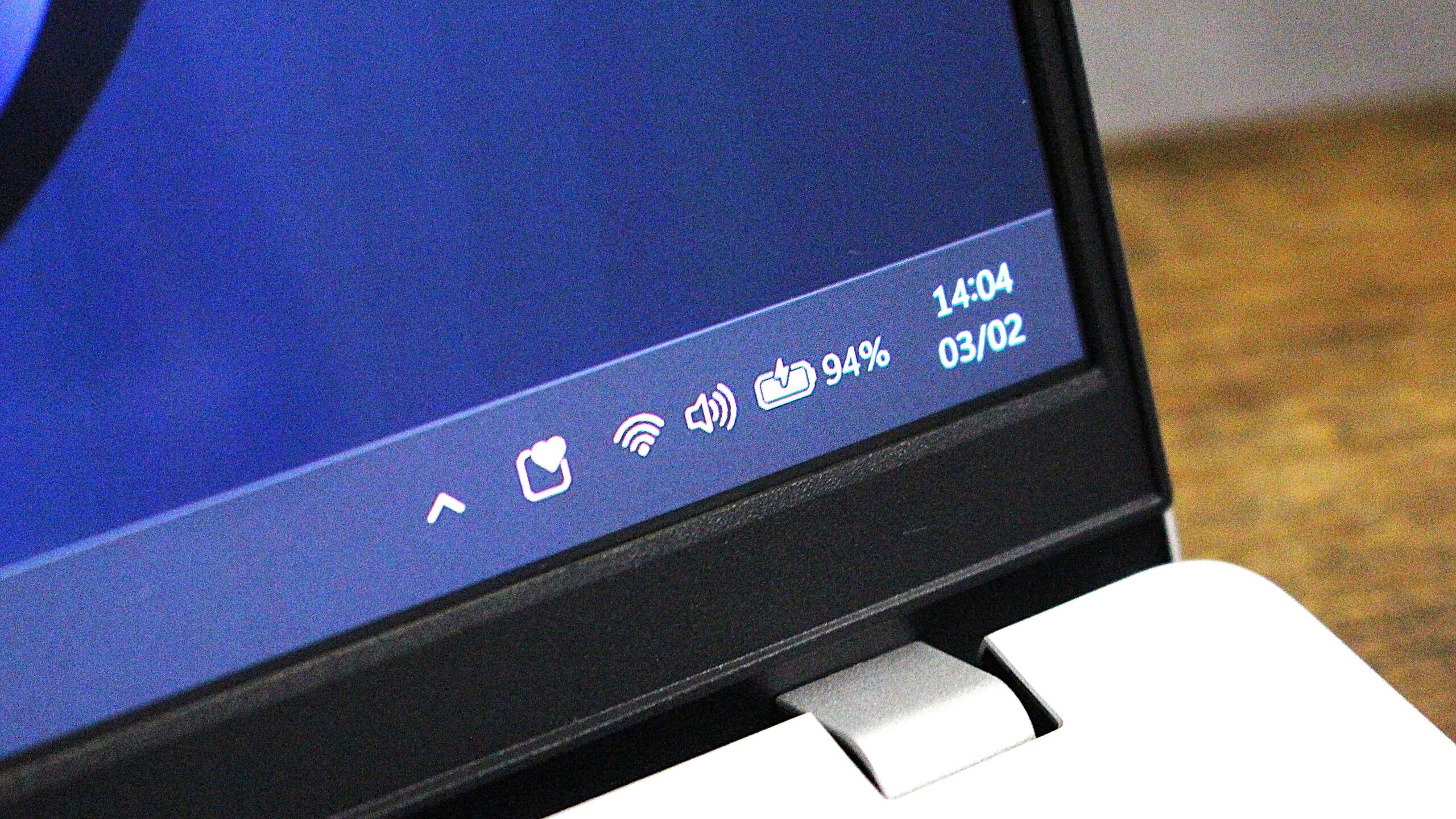
    The new battery icon on Windows 11.
    Share
    Facebook Twitter LinkedIn Pinterest Email

    Microsoft is trying out a new feature for Windows 11 that is designed to adaptively enable energy saver mode based on your current usage of your PC. The feature is dubbed “adaptive energy saver,” and will switch on battery saver mode regardless of your battery level, based on how you’re using your PC.

    “Adaptive energy saver is an opt-in feature that automatically enables and disables energy saver, without changing screen brightness, based on the power state of the device and the current system load” says Microsoft in the blog post announcing the feature.

    On paper, it actually sounds like a good idea. Windows devices are notorious for having not great battery life, and so adaptively enabling energy saving mode could help increase the longevity of your laptop if you’re only conducting tasks that don’t require a lot of compute power.


    You may like

    Microsoft doesn’t go into any technical details as to how this feature works, but I suspect it will essentially measure your current CPU and GPU usage, and weigh up whether you need extra power to complete the task you’re currently working on. If not, it will enable energy saving mode.

    If you’re just writing emails and browsing the web, adaptive energy saver will likely kick in to save battery life. Alternatively, if you’re trying to render a video or play a game, then it’s likely adaptive energy saver will disable itself to give you as much performance as possible.

    Notably, adaptive energy saver won’t change your screen brightness, likely in an attempt to make the feature as subtle as possible in its operation. It would be annoying to have your screen constantly changing brightness whenever it enters energy saver mode adaptively. The icon on the Taskbar will still change to show when energy saver is active.

    You can configure which energy saver mode is enabled in Settings. (Image credit: Microsoft)

    Additionally, the new adaptive energy saving mode is optional. It doesn’t appear to be on by default, meaning you will need to head into Settings to turn on the feature yourself if you want your PC to adaptively enable energy saver while you use it. Otherwise, it will be set to the old school way of doing things.

    All the latest news, reviews, and guides for Windows and Xbox diehards.

    Windows 11’s current energy saver mode will automatically come on when your battery reaches a certain percentage, usually 20% or 30%. When enabled, energy saver mode lowers your screen brightness and reduces system load, including capping the power delivered to the CPU and GPU to prolong battery life.

    Of course, given this feature is now only in testing with Windows Insiders in the Canary Channel, feedback will likely determine if this feature actually ships. Microsoft is known for trailing features in the Windows Insider Program that never see the light of day, and this could be one of them, pending feedback from users.

    In recent years, Microsoft has changed how energy saver mode works on Windows 11, even bringing it to PCs without a battery in them. That means even desktop computers can enable energy saver mode these days, which helps reduce the amount of energy they are pulling from the wall.

    Adaptive energy saver is only for PCs with a battery, so desktops won’t be able to take advantage of this automatic mode. However, desktops can still choose to manually enable energy saver whenever they like, and can even set it to always be enabled, just like laptops can.

    This new feature is now rolling out in preview as part of the Windows 11 build 27898 build that was released to the Canary Channel last week. Microsoft utilizes an A/B rollout system that means some users might not see it right away once they upgrade to the latest preview build.

    adaptive Announces battery Feature Microsoft saver Windows
    Share. Facebook Twitter Pinterest LinkedIn Tumblr Email
    Previous ArticleBuilding trust in data centers: an imperative for the global technology industry
    Next Article OpenAI Says Its Open-Source Reasoning AI Model Is Delayed Indefinitely
    techupdateadmin
    • Website

    Related Posts

    Gadgets

    Your next Legion Go 2 might run SteamOS instead of Windows 11

    December 21, 2025
    Mobile

    Samsung announces Exynos 2600, the world’s first 2nm mobile chip

    December 19, 2025
    Gadgets

    Facebook’s wants to turn basic link sharing into a paid feature

    December 18, 2025
    Add A Comment
    Leave A Reply Cancel Reply

    Top Posts

    NYT Strands hints and answers for Monday, August 11 (game #526)

    August 11, 202545 Views

    These 2 Cities Are Pushing Back on Data Centers. Here’s What They’re Worried About

    September 13, 202542 Views

    Today’s NYT Connections: Sports Edition Hints, Answers for Sept. 4 #346

    September 4, 202540 Views
    Stay In Touch
    • Facebook
    • YouTube
    • TikTok
    • WhatsApp
    • Twitter
    • Instagram
    Latest Reviews

    Subscribe to Updates

    Get the latest tech news from FooBar about tech, design and biz.

    Most Popular

    Best Fitbit fitness trackers and watches in 2025

    July 9, 20250 Views

    There are still 200+ Prime Day 2025 deals you can get

    July 9, 20250 Views

    The best earbuds we’ve tested for 2025

    July 9, 20250 Views
    Our Picks

    My Health Anxiety Means I Won’t Use Apple’s or Samsung’s Smartwatches. Here’s Why

    December 22, 2025

    You can now buy the OnePlus 15 in the US and score free earbuds if you hurry

    December 22, 2025

    Today’s NYT Connections: Sports Edition Hints, Answers for Dec. 22 #455

    December 22, 2025

    Subscribe to Updates

    Get the latest creative news from FooBar about art, design and business.

    Facebook X (Twitter) Instagram Pinterest
    • About Us
    • Contact us
    • Privacy Policy
    • Disclaimer
    • Terms and Conditions
    © 2026 techupdatealert. Designed by Pro.

    Type above and press Enter to search. Press Esc to cancel.