
Close Menu
TechUpdateAlert

    Subscribe to Updates

    Get the latest creative news from FooBar about art, design and business.

    What's Hot

    My Health Anxiety Means I Won’t Use Apple’s or Samsung’s Smartwatches. Here’s Why

    December 22, 2025

    You can now buy the OnePlus 15 in the US and score free earbuds if you hurry

    December 22, 2025

    Today’s NYT Connections: Sports Edition Hints, Answers for Dec. 22 #455

    December 22, 2025
    Facebook X (Twitter) Instagram
    Trending
    • My Health Anxiety Means I Won’t Use Apple’s or Samsung’s Smartwatches. Here’s Why
    • You can now buy the OnePlus 15 in the US and score free earbuds if you hurry
    • Today’s NYT Connections: Sports Edition Hints, Answers for Dec. 22 #455
    • Android might finally stop making you tap twice for Wi-Fi
    • Today’s NYT Mini Crossword Answers for Dec. 22
    • Waymo’s robotaxis didn’t know what to do when a city’s traffic lights failed
    • Today’s NYT Wordle Hints, Answer and Help for Dec. 22 #1647
    • You Asked: OLED Sunlight, VHS on 4K TVs, and HDMI Control Issues
    Facebook X (Twitter) Instagram Pinterest Vimeo
    TechUpdateAlertTechUpdateAlert
    • Home
    • Gaming
    • Laptops
    • Mobile
    • Software
    • Reviews
    • AI & Tech
    • Gadgets
    • How-To
    TechUpdateAlert
    Home»AI & Tech»Google’s new AI service turns into your own private tutor
    AI & Tech

    Google’s new AI service turns into your own private tutor

    techupdateadminBy techupdateadminNovember 18, 2025No Comments4 Mins Read
    Share Facebook Twitter Pinterest LinkedIn Tumblr Reddit Telegram Email
    Google Gemini
    Share
    Facebook Twitter LinkedIn Pinterest Email

    When ChatGPT launched three years ago, it shook the academic world to its core. Suddenly, students could have AI answer questions and even write essays. And because ChatGPT is so articulate, spotting cheaters became increasingly difficult.

    But AI isn’t just used for cheating, it can also help those who want to learn more. Recently, the Guided Learning feature was added to Gemini.

    Guided Learning: No answers up front

    The point of Guided Learning is that Gemini doesn’t present the answer right away. Instead, it guides you through the topic much like a flesh and blood teacher would. You receive a small amount of information at a time and follow-up questions help you confirm your understanding.

    Guided Learning uses not only text but also images, diagrams, and videos. You can even upload your own learning materials, such as presentations, PDF files, and images. It’s also possible to create tests and quizzes.

    Of course, you can choose the topic yourself. Irregular verbs in Spanish, second-degree math equations, or the periodic table in physics? Anything is possible! And it’s not just theoretical knowledge, you can also use the feature to learn practical skills like cooking and photography.

    However, it’s important to remember that Guided Learning has the same privacy concerns as any other AI service. There’s also no guarantee that the information is totally accurate, so it’s wise to double-check anything you’re unsure about.

    Here’s how to get started:

    1. Write a question

    Foundry / Ashley Biancuzzo

    Go to gemini.google.com and log in. Type a question or description about what you want to learn more about. Click on Tools and select Guided Learning (or add Use Guided Learning to your question). Confirm with the Submit arrow on the right.

    2. Uploading files
    Google Gemini

    Foundry / Ashley Biancuzzo

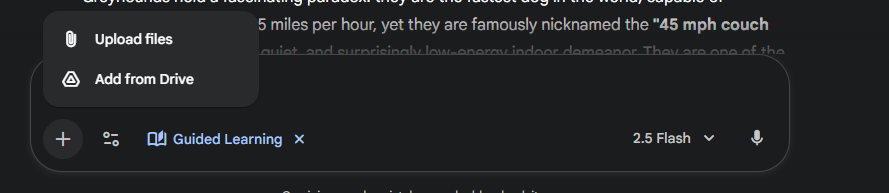
    You can also upload your own files like PowerPoint presentations, images, and other documents. To do so, tap Add files (plus icon on the left) and then Upload files. Locate your file and press Open.

    3. Read the explanation

    Google Gemini

    Foundry / Ashley Biancuzzo

    Now Gemini displays an explanatory text that’s guided by your command. If you’ve asked a specific question, you will get a direct answer, while an open question will produce a more general explanation. You’ll also often receive follow-up questions, and by answering them, you can steer the learning process.

    4. Ask for help

    Gemini can also help you solve math problems. You won’t get the answer straight away, but you’ll get hints to help you understand how to solve it. Type in the problem and you’ll get a step-by-step explanation along with educational questions to help you.

    5. Take a quiz

    Google Gemini (quiz)

    Foundry / Ashley Biancuzzo

    Gemini can create quizzes/tests around the material. For example, you can get 10 questions with four answer options and Gemini will, of course, correct everything itself. Just write Create a quiz and add details about the number of questions and the format.

    6. Create a study plan
    Google Gemini

    Foundry / Ashley Biancuzzo

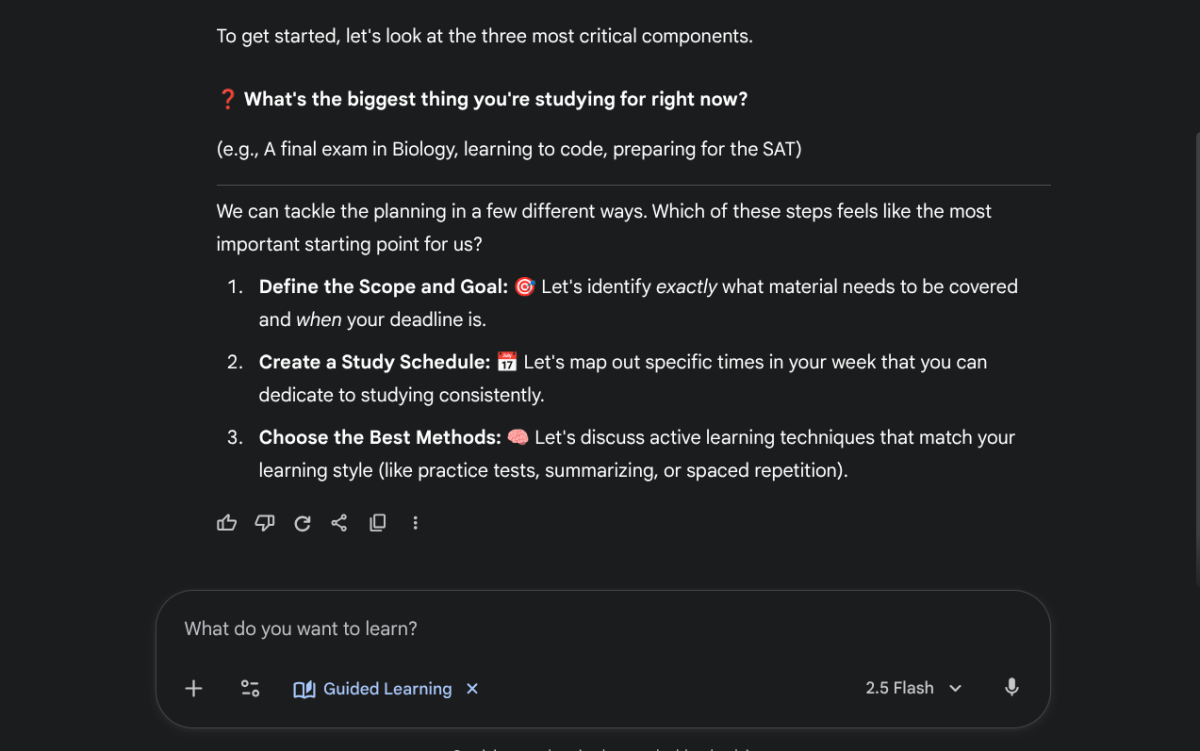
    Google Gemini doesn’t just help you with individual questions. It can also create individual study plans. Simply type in a description of what you want to learn and what your ambitions are, and a wizard will launch to create a complete study plan.

    7. Use your cell phone

    In the steps above, we’re using Gemini on your computer, but you can just as easily use your cell phone or tablet. To do so, search for Google Gemini in the Google Play Store (Android) or App Store (iOS) and download the app.

    The first time you use it, you will have to accept certain warnings. You may also need to sign in with your Google account.

    Once you’re up and running, the app works in the same way as on your computer, but with a more compact interface. For example, you won’t see Guided Learning right away, so you’ll need to tap the icon next to the plus button at the bottom left of the screen.

    Googles Private service turns tutor
    Share. Facebook Twitter Pinterest LinkedIn Tumblr Email
    Previous ArticleGoogle’s Nano Banana is now in Samsung’s Now Brief
    Next Article All the new Xbox games arriving this week (Nov. 17-23)
    techupdateadmin
    • Website

    Related Posts

    Gadgets

    This Chrome Extension Turns LinkedIn Posts About AI Into Facts About Allen Iverson

    December 19, 2025
    Gadgets

    Google’s best Gemini AI feature could soon appear in your everyday apps

    December 13, 2025
    Mobile

    Google turns Chrome into a native AI browser with Gemini-powered tools

    December 11, 2025
    Add A Comment
    Leave A Reply Cancel Reply

    Top Posts

    NYT Strands hints and answers for Monday, August 11 (game #526)

    August 11, 202545 Views

    These 2 Cities Are Pushing Back on Data Centers. Here’s What They’re Worried About

    September 13, 202542 Views

    Today’s NYT Connections: Sports Edition Hints, Answers for Sept. 4 #346

    September 4, 202540 Views
    Stay In Touch
    • Facebook
    • YouTube
    • TikTok
    • WhatsApp
    • Twitter
    • Instagram
    Latest Reviews

    Subscribe to Updates

    Get the latest tech news from FooBar about tech, design and biz.

    Most Popular

    Best Fitbit fitness trackers and watches in 2025

    July 9, 20250 Views

    There are still 200+ Prime Day 2025 deals you can get

    July 9, 20250 Views

    The best earbuds we’ve tested for 2025

    July 9, 20250 Views
    Our Picks

    My Health Anxiety Means I Won’t Use Apple’s or Samsung’s Smartwatches. Here’s Why

    December 22, 2025

    You can now buy the OnePlus 15 in the US and score free earbuds if you hurry

    December 22, 2025

    Today’s NYT Connections: Sports Edition Hints, Answers for Dec. 22 #455

    December 22, 2025

    Subscribe to Updates

    Get the latest creative news from FooBar about art, design and business.

    Facebook X (Twitter) Instagram Pinterest
    • About Us
    • Contact us
    • Privacy Policy
    • Disclaimer
    • Terms and Conditions
    © 2026 techupdatealert. Designed by Pro.

    Type above and press Enter to search. Press Esc to cancel.