



It’s been a huge year for Spotify, and now all that’s left is the forthcoming arrival of Spotify Wrapped 2025, but the platform is still keeping quiet about when it will drop. With that said, now is the ideal time to look back on what’s been one of the busiest years for the best music streaming service.
From the long-awaited arrival of Spotify Lossless to features such as Spotify Mix and Messages, the platform has gone through some substantial changes, dropping one huge feature after the next. Which new addition to the app have you enjoyed the most? Let us know in the comments.
1. Spotify Lossless
Of all the updates that have been released over the past year, Spotify Lossless is the big kahuna, which the company started rolling out on September 10 to a slew of devices from mobile to desktop and tablet, offering compatibility with devices that support Spotify Connect, including Sony, Bose, Sennheiser, and more.
For five years, Spotify subscribers had been waiting patiently for the arrival of Lossless, but Spotify was very hush-hush when it came to its status, which sparked many rumors. One of them suggested that Spotify Lossless would arrive as a paid add-on called Music Pro, but to our surprise, it’s included with a Premium subscription.
2. Spotify Mix

Spotify Mix allows you to create seamless transitions between songs in your playlists, adding another layer of personality to your soundtracks. You can play around with EQ settings and effects, or you can simply select a preset and tinker with it from there, so it’s easy to navigate for all DJing abilities.
3. Smart filters

Though Spotify is my go-to music streaming service, I’ve been open about how poor and cluttered its interface is. Its Smart Filters add some order to your Library, dividing your saved music into three broad categories: Activities, Moods, and Genres.
The Activities category shows presets such as ‘Running’, ‘Party’, and even ‘Crying’, while Moods pushes Spotify’s focus on ‘vibe’ listening with categories such as ‘Feel good’ and ‘Gentle’.
4. Messages

Your message history will live in your profile section in the top-left corner of the app, and when you’ve accepted a message request, you’ll then be able to react with emojis and send text messages.
5. Discover Weekly overhaul

To celebrate 10 years of its first personalized music discovery feature, Spotify gave its Discover Weekly playlist a much-needed glow-up. As well as a new visual upgrade, its new control functions allow you to search through up to five different genres based on your listening history. Based on which genre you select, this will generate a 30-track playlist to bring you one step closer to your next favorite song or artist.
6. Upcoming Releases hub

It’s essentially an in-app space where you can view the top 10 most pre-saved albums and view recommendations based on your listening habits, which you can pre-save to your library. You can also use this hub to quickly access album Countdown Pages to view the tracklist, listen to singles, check out merch, and watch clips.
7. AI DJ requests

Two years after AI DJ was launched, Spotify rolled out its first major upgrade in the form of voice requests.
As well as curating a personalized listening experience based on your music habits, past and present, AI DJ will listen to your requests and then generate a listening session based on what you want to hear in real time, using prompts such as “Play me some electronic beats for a midday run”.
In the more recent months, AI DJ also rolled out the option to type out requests and choose from personalized prompts suggested by Spotify.
8. Disable smart shuffle

While you can turn off Smart Shuffle by tapping through the different shuffle options in the music playback screen, this never guaranteed a complete disabling of Smart Shuffle. If you go to Settings and into Playback, you can scroll down to ‘Include Smart Shuffle in play modes’ and disable the toggle to avoid running into it again.
9. Concerts Near You
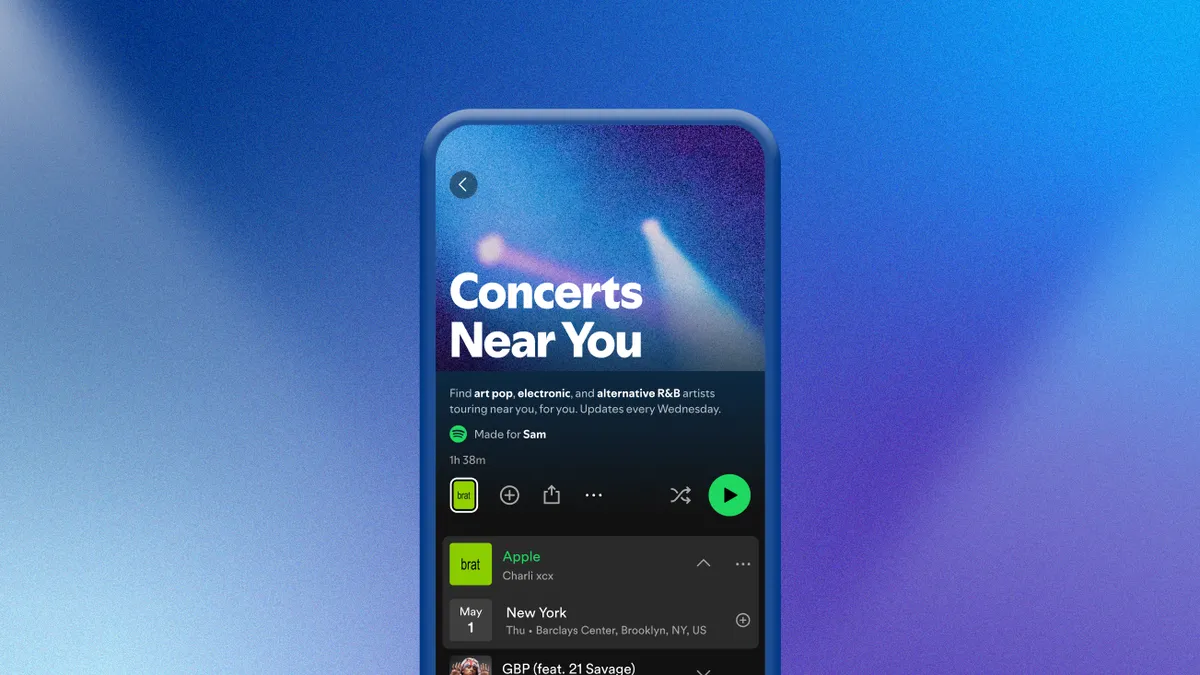
Earlier this year, Spotify made it easier for you to find touring artists in your area with its Concerts Near You playlist. Updated every Wednesday based on your listening habits, the playlist brings you 30 fresh songs from artists with scheduled shows in your area, and even lets you access links that take you to third-party booking platforms to secure tickets.
10. Podcast upgrades

Spotify’s focus on expanding the reach of its collection of podcasts has grown substantially this year, and it dropped three new podcast upgrades.
The first was a new Following feed for podcasts on the homepage, a dedicated space that shows you all the podcasts you already follow. This was followed by podcast recommendations under your home feed shortcuts, which you can easily save to your library, as well as an ‘In this episode’ section. For example, if a creator mentions a specific album, song, or audiobook in a podcast episode, those titles will appear in this section, and you’ll have the option to explore the referenced content.
11. Hide the Create button

This was a quiet move on Spotify’s part, but one that a large majority of subscribers were greatly thankful for. The Create button caused quite a stir when Spotify added it in place of the Library tab, mainly because it interfered with users’ muscle memory, but Spotify has since offered a solution to remove it from your navigation bar.
To remove the Create button, head to Settings in the Spotify app and tap ‘Content and display’, from there you can find the toggle to disable the Create button under the ‘Display preferences’ subhead.
12. Exclude individual songs from your Taste Profile

You’ve been able to exclude playlists from your Taste Profile for quite some time, but only recently, Spotify introduced a new feature that lets you exclude individual songs, which is perfect for eliminating those guilty pleasures from your Spotify Wrapped.
To exclude a song from your taste profile, find the track you want to exclude (whether it’s in an album or a playlist) and tap the three dots next to it. Then all you have to do is scroll down to select ‘Exclude track from your taste profile’, and Spotify will do the rest.
Follow TechRadar on Google News and add us as a preferred source to get our expert news, reviews, and opinion in your feeds. Make sure to click the Follow button!
And of course you can also follow TechRadar on TikTok for news, reviews, unboxings in video form, and get regular updates from us on WhatsApp too.
