
Close Menu
TechUpdateAlert

    Subscribe to Updates

    Get the latest creative news from FooBar about art, design and business.

    What's Hot

    My Health Anxiety Means I Won’t Use Apple’s or Samsung’s Smartwatches. Here’s Why

    December 22, 2025

    You can now buy the OnePlus 15 in the US and score free earbuds if you hurry

    December 22, 2025

    Today’s NYT Connections: Sports Edition Hints, Answers for Dec. 22 #455

    December 22, 2025
    Facebook X (Twitter) Instagram
    Trending
    • My Health Anxiety Means I Won’t Use Apple’s or Samsung’s Smartwatches. Here’s Why
    • You can now buy the OnePlus 15 in the US and score free earbuds if you hurry
    • Today’s NYT Connections: Sports Edition Hints, Answers for Dec. 22 #455
    • Android might finally stop making you tap twice for Wi-Fi
    • Today’s NYT Mini Crossword Answers for Dec. 22
    • Waymo’s robotaxis didn’t know what to do when a city’s traffic lights failed
    • Today’s NYT Wordle Hints, Answer and Help for Dec. 22 #1647
    • You Asked: OLED Sunlight, VHS on 4K TVs, and HDMI Control Issues
    Facebook X (Twitter) Instagram Pinterest Vimeo
    TechUpdateAlertTechUpdateAlert
    • Home
    • Gaming
    • Laptops
    • Mobile
    • Software
    • Reviews
    • AI & Tech
    • Gadgets
    • How-To
    TechUpdateAlert
    Home»Reviews»Copilot AI’s latest trick? A secure sandbox for its agentic activity
    Reviews

    Copilot AI’s latest trick? A secure sandbox for its agentic activity

    techupdateadminBy techupdateadminOctober 30, 2025No Comments3 Mins Read
    Share Facebook Twitter Pinterest LinkedIn Tumblr Reddit Telegram Email
    Microsoft 365 Copilot Researcher with Computer Use password
    Share
    Facebook Twitter LinkedIn Pinterest Email

    Microsoft Copilot is tapping a key feature from Windows 11 Pro to enable Copilot’s AI to dig even further than it already has. It’s part of an update to Microsoft 365 Copilot called Researcher with Computer Use, debuting today for a limited subset of Microsoft 365 Copilot users.

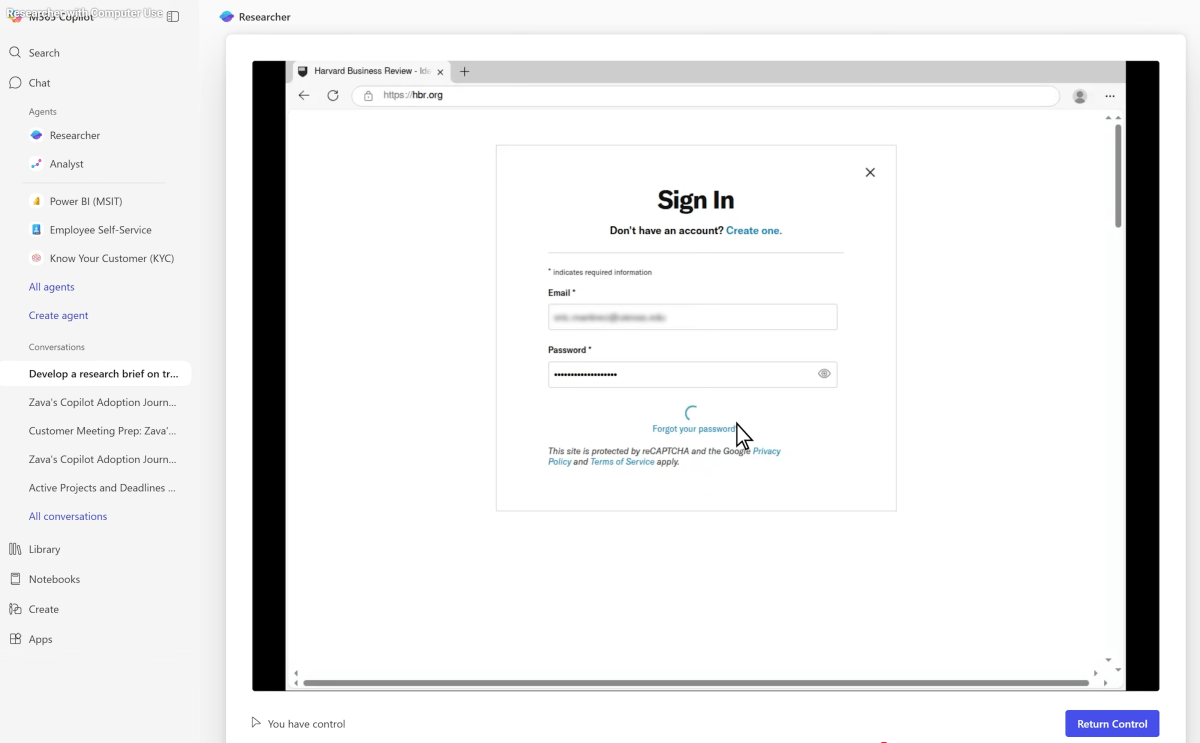
    LLMs that engage in deep research, like Copilot, face a problem: some content is locked away behind an authentication process, like requiring a password. Researcher with Computer Use is adding a “secure virtual computer” with a virtual browser, terminal, and a text interface that will trigger when needed and also provide a visual “chain of thought” that can show you what’s happening and if you need to step in.

    All of this takes place within a “sandbox,” an optional virtual environment that has existed within Windows since the launch of Windows 10 Pro. Windows Sandbox is a powerful utility in Windows 10 and Windows 11 for surfing the web safely, since it creates a virtual OS within Windows that’s sealed off from your “main” Windows environment.

    It’s a much more secure way of visiting dodgy sites on the web or opening untrusted files—once you close the sandbox, the OS and everything within it vanishes. But you can still open files within it and read their contents, which is where Researcher steps in.

    Recently, Microsoft has also tip-toed into letting Copilot access a sandbox via Copilot Actions, an upcoming feature that would allow Copilot to take actions on the PC. In the near term, Microsoft also released a fall 2025 update for Copilot with long-term memory and integration into various services.

    In this case, Researcher with Computer Use isn’t designed for dodging malware, although that’s one benefit of it. The created sandbox is primarily designed as a test bed for code that Copilot creates, so it doesn’t put your machine at risk. The virtual browser can be used by Researcher to navigate the web and perform actions, Microsoft notes in a blog post, while the terminal interface is used for command-line-based code execution.

    “Deep research” LLMs typically come up with a plan, then execute it while keeping you abreast of what they’re doing and what’s going on. Researcher with Computer Use does this visually, snapping screenshots of the virtual sandbox as it works. While you can take over whenever you want, it’s also useful for when Researcher runs into roadblocks and needs a username and password to proceed further. That takes place via a “secure screen-sharing connection,” Microsoft says.

    Microsoft 365 Copilot Researcher with Computer Use will hand back control to the user to enter a password when needed.

    Microsoft

    Microsoft says that users at any given organization won’t have access to internal or proprietary information by default, though users and IT admins can choose to turn that on. The sources of data that Researcher sifts through can also be managed.

    “The user sees the actions of Researcher while it is accessing the web through the browser or using any computer use tools,” Microsoft added. “Researcher will always ask for explicit confirmation before taking any actions or request the user securely log in to any web sources in the browser when required to complete a task.”

    On BrowseComp—a benchmark focused on complex, multi-step browsing tasks—Researcher with Computer Use performed 44 percent better than the current version of Researcher, Microsoft said.

    Activity Agentic AIs Copilot Latest Sandbox Secure trick
    Share. Facebook Twitter Pinterest LinkedIn Tumblr Email
    Previous ArticleBest Antivirus Software We’ve Tested in 2025: This Security Service Just Dethroned a Top Competitor
    Next Article Someone please get me this Star Trek hacker con badge, I’m begging you
    techupdateadmin
    • Website

    Related Posts

    Gadgets

    Sony’s XM5 headphones and the latest Kindle round out this week’s best deals

    December 21, 2025
    Gadgets

    LG forced a Copilot web app onto its TVs but will let you delete it

    December 19, 2025
    Mobile

    macOS 26.2 puts a light trick on Macs, and it surprised me in total darkness

    December 15, 2025
    Add A Comment
    Leave A Reply Cancel Reply

    Top Posts

    NYT Strands hints and answers for Monday, August 11 (game #526)

    August 11, 202549 Views

    These 2 Cities Are Pushing Back on Data Centers. Here’s What They’re Worried About

    September 13, 202542 Views

    Today’s NYT Connections: Sports Edition Hints, Answers for Sept. 4 #346

    September 4, 202540 Views
    Stay In Touch
    • Facebook
    • YouTube
    • TikTok
    • WhatsApp
    • Twitter
    • Instagram
    Latest Reviews

    Subscribe to Updates

    Get the latest tech news from FooBar about tech, design and biz.

    Most Popular

    Best Fitbit fitness trackers and watches in 2025

    July 9, 20250 Views

    There are still 200+ Prime Day 2025 deals you can get

    July 9, 20250 Views

    The best earbuds we’ve tested for 2025

    July 9, 20250 Views
    Our Picks

    My Health Anxiety Means I Won’t Use Apple’s or Samsung’s Smartwatches. Here’s Why

    December 22, 2025

    You can now buy the OnePlus 15 in the US and score free earbuds if you hurry

    December 22, 2025

    Today’s NYT Connections: Sports Edition Hints, Answers for Dec. 22 #455

    December 22, 2025

    Subscribe to Updates

    Get the latest creative news from FooBar about art, design and business.

    Facebook X (Twitter) Instagram Pinterest
    • About Us
    • Contact us
    • Privacy Policy
    • Disclaimer
    • Terms and Conditions
    © 2026 techupdatealert. Designed by Pro.

    Type above and press Enter to search. Press Esc to cancel.