
Close Menu
TechUpdateAlert

    Subscribe to Updates

    Get the latest creative news from FooBar about art, design and business.

    What's Hot

    My Health Anxiety Means I Won’t Use Apple’s or Samsung’s Smartwatches. Here’s Why

    December 22, 2025

    You can now buy the OnePlus 15 in the US and score free earbuds if you hurry

    December 22, 2025

    Today’s NYT Connections: Sports Edition Hints, Answers for Dec. 22 #455

    December 22, 2025
    Facebook X (Twitter) Instagram
    Trending
    • My Health Anxiety Means I Won’t Use Apple’s or Samsung’s Smartwatches. Here’s Why
    • You can now buy the OnePlus 15 in the US and score free earbuds if you hurry
    • Today’s NYT Connections: Sports Edition Hints, Answers for Dec. 22 #455
    • Android might finally stop making you tap twice for Wi-Fi
    • Today’s NYT Mini Crossword Answers for Dec. 22
    • Waymo’s robotaxis didn’t know what to do when a city’s traffic lights failed
    • Today’s NYT Wordle Hints, Answer and Help for Dec. 22 #1647
    • You Asked: OLED Sunlight, VHS on 4K TVs, and HDMI Control Issues
    Facebook X (Twitter) Instagram Pinterest Vimeo
    TechUpdateAlertTechUpdateAlert
    • Home
    • Gaming
    • Laptops
    • Mobile
    • Software
    • Reviews
    • AI & Tech
    • Gadgets
    • How-To
    TechUpdateAlert
    Home»Gaming»Hate Windows 11’s centered taskbar? Here’s how to change it
    Gaming

    Hate Windows 11’s centered taskbar? Here’s how to change it

    techupdateadminBy techupdateadminOctober 16, 2025No Comments2 Mins Read
    Share Facebook Twitter Pinterest LinkedIn Tumblr Reddit Telegram Email
    Taskbar alignment
    Share
    Facebook Twitter LinkedIn Pinterest Email

    If you’ve only just adopted Windows 11, one of the things that will jump out at you is the placement of the Start button on the desktop. It’s now towards the middle of the screen.

    I actually like it in the center position, because it’s easier to orientate my searches without having to drag my mouse pointer all the way to the side of the screen. That said, not everyone feels the same way. It bugs some long-time users of Windows 10 who are used to the far left-hand side placement. But fret not, because you can change it back to the left in just a few clicks.

    What to do:

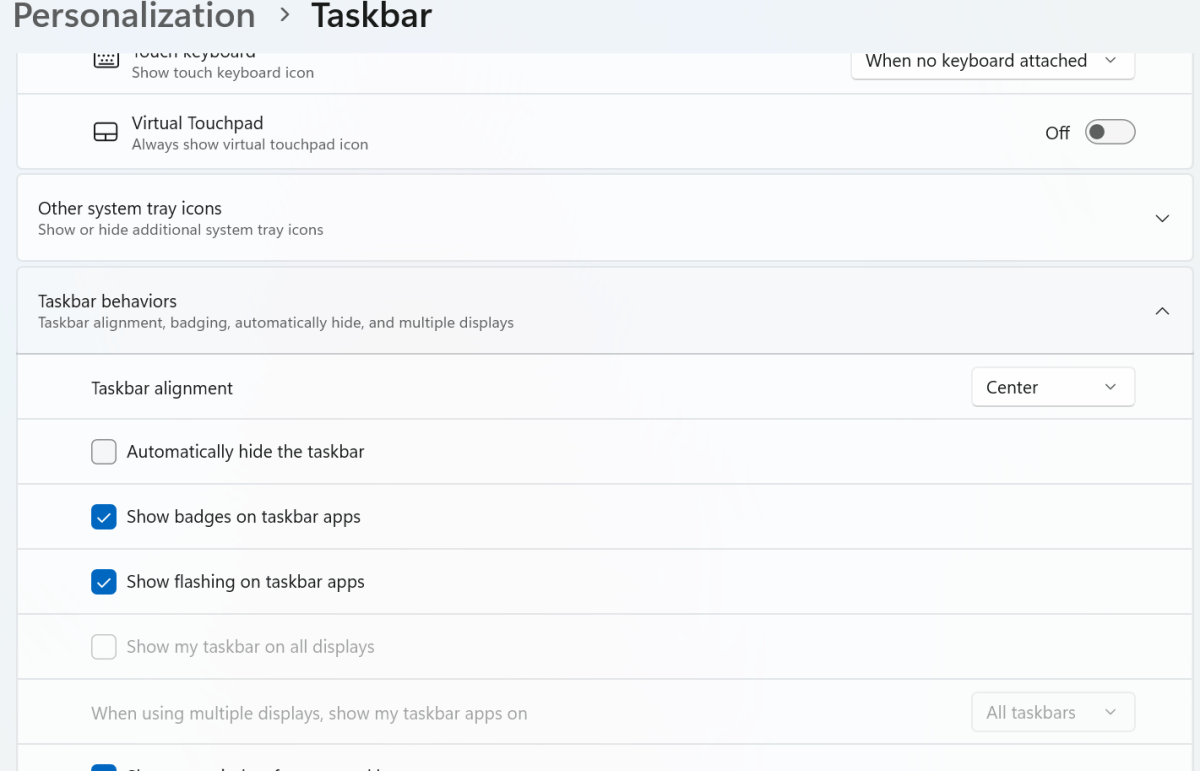
    • Right click on the taskbar and select Taskbar settings.
    • Find the submenu “Taskbar behaviors” and click the dropdown arrow next to it.
    • Now next to “Taskbar alignment” change Center to Left. Close the window and watch your taskbar magically shift position.

    Dominic Bayley / Foundry

    And voila! Your taskbar should be back in left-hand placement. Don’t worry if you’re not sold on it being there, because you can always change it back again in a jiffy. If you’re coming to Windows 11 due to Windows 10’s end of support, you can find more helpful tips like this in our Windows 11 guide for Windows 10 refugees.

    That’s all for this Try This. If you want more tips like this one sent to your inbox each week be sure to sign-up to our PCWorld Try This newsletter.

    11s centered Change hate Heres taskbar Windows
    Share. Facebook Twitter Pinterest LinkedIn Tumblr Email
    Previous ArticleAndroid 16 QPR2 Beta 3 lands with a flurry of bug fixes
    Next Article Logitech made an Apple Pencil-like stylus for the Vision Pro
    techupdateadmin
    • Website

    Related Posts

    Gadgets

    My Health Anxiety Means I Won’t Use Apple’s or Samsung’s Smartwatches. Here’s Why

    December 22, 2025
    Gadgets

    Your next Legion Go 2 might run SteamOS instead of Windows 11

    December 21, 2025
    Mobile

    Oppo Pad Air5’s launch date is official, here’s what it looks like

    December 20, 2025
    Add A Comment
    Leave A Reply Cancel Reply

    Top Posts

    NYT Strands hints and answers for Monday, August 11 (game #526)

    August 11, 202545 Views

    These 2 Cities Are Pushing Back on Data Centers. Here’s What They’re Worried About

    September 13, 202542 Views

    Today’s NYT Connections: Sports Edition Hints, Answers for Sept. 4 #346

    September 4, 202540 Views
    Stay In Touch
    • Facebook
    • YouTube
    • TikTok
    • WhatsApp
    • Twitter
    • Instagram
    Latest Reviews

    Subscribe to Updates

    Get the latest tech news from FooBar about tech, design and biz.

    Most Popular

    Best Fitbit fitness trackers and watches in 2025

    July 9, 20250 Views

    There are still 200+ Prime Day 2025 deals you can get

    July 9, 20250 Views

    The best earbuds we’ve tested for 2025

    July 9, 20250 Views
    Our Picks

    My Health Anxiety Means I Won’t Use Apple’s or Samsung’s Smartwatches. Here’s Why

    December 22, 2025

    You can now buy the OnePlus 15 in the US and score free earbuds if you hurry

    December 22, 2025

    Today’s NYT Connections: Sports Edition Hints, Answers for Dec. 22 #455

    December 22, 2025

    Subscribe to Updates

    Get the latest creative news from FooBar about art, design and business.

    Facebook X (Twitter) Instagram Pinterest
    • About Us
    • Contact us
    • Privacy Policy
    • Disclaimer
    • Terms and Conditions
    © 2026 techupdatealert. Designed by Pro.

    Type above and press Enter to search. Press Esc to cancel.