


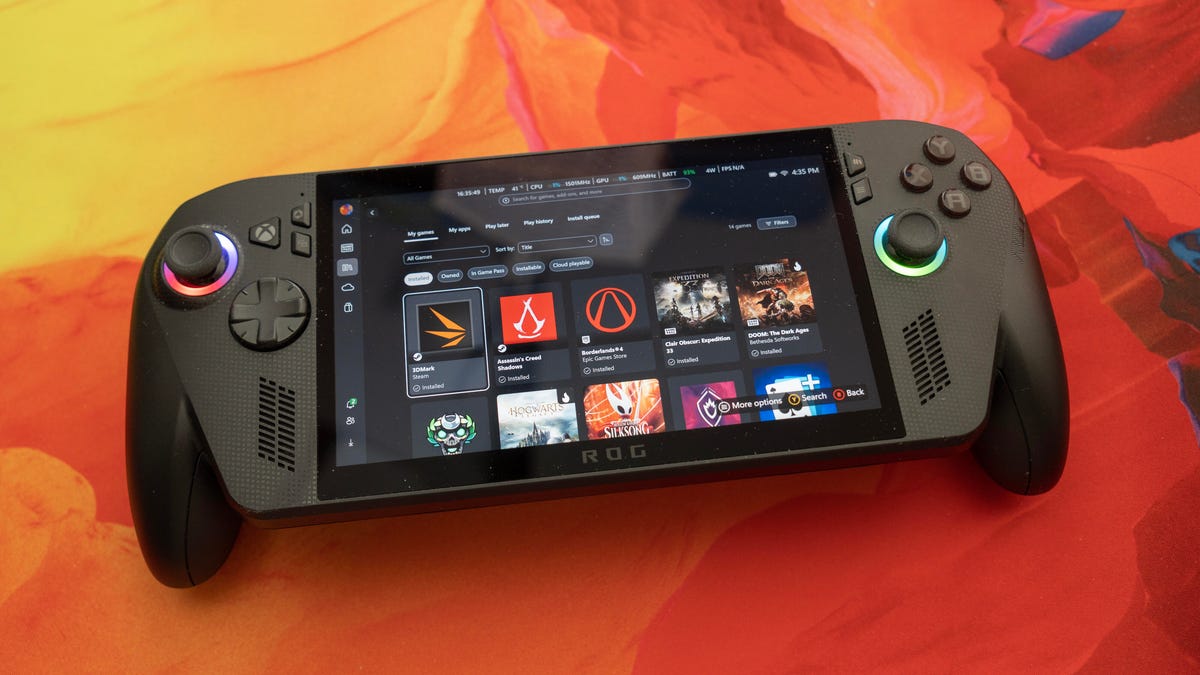
Pros
- Supports a wider library of games than competitors like the Steam Deck and Nintendo Switch
- Excellent performance for its components on lightweight games
- Bumpers and buttons feel clicky and responsive, joysticks have good tension
- Substantial grips can be more comfortable than the typical design found on these devices
Cons
- Expensive
- Display doesn’t support HDR and doesn’t show great contrast
- No trigger stops
- Interface is still buggy and inconsistent and Windows sometimes bogs it down
- Doesn’t include a case
Everyone’s been referring to the ROG Xbox Ally and Ally X as “Xbox portables” or “Handheld Xboxes” for so long during development that it’s easy to forget that they’re not that at all: They’re portable Windows gaming systems with Xbox branding. Microsoft’s “This is an Xbox” marketing campaign technically makes the devices one, but really, do you think of a Windows laptop as a portable Xbox?
It may not matter or it may affect which games you can play — I’m not searching for exceptions at the moment — but it does affect your experience. And that experience is a lot better overall than what’s been available in previous Windows handhelds (which have the same game compatibilities). But at $1,000 for the Ally X, you’ve got to want it a lot.
Watch this: The ROG Xbox Ally Isn’t the Xbox Handheld of My Dreams | Prove It
So who’s it for? One of our game reviewers, Oscar Gonzalez, preordered the device and explained it succinctly when I asked why he’d bought it: “I liked how it felt and I’m looking for the portable console thats easiest to set up for Xbox, Steam games and Epic Games Store games.” (He actually has five reasons for giving up his Steam Deck.) And that’s this device’s primary advantage over not just the Steam Deck, but the Nintendo Switch: It can run everything a PC can. A lot of people who are considering the device view it as an alternative to a Steam Deck, which feels stale at this point.
ROG Xbox Ally X
| Price as reviewed | $1,000 |
|---|---|
| Display | 7-inch 1,920×1,080 IPS touch screen, 120Hz, 500 nits, sRGB |
| CPU | AMD Ryzen AI Z2 Extreme Processor |
| Memory | 24GB LPDDR5X-8000 |
| Graphics | 8GB Integrated Radeon 890M |
| Storage | 953GB SSD (all the preinstalled stuff takes 89GB) |
| Ports | 2x USB-C (1 x USB4, 1 x USB 3.2 both w/ DP 2.1, PD 3.0), 1 x micro SD, 1 x analog audio |
| Networking | WiFi 6E, Bluetooth 5.4 |
| Operating system | Microsoft Windows 11 24H2 |
| Size | 11.5×4.8×2.0 in./29.1×12.2×5.1 cm |
| Weight | 1.6 lbs/715g |
But if all you want is a more up-to-date Steam Deck, I suggest the Lenovo Legion Go S (SteamOS); it’s less expensive, has a bigger screen, more memory, the last-gen version of the chip in the Xbox Ally X and a better design in some ways. I use GeForce Now Ultimate with it to stream Xbox cloud-enabled games, though given the price hike for Game Pass Ultimate, I’ll probably give that up after I run through my stacked codes. The biggest drawback is there’s no OLED model of the Lenovo or the Ally like there is for the Deck.
The Ally comes in two models: the $1,000 Ally X and the $600 Ally. The base model has 16GB of memory, a lower-power Ryzen Z2 A chip with much older graphics and 512GB SSD. I haven’t tested the latter, but I’d be surprised if it could run Windows well without choking, since it shares that 16GB memory with the graphics.
I reread my Asus ROG Ally X review and was genuinely surprised by how similar my thoughts were about that handheld and this new Xbox-branded version. I think I probably could’ve cut-and-pasted it with a few changes. And I’m still wrestling with appreciating this handheld for what it can do rather than frustrations with what Microsoft didn’t change.
It’s the first Windows handheld console with the Xbox imprimatur.
There are some welcome updates to the controls and grip and a somewhat smoother operation. But it’s still ultimately skinned Windows — just with a slightly thicker skin. Operating system microaggressions bother me a lot more than they do most people (which should be clear just from my dubbing them “microaggressions”), so if you’re zen about those, just ignore me where necessary.
Design
The Xbox version of the ROG Ally brings a handful of thoughtful design improvements. The grips are bigger and more pronounced, it uses Hall Effect joysticks (they’re an optional upgrade for Asus’ model) and there’s an Xbox button.
I never had a problem with the fully screen-connected grips on the original model (or on competitors like the Steam Deck), and the Xbox Ally’s new controller-style grips don’t feel any more or less comfortable to me. By the time I’ve been through the Chronos and Typhon endgame boss battles in Hades 2, my hands are equally sweaty and cramped with both designs. It’s really something you have to feel and decide for yourself.
The grips distinguish the ROG Xbox Ally from competing handhelds.
But the new grips do make one thing worse for me. The small back buttons that are easy to reach on the Asus model now require an awkward stretch on the Xbox version. They’re the same size and in the same place, but the grips put them just out of my comfortable reach when my fingers are on the triggers, partly because the grips tilt outwards where my hands rest.
And while the triggers, joystick and bumpers all feel responsive, my biggest want-it remains: trigger stops. Not a deal-breaker for a lot of people, but it could be for some. The triggers don’t have an exceptionally deep pull, so it’s not a huge issue, but there are times it might have helped. Asus’ Armoury Crate control software lets you calibrate the sticks, triggers and gyro, but you can’t adjust the dead zone on the sticks.
The wider grips make it a little harder for me to reach the small back buttons than on the Asus ROG Ally X.
I had no issues connecting and using USB and Bluetooth headsets, sending video to a monitor or transferring files via a microSD card. The built-in audio isn’t bad — certainly good enough for ambient music, sounds and dialogue. The screen isn’t bad, but it’s not a standout either. It’s a fairly standard IPS panel; it can get bright, but the blacks are kind of dark gray. As a result, contrast is just OK. I even set it to “vivid,” which I never use, just to perk things up a bit.
Windows is still hit and miss
On one hand, Microsoft made some nice strides in hiding Windows more than in the previous generation. The new Xbox app provides a “full-screen experience,” which is just a way of saying that when you start the device it can launch straight into the Xbox app in full-screen mode (or to the Windows desktop).
The Xbox app combines your games from different stores.
The app aggregates your installed games or recently streamed games and game launchers for storefronts such as Steam, Epic Games Store, GOG and others. The Xbox app includes Game Pass — the Ally comes with three months of Ultimate — and a games-only version of the Microsoft Store. There’s a compact settings view with a task switcher, which can also launch the full Armoury Crate SE app, which controls lighting, power profiles, Wi-Fi, audio and so on.
Beyond the app, though, the experience is inconsistent. Everything you launch from there goes into its own interfaces. Steam may launch into Big Picture mode, but it doesn’t always return to it. The Epic Games Store doesn’t have a full-screen mode, just a maximized window. It doesn’t support controller-based navigation, either. Microsoft, couldn’t you have worked with this major game store to have it fit in better with the rest of the interface?
At one point, I accidentally closed the Xbox app and boom — back in Windows. The problem with this inconsistency is that you’re never quite sure what will work and what won’t — when you can use the controller, when you need to tap the screen and everything in between.
The handheld’s calibration options.
Then there are the annoyances. There’s no simple way to skip signing in. (I haven’t attempted the clunky desktop workaround of creating a local account after setup.) Microsoft does let you sign in without an internet connection, but it warns that your games will only stay available offline for 14 days. It doesn’t seem to distinguish between games you actually own and those from Game Pass; it’s unclear what exactly the restriction applies to. So, don’t count on taking the Ally on any long off-grid trips.
There are also jarring Windows dialogs that pop up — often during installs, like the .NET installer — along with interface screens that render oddly, sometimes too small or slightly oversized. And then there’s the random app switching while a game is loading, which makes everything feel a bit chaotic. And don’t get me started on setup, which Microsoft didn’t bother to tailor to the device. “Unlock your photographic memory with Recall” — sorry, I can’t because it doesn’t have a webcam or fingerprint reader.
There are two USB ports, one of which is a fast USB4 40Gbps connection.
Microsoft has integrated Gaming Copilot (still in beta), its AI-powered assistant, as one of the switchable tasks, complete with voice and text support. I tried it and found it… not especially useful. I asked, via voice, for a hint about how to bond with Chronos in Hades 2. It started telling me about Kratos from God of War. When I clarified, I got a useless response. Then I came back another day and tried a different approach, and after following its advice — going through another run looking in vain for a secret door — I did a web search and discovered that the door isn’t visible until about five other tasks are completed. There are probably things that it’s better at answering, but that’s what I needed help with.
Speed depends on the game
Windows affects nongame performance as well. After a while, it even started to bog down controller response when navigating the Xbox app. I’d overshoot the setting I wanted to adjust or accidentally close an app altogether. Sometimes it didn’t respond to the controller at all until I touched the screen.
Gaming performance was a mixed bag. It’s great for games like Hades 2 and Hollow Knight Silksong, where the GPU load is low. I hit upwards of 200fps in Silksong and over 360fps in Hades 2 without taking any quality hits. Hogwarts Legacy, a GPU mediumweight, was playable at 60 to 70fps with upscaling. (Hogwarts is flagged as “Handheld Optimized” and “Will Play Great on Your Device.”)
Performance depends upon how lightly or heavily the game uses the GPU. Hades 2’s 2D graphics don’t stress it much and hit 360fps pretty consistently.
To get Doom: The Dark Ages running at a playable frame rate, I had to lower the graphics to medium — a notch below the “high” setting, where I stop noticing visual compromises. Borderlands 4? Couldn’t get much above 40fps on low. That game is notoriously piggy, though. And it failed a 3DMark stress test on battery (Steel Nomad Light) because the frame rate dropped significantly after the third loop.
Given time, I probably could have found more optimized settings rather than presets, but the point remains: On the inside, the ROG Xbox Ally X is equivalent to a pretty low-end laptop.
For reference, take the MSI Katana 15 HX B14W, a $1,000 gaming laptop equipped with an Nvidia GeForce RTX 5050. It’s not a competitor for the Xbox handheld by any stretch of the imagination, but it does highlight the kind of portable gaming performance you can get for the same price when you pack in more power.
Battery life was just OK; it really depends on what you expect. Streaming games will deliver the longest, since they don’t use the GPU as much as playing locally. A mix — Hades 2, Hogwarts Legacy and streaming Tunic — used about 71% of the battery over two hours. Extrapolating, that puts battery at about 3 hours, which is pretty meh.
To buy or not to buy?
Given the ROG Xbox Ally X’s performance, I can’t imagine the base model Ally is good for anything more than lightweight games or playing mostly streamed games.
Whether or not the Ally X deserves your $1,000 depends on how diverse your launcher needs are: If you’re mostly a Steam gamer, it might not be worth it. But if you have games scattered across multiple stores, you’ll likely appreciate the flexibility. I’d forgotten about a lot of the games in my Epic library since I don’t sit down at my desktop to play as often as I used to, but the Ally X might change that.
If all you want is a handheld to play your Xbox games, that’s between you, your wallet and how power-hungry your favorite titles are.
Assassin’s Creed Shadows (1920×1080 @ High)
ROG Xbox Ally X (on battery) 19ROG Xbox Ally X 24ROG Xbox Ally X (low preset) 43MSI Katana 15 HX B14W 53
Shadow of the Tomb Raider gaming test (1080p)
Asus ROG Ally 24Asus ROG Ally X (on battery) 29ROG Xbox Ally X (on battery) 37ROG Xbox Ally X 43MSI Katana 15 HX B14W 155
Configurations
| Asus ROG Ally | Microsoft Windows 11 Home (23H2); 3.3GHz AMD Z1 Extreme; 16GB LPDDR5X-6400; integrated Radeon 780M; 512GB SSD |
|---|---|
| Asus ROG Ally X | Microsoft Windows 11 Home (23H2); 3.3GHz AMD Z1 Extreme; 24GB LPDDR5X-7600 (8GB dedicated to GPU); integrated Radeon 780M; 1TB SSD |
| MSI Katana 15 HX B14W | Windows 11 Home; Intel Core i7-14650HX; 16GB DDR5 5,600MHz RAM; Nvidia GeForce RTX 5050 graphics @ 115W; 512GB SSD |
| ROG Xbox Ally X | Microsoft Windows 11 Home (24H2); tkGHz AMD Z2 Extreme; 24GB LPDDR5X-8000 (8GB dedicated to GPU); integrated Radeon 890M; 1TB SSD |
