
Close Menu
TechUpdateAlert

    Subscribe to Updates

    Get the latest creative news from FooBar about art, design and business.

    What's Hot

    My Health Anxiety Means I Won’t Use Apple’s or Samsung’s Smartwatches. Here’s Why

    December 22, 2025

    You can now buy the OnePlus 15 in the US and score free earbuds if you hurry

    December 22, 2025

    Today’s NYT Connections: Sports Edition Hints, Answers for Dec. 22 #455

    December 22, 2025
    Facebook X (Twitter) Instagram
    Trending
    • My Health Anxiety Means I Won’t Use Apple’s or Samsung’s Smartwatches. Here’s Why
    • You can now buy the OnePlus 15 in the US and score free earbuds if you hurry
    • Today’s NYT Connections: Sports Edition Hints, Answers for Dec. 22 #455
    • Android might finally stop making you tap twice for Wi-Fi
    • Today’s NYT Mini Crossword Answers for Dec. 22
    • Waymo’s robotaxis didn’t know what to do when a city’s traffic lights failed
    • Today’s NYT Wordle Hints, Answer and Help for Dec. 22 #1647
    • You Asked: OLED Sunlight, VHS on 4K TVs, and HDMI Control Issues
    Facebook X (Twitter) Instagram Pinterest Vimeo
    TechUpdateAlertTechUpdateAlert
    • Home
    • Gaming
    • Laptops
    • Mobile
    • Software
    • Reviews
    • AI & Tech
    • Gadgets
    • How-To
    TechUpdateAlert
    Home»How-To»Phone Doesn’t Charge? Try This Simple DIY Fix at Home First
    How-To

    Phone Doesn’t Charge? Try This Simple DIY Fix at Home First

    techupdateadminBy techupdateadminOctober 10, 2025No Comments4 Mins Read
    Share Facebook Twitter Pinterest LinkedIn Tumblr Reddit Telegram Email
    Phone Doesn't Charge? Try This Simple DIY Fix at Home First
    Share
    Facebook Twitter LinkedIn Pinterest Email

    From broken power cables and old, faulty plugs to damaged charging ports in your phone, there are multiple reasons why your iPhone or Android phone will no longer start charging when you plug in the power cable to the USB-C port. Some of these issues can be resolved simply by trying a different cable or charging plug, while others may be more difficult — or expensive — to fix. 

    One common reason for faulty charging is simply that your phone’s charging port is clogged with fluff, dirt and other debris from inside your pocket, and all that compacted rubbish is preventing your cable from properly connecting. 

    This can easily happen with any charging port, whether that’s Lightning on the iPhone 14 Pro or older iPhones, or USB-C on the more recent iPhone 17 range and Android phones like the Google Pixel 10 Pro or Samsung Galaxy S25 Ultra.

    However, this is one of the simplest and cheapest charging problems to fix. Here’s how. 

    CNET Tech Tips logo

    Why is my charging port blocked? 

    There are no covers on your phone’s charging port, meaning it’s exposed to every bit of dust, dirt and debris it encounters. Every time you slide your phone into your pocket, your phone will be susceptible to pocket fluff, and if, like me, you’ve got pockets filled with detritus from accidentally washing your jeans with old receipts in the pockets, then that’s asking for trouble. And that’s to say nothing of the cookie crumbs. Do not ask me why I have cookie crumbs in my pockets. 

    Day by day, this won’t be much of a problem, but those tiny bits of dust and fluff will build up inside your charging port over the months or years you have your phone, compacting and building up each time you plug in your charging cable until it forms a solid barrier that stops your charger from going all the way in and allowing it to connect and charge. 

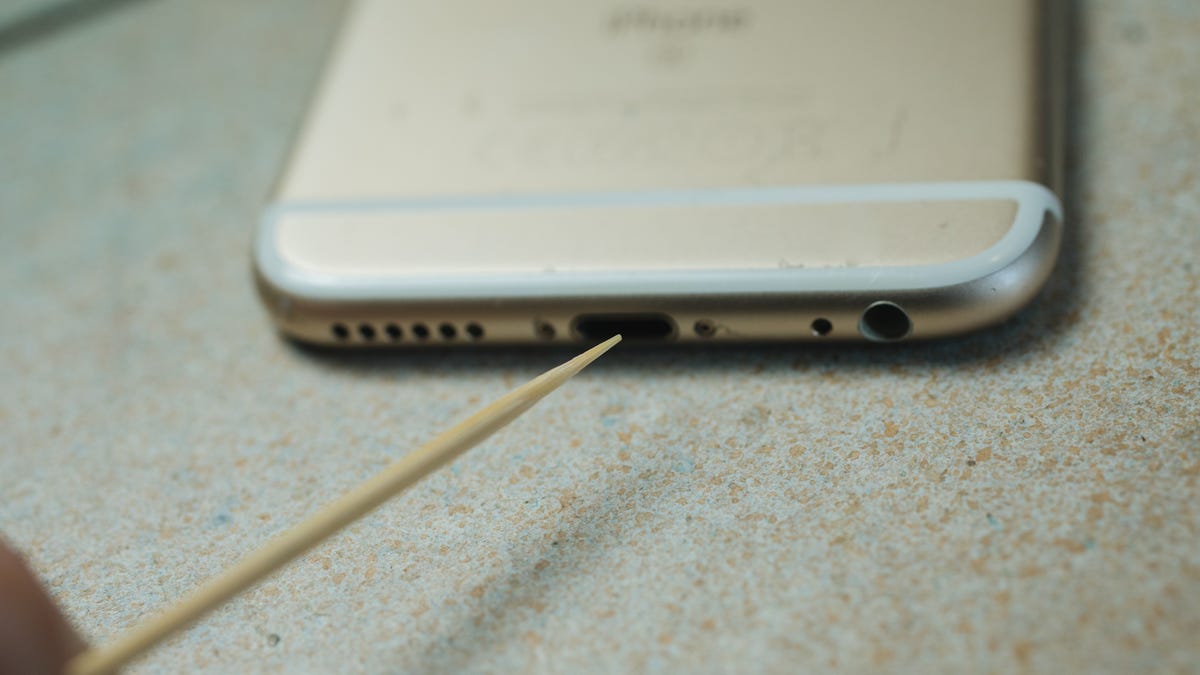
    Inserting a cocktail stick into an iPhone's charging port

    A wooden cocktail stick is a great tool for the job as the wood won’t damage the internal parts. 

    Andrew Lanxon/CNET

    If you’ve had your phone for more than a few months and you’re gradually finding the charger becoming less and less stable (particularly if you have to wiggle it around to get it to begin charging or if the cable won’t go in all the way) then it’s highly likely that dirt in your port is the culprit. 

    How to clean out your phone’s charging port 

    Unclogging your phone’s port is simple. You’ll need a cocktail stick, toothpick or other thin item that you can poke into the port to scrape out the grime. Wood or plastic is better, as it’s less likely to scrape against anything inside and potentially cause harm. I’ve done this using a metal SIM removal tool and the pin on the back of an earring, and while it worked well, it’s not the safest option for your phone. 

    Insert your tool of choice into the charging port until it won’t go further and gently start scraping away. With an older iPhone’s Lightning port you can scrape back and forth, but with USB-C you’ll need to scrape around the charging connector, which sits in the middle of the port. 

    A cocktail stick inside an iPhone's charging port

    Get it in there.

    Andrew Lanxon/CNET

    Eventually, you’ll start to work the compacted debris loose and then remove it from the port. It’s a satisfying process, and you might be surprised at how much stuff actually comes out. Gently work on the sides of the port, too, but be careful not to scrape hard against any of the metal charging connectors. 

    Soon, you’ll have pretty much all of it out. It’s difficult to check for sure if you’ve gotten rid of it all, as it’s tricky to see inside the port, even if you have a good light handy. But once you’ve got a good amount of debris out, you can try your charging cable again. 

    Close up on dirt removed from an iPhone's charging port

    It’s satisfying to remove debris from your phone’s charging port.

    Andrew Lanxon/CNET

    Hopefully, it’ll plug in more securely and begin charging. If not, keep trying to extract more dirt and then test the charger again. If that still doesn’t solve the issue, it’s time to consider other solutions like a new cable or charger.

    Charge DIY doesnt Fix Home Phone simple
    Share. Facebook Twitter Pinterest LinkedIn Tumblr Email
    Previous ArticleNew Ruling Could Change How Google Operates in the UK
    Next Article Watch: We tested Battlefield 6’s micro stutter and smooth performance
    techupdateadmin
    • Website

    Related Posts

    Gadgets

    Apple’s foldable phone might be coming in 2026 but you won’t be able to buy it yet

    December 20, 2025
    Gadgets

    Oh snap, I have a new favorite phone grip

    December 19, 2025
    Gadgets

    Marshall’s Acton III home speaker is 40% off and looks good in any room

    December 18, 2025
    Add A Comment
    Leave A Reply Cancel Reply

    Top Posts

    NYT Strands hints and answers for Monday, August 11 (game #526)

    August 11, 202545 Views

    These 2 Cities Are Pushing Back on Data Centers. Here’s What They’re Worried About

    September 13, 202542 Views

    Today’s NYT Connections: Sports Edition Hints, Answers for Sept. 4 #346

    September 4, 202540 Views
    Stay In Touch
    • Facebook
    • YouTube
    • TikTok
    • WhatsApp
    • Twitter
    • Instagram
    Latest Reviews

    Subscribe to Updates

    Get the latest tech news from FooBar about tech, design and biz.

    Most Popular

    Best Fitbit fitness trackers and watches in 2025

    July 9, 20250 Views

    There are still 200+ Prime Day 2025 deals you can get

    July 9, 20250 Views

    The best earbuds we’ve tested for 2025

    July 9, 20250 Views
    Our Picks

    My Health Anxiety Means I Won’t Use Apple’s or Samsung’s Smartwatches. Here’s Why

    December 22, 2025

    You can now buy the OnePlus 15 in the US and score free earbuds if you hurry

    December 22, 2025

    Today’s NYT Connections: Sports Edition Hints, Answers for Dec. 22 #455

    December 22, 2025

    Subscribe to Updates

    Get the latest creative news from FooBar about art, design and business.

    Facebook X (Twitter) Instagram Pinterest
    • About Us
    • Contact us
    • Privacy Policy
    • Disclaimer
    • Terms and Conditions
    © 2026 techupdatealert. Designed by Pro.

    Type above and press Enter to search. Press Esc to cancel.